
Sony K-65XR55A
Sony BRAVIA 5 Series 4K Ultra HD Smart Mini LED Google TV User Manual
Model: K-65XR55A
Introduction
This manual provides essential information for setting up, operating, and maintaining your Sony BRAVIA 5 Series 4K Ultra HD Smart Mini LED Google TV, model K-65XR55A. Please read these instructions carefully before using your television to ensure proper and safe operation.

Image: Front view of the Sony BRAVIA 5 Series 65-inch television, showcasing its display and sleek design.
What's in the Box
Verify that all components are present in the packaging:
- 1 LED TV
- 1 Remote Control
- 2 AAA Batteries

Image: Illustration showing the main components included in the TV box: the LED TV, a standard remote control, and two AAA batteries.
Setup
1. Unpacking and Placement
- Carefully remove the TV from its packaging. It is recommended that two people handle the TV due to its size and weight.
- Place the TV on a stable, flat surface or mount it on a wall using a compatible VESA mount (sold separately). Ensure adequate ventilation around the TV.
2. Connecting Peripherals
Connect your external devices such as set-top boxes, gaming consoles, Blu-ray players, and USB storage devices to the appropriate ports on the TV.
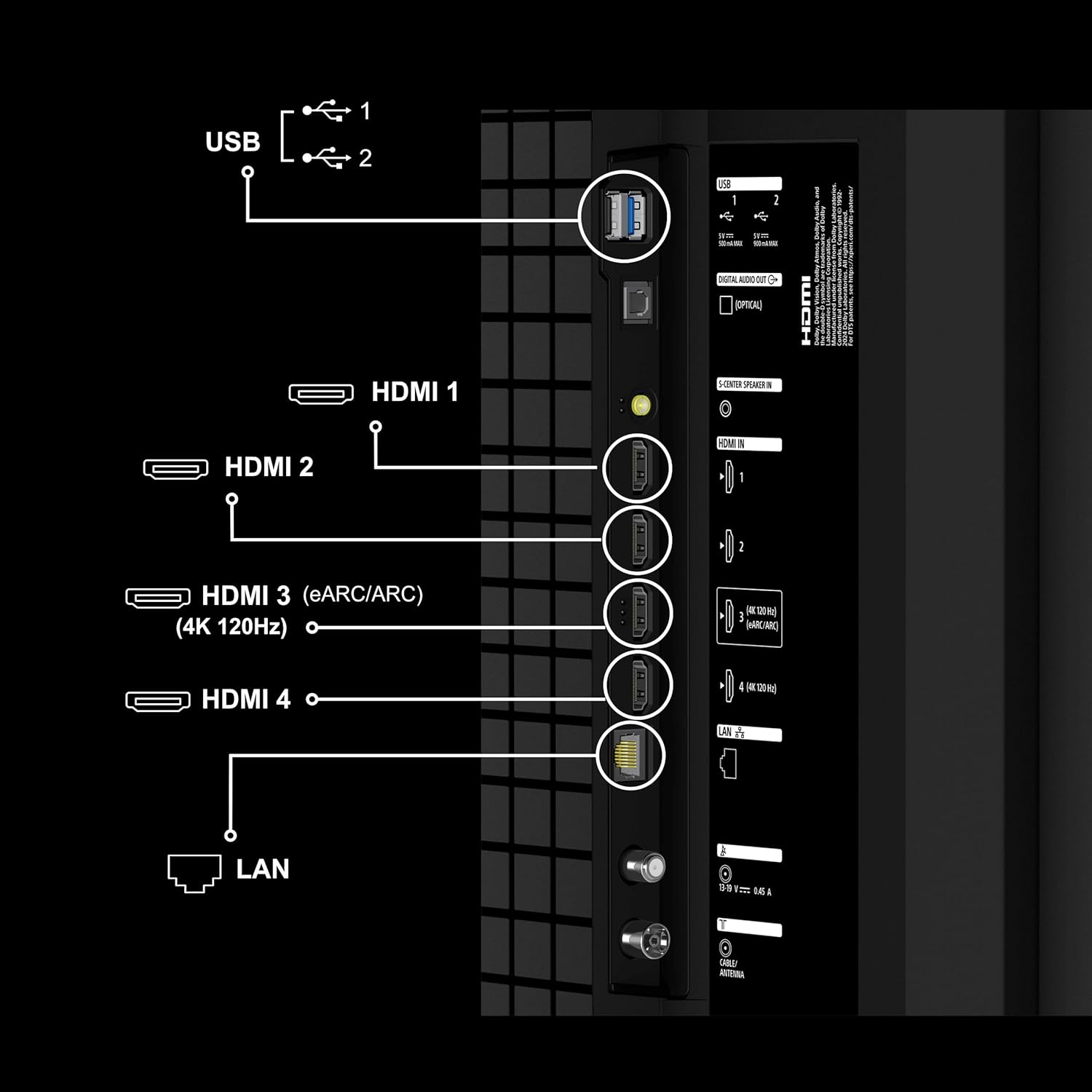
Image: Diagram illustrating the various connectivity ports on the rear of the TV, including USB, HDMI (HDMI 3 supports eARC/ARC and 4K 120Hz), and LAN ports.
- HDMI Ports: The TV features 4 HDMI ports. HDMI 3 supports eARC/ARC and 4K 120Hz for high-performance devices.
- USB Ports: Two USB ports are available for connecting hard drives and other USB devices.
- LAN Port: For wired internet connection.
- Power: Connect the power cord to the TV and then to a wall outlet.
3. Initial Power On and Network Setup
- Press the power button on the remote control or the TV.
- Follow the on-screen instructions to complete the initial setup, including language selection, country, and network connection (Wi-Fi or Ethernet).
- Sign in with your Google account to access Google TV features.
Operating Instructions
Remote Control Functions
The included remote control provides access to all TV functions. Insert the two AAA batteries into the remote control before use.

Image: Close-up of the Sony Eco Remote, highlighting buttons for power, menu, navigation, volume, channel, Google Assistant, and dedicated buttons for streaming services like YouTube, Prime Video, Netflix, Sony Pictures Core, Sony Liv, and Crunchyroll.
- Power Button: Turns the TV on or off.
- Google Assistant Button: Activates voice control for searching content or controlling the TV.
- Navigation Pad: Used to navigate menus and select items.
- Volume/Channel Buttons: Adjust volume and change channels.
- Quick Access Buttons: Dedicated buttons for popular streaming services like YouTube, Prime Video, Netflix, and Sony Pictures Core.
Google TV Interface
Your TV runs on Google TV, providing a personalized content experience.

Image: Screenshot of the Google TV home screen, displaying various streaming app icons and content recommendations.
- Home Screen: Access recommended content, installed apps, and settings.
- Watchlist: Add movies and shows you want to watch later.
- Google Assistant: Use the built-in microphone for hands-free voice commands.
- Google Cast: Stream content from your mobile devices directly to the TV.
Key Features
Display Technology
- 4K Mini LED: Experience precise contrast and brightness with thousands of individually controlled Mini LEDs.
- XR Processor: Enhances picture quality by analyzing and optimizing details, color, and motion in real-time.
- XR Backlight Master Drive: Provides precise local dimming for deep blacks and bright highlights.
- XR Triluminos Pro: Reproduces a wide spectrum of colors for natural and accurate picture quality.
- XR Clear Image: Intelligent upscaling adapts to source quality, minimizing noise for clarity.
- XR Motion Clarity: Ensures smooth and sharp motion, even in fast-paced scenes.
- HDR10, HLG, Dolby Vision: Support for various High Dynamic Range formats for enhanced contrast and color.

Image: Visual representation of the XR Processor's capabilities, showing enhanced brightness, motion processing, expanded color, and refined clarity across different scenes.

Image: Diagram illustrating the XR Backlight Master Drive, showing how precise local dimming controls thousands of LEDs for striking contrast and brightness.

Image: Side-by-side comparison of a conventional TV and a TV with XR Triluminos Pro, demonstrating the richer and more accurate color reproduction of the latter.
Audio Features
- 40 Watts Output: Powerful audio output for clear sound.
- Acoustic Multi-Audio: Side tweeters elevate sound and improve dialogue, making sound appear to come directly from the screen.
- DTS Digital Surround, DTS:X, Dolby Atmos, Dolby Audio: Support for immersive surround sound technologies.
- Voice Zoom 3: AI technology recognizes human dialogue and adjusts volume for clearer speech.
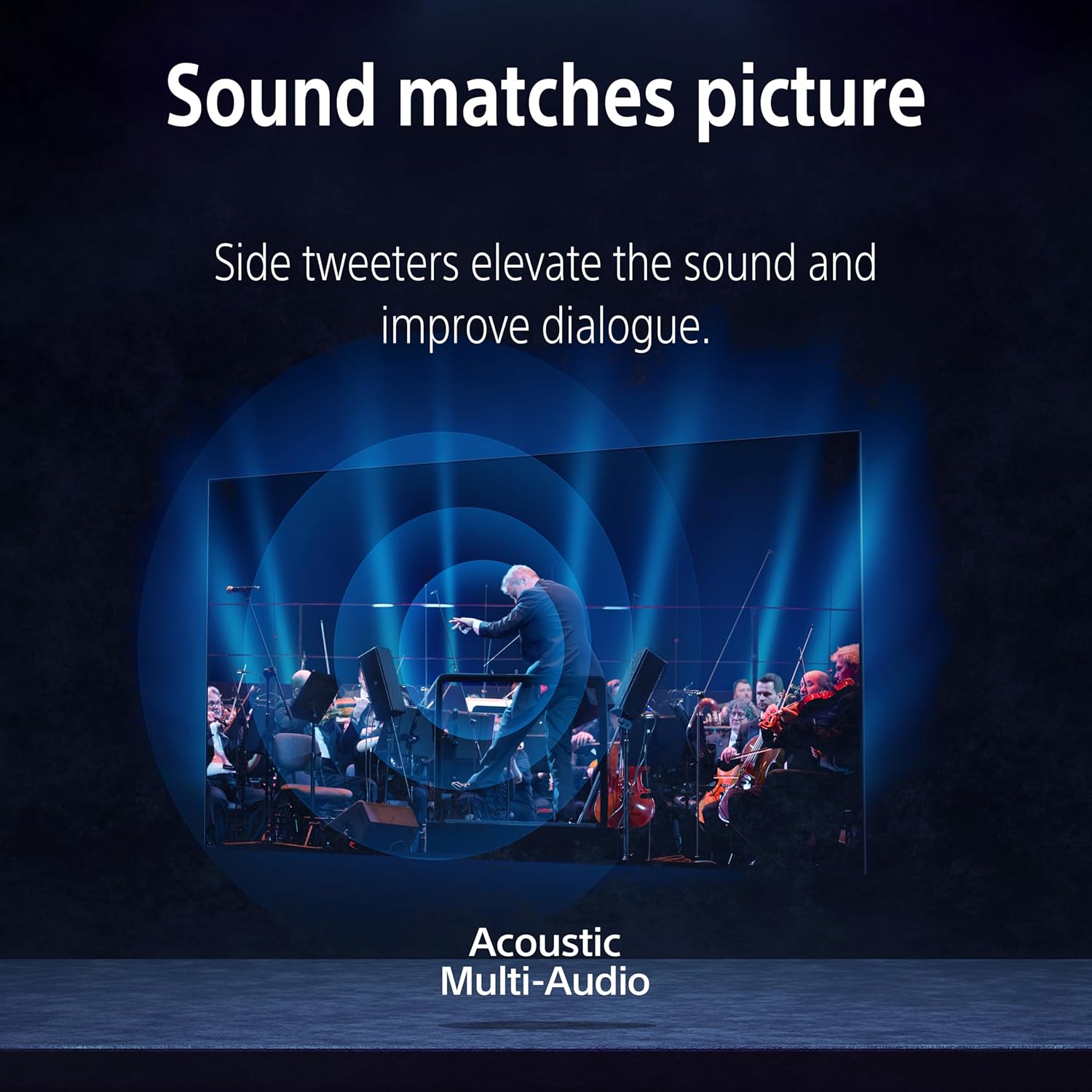
Image: Graphic illustrating how Acoustic Multi-Audio projects sound from the screen, with side tweeters enhancing dialogue and sound placement.

Image: Visual showing Voice Zoom 3 in action, with a person speaking into a microphone and the TV adjusting volume levels to enhance speech clarity against background noise.
Smart TV and Gaming Features
- Google TV: Access a vast library of movies, TV episodes, and apps.
- Google Assistant & Built-In Mic: Control your TV and search content using voice commands.
- Apple Airplay 2 & Apple Homekit: Seamlessly integrate with Apple devices for streaming and control.
- SONY PICTURES CORE: Access exclusive movie content and promotions.
- Perfect for PlayStation 5: Features like ALLM (Auto Low Latency Mode) and VRR (Variable Refresh Rate) via HDMI 2.1 ensure optimal gaming performance.

Image: A scene depicting a video game character on the TV screen, with a PlayStation 5 console and controller next to it, emphasizing the TV's gaming optimization.

Image: The SONY PICTURES CORE app interface displayed on the TV, promoting movie credits and access to a curated selection of films.
Maintenance
Cleaning the TV
- Always unplug the TV before cleaning.
- Use a soft, dry cloth to wipe the screen and cabinet. For stubborn marks, lightly dampen the cloth with water or a mild, non-abrasive cleaner specifically designed for TV screens.
- Avoid using harsh chemicals, abrasive pads, or solvents as they can damage the screen or finish.
General Care
- Do not block ventilation openings on the TV.
- Keep the TV away from direct sunlight, heat sources, and excessive dust.
- If the TV will not be used for an extended period, unplug it from the power outlet.
Troubleshooting
This section addresses common issues you might encounter. For more detailed troubleshooting, refer to the online user manual on the Sony website or contact customer support.
| Problem | Possible Cause | Solution |
|---|---|---|
| No power | Power cord disconnected; remote batteries depleted. | Ensure power cord is securely connected. Replace remote batteries. |
| No picture, but sound is present | Incorrect input source selected; external device issue. | Verify correct HDMI/input source. Check external device connection and power. |
| Poor picture quality | Low-resolution source; incorrect picture settings. | Ensure high-quality source. Adjust picture settings (e.g., brightness, contrast, sharpness). |
| No internet connection | Wi-Fi signal weak; incorrect network settings; router issue. | Check Wi-Fi signal strength. Re-enter network password. Restart router. Consider wired Ethernet connection. |
| Remote control not responding | Batteries depleted; obstruction between remote and TV. | Replace batteries. Remove any obstructions. Ensure remote is pointed at the TV's IR receiver. |
Specifications
Detailed technical specifications for the Sony BRAVIA 5 Series K-65XR55A TV:

Image: Diagram showing the physical dimensions of the Sony BRAVIA 5 Series 65-inch TV, including width, height, depth, and stand dimensions.
| Feature | Detail |
|---|---|
| Brand | Sony |
| Model | K-65XR55A |
| Screen Size | 65 Inches (164 cm) |
| Display Technology | Mini LED |
| Resolution | 4K Ultra HD (3840 x 2160 Pixels) |
| Refresh Rate | 120 Hz |
| Operating System | Google TV |
| Connectivity | 4 HDMI ports (HDMI 2.1 compatible), 2 USB ports, Ethernet, Wi-Fi, Bluetooth |
| Audio Output | 40 Watts, Dolby Atmos, Dolby Audio, DTS:X |
| Special Features | Google Assistant, Google Cast, Built-In Mic, ALLM/VRR/eARC, Apple Airplay 2, Apple Homekit, SONY PICTURES CORE, Perfect for PlayStation 5, Alexa, Voice Zoom 3, XR Processor, XR Backlight Master Drive, XR Triluminos Pro, XR Clear Image, XR Motion Clarity |
| Product Dimensions (WxHxD) | 144.7 x 83.2 x 5.8 cm (without stand) |
| Item Weight | 24.9 kg |
| Power Source | AC 240 Volts |
| On-mode Power Consumption | 264 watts |
| Annual Energy Consumption | 338.75 kWh (based on 4 hours/day, 365 days) |
| Included Components | 1 LED TV, 1 Remote Control, 2 AAA Batteries |
Warranty and Support
Warranty Information
Your Sony BRAVIA 5 Series TV comes with a 3-year comprehensive warranty provided by Sony from the date of purchase. This warranty covers technical issues with the product, including the remote control. Please retain your invoice as proof of purchase to avail warranty services.
Note: This warranty offer is valid for products purchased between September 18, 2025, and October 31, 2025.
Customer Support
For any technical assistance, installation requests, or product inquiries, please contact Sony Customer Care:
- Customer Care: 080 6500 6500
- Email: Sonyindia.care@ap.sony.com
- Website: Visit sonyindia.co.in for product recycling information and additional support.

Image: A Sony service technician demonstrating TV features to customers, highlighting trained and verified experts, 24x7 support, and installation services.
Related Documents - K-65XR55A
 |
Sony XR Series Television Reference Guide: Models K-98XR56A to K-55XR50A Comprehensive reference guide for Sony XR series televisions, covering installation, setup, remote control functions, troubleshooting, and technical specifications for models K-98XR56A through K-55XR50A. Includes dimensions, power requirements, and trademark information. |
 |
Sony BRAVIA 4K TV Installation, Operation, and Specifications Guide A comprehensive reference guide for Sony BRAVIA 4K TV models K-85S30 through K-43S30, detailing installation (wall mounting, stand detachment), remote control functions, troubleshooting, technical specifications, dimensions, weight, and safety guidelines. |
 |
Sony BRAVIA 4K TV Reference Guide: Installation, Features & Troubleshooting Explore the Sony BRAVIA 4K TV Reference Guide for detailed setup instructions, remote control features, essential safety information including wall mounting, troubleshooting common issues, and technical specifications for models K-XR70 series. |
 |
Sony BRAVIA TV Setup Guide and Safety Information Comprehensive guide for setting up and safely using your Sony BRAVIA TV, including installation instructions, safety precautions, troubleshooting, and warranty information. Covers models K-85S30, K-75S30, K-65S30, K-55S30, K-50S30, and K-43S30. |
 |
Sony BRAVIA XR Series Television Setup Guide Comprehensive setup guide for Sony BRAVIA XR Series televisions, covering stand installation, wall mounting, and cable connections. Includes model numbers K-85XR56A, K-75XR56A, K-65XR56A, K-55XR56A and others. |
 |
Sony BRAVIA XR8 Series OLED TV: Reference Guide and Specifications Comprehensive reference guide for Sony BRAVIA XR8 series OLED televisions (K-77XR8x, K-65XR8x, K-55XR8x), covering remote control functions, physical dimensions, technical specifications, installation guidance, troubleshooting, and compliance information. |