
1. Introduction and Overview
The NEXTORCH UT22 is a compact, rechargeable multifunction warning light designed for 360° visibility. It features a white light output of 11 lumens and red and blue flashing warning lights visible up to 1000 meters in clear night conditions. Its lightweight design and versatile mounting options make it suitable for various tactical and everyday uses, providing enhanced safety and illumination.

Image: NEXTORCH UT22 multifunction warning light with red and blue flashing LEDs, highlighting key features.
2. Safety Information
- Do not look directly into the light beam to avoid eye injury.
- Keep out of reach of children.
- Do not disassemble or modify the device.
- Use only the provided USB cable for charging.
- Avoid exposing the device to extreme temperatures or direct sunlight for prolonged periods.
3. Package Contents
Verify that all items are present in the package:
- 1 x NEXTORCH UT22 Multifunction Warning Light
- 1 x USB Type-C Charging Cable
4. Product Features
- 360° Panoramic Illumination: Equipped with 22 high-power LEDs for comprehensive visibility.
- White Light Mode: Provides 11 lumens of constant white light for up to 25 hours.
- Red and Blue Flashing Modes: Two distinct flashing patterns for effective warning signals.
- Lightweight Design: Weighs only 92.3g for comfortable and versatile carrying.
- Versatile Mounting: Includes accessories for mounting on helmets, MOLLE straps, backpacks, and shoulders.
- Type-C Direct Charging: Convenient and fast recharging via USB Type-C.
- Magnetic Adsorption: Features two powerful magnets for attachment to metallic surfaces.
- IPX4 Water Resistance: Protected against splashing water from any direction.
5. Setup and Installation
5.1 Mounting Options
The UT22 offers multiple mounting solutions to suit various needs:
MOLLE Strap Mounting:
Attach the UT22 to MOLLE webbing on vests or bags using the provided strap clip.

Image: UT22 mounted on a MOLLE strap.
Velcro Mounting:
Utilize the Velcro accessory to secure the light to Velcro-compatible surfaces on backpacks or helmets.

Image: UT22 mounted on a tactical backpack with Velcro.
Helmet Mounting:
Use the helmet clip for secure attachment to tactical helmets, featuring a 360° rotatable base for adjustable light direction.

Image: UT22 mounted on a tactical helmet.
Magnetic Mounting:
The integrated magnets allow for quick attachment to any suitable metallic surface.

Image: Underside of UT22 showing magnetic adsorption points.
6. Operating Instructions
6.1 Power On/Off
Press and hold the main button for approximately 1 second to turn the UT22 on or off.
6.2 Mode Selection
With the light on, short press the main button to cycle through the available modes:
- White Light (11 lumens)
- Red-Blue Flashing (Horizontal Direction)
- Red-Blue Flashing (Vertical Direction)

Image: UT22 providing white light illumination during night operations.
7. Charging
The UT22 features an integrated 640mAh Lithium-ion battery and is rechargeable via a USB Type-C port.
- Connect the provided USB Type-C cable to the UT22's charging port and to a compatible USB power source (e.g., computer, wall adapter, power bank).
- Charging Indicator:
- Red light: Device is charging.
- Green light: Device is fully charged.
- Flashing red light (5 times): Battery level is below 20%, indicating low power.

Image: UT22 connected for USB Type-C charging, showing battery indicators.
8. Maintenance
- Clean the light with a soft, damp cloth. Do not use abrasive cleaners or solvents.
- Ensure the USB port cover is securely closed when not charging to maintain IPX4 water resistance.
- Store the device in a cool, dry place when not in use.
- Recharge the battery every 3-6 months if stored for extended periods to maintain battery health.

Image: UT22 demonstrating IPX4 water resistance.
9. Troubleshooting
- Light does not turn on: Ensure the battery is charged. If the battery is low, charge the device.
- Light does not charge: Verify that the USB cable is properly connected to both the device and the power source. Try a different USB port or power adapter.
- Light modes are not cycling: Ensure the device is powered on. Press the button firmly and briefly to cycle modes.
10. Specifications
| Feature | Detail |
|---|---|
| Model Number | UT22 |
| Light Source | 22 LEDs (Red, Blue, White) |
| White Light Output | 11 Lumens |
| Runtime (White Light) | 25 hours |
| Runtime (Red-Blue Flashing Horizontal) | 20 hours |
| Runtime (Red-Blue Flashing Vertical) | 22 hours |
| Battery Type | Integrated 640mAh Lithium-ion |
| Charging | USB Type-C Direct Charging |
| Water Resistance | IPX4 |
| Shock Resistance | 2 meters |
| Weight | 92.3 grams (with battery) |
| Dimensions (D x W x H) | 72.4 mm x 50 mm x 38.4 mm |
| Material | Aluminum |
| Compliant Specifications | CE |
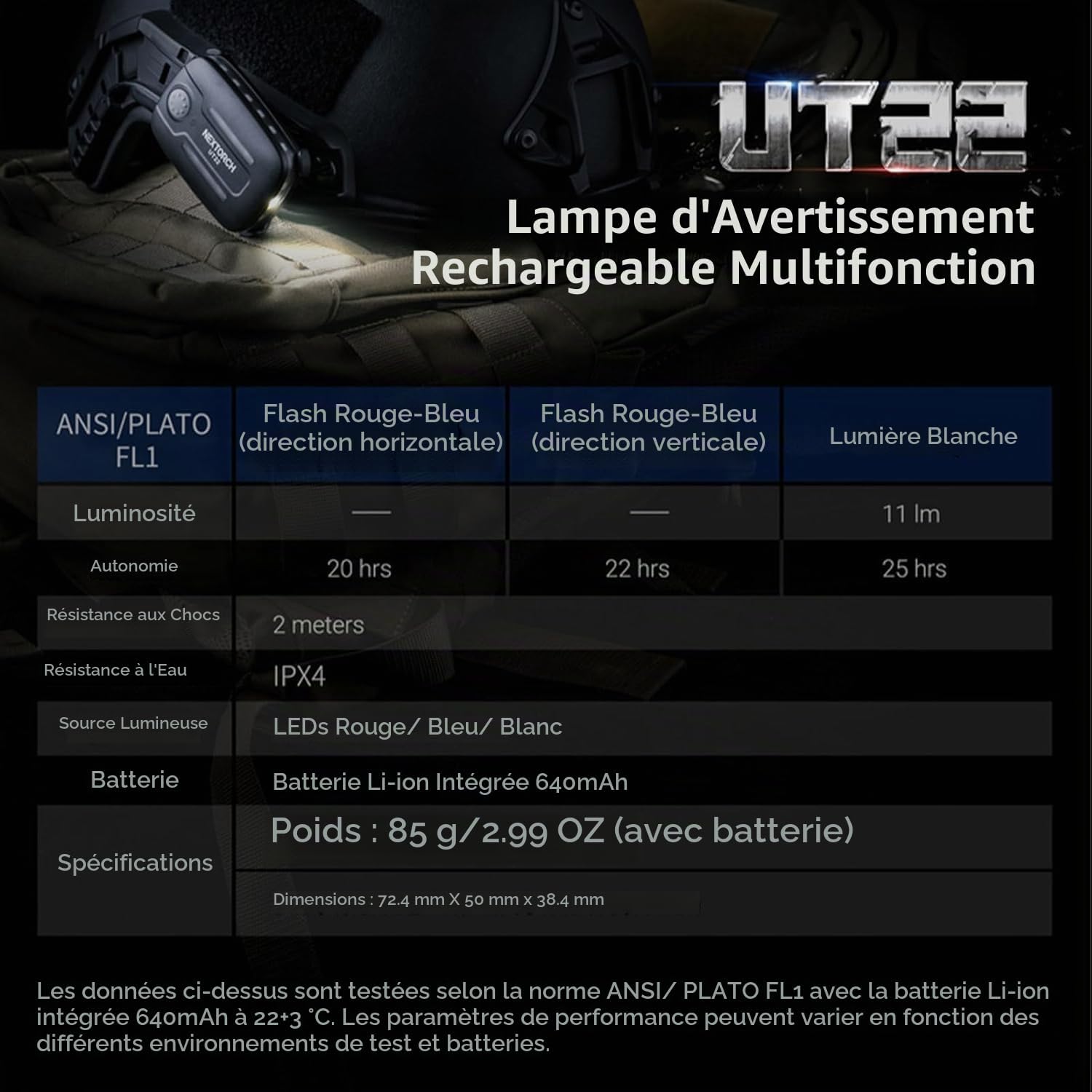
Image: Detailed specifications table for the UT22.
11. Warranty and Support
NEXTORCH products are covered by a warranty against defects in materials and workmanship. For specific warranty terms, claims, or technical assistance, please contact NEXTORCH customer support through their official website or your point of purchase. Please retain your proof of purchase for warranty services.


