
Introduction
This manual provides essential information for setting up, operating, and maintaining your Sony BRAVIA 2M2 Series 4K Ultra HD Smart LED Google TV. Please read this manual thoroughly before using your television and retain it for future reference.
The Sony BRAVIA 2M2 Series offers a stunning 4K Ultra HD display, smart features powered by Google TV, and immersive audio technologies for an enhanced entertainment experience.
What's in the Box
Verify that all items listed below are included in your television package. If any items are missing or damaged, please contact your retailer.
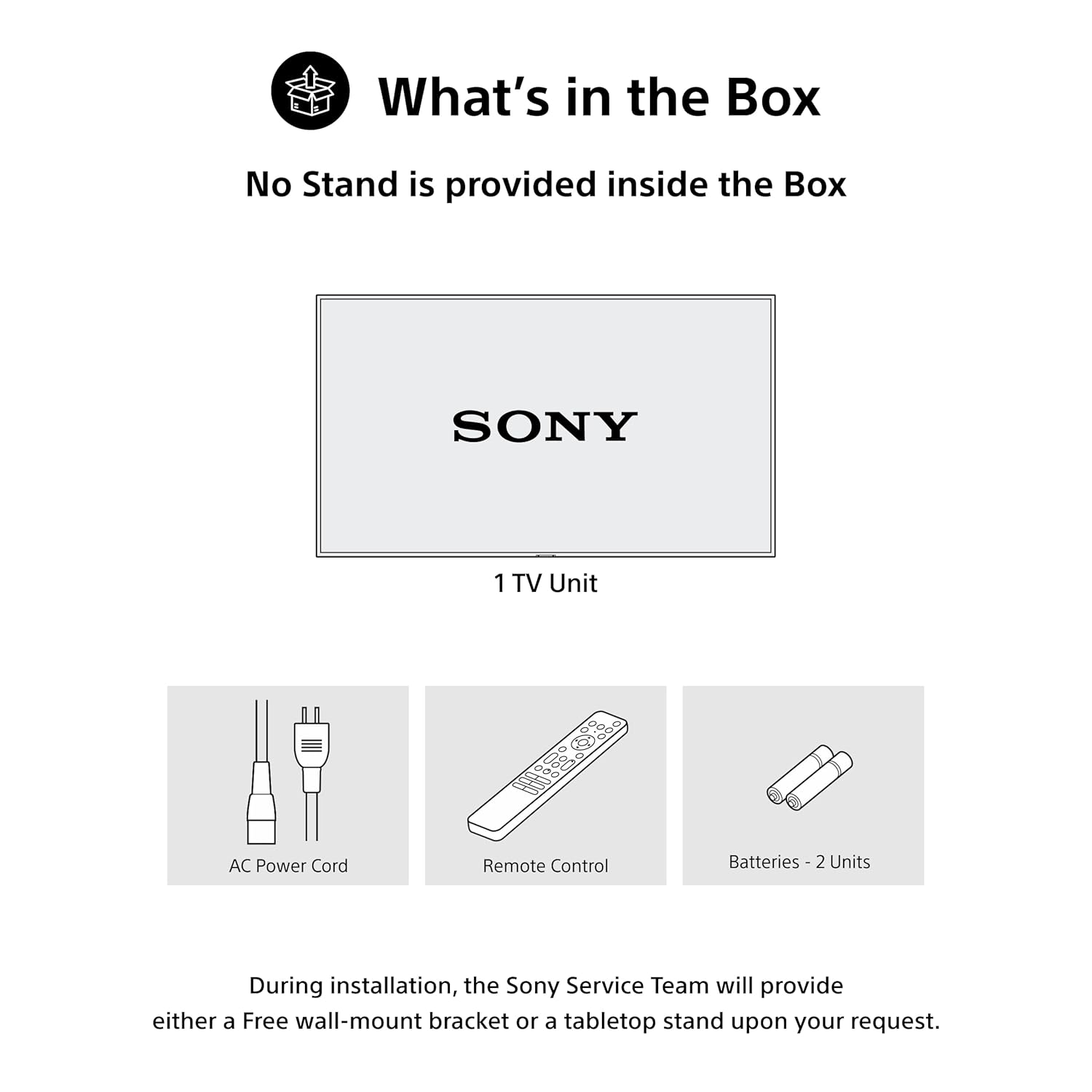
Image: Contents of the TV box, including the TV unit, AC power cord, remote control, and two AAA batteries.
- 1 x Sony BRAVIA 2M2 Series 4K Ultra HD Smart LED Google TV (43 inches)
- 1 x AC Power Cord
- 1 x Remote Control
- 2 x AAA Batteries (for remote control)
Note: A TV stand is not provided in the box. During installation, the Sony Service Team can provide either a free wall-mount bracket or a tabletop stand upon your request.
Setup
1. Physical Installation
Carefully unpack the television and place it on a stable surface or mount it on a wall using a compatible VESA mount (not included, available upon request from Sony Service Team).

Image: Product dimensions for the 43-inch Sony BRAVIA 2M2 TV.
2. Connecting Peripherals
Connect your external devices such as set-top boxes, Blu-ray players, gaming consoles, and USB devices to the appropriate ports on the TV.

Image: Rear panel connectivity ports, including 4 HDMI ports (one with eARC/ALLM support), 2 USB ports, and a LAN port.
- HDMI Ports: The TV features 4 HDMI ports. HDMI 3 supports eARC/ALLM (HDMI 2.1 compatible) for enhanced audio return and automatic low latency mode, ideal for gaming consoles.
- USB Ports: Two USB ports are available for connecting hard drives and other USB devices.
- LAN Port: For wired internet connection.
- Antenna/Cable Input: Connect your antenna or cable for broadcast TV.
3. Power Connection
Connect the AC power cord to the TV and then to a power outlet. Press the power button on the remote control or the TV to turn it on.
Operating Instructions
Initial Setup and Google TV
Upon first power-on, follow the on-screen instructions to complete the initial setup, including network connection, Google account login, and channel scanning. Your TV runs on Google TV, providing access to a vast library of content and smart features.

Image: The Google TV interface, offering personalized content and access to over 10,000 apps.
Key Google TV Features:
- Watchlist: Create a personalized list of movies and shows to watch later.
- Google Assistant: Use voice commands via the remote to search for content, control smart home devices, and get information.
- Google Cast: Easily stream content from your compatible mobile devices to the TV.
- Game Menu: Access gaming-specific settings and features.
- Apple Airplay 2 & Homekit: Seamlessly stream content from Apple devices and integrate with Apple Homekit.
- Alexa Compatibility: Control your TV using Alexa-enabled devices.
Video: A short preview demonstrating the Google TV interface and voice search functionality.

Image: Voice search functionality using the remote control for quick content discovery.

Image: Streaming content from a smartphone to the TV using Apple AirPlay or Google Cast.
Display Features
Experience stunning visuals with advanced display technologies.
- 4K Ultra HD (3840 x 2160): Delivers exceptional detail and clarity.
- 60 Hertz Refresh Rate: Ensures smooth motion for most content.
- 4K Processor X1: Enhances picture quality by analyzing and optimizing every scene.
- Live Color: Produces vibrant and realistic colors.
- 4K X-Reality PRO: Upscales content to near-4K resolution, improving detail and texture.
- MotionFlow XR 200: Reduces motion blur in fast-paced scenes, ideal for sports and action movies.
- HDR10/HLG: Supports High Dynamic Range formats for increased contrast and color accuracy.

Image: The X1 4K Processor, responsible for picture quality enhancements.

Image: Comparison of Standard Dynamic Range (SDR) and 4K HDR, highlighting enhanced detail and color in HDR content.

Image: Comparison of conventional TV visuals versus the enhanced clarity of 4K X-Reality PRO.

Image: MotionFlow XR technology reducing blur in fast-moving scenes compared to conventional TVs.
Audio Features
Immerse yourself in rich, clear sound.
- 20 Watts Output: Powerful audio output for clear sound.
- 2ch Open Baffle Speaker: Delivers a wide soundstage.
- Dolby Atmos & Dolby Audio: Provides multi-dimensional, immersive sound.
- DTS Digital Surround & DTS:X: Enhances surround sound experience.
- Clear Phase: Ensures precise and natural sound reproduction.

Image: Dolby Atmos technology creating immersive surround sound.

Image: Clear Phase technology ensuring every sound is clear and precise.
Video: A short preview highlighting the picture and sound quality of the BRAVIA 2M2 TV.
Remote Control
The included remote control provides easy access to all TV functions and smart features. It supports both IR and Bluetooth technology.

Image: The remote control with dedicated buttons for Google Assistant, Sony Picture Core, YouTube, Netflix, Sony Liv, Prime Video, and Crunchyroll.
Remote Control Description: One Click Google Assistant, Sony Picture Core, Youtube, Netflix, Sony Liv, Prime Video, Crunchyroll.
Maintenance
Cleaning the TV
- Always unplug the TV before cleaning.
- Use a soft, dry cloth to wipe the screen and cabinet. For stubborn marks, lightly dampen the cloth with water or a mild, non-abrasive cleaner specifically designed for electronics.
- Do not use strong detergents, abrasive pads, or chemical solvents as they can damage the TV's surface.
General Care
- Avoid exposing the TV to direct sunlight or heat sources.
- Ensure proper ventilation around the TV to prevent overheating.
- Protect the TV from dust and moisture.
Troubleshooting
If you encounter issues with your TV, refer to the following common solutions. For more complex problems, contact Sony customer support.
No Power
- Check if the power cord is securely connected to both the TV and the power outlet.
- Ensure the power outlet is functioning by plugging in another device.
- Press the power button on the TV itself, not just the remote, to rule out a remote issue.
No Picture/Poor Picture Quality
- Verify that the correct input source is selected (e.g., HDMI 1, TV).
- Check all cable connections (HDMI, antenna) for looseness or damage.
- Adjust picture settings (brightness, contrast, color) in the TV menu.
- If using an external device, try connecting it to a different HDMI port or a different TV to isolate the issue.
No Sound/Poor Sound Quality
- Ensure the volume is not muted and is set to an audible level.
- Check audio output settings in the TV menu (e.g., internal speakers, external audio system).
- Verify audio cable connections if using external speakers.
Remote Control Not Working
- Replace the batteries in the remote control.
- Ensure there are no obstructions between the remote and the TV's IR sensor.
- If it's a Bluetooth remote, try re-pairing it with the TV (refer to the TV's on-screen help for pairing instructions).
Specifications
| Feature | Description |
|---|---|
| Brand | Sony |
| Model | K-43S22M2 |
| Screen Size | 43 Inches (108 cm) |
| Resolution | 4K Ultra HD (3840 x 2160 Pixels) |
| Refresh Rate | 60 Hz |
| Display Technology | LED |
| Processor | 4K Processor X1 |
| Picture Enhancement | Live Color, 4K X-Reality PRO, MotionFlow XR 200, HDR10/HLG |
| Operating System | Google TV |
| Smart TV Features | Watchlist, Google Assistant, Google Cast, Game Menu, ALLM/eARC (HDMI 2.1 Compatible), Apple Airplay 2, Apple Homekit, Alexa |
| Audio Output | 20 Watts |
| Speaker Configuration | 2ch Open Baffle Speaker |
| Audio Technologies | DTS Digital Surround, DTS:X, Dolby Atmos, Dolby Audio, Clear Phase |
| Connectivity | 4 x HDMI ports, 2 x USB ports, Ethernet, Wi-Fi, Bluetooth |
| Remote Control | IR, Bluetooth (with dedicated app buttons) |
| Power Source | AC 240 Volts |
| Annual Energy Consumption | 134.38 kWh (2 Star Energy Rating) |
| Product Dimensions (LxWxH) | 95.8 x 7.9 x 57 cm |
| Item Weight | 7.8 kg |
| Mounting Type | Wall Mount & Table Mount |
| Country of Origin | India |
Warranty and Support
Your Sony BRAVIA 2M2 Series TV comes with a 1-year comprehensive warranty on the product, provided by Sony from the date of purchase. This warranty also covers the remote control for technical issues.
To avail warranty services, please retain your purchase invoice. For any technical issues or service requests, you can contact Sony customer care:
- Customer Care: 080 6500 6500
- Email: Sonyindia.care@ap.sony.com
- Website: Visit sonyindia.co.in for product recycling and additional support.
Installation services are typically coordinated by the retailer within 48 hours of delivery. Sony provides trained and verified experts for installation and feature demonstration.

Image: Sony's trained and verified experts provide installation and detailed feature demonstrations.