
1. Safety Instructions
Please read all instructions carefully before using the product and retain this manual for future reference.
- Do not disassemble, repair, or modify the product. Unauthorized modifications may cause damage or injury.
- Keep the device away from water and high humidity environments. This product is not waterproof.
- Avoid exposing the device to direct sunlight or extreme temperatures.
- Use only the provided USB-C charging cable or a certified equivalent.
- Keep out of reach of children.
2. Package Contents
Verify that all items are present in your package:
- 2 x Motion Sensor Cabinet Lights
- 2 x USB-C Charging Cords
- 4 x Adhesive Iron Plates
- 1 x Product User Manual (this document)
3. Product Overview
The EZVALO UCL05-C is a versatile, rechargeable under cabinet light designed for various indoor applications. It features a motion sensor, adjustable color temperatures, dimmable brightness, and magnetic installation for convenience.

Image 1: EZVALO UCL05-C 12-inch Rechargeable Motion Sensor Under Cabinet Light (2 Pack) showing the product and its features like motion sensor, rechargeable, dimmable, and magnetic.
Key Features:
- Smart Motion Sensor: Automatically detects human movement within 12ft/120° in dark or low-light conditions, turning on instantly and off after approximately 20 seconds of no motion.
- 3 Lighting Modes: Offers Always-on Mode, Day Mode (all-day sensing), and Night Mode (sensing only in darkness).
- 3 Color Temperatures: Cycle through 3000K (warm white), 4500K (natural white), and 6500K (cool white).
- Stepless Dimming: Adjust brightness from 10% to 100%.
- Long-Lasting Battery: Built-in 3100mAh rechargeable battery provides extended illumination.
- Easy Installation: Features built-in strong magnets for direct attachment to iron surfaces or use included adhesive metal plates for other surfaces.
4. Setup and Installation
The EZVALO UCL05-C offers two primary installation methods:
Method 1: Magnetic Attachment (for iron surfaces)
- Ensure the desired iron surface is clean and dry.
- Simply place the light directly onto the iron surface. The built-in magnets will secure it in place.
Method 2: Adhesive Metal Plates (for non-iron surfaces)
- Choose a clean, dry, and smooth surface for installation.
- Peel off the protective film from one side of an adhesive metal plate.
- Attach the adhesive side of the metal plate firmly to the desired surface. Apply pressure for a few seconds to ensure good adhesion.
- Align the light with the metal plate. The built-in magnets will attach the light to the plate.
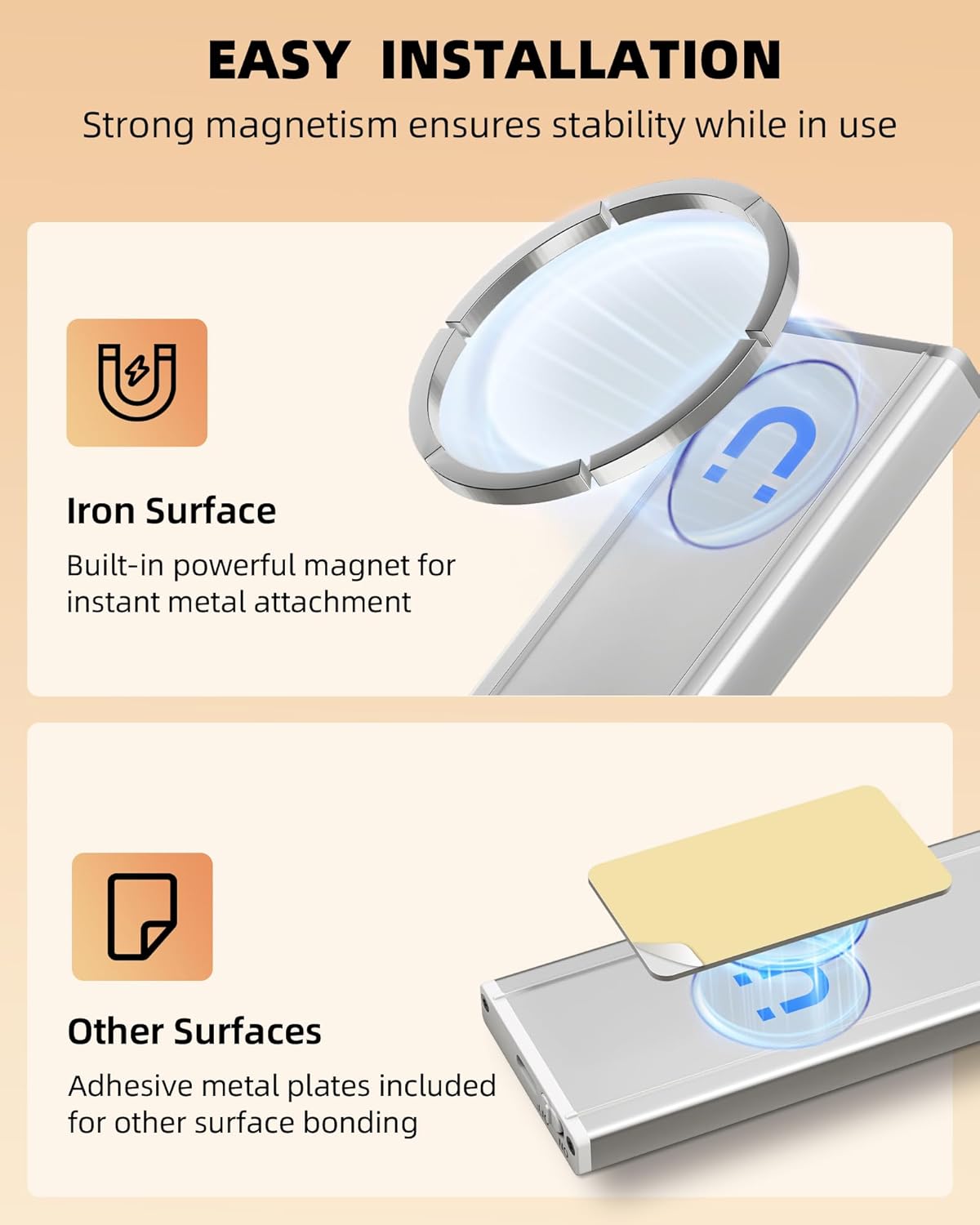
Image 2: Illustration of magnetic installation on iron surfaces and using adhesive metal plates for other surfaces.
Note: For optimal adhesion, allow 24 hours after attaching the metal plate before mounting the light.
5. Operating Instructions
The EZVALO UCL05-C features a multi-function switch and button for easy control.

Image 3: Close-up of the light's control panel, highlighting the mode indicator light, mode change button, and power ON/OFF switch.
5.1 Power ON/OFF
- Locate the ON/OFF switch on the side of the light.
- Slide the switch to 'ON' to power on the device.
- Slide the switch to 'OFF' to power off the device.
5.2 Selecting Lighting Modes
The light offers three distinct operating modes. Use the 'Change Mode' button (marked 'M' or with a sun/moon icon) to cycle through them. An LED indicator will confirm the selected mode.
- Always-on Mode (ON): The light remains continuously on. This mode is suitable for tasks requiring constant illumination.
- Day Mode (All-day Sensing): The motion sensor is active regardless of ambient light conditions. The light will turn on when motion is detected and turn off after 20 seconds of no motion.
- Night Mode (Sensing in Darkness): The motion sensor is active only in dark or low-light environments. The light will turn on when motion is detected in darkness and turn off after 20 seconds of no motion. This mode conserves battery life.
Image 4: Visual representation of the three work modes: Always On, Day Mode (all-day motion sensing), and Night Mode (night-only motion sensing).
5.3 Adjusting Color Temperature
The light offers three color temperature options. Short press the 'Color Temperature/Brightness Button' (often marked with a light bulb icon) to cycle through them:
- 3000K: Warm White
- 4500K: Natural White
- 6500K: Cool White
5.4 Stepless Dimming
To adjust the brightness level:
- When the light is on, long press the 'Color Temperature/Brightness Button'.
- The brightness will gradually increase or decrease. Release the button when the desired brightness is reached.
- The light will remember your last brightness setting.

Image 5: Demonstration of cycling through 3 color temperatures and stepless dimming functionality.
6. Charging
The EZVALO UCL05-C features a built-in 3100mAh rechargeable battery. When the battery is low, the light's performance may diminish, or it may not turn on. It is recommended to fully charge the light before initial use.
Charging Process:
- Locate the USB-C charging port on the side of the light.
- Connect one end of the provided USB-C charging cable to the light's charging port.
- Connect the other end of the USB-C cable to a standard USB power adapter (not included) or a computer's USB port.
- A charging indicator light will illuminate (typically red) during charging.
- The indicator light will change color (typically green or off) when charging is complete.

Image 6: Illustration of the USB-C charging port and the light's 3100mAh battery capacity.
Battery Life:
- Charging Time: Approximately 3.5 hours for a full charge.
- Motion Sensor Mode: Up to 15-45 days (depending on usage frequency).
- Always-on Mode: Up to 14 hours.
7. Maintenance
To ensure the longevity and optimal performance of your EZVALO UCL05-C light:
- Clean the light regularly with a soft, dry cloth. Do not use abrasive cleaners or solvents.
- Ensure the motion sensor lens is free from dust or obstructions for accurate detection.
- If storing the light for an extended period, charge it fully every 3-6 months to maintain battery health.
8. Troubleshooting
| Problem | Possible Cause | Solution |
|---|---|---|
| Light does not turn on. | Battery is depleted. | Charge the light fully using the provided USB-C cable. |
| Motion sensor not working. | Incorrect mode selected (e.g., Night Mode in a bright area). Sensor obstructed. Motion outside detection range/angle. | Check the selected mode and switch to Day Mode if needed. Ensure the sensor lens is clean and unobstructed. Verify motion is within 12ft/120°. |
| Light turns off too quickly. | No continuous motion detected. | The light is designed to turn off after 20 seconds of no motion. If continuous light is needed, switch to Always-on Mode. |
| Brightness is too low/high. | Brightness setting needs adjustment. | Long press the 'Color Temperature/Brightness Button' to adjust brightness steplessly. |
| Light color is not desired. | Color temperature setting needs adjustment. | Short press the 'Color Temperature/Brightness Button' to cycle through 3000K, 4500K, and 6500K. |
9. Specifications
| Feature | Detail |
|---|---|
| Model Name | UCL05-C |
| Dimensions | 12 x 1.51 x 0.52 inches |
| Item Weight | 13.1 ounces |
| Material | Aluminum, Plastic |
| Light Source Type | LED |
| Number of Light Sources | 53 |
| Brightness | 150 Lumen (Max) |
| Color Temperatures | 3000K, 4500K, 6500K |
| Wattage | 1.5 watts |
| Voltage | 5 Volts (DC) |
| Power Source | Battery Powered |
| Battery Type | 1 Lithium Metal battery (included) |
| Battery Capacity | 3100mAh |
| Charging Port | USB-C |
| Motion Sensor Range | 12ft / 120° |
| Auto-off Time | Approx. 20 seconds (after no motion) |
| Mounting Type | Magnetic Mount |
| Indoor/Outdoor Usage | Indoor |
| Water Resistance Level | Not Water Resistant |
10. Warranty and Support
EZVALO products are designed for quality and reliability. For warranty information, technical support, or any questions regarding your product, please refer to the contact information provided on the product packaging or visit the official EZVALO website.
Please have your model number (UCL05-C) and purchase details ready when contacting support.