
Introduction
Thank you for choosing the EZVALO UCL05-C 12-inch LED Motion Sensor Under Cabinet Light. This manual provides essential information for the safe and efficient operation of your new lighting solution. Please read these instructions thoroughly before installation and use, and retain them for future reference.
What's in the Box
Verify that all components are present in your package:
- 2 x Motion Sensor Cabinet Lights
- 2 x USB-C Charging Cords
- 4 x Adhesive Iron Plates
- 1 x Product User Manual

Image: Contents of the EZVALO product package, including two light bars, two USB-C charging cables, and adhesive metal plates.
Product Features
Smart Motion Sensor with Multiple Modes
The lights feature an advanced motion sensor that detects human movement within 12 feet and a 120° angle. Choose from three distinct operating modes:
- Night Motion Mode: Activates only in low-light environments, ideal for nighttime use.
- All-Day Motion Mode: Turns on whenever motion is detected, regardless of ambient light, suitable for consistently dim areas.
- Always On Mode: Provides continuous illumination for extended tasks.
Lights automatically turn off after approximately 20 seconds of no motion detected in sensor modes, conserving energy.

Image: Visual representation of the three operational modes (Always On, Day Mode, Night Mode) and their respective indicator lights.
Video: Demonstration of the EZVALO motion sensor under cabinet lights in various settings, highlighting their automatic activation and different modes.
Dimmable Brightness
Equipped with 53 energy-saving LEDs, these lights emit up to 150 lumens of bright, soft white light. Adjust brightness easily:
- Short Press: Cycle through 5 brightness levels (20%-40%-60%-80%-100%).
- Long Press: Engage stepless dimming (10%-100%).
The light remembers your last brightness setting for convenience.
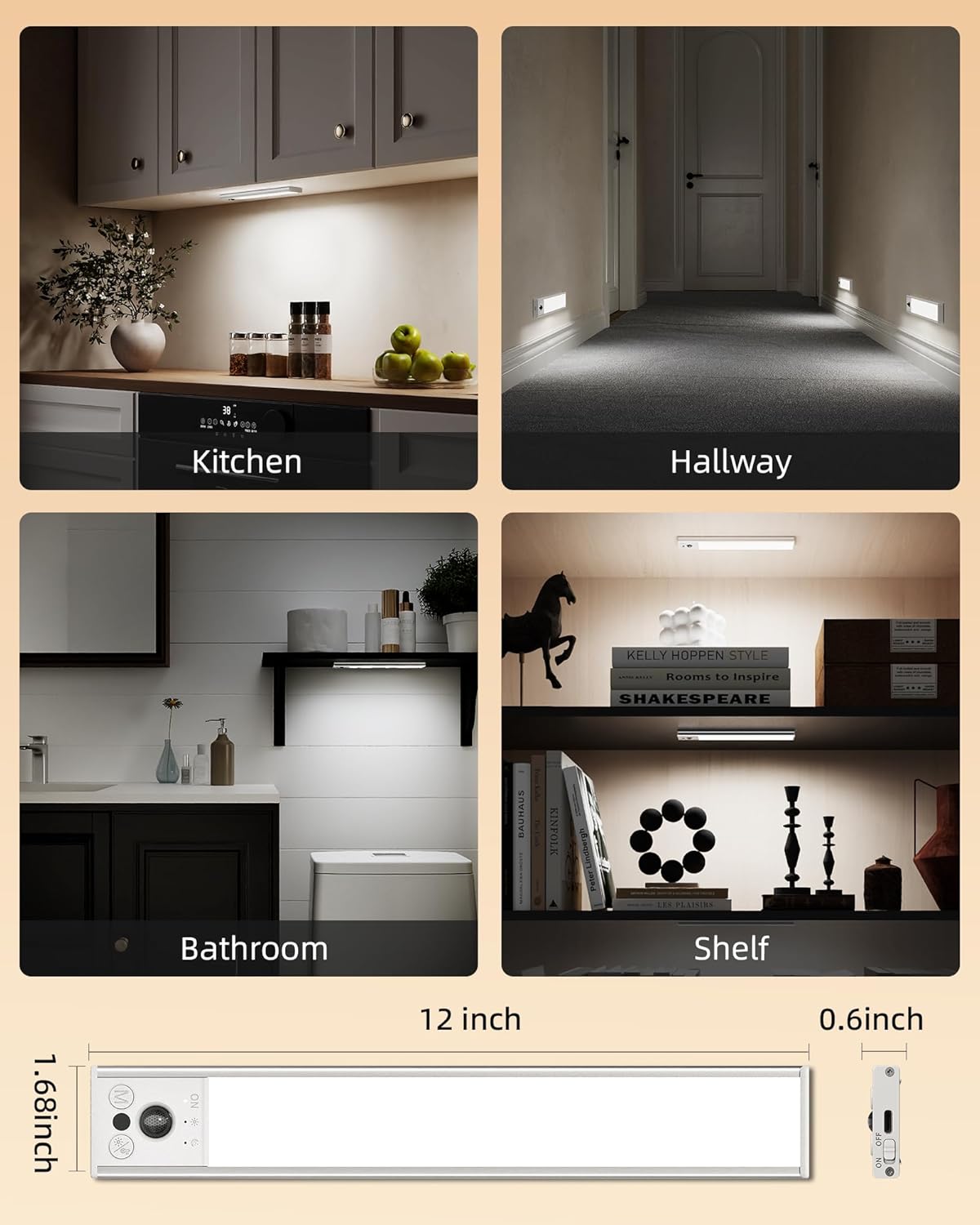
Image: Illustration of the adjustable brightness feature, demonstrating five distinct levels and continuous dimming capability.
Long-Lasting Rechargeable Battery
Each light features a built-in 3100mAh high-capacity rechargeable battery, eliminating the need for wiring or frequent battery replacement. Fast USB-C charging (3.5 hours for a full charge) provides:
- 15-45 days of use on Motion Sensor Mode (depending on frequency).
- Up to 14 hours of continuous light on Always-on Mode.

Image: Details on the light's 3100mAh battery, including its duration in different modes and charging time.
Easy Installation
The lights are designed for hassle-free installation with built-in strong magnets. They can be directly attached to iron surfaces or mounted anywhere using the included adhesive metal plates. This allows for easy removal for charging or relocation.
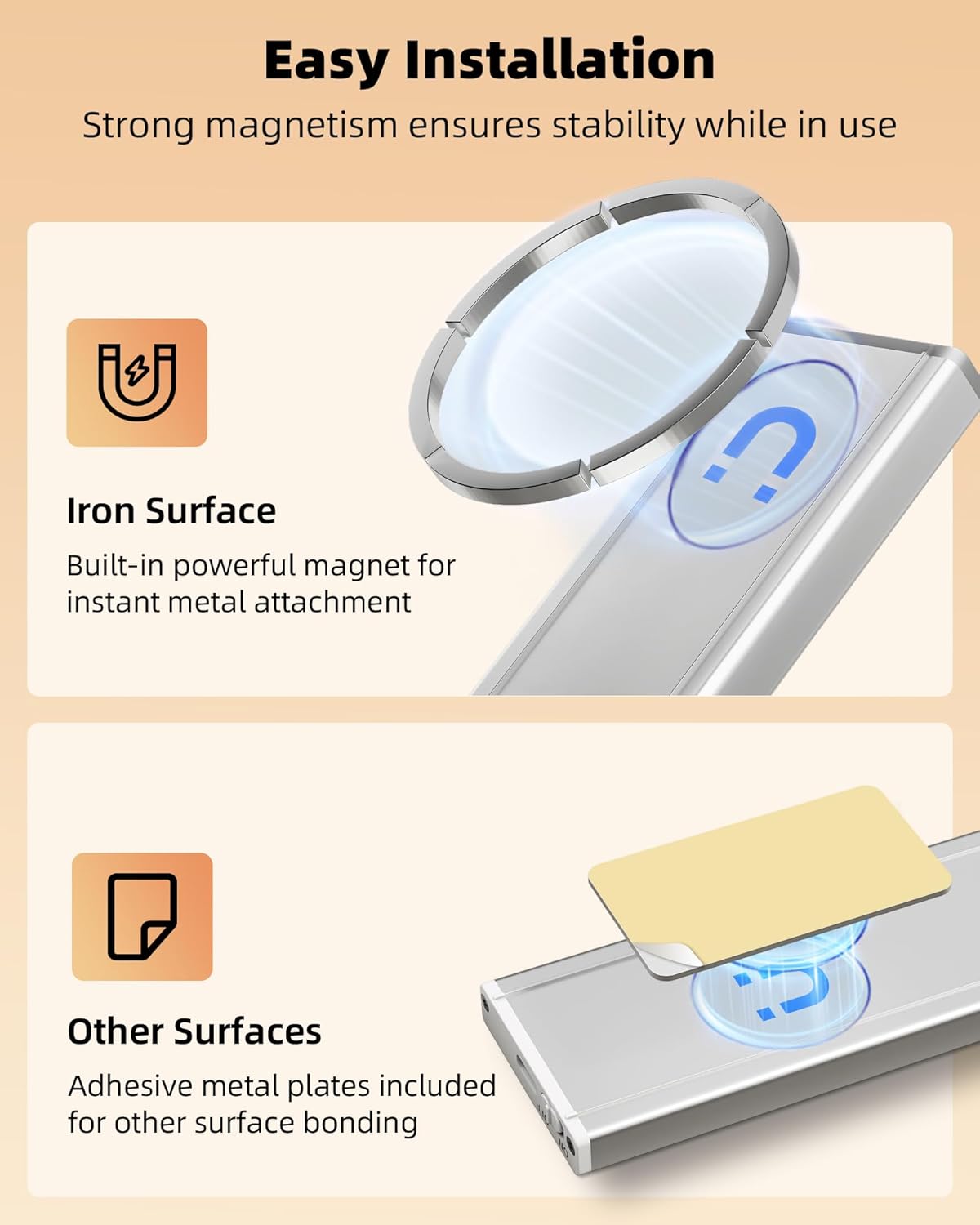
Image: Step-by-step guide for installing the lights using either direct magnetic attachment or adhesive metal plates.
Setup & Installation
- Charge the Lights: Before first use, fully charge both lights using the provided USB-C charging cords. A red light indicates charging, and a green light indicates a full charge.
- Prepare Mounting Surface: Ensure the desired installation surface is clean and dry.
- Choose Installation Method:
- For Iron Surfaces: Simply place the light directly onto the iron surface. The built-in magnets will secure it.
- For Non-Iron Surfaces: Peel the protective film from one side of an adhesive metal plate. Stick this side firmly onto the desired surface. Then, attach the light to the metal plate using its built-in magnets. Repeat for the second light.
- Positioning: For optimal motion detection, position the lights where movement will occur within the 12ft/120° range.
Operating Instructions
- Power On/Off: Locate the ON/OFF switch on the side of the light. Slide it to 'ON' to activate the light or 'OFF' to power down completely.
- Select Mode: With the light powered on, press the 'M' (Mode) button to cycle through the three operating modes: Always On, Day Motion, and Night Motion. An LED indicator will confirm the selected mode.
- Adjust Brightness: Press the brightness button (sun icon) to cycle through 5 preset brightness levels. For stepless dimming, press and hold the brightness button until the desired light intensity is reached.
- Charging: When the battery is low, connect the USB-C charging cord to the light's charging port and a USB power source. The indicator light will be red during charging and turn green when fully charged.
Maintenance
- Cleaning: Wipe the light surface with a soft, dry cloth. Do not use abrasive cleaners or solvents.
- Battery Care: For optimal battery life, avoid fully discharging the battery frequently. Recharge when the light output noticeably diminishes.
- Storage: If storing the lights for an extended period, charge them fully and store in a cool, dry place. Recharge every 3-6 months to maintain battery health.
Troubleshooting
- Light not turning on: Ensure the ON/OFF switch is in the 'ON' position. Check if the battery is charged. If in motion sensor mode, verify ambient light conditions and motion detection.
- Motion sensor not working: Ensure the light is in either Day Motion or Night Motion mode. Check for obstructions blocking the sensor. Verify the ambient light level is appropriate for the selected mode.
- Light flickers or is dim: The battery may be low. Recharge the light.
Specifications
| Model Name | UCL05-C |
| Product Dimensions | 12 x 1.68 x 0.6 inches |
| Item Weight | 12.6 ounces (0.36 Kilograms) |
| Light Source Type | LED (53 LEDs) |
| Brightness | 150 Lumens (Max) |
| Color Temperature | 6500 Kelvin (Cool White) |
| Battery Capacity | 3100mAh Lithium Metal (included) |
| Charging Time | Approx. 3.5 hours (USB-C) |
| Power Source | Battery Powered |
| Voltage | 5 Volts (DC) |
| Wattage | 1.5 watts |
| Material | Aluminum, Plastic |
| Mounting Type | Magnetic Mount |
| Indoor/Outdoor Usage | Indoor |
| Special Features | Cordless, Dimmable, Energy Efficient, Motion Sensor, Rechargeable |
Warranty and Support
EZVALO offers a 24-month warranty for this product. If you encounter any issues or have questions regarding your EZVALO LED Motion Sensor Light, please refer to the contact information provided in the product packaging or visit the official EZVALO website for support.