
1. Introduction
This manual provides comprehensive instructions for the setup, operation, and maintenance of your Moultrie Edge 2 Cellular Trail Camera and the accompanying Code Blue Rope-A-Dope Kit. Adherence to these instructions will ensure optimal performance and longevity of your equipment. This kit is designed to assist in wildlife monitoring by combining advanced cellular camera technology with an effective scent attractant system.
2. Package Contents
Verify that all items listed below are present in your package:
- Moultrie Edge 2 Cellular Trail Camera
- Mounting Strap
- Code Blue Rope-A-Dope Kit (includes rope and Rack Rub gel)

Image 2.1: Contents of the Moultrie Edge 2 Cellular Trail Camera and Scout-N-Scrape Kit, including the camera, rope, and Rack Rub gel.
3. Setup Instructions
3.1. Moultrie Edge 2 Cellular Trail Camera Setup
- Battery Installation: Open the camera housing and insert the required batteries (not included) into the designated compartment, ensuring correct polarity.
- App Download and Account Creation: Download the Moultrie App from your device's app store. Create an account and follow the in-app instructions to register your camera. This process typically involves scanning a QR code on the camera.
- Mounting the Camera: Select a suitable tree or post for mounting. Use the provided mounting strap to securely fasten the camera at the desired height and angle. Ensure the camera is stable and pointed towards the area of interest, such as a game trail or scrape location.
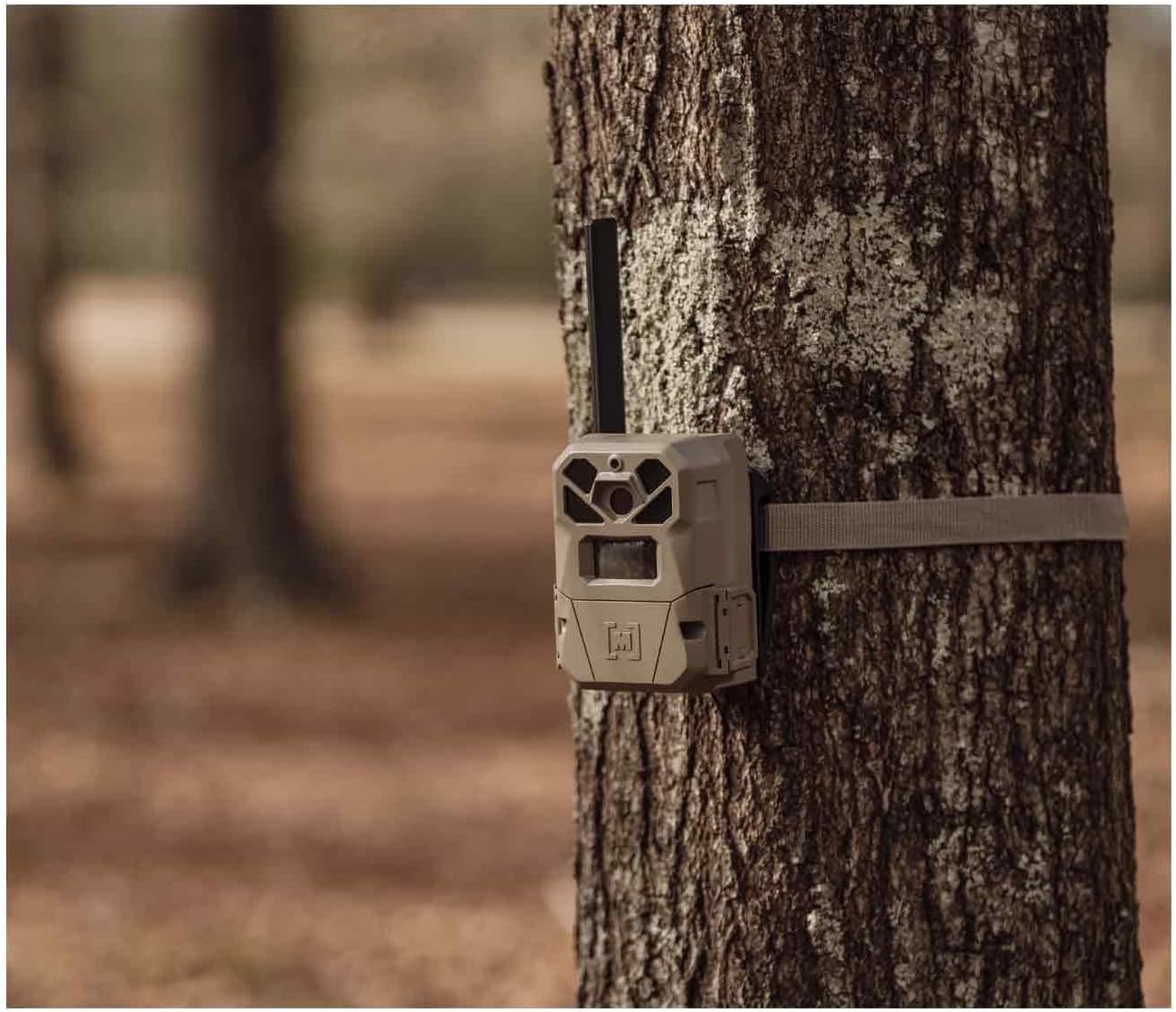
Image 3.1: The Moultrie Edge 2 Cellular Trail Camera securely mounted to a tree using the provided strap, positioned for optimal wildlife monitoring.

Image 3.2: A detailed view of the Moultrie Edge 2 camera mounted, showing its compact design and antenna for cellular connectivity.
3.2. Code Blue Rope-A-Dope Kit Setup
- Identify Scrape Location: Choose an existing or desired scrape location where wildlife activity is expected.
- Hang the Rope: Securely hang the provided rope from a sturdy branch directly above the scrape. Ensure the rope hangs low enough for animals to interact with it.
- Apply Rack Rub Gel: Apply the Code Blue Rack Rub gel generously to the rope. This gel is formulated to mimic the scent of a buck's forehead and preorbital gland, stimulating licking and rubbing behavior.

Image 3.3: An individual demonstrating the proper method for hanging the Code Blue Rope-A-Dope kit from a tree branch.
4. Operating Instructions
4.1. Camera Operation
Once set up and activated, the Moultrie Edge 2 camera operates automatically. It features a 0.4-second trigger speed to capture fast-moving wildlife. Images and videos are stored internally and managed through the Moultrie App, eliminating the need for an SD card. The camera automatically connects to the strongest available cellular signal for reliable data transmission.
4.2. Moultrie App Usage
The Moultrie App serves as the central control and monitoring hub for your Edge 2 camera:
- Image and Video Viewing: Access and review 36MP photos and 1080p HD videos captured by your camera directly from the app.
- Remote Control: Trigger photos or videos remotely on demand.
- Instant Notifications: Receive immediate alerts on your device when new activity is detected by the camera.
- Interactive Maps: Utilize the in-app mapping feature to pin camera and scrape locations, track movement, and navigate your scouting areas.
- Species Recognition: The app includes features to automatically identify and tag various species in your captured images.

Image 4.1: The Moultrie App interface displaying various features for managing devices, including feed levels, on-demand feeding, and clog alerts for compatible accessories.

Image 4.2: Examples of images captured by Moultrie cameras, including elk and turkey, alongside an in-app notification for new images.

Image 4.3: A user interacting with the Moultrie App's interactive map feature, which allows for pinning locations and tracking activity.

Image 4.4: The Moultrie App demonstrating its species recognition capabilities, allowing users to filter images by detected animal types.
5. Maintenance
- Camera Cleaning: Periodically wipe the camera lens and housing with a soft, damp cloth to remove dirt, dust, or debris. Avoid abrasive cleaners.
- Battery Replacement: Monitor battery levels via the Moultrie App. Replace batteries as needed to ensure continuous operation. Always use fresh, high-quality batteries.
- Rope and Gel Inspection: Regularly check the Rope-A-Dope for wear and tear. Reapply Rack Rub gel as necessary to maintain its effectiveness.
- Firmware Updates: Check the Moultrie App for any available firmware updates for your camera. Keeping the firmware updated ensures optimal performance and access to new features.
6. Troubleshooting
If you encounter issues with your Moultrie Edge 2 Cellular Trail Camera or Rope-A-Dope Kit, consider the following:
- No Images/Videos:
- Check battery levels.
- Ensure the camera is powered on and in active mode.
- Verify cellular signal strength in the camera's location via the app.
- Confirm camera settings (e.g., trigger delay, photo/video mode).
- Poor Image Quality:
- Clean the camera lens.
- Ensure adequate lighting conditions for optimal capture.
- No Cellular Connection:
- Relocate the camera to an area with better cellular coverage.
- Check your cellular plan status within the Moultrie App.
- Rope-A-Dope Not Attracting:
- Reapply Rack Rub gel to refresh the scent.
- Ensure the rope is positioned correctly over an active or potential scrape.
- Consider environmental factors or recent changes in wildlife patterns.
For further assistance, consult the Moultrie App's help section or contact Moultrie customer support.
7. Specifications
| Feature | Detail |
|---|---|
| Item Package Dimensions L x W x H | 10.24 x 9.45 x 3.78 inches |
| Package Weight | 2.73 Pounds |
| Item Dimensions L x W x H | 9.45 x 10.24 x 3.78 inches |
| Brand Name | Moultrie |
| Model Name | EDGE 2 Scout-N-Scrape Kit |
| Color | Khaki |
| Material | Plastic |
| Number of Items | 2 |
| Manufacturer | PRADCO Outdoor Brands |
| Part Number | MMC-14220 |
| Included Components | Cellular Trail Camera, Mounting Strap, Rope a Dope Kit |

Image 7.1: Visual representation of key specifications for the Moultrie Edge 2 camera, including 36MP resolution, 1080p video, 0.4-second trigger speed, and up to 100 ft detection range.
8. Warranty and Support
8.1. Warranty Information
The Moultrie Edge 2 Cellular Trail Camera and Scout-N-Scrape Kit are covered by a 2-Year Manufacturer Warranty. This warranty covers defects in materials and workmanship under normal use. Please retain your proof of purchase for warranty claims.
8.2. Customer Support
For technical assistance, troubleshooting beyond the scope of this manual, or warranty inquiries, please contact Moultrie customer support. Refer to the official Moultrie website for current contact information and support resources.