Introduction
This manual provides detailed instructions for the installation, operation, and maintenance of the DHUFKN SP638E 2.4G LED Controller. This device is designed to control various SPI IC chip LED light strips and PWM LED light strips, offering versatile lighting control solutions.
Product Overview
The SP638E is a 2.4G LED controller compatible with a wide range of LED strip types. It features a wired connection method and operates within a 5V-24V voltage range. The controller supports both SPI IC chip-based light strips and PWM light strips without ICs.
Key Features:
- Controller Type: SPI PWM LED Controller
- Wireless Frequency: 2.4G
- Input Voltage: DC 5V-24V
- Output Signal: SPI
- Supported IC Chips: WS2811, WS2812, WS2813, WS2814, WS2815, TM1804, TM1812, UCS1903, UCS1909, GS8206, GS8208, etc.
- Supported PWM Chips (without IC): FCOB, SMD5050, 3014, 3528, 5730, 5630, etc.
- Supported LED Strip Types:
- 2-pin (V+ V-)
- 3-pin CCT (V+ CW WW)
- 4-pin RGB (V+ RGB)
- 5-pin RGBW (V+ RGBW)
- 6-pin RGBCCT (V+ RGB CW WW)
- Maximum IC Count: Up to 600 ICs for monochrome CCT RGB, 450 ICs for RGBW, and 300 ICs for RGBCCT.
- Operating Temperature: -10°C to 60°C
- Control Method: Supports remote control (remote not included with this specific variant).
Specifications
| Parameter | Value |
|---|---|
| Model | SP638E |
| Input Voltage | DC 5-24V |
| Output Signal | SPI |
| Working Temperature | -10°C to 60°C |
| Max. IC Count (Monochrome CCT RGB) | 600 ICs |
| Item Weight | 1.76 ounces (50 grams) |
| Package Dimensions | 0.39 x 0.39 x 0.39 inches (1 x 1 x 1 cm) |
| Material | Plastic |
Setup and Installation
Follow these steps to properly set up and install your SP638E LED controller. Ensure all power is disconnected before making any connections.
Wiring Diagram:
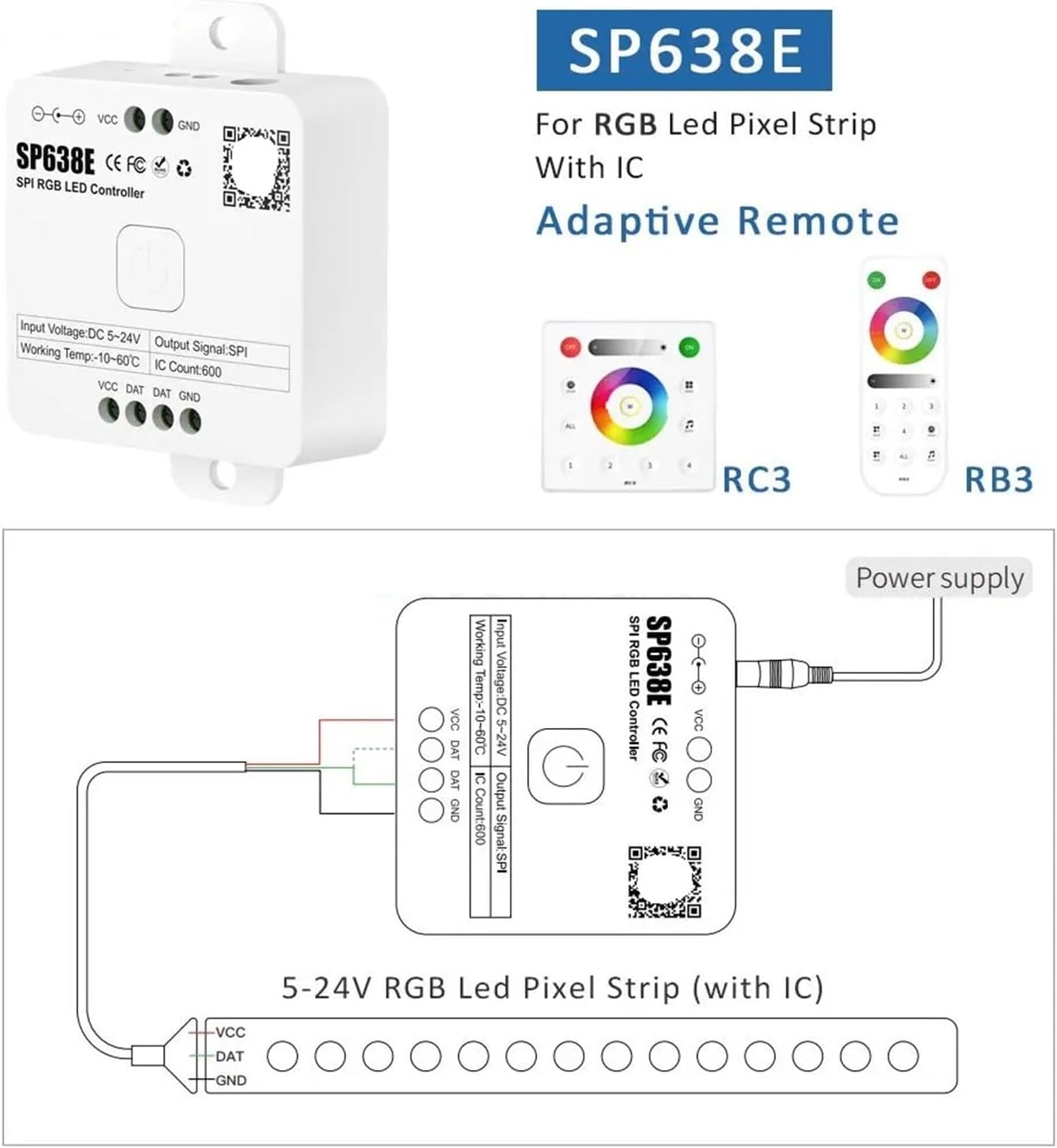
- Power Supply Connection: Connect a DC 5-24V power supply to the controller's input terminals labeled VCC and GND. Ensure the polarity is correct (positive to VCC, negative to GND).
- LED Strip Connection: Connect your compatible LED pixel strip to the controller's output terminals. Match the connections as follows:
- Controller VCC to LED Strip VCC
- Controller DAT to LED Strip DAT
- Controller GND to LED Strip GND
Note: Some LED strips may have additional pins (e.g., CLK). The SP638E is designed for SPI strips using DAT and GND. Refer to your LED strip's specific wiring requirements.
- Secure Connections: Ensure all wire connections are secure to prevent shorts or intermittent operation.
- Power On: Once all connections are verified, connect the power supply to an electrical outlet. The controller should power on.
Operating Instructions
The SP638E controller is designed for use with a compatible 2.4G remote control (sold separately or not included with this variant). The controller itself features a single button for basic power control and mode cycling.
Basic Operation (Controller Button):
- Short Press: A short press of the button on the controller will typically cycle through pre-programmed lighting modes or turn the unit on/off.
- Long Press: A long press may initiate pairing mode for a remote control or reset the controller to default settings. Refer to the specific remote control manual for pairing instructions.
Remote Control Operation (if applicable):
If you are using a compatible 2.4G remote control (e.g., RC3 or RB3 as shown in product imagery, but not included with this model), refer to the remote's instruction manual for detailed operation. Typically, remotes allow for:
- Power On/Off
- Mode Selection (static colors, dynamic effects)
- Brightness Adjustment
- Speed Adjustment for dynamic modes
- Color Selection (e.g., via a color wheel)
Note: This specific product variant (SP638E No Remote) does not include a remote control. A compatible 2.4G remote must be purchased separately to access full functionality.
Maintenance
The DHUFKN SP638E LED Controller requires minimal maintenance to ensure long-term performance.
- Cleaning: Gently wipe the controller's exterior with a dry, soft cloth. Do not use harsh chemicals or abrasive cleaners.
- Environment: Ensure the controller is operated within its specified temperature range (-10°C to 60°C) and kept away from excessive moisture, dust, and direct sunlight.
- Connections: Periodically check all wiring connections to ensure they remain secure.
Troubleshooting
If you encounter issues with your SP638E LED controller, refer to the following common problems and solutions:
| Problem | Possible Cause | Solution |
|---|---|---|
| LED strip does not light up. | No power to controller or LED strip. Incorrect wiring. Faulty LED strip or power supply. | Check power supply connection and ensure it's plugged in. Verify VCC, DAT, and GND connections are correct and secure. Test LED strip with another controller or power supply if possible. |
| LED strip colors are incorrect or flickering. | Incorrect IC type setting (if configurable via remote/app). Loose DAT connection. Power supply insufficient. | Ensure the controller is configured for the correct LED strip IC type (if using a remote/app). Check the DAT wire connection for looseness. Ensure power supply voltage and current are adequate for the length and type of LED strip. |
| Remote control not responding. | Remote not paired. Remote battery low/dead. Interference. | Follow remote pairing instructions (if applicable). Replace remote batteries. Reduce distance between remote and controller, or remove obstacles. |
| Controller is hot. | Overload. Poor ventilation. | Ensure the total power consumption of the LED strip does not exceed the controller's capacity. Provide adequate airflow around the controller. |
Warranty and Support
For warranty information and technical support, please contact DHUFKN customer service through the retailer where the product was purchased. Keep your purchase receipt as proof of purchase.
Manufacturer: DHUFKN
Model: SP638E
ASIN: B0F7RYCDTK
