Product Overview
The GEP-Taker F411-12A-E 1-2S AIO F4 Flight Controller is a compact and efficient all-in-one solution designed for 1-2S racing drones. It integrates an F4 flight controller with a 12A ESC, providing robust power handling and stable flight performance. This unit is suitable for various RC DIY projects, offering versatility and ease of use for both beginners and experienced users.
Package Contents
Upon opening the package, you should find the following items:
- 1 x TAKER F411-12A-E 1~2S AIO Flight Controller
- 1 x Set of connection cables/accessories (specific contents may vary)
Setup and Installation
This section provides guidance on the initial setup and installation of your F411-12A-E Flight Controller.
Component Identification
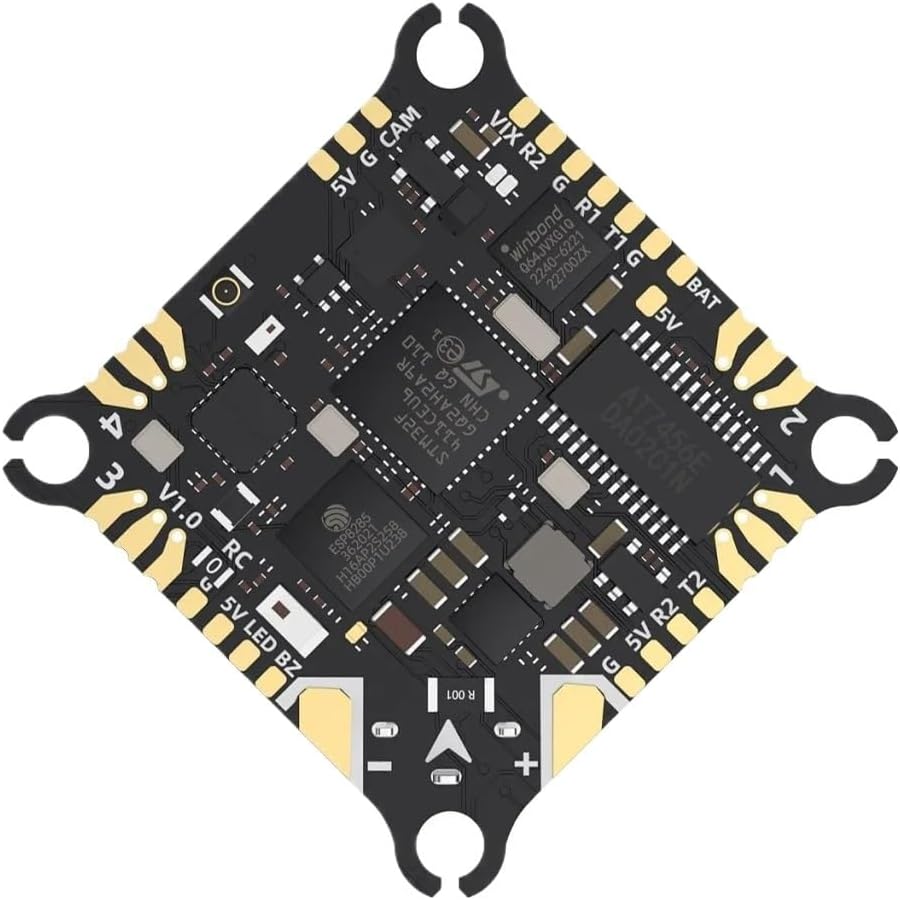
Figure 1: Top view of the GEP-Taker F411-12A-E Flight Controller, showing various solder pads for connections such as 5V, G (Ground), CAM (Camera), VTX (Video Transmitter), RX (Receiver), TX (Transmitter), BAT (Battery), and LED/Buzzer outputs. The main MCU (STM32F411) and OSD chip (AT7456Ev) are visible.

Figure 2: Bottom view of the GEP-Taker F411-12A-E Flight Controller, highlighting the USB-C port for configuration and the ELRS 2.4G receiver module. The ESC components are also visible on this side.
Wiring Connections
Carefully connect the flight controller to your drone's components. Refer to the pinout diagram (Figure 1) for specific connections.
- Power Input: Connect your 1S-2S LiPo/LiHv battery to the BAT pads. Ensure correct polarity.
- Receiver: Connect your receiver (e.g., ELRS 2.4G, SBUS) to the designated pads (R2 for SBUS, ELRS 2.4G is integrated).
- Video Transmitter (VTX) & Camera (CAM): Connect your VTX and camera to the respective VTX and CAM pads.
- Motors: Solder motor wires to the ESC pads (M1, M2, M3, M4) according to your drone's motor layout.
- Buzzer & LED: Optional connections for a buzzer and LED strip are available.
Firmware Flashing and Configuration
The flight controller comes pre-flashed with Betaflight firmware. For configuration or updates, connect the board to your computer via the USB-C port (Figure 2).
- Download and install the latest Betaflight Configurator software.
- Connect the flight controller to your PC.
- Select the correct COM port in the configurator and click "Connect".
- The recommended firmware target is TAKERF411 for the flight controller and C-X-30 for the ESC.
- Configure settings such as PID tuning, OSD elements, receiver protocols, and motor directions as per your drone's requirements.
Operating Instructions
Once installed and configured, the GEP-Taker F411-12A-E is ready for operation.
- Power On: Connect a fully charged 1S or 2S LiPo/LiHv battery. The flight controller will power up and the integrated ELRS receiver will bind if configured correctly.
- Arming: Arm the drone using your radio transmitter, as configured in Betaflight. Ensure propellers are clear before arming.
- Flight Protocols: The integrated 12A ESC supports Dshot300, Dshot600, Oneshot, and Multishot protocols for precise motor control.
- OSD (On-Screen Display): Critical flight data such as battery voltage, current, flight time, and RSSI will be displayed on your FPV goggles or monitor via the integrated OSD.
- Blackbox: The 8MB Blackbox flash memory records flight data, which can be downloaded and analyzed for tuning and troubleshooting.
Maintenance
Proper maintenance ensures the longevity and reliable performance of your flight controller.
- Regular Inspection: Periodically inspect all solder joints and connections for any signs of damage, corrosion, or loose wires.
- Cleaning: Keep the board clean from dust, dirt, and debris. Use a soft brush or compressed air. Avoid using liquids directly on the board.
- Storage: Store the flight controller in a dry, anti-static environment when not in use.
- Firmware Updates: Regularly check for and apply the latest Betaflight firmware updates to benefit from performance improvements and bug fixes.
Troubleshooting
This section addresses common issues you might encounter.
- No Power:
- Verify battery connection and polarity.
- Check for short circuits on the board or connected components.
- Cannot Connect to Betaflight Configurator:
- Ensure USB drivers are correctly installed (e.g., STM32 Virtual COM Port Driver, Zadig for DFU mode).
- Try a different USB cable or port.
- Ensure the flight controller is powered (either via USB or battery).
- Motors Not Spinning:
- Check motor wiring and solder joints.
- Verify ESC calibration and settings in Betaflight.
- Ensure the drone is armed and throttle is above minimum.
- Check for motor desync issues; adjust Dshot protocol or motor timing if necessary.
- Unstable Flight:
- Review PID tuning settings in Betaflight.
- Check for vibrations affecting the IMU (BMI270).
- Ensure propellers are balanced and undamaged.
For more detailed troubleshooting, consult the extensive Betaflight documentation online or relevant community forums.
Specifications
| Feature | Detail |
|---|---|
| Model | TAKER F411-12A-E 1~2S AIO |
| MCU (Flight Controller) | STM32F411 |
| IMU (Gyro/Accelerometer) | BMI270 |
| Firmware Target (FC) | TAKERF411 |
| OSD | Betaflight OSD w/ AT7456Ev |
| UART Ports | T1 R1 / T2 R2 |
| SBUS Support | R2 |
| Integrated Receiver | ELRS2.4G 3.0 |
| Buzzer Support | Supported |
| USB Port | USB-C |
| ESC MCU | EFM8BB21F16G |
| Continuous Current (ESC) | 12A |
| Burst Current (ESC) | 13A |
| Input Voltage | LiPo/LiHv 1S-2S |
| Supported Protocols (ESC) | Dshot300/600, Oneshot, Multishot |
| Blackbox | 8MB |
| Galvanometer | Supported |
| Firmware Target (ESC) | C-X-30 |
| Size | 30.5mm x 30.5mm |
| Fixing Hole Size | 25.5mm x 25.5mm (M2) |
| Weight | 4.2g |
Warranty and Support
Specific warranty details for this product are not provided in this manual. Please refer to the product packaging, the seller's website, or contact the manufacturer, DHUFKN, directly for warranty information and support inquiries.
For technical support related to Betaflight firmware or general FPV drone building, consider consulting online communities and resources such as the official Betaflight documentation or dedicated FPV forums.