
IRONCK HK-CTG-LL03PS
IRONCK Nightstand with Charging Station (Model HK-CTG-LL03PS) User Manual
Model: HK-CTG-LL03PS | Brand: IRONCK
Introduction
Thank you for choosing the IRONCK Nightstand with Charging Station. This manual provides essential information for the safe assembly, operation, and maintenance of your new nightstand. Please read it thoroughly before use and retain it for future reference.
This nightstand features a 2-tier storage design with a drawer and an open shelf, along with a built-in charging station. Its dimensions are 22.8"W x 15.4"D x 26.5"H, making it a versatile addition to your bedroom, living room, or office.

Image: The IRONCK Nightstand positioned next to a bed, illustrating its use as a bedside table.
Safety Information
Please observe the following safety precautions to prevent injury or damage to the product:
- Always unplug the charging station when not in use.
- Do not overload the tabletop. The maximum weight recommendation is 240 pounds.
- Assemble this product with the help of another person to prevent injury.
- Always follow the assembly instructions carefully to ensure stability and prevent tipping.
- Ensure all electrical connections are secure and meet local safety standards.
- Keep liquids away from the charging station to prevent electrical hazards.
Package Contents
Before assembly, verify that all components are present and undamaged. If any parts are missing or damaged, please contact customer support.
- Top Panel with Integrated Charging Station
- Side Panels (2)
- Bottom Panel
- Back Panel
- Drawer Components (Front, Back, Sides, Bottom)
- Drawer Glides (2 sets)
- Drawer Handle
- Assembly Hardware (screws, dowels, cam locks, etc.)
- Instruction Manual
Assembly Instructions
Assembly is required for this nightstand. It is recommended that two people assemble the unit to ensure stability and ease of construction. A screwdriver is recommended for assembly.
- Unpack and Identify Parts: Carefully remove all components from the packaging. Lay them out on a clean, soft surface to prevent scratches. Identify each part using the provided parts list.
- Attach Drawer Glides: Secure the drawer glides to the side panels of the nightstand and the drawer box according to the diagrams. Ensure they are aligned correctly for smooth operation.
- Assemble Frame: Connect the side panels to the bottom panel and the top panel (which includes the charging station). Use the provided hardware, ensuring all connections are tight and secure.
- Install Back Panel: Attach the back panel to the assembled frame. This adds stability to the unit.
- Assemble Drawer: Construct the drawer box using the drawer front, back, sides, and bottom. Attach the drawer handle to the drawer front.
- Insert Drawer: Carefully slide the assembled drawer into the installed drawer glides on the nightstand frame.
- Connect Power Cord: Ensure the power cord for the charging station is routed safely and plugged into a suitable wall outlet.

Image: Detailed dimensions of the nightstand and its drawer for assembly reference.

Image: Features like the desktop baffle, silent-slide glides, and handle detail.
Operating Instructions
Using the Charging Station
The integrated charging station provides convenient power access for your devices. It includes 2 USB ports and 2 AC outlets, designed with ample spacing to prevent interference when multiple devices are plugged in. The power cord is 4.9 feet long, offering flexibility in placement.
- AC Outlets: Plug in devices requiring standard 125V/12A power.
- USB Ports: Connect devices for 5V/2A charging.
- Ensure the nightstand's power cord is securely plugged into a functional wall outlet before using the charging features.
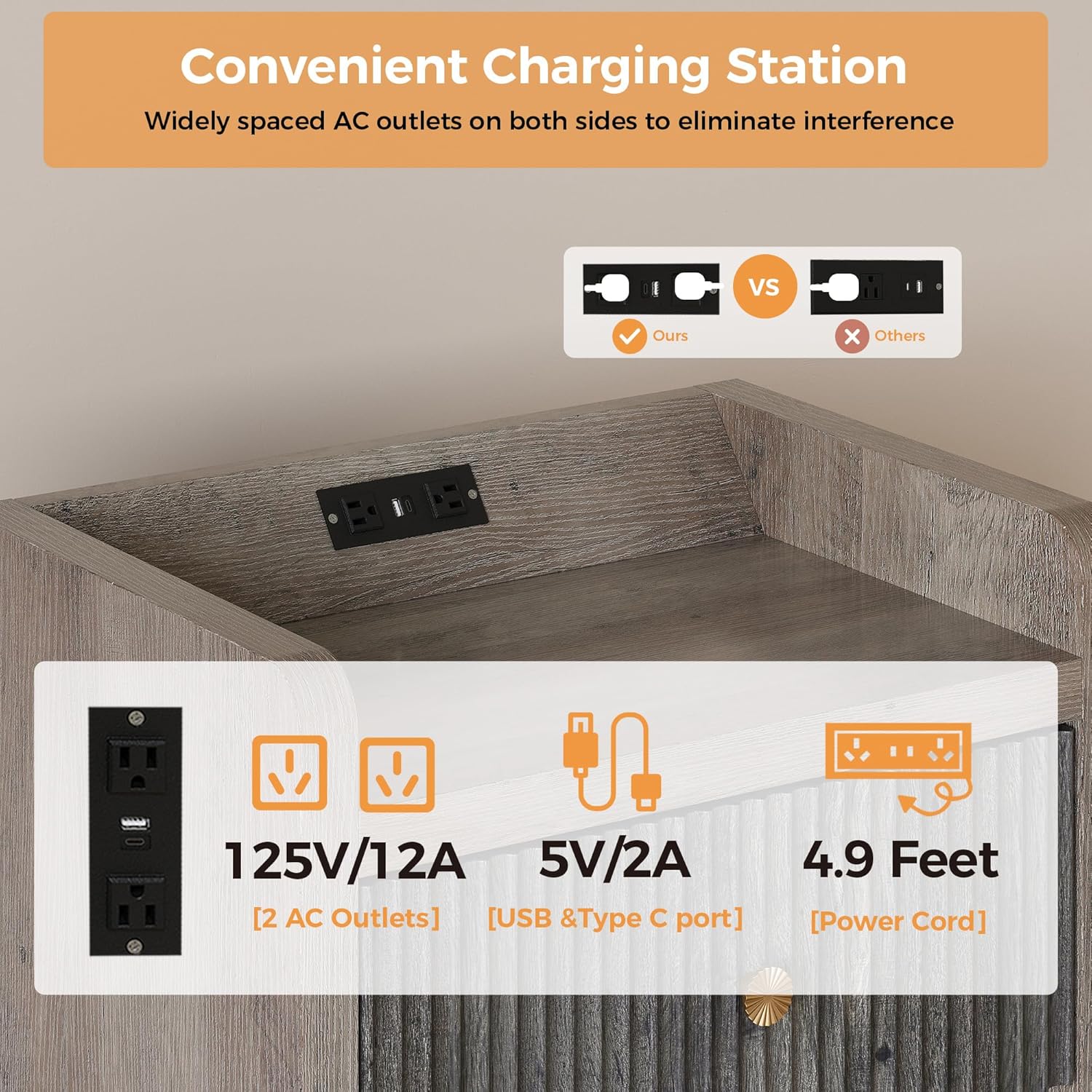
Image: Close-up of the charging station, detailing its specifications and design.
Utilizing Storage
The nightstand offers two tiers of storage:
- Drawer: The enclosed drawer provides discreet storage for personal items, keeping your space tidy. The silent-slide glides ensure smooth and quiet operation.
- Open Shelf: The lower open shelf is ideal for displaying books, decorative items, or storing frequently accessed essentials.

Image: The nightstand's two-tier storage, featuring an open drawer and a lower shelf.
Maintenance
Proper care will extend the life and appearance of your nightstand:
- Cleaning: Wipe surfaces with a soft, damp cloth. Avoid harsh chemicals or abrasive cleaners, which can damage the finish.
- Spills: Immediately wipe up any spills to prevent staining or damage to the engineered wood.
- Charging Station: Keep the charging ports free of dust and debris. Do not attempt to disassemble the charging unit.
- Stability Check: Periodically check all screws and connections to ensure they remain tight. Retighten if necessary.
Troubleshooting
| Problem | Possible Cause | Solution |
|---|---|---|
| Charging station not working. | Power cord unplugged; wall outlet not functional; device cable faulty. | Ensure the nightstand's power cord is securely plugged into a live wall outlet. Test the wall outlet with another device. Try a different charging cable for your device. |
| Drawer is stiff or not sliding smoothly. | Drawer glides misaligned; debris in glides; drawer overloaded. | Check that the drawer glides are properly installed and aligned. Remove any obstructions from the glides. Reduce the weight in the drawer. |
| Nightstand feels wobbly. | Loose assembly hardware; uneven floor. | Tighten all assembly screws. Ensure the nightstand is placed on a flat, level surface. |
Specifications
| Brand | IRONCK |
| Model Name | HK-CTG-LL03PS |
| Product Dimensions (D x W x H) | 15.4" x 22.83" x 26.5" |
| Item Weight | 43.1 Pounds |
| Maximum Weight Recommendation | 240 Pounds |
| Frame Material | Engineered Wood |
| Included Components | Charging Station |
| Charging Station Output | 2 AC Outlets (125V/12A), 2 USB Ports (5V/2A) |
| Power Cord Length | 4.9 Feet |
| Tabletop Thickness | 1.4 Inches |
| Required Assembly | Yes (Recommended 2 people) |
| Color | Grey |

Image: Details of the nightstand's construction, including smooth surface, soft edges, and sturdy base.
Official Product Video
Video: An official product video from IRONCK Direct showcasing the 26.5" Fluted Nightstand with Drawer, highlighting its features and design.
Warranty and Support
For warranty information, product support, or to report missing/damaged parts, please contact IRONCK customer service directly. Refer to your purchase documentation or the IRONCK official website for contact details.
Online Support: Visit the IRONCK Store on Amazon
Related documentsHK-CTG-LL03PS


Ask a question about this manual
Ask about setup, troubleshooting, compatibility, parts, safety, or missing instructions. Manuals+ will review the question and use this page’s manual context to help answer it.