1. Introduction
This instruction manual provides detailed guidance for the safe and effective use of the Eujgoov AS803 Digital Lux Meter. This compact device is designed for accurate measurement of illuminance (light intensity) in both Lux and Foot-Candle (FC) units, and also measures ambient temperature. Please read this manual thoroughly before operation and retain it for future reference.
2. Safety Information
- Do not attempt to disassemble or modify the device. Unauthorized modifications may void the warranty and pose safety risks.
- Keep the device away from water, high humidity, and extreme temperatures to prevent damage.
- Avoid dropping the device or subjecting it to strong impacts.
- Remove batteries if the device will not be used for an extended period to prevent leakage.
- Dispose of used batteries according to local regulations.
- Clean the device with a soft, dry cloth. Do not use abrasive cleaners or solvents.
3. Product Overview
The Eujgoov AS803 Digital Lux Meter is a portable instrument featuring a rotatable illuminance probe and an LCD display with backlight. Key components are identified below:

Figure 3.1: Front view of the AS803 Digital Lux Meter with labeled components. The image shows the illuminance probe at the top, the LCD display in the middle, and control buttons below it. Labels point to the illuminance probe, LCD display, numerical lock maximum and minimum buttons, backlight control and temperature unit buttons, power switch, and photometric unit conversion key.
- Illuminance Probe: Sensor for detecting light intensity. Can be adjusted 180 degrees.
- LCD Display: Shows illuminance readings, temperature, battery status, and unit indicators.
- Power Switch (⏻): Turns the device on or off.
- Mode Button: Activates data hold (MAX/MIN) functions.
- Lux/FC Button: Toggles between Lux and Foot-Candle measurement units.
- °C/°F Button: Toggles between Celsius and Fahrenheit temperature units and controls backlight.
4. Setup
4.1 Battery Installation
The AS803 Lux Meter requires three (3) 1.5V AAA batteries (not included) for operation.
- Locate the battery compartment cover on the back of the device.
- Slide the cover downwards to open the compartment.
- Insert three AAA batteries, ensuring correct polarity (+ and -) as indicated inside the compartment.
- Replace the battery compartment cover by sliding it back into place until it clicks securely.

Figure 4.1: Rear view of the AS803 Digital Lux Meter with the battery compartment open, showing slots for three AAA batteries.
5. Operating Instructions
5.1 Power On/Off
Press the ⏻ (Power) button to turn the device on. Press and hold the ⏻ button for approximately 2 seconds to turn the device off. The device also features an automatic shutdown function to conserve battery power.
5.2 Illuminance Measurement (Lux/FC)
- Turn on the device.
- Point the illuminance probe towards the light source or area you wish to measure.
- The current illuminance reading will be displayed on the LCD screen.
- Press the Lux/FC button to switch between Lux and Foot-Candle units. The selected unit will be indicated on the display.
5.3 Temperature Measurement
The AS803 automatically displays the ambient temperature in real-time. Press the °C/°F button to toggle between Celsius (°C) and Fahrenheit (°F) temperature units.
5.4 Backlight Control
Press and hold the °C/°F button for approximately 2 seconds to turn the LCD backlight on or off. This feature enhances readability in low-light conditions.
5.5 Data Hold (MAX/MIN)
The device can record maximum and minimum illuminance values:
- Press the Mode button once to activate the MAX hold function. The display will show "MAX" and the maximum measured value since activation.
- Press the Mode button again to activate the MIN hold function. The display will show "MIN" and the minimum measured value since activation.
- Press the Mode button a third time to exit the MAX/MIN hold mode and return to real-time measurement.
5.6 Probe Adjustment
The illuminance probe can be rotated up to 180 degrees to the right. This allows for flexible positioning to measure light from various angles without repositioning the entire device.
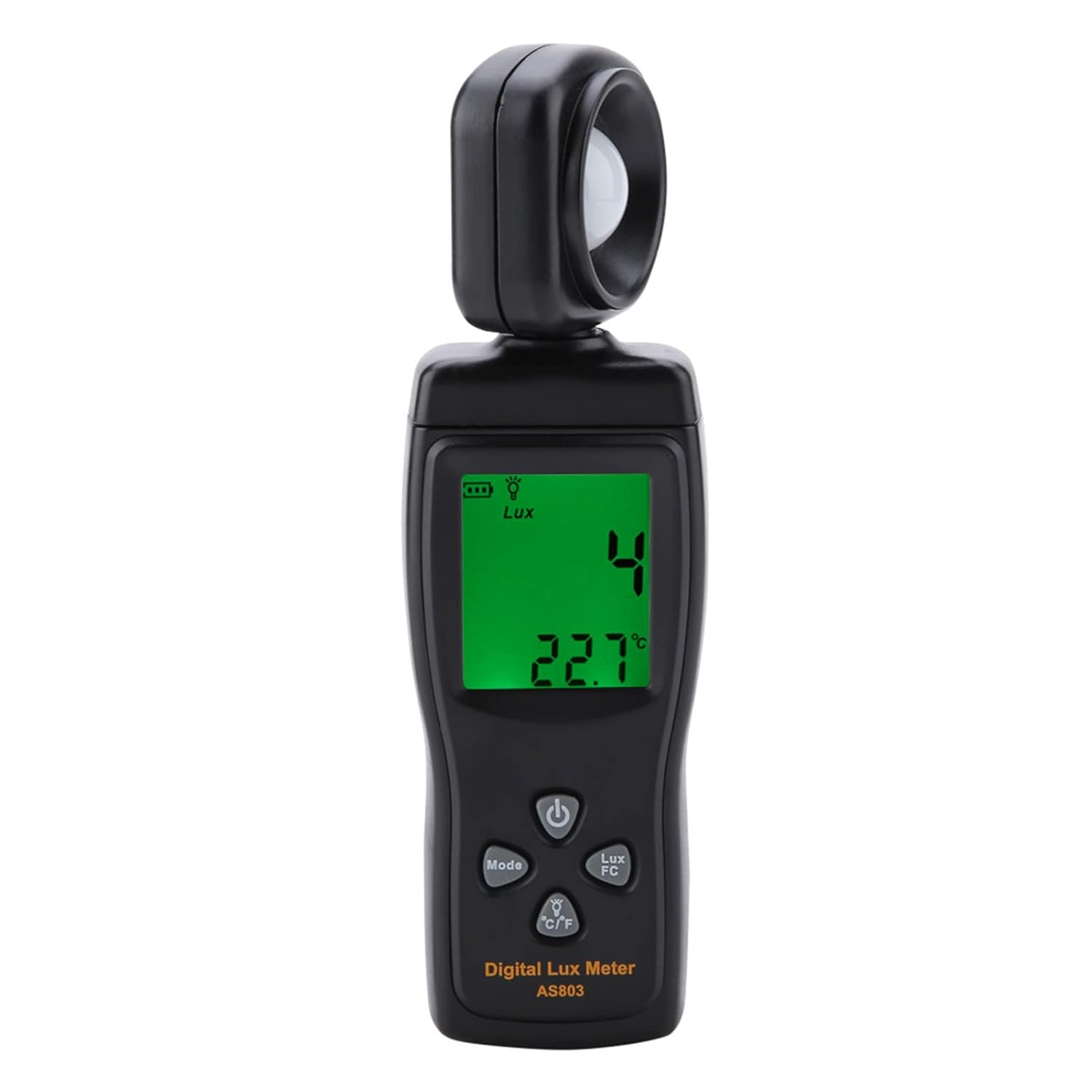
Figure 5.1: The AS803 Digital Lux Meter with its illuminance probe rotated 180 degrees, demonstrating its adjustable feature for versatile light measurement.
6. Maintenance
- Cleaning: Use a soft, dry cloth to clean the device. Do not use liquid cleaners or solvents. Ensure the illuminance probe is kept clean and free of dust for accurate readings.
- Storage: Store the device in a cool, dry place, away from direct sunlight and extreme temperatures.
- Battery Replacement: When the low battery indicator appears on the display, replace all three AAA batteries promptly to ensure continuous accurate operation.
7. Troubleshooting
- Device does not power on:
- Check if batteries are installed correctly with the right polarity.
- Replace old or depleted batteries with new ones.
- Inaccurate readings:
- Ensure the illuminance probe is clean and unobstructed.
- Verify that the measurement unit (Lux/FC) is set correctly.
- Ensure the device is within its specified operating temperature range.
- Display is dim or blank:
- Check battery level and replace if low.
- Ensure the backlight is turned on if operating in low light.
8. Specifications
| Feature | Specification |
|---|---|
| Model | AS803 |
| Measuring Range | 0-200,000 Lux |
| Unit Selection | Lux / FC |
| Accuracy | ±5% rdg ±10dgts |
| Temperature Range | -10~50°C / 14~122°F |
| Temperature Resolution | 0.1°C |
| Sampling Rate | 2 Times/Sec |
| Measurement Repeatability | ±2% |
| Power Supply | 3 * 1.5V AAA Battery (Not Included) |
| Working Temperature | 0-40°C (≤ 80% Rh Without Condensation) |
| Storage Temperature | -10-60°C (≤ 70% Rh Without Condensation) |
| Dimensions | Approx. 16.3 * 4.7 * 2.5cm / 6.4 * 1.9 * 1.0in |
| Weight | Approx. 123g / 4.3oz |
9. Package Contents
The standard package for the Eujgoov AS803 Digital Lux Meter includes:
- 1 x Eujgoov AS803 Digital Lux Meter
- 1 x Rope (Lanyard)
- 1 x Protective Cover
- 1 x Instruction Manual (This document)

Figure 9.1: The AS803 Digital Lux Meter shown with its included rope lanyard and protective sensor cover.
10. Warranty and Support
For warranty information, technical support, or service inquiries, please refer to the contact information provided by your retailer or visit the official Eujgoov website. Please retain your purchase receipt as proof of purchase for warranty claims.