1. Introduction
This manual provides detailed instructions for the assembly, operation, and maintenance of your Herture Mini Fridge Cabinet, model KH02MRB. Please read this manual thoroughly before assembly and use to ensure safe and optimal performance of the product. This cabinet is designed to function as a versatile beverage station, coffee bar, or storage unit, accommodating a mini fridge, microwave, and other small appliances.
2. Safety Information
Important Safety Instructions:
- Always ensure the cabinet is properly installed and secured to the floor.
- Do not overload the shelves or place excessively heavy items on the top surface.
- Exercise caution when handling small appliances and position them away from the edges to prevent tipping.
- Avoid exposing the cabinet to excessive moisture or liquids to prevent damage to the engineered wood material.
- Utilize the provided anti-tip kit to secure the cabinet to a wall, enhancing stability and safety.

Image: Anti-tip kit. This kit is essential for securing the cabinet to the wall, preventing accidental tipping and ensuring user safety, especially in households with children or pets.
3. Assembly Instructions
The Herture Mini Fridge Cabinet requires assembly. Please ensure all components are present before beginning. It is recommended to have two people for assembly due to the size and weight of the unit.
3.1 Unpacking and Component Check
- Carefully unpack all parts from the packaging.
- Refer to the included hardware list to verify all screws, dowels, and other fasteners are present.
- Inspect all wooden panels for any damage. Contact customer support if any parts are missing or damaged.
3.2 Assembly Steps (General Guidance)
While specific step-by-step instructions are provided in the packaging, the general assembly involves:
- Assemble the base frame of the cabinet.
- Attach the side panels and the back panel.
- Install the shelves and dividers for the storage compartments.
- Assemble and attach the doors to the upper and side cabinets.
- Install the power panel on the top section.
- Secure the anti-tip kit to the cabinet and the wall.

Image: Cabinet dimensions and internal layout. This diagram illustrates the various sections and their measurements, which is helpful during assembly and for planning appliance placement.
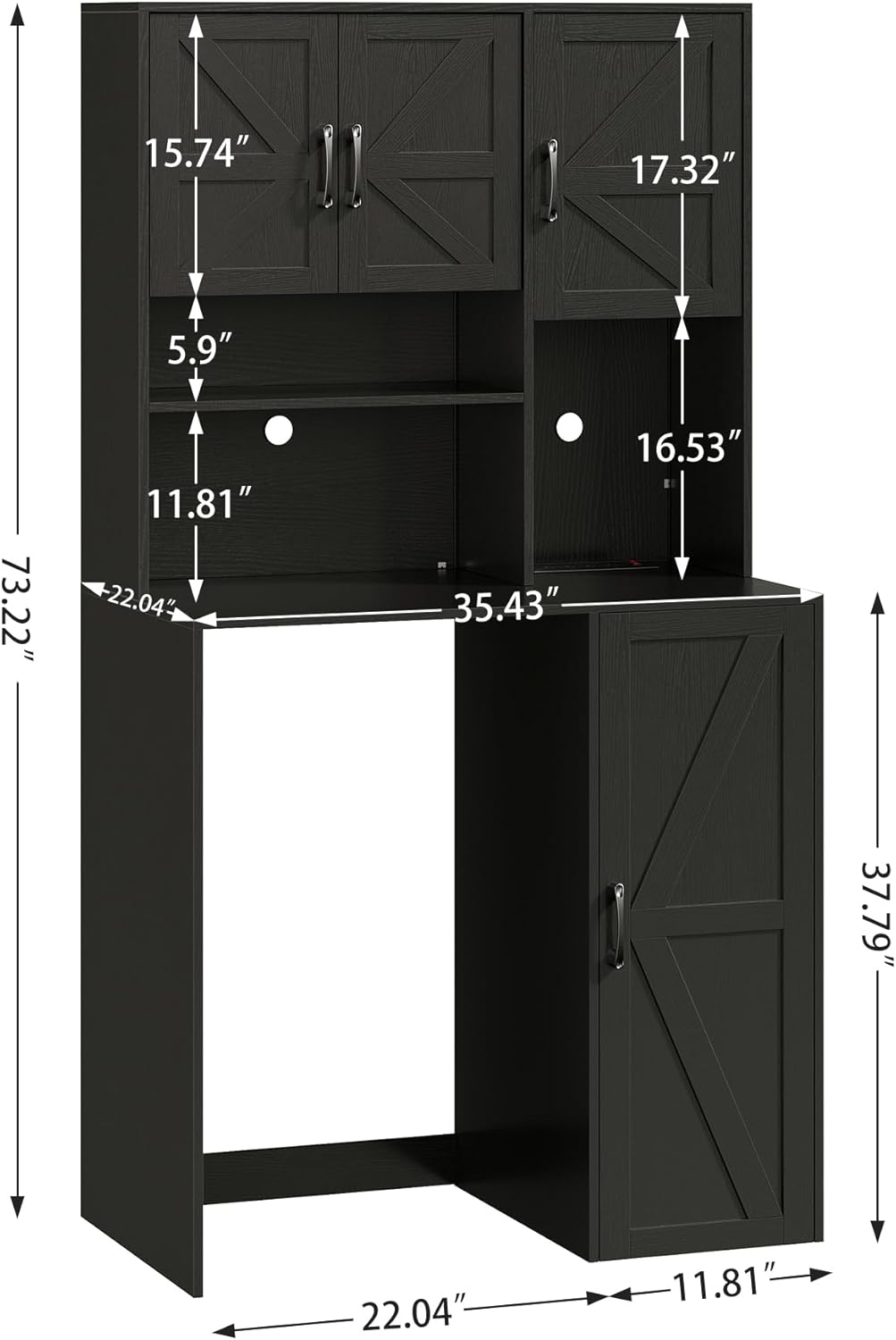
Image: Internal view of the cabinet. This image provides a visual reference for the arrangement of shelves and compartments, aiding in correct assembly and understanding storage options.
4. Operating Instructions
4.1 Using the Dedicated Fridge Area
The cabinet features a dedicated space for a mini fridge or wine cooler. Ensure your appliance fits within the internal dimensions of 22.04" L x 22.04" W x 37.79" H. Adequate space is provided at the back and top for proper ventilation, which is crucial for the safe and efficient operation of your fridge. Position the fridge carefully to avoid obstructing ventilation openings.
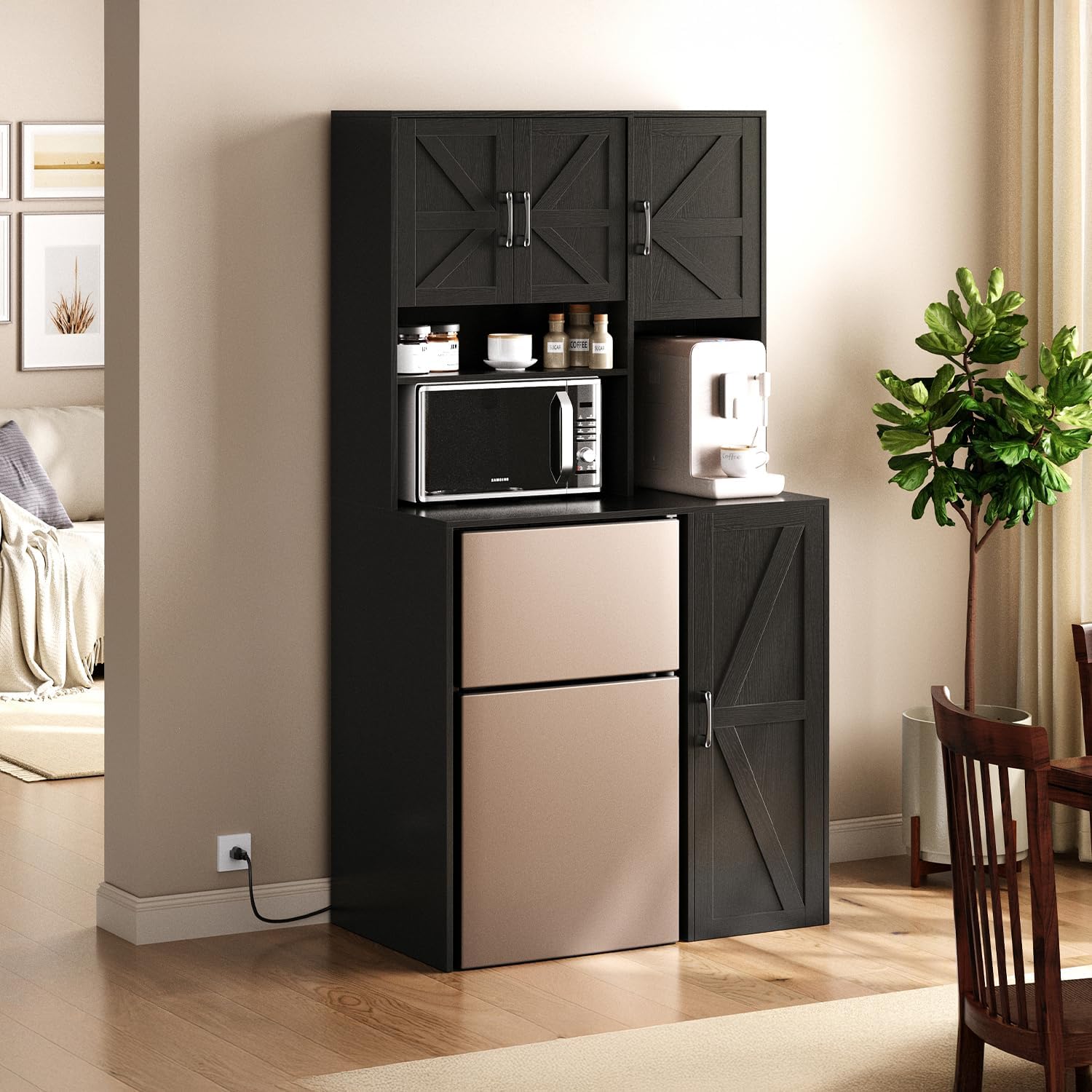
Image: Herture Mini Fridge Cabinet with a mini fridge. This image demonstrates the intended use of the dedicated fridge compartment, showing a mini fridge seamlessly integrated into the cabinet design.
4.2 Utilizing the Built-in Power Panel
The top section of the cabinet is equipped with a power panel featuring 4 AC outlets and a master switch. This panel is designed for convenient power access for small appliances such as coffee machines, microwaves, or blenders. Connect the cabinet's main power cord to a wall outlet, then use the integrated outlets for your devices. Always ensure the master switch is off before plugging or unplugging appliances.

Image: Built-in power panel. This close-up shows the 4 AC outlets and the master switch, highlighting the convenience for powering multiple small appliances directly from the cabinet.
4.3 Storage Compartments
The cabinet offers various storage options:
- Right Side Open Shelves: Three open shelves are suitable for storing frequently accessed items like coffee mugs, barware, spice jars, snacks, and drinks.
- Upper Double-Door Cabinets: These provide enclosed storage for items such as appliance accessories, tissues, or coffee beans, helping to maintain a tidy appearance.
- Single-Door Storage Cabinet: Located on the side, this offers additional private storage space.

Image: Upper double-door cabinets. This image illustrates the storage capacity and organization possibilities within the upper enclosed compartments.

Image: Side single-door storage cabinet. This image shows the additional storage space available in the single-door compartment, suitable for items like a coffee maker or other kitchen supplies.
5. Maintenance and Care
To ensure the longevity and appearance of your Herture Mini Fridge Cabinet, follow these maintenance guidelines:
- Cleaning: The cabinet's high-density, eco-friendly board material has a scratch-resistant and easy-to-clean surface. Wipe surfaces with a soft, damp cloth. Avoid abrasive cleaners or harsh chemicals that could damage the finish.
- Spills: Immediately wipe up any spills to prevent moisture absorption and potential swelling of the engineered wood.
- Inspection: Periodically check all fasteners and connections to ensure they remain tight. Retighten if necessary.
- Ventilation: Ensure the ventilation areas around your mini fridge are kept clear of obstructions to prevent overheating.
6. Troubleshooting
This section addresses common issues you might encounter with your cabinet.
- Cabinet feels wobbly or unstable:
- Ensure all assembly screws are securely tightened.
- Verify the cabinet is placed on a flat, level surface.
- Confirm the anti-tip kit is correctly installed and secured to both the cabinet and the wall.
- Avoid placing excessive weight on shelves or the top surface.
- Doors do not close properly:
- Check if hinges are properly aligned and tightened.
- Ensure no items inside the cabinet are obstructing the door's closure.
- Appliances not receiving power from the built-in outlets:
- Verify the cabinet's main power cord is securely plugged into a functional wall outlet.
- Ensure the master switch on the power panel is in the "ON" position.
- Check if the appliance itself is properly plugged into the cabinet's outlet and is functional.
7. Specifications
| Feature | Detail |
|---|---|
| Brand | Herture |
| Model Name | Mini Fridge Cabinet |
| Model Number | KH02MRB |
| Color | Black |
| Product Dimensions (Overall) | 35.43" L x 22.04" W x 73.22" H |
| Dedicated Fridge Area Dimensions (Internal) | 22.04" L x 22.04" W x 37.79" H |
| Material | Engineered Wood |
| Item Weight | 102 Pounds |
| Mounting Type | Floor Mount, Freestanding (with anti-tip kit) |
| Number of Shelves | 3 (open shelves) + internal shelves in closed compartments |
| Power Outlets | 4 AC outlets with switch |
| Assembly Required | Yes |
8. Warranty and Support
For warranty information, product support, or to report missing/damaged parts, please contact Herture customer service directly. Refer to the contact information provided with your purchase or visit the official Herture website.
Please retain this instruction manual for future reference.
