
NOBIS B0F7RHMLB2
NOBIS Portable Charger User Manual
Models: 45W 20000mAh Power Bank & 22.5W 5000mAh Magnetic Power Bank
Introduction
This user manual provides detailed instructions for the NOBIS Portable Charger bundle, which includes a 45W 20000mAh Power Bank and a 22.5W 5000mAh Magnetic Power Bank. Please read this manual thoroughly before using the products to ensure safe and optimal performance. Keep this manual for future reference.
Product Overview
The NOBIS Portable Charger bundle offers versatile charging solutions for various devices. It comprises two distinct power banks:
- 45W 20000mAh Power Bank: A high-capacity power bank designed for extended use and multi-device charging, featuring multiple output ports and a digital display.
- 22.5W 5000mAh Magnetic Power Bank: A compact, ultra-thin magnetic power bank with built-in cable and wireless charging capabilities, ideal for on-the-go charging.
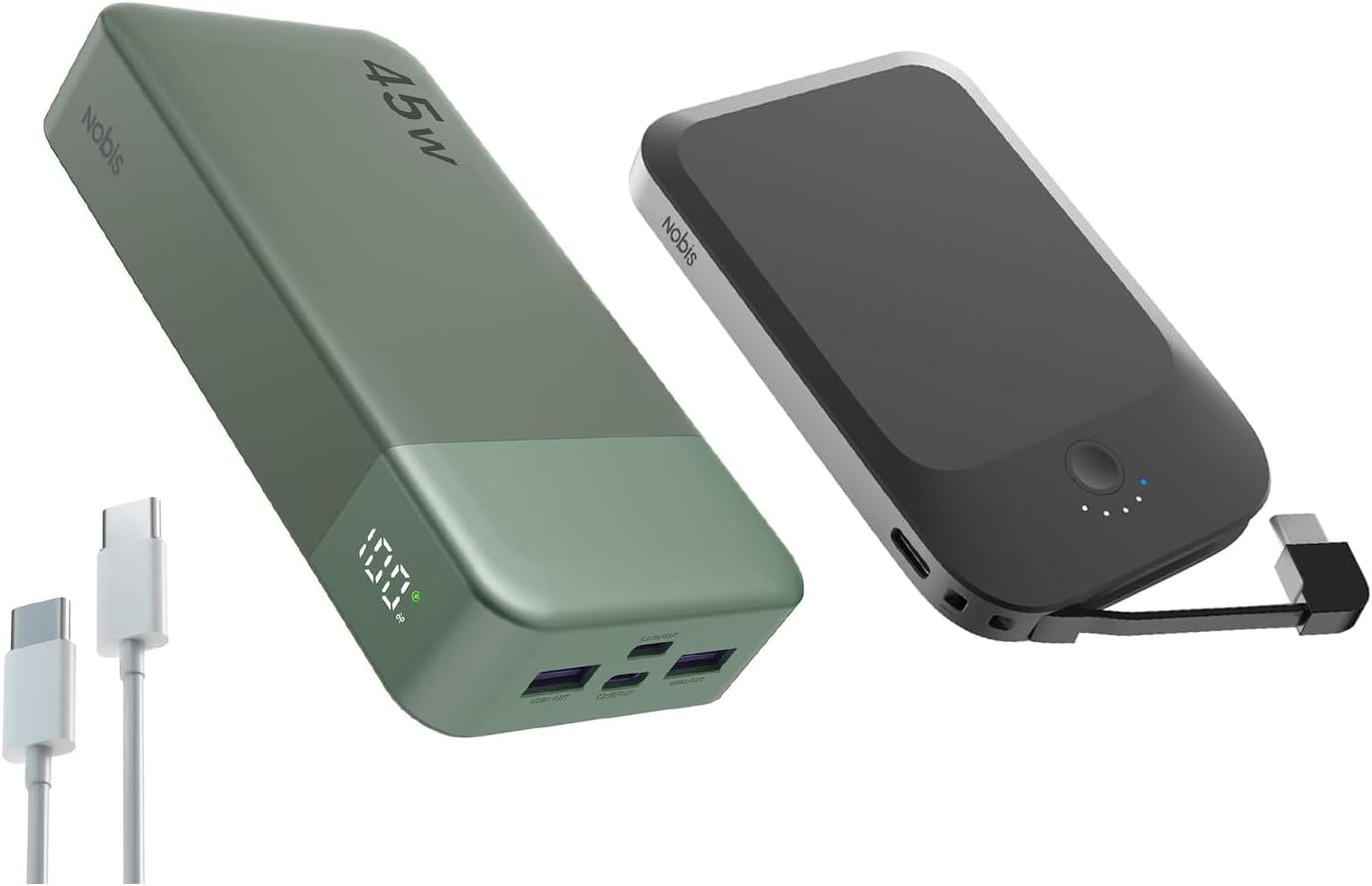
Image: The NOBIS Portable Charger bundle, showcasing both the larger 45W 20000mAh power bank (green) and the smaller 22.5W 5000mAh magnetic power bank (black), along with two USB-C cables.
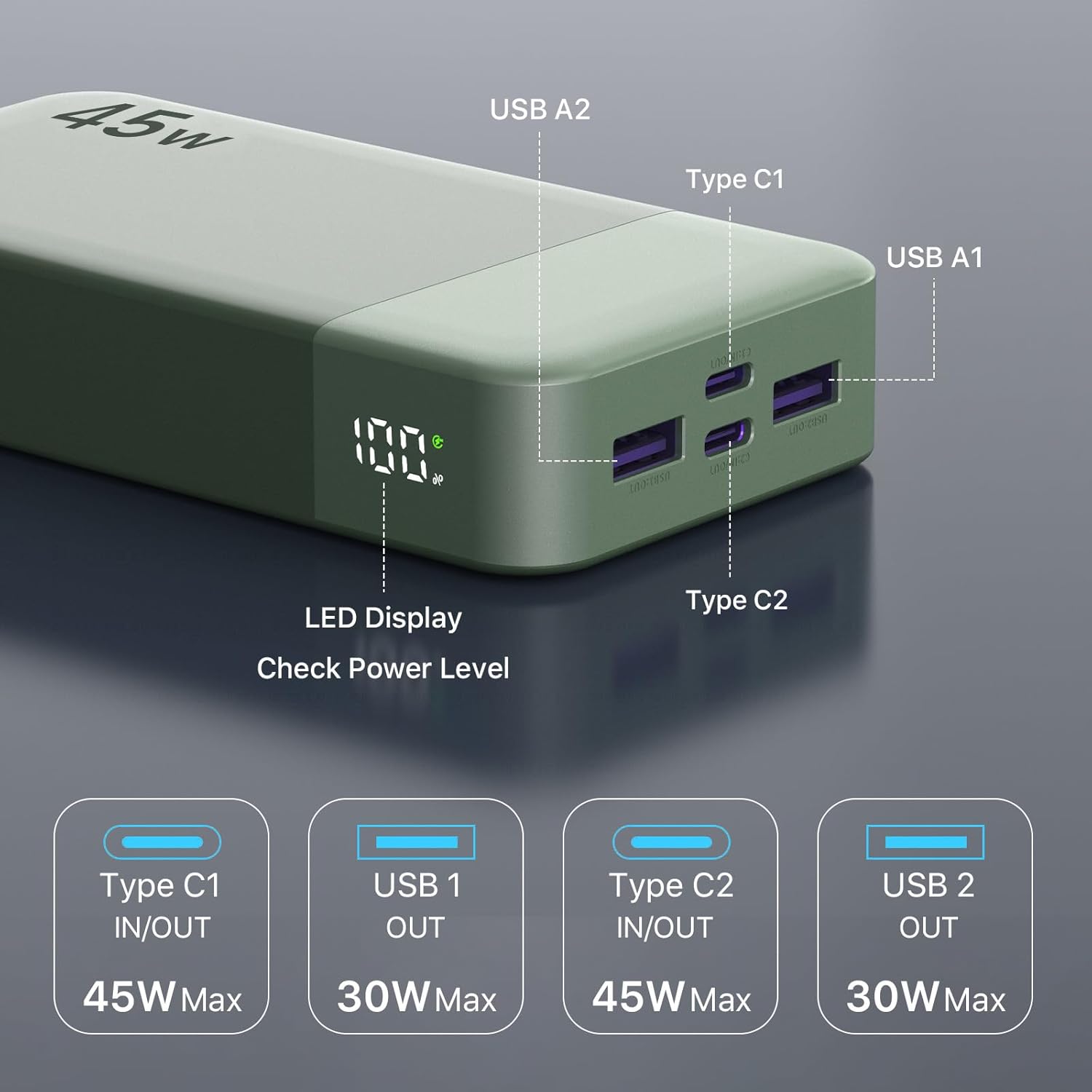
Image: Close-up view of the 45W power bank, highlighting its LED display and various ports: USB A1 (out), USB A2 (out), Type C1 (in/out), and Type C2 (in/out).
Features
- Dual Fast Charging Technologies: The 45W power bank supports PD3.0 and QC3.0 protocols, while the magnetic power bank offers 22.5W Type-C bi-directional fast charging and 15W wireless charging.
- High Capacity & Portability: The 20000mAh power bank provides extended power, and the 5000mAh magnetic charger is ultra-thin (10.2x6.8x1.2 mm) and lightweight (132g) for daily portability.
- Multi-Device Charging: The 45W model features 2 USB-A output ports and 2 Type-C ports (supporting input & output). The 22.5W model includes a built-in Type-C cable, a USB-C port, and wireless charging.
- Wide Compatibility: Both chargers are compatible with a broad range of mobile phones, tablets, and other devices, suitable for various travel needs.
- Superior Safety: Equipped with intelligent protection features including smart temperature control and overcharge protection, certified for aviation safety.

Image: Illustration showing the 20000mAh power bank's capacity, capable of charging an iPhone 15 approximately 3.96 times, a MacBook 14 approximately 1.05 times, a Samsung S22 Ultra approximately 2.6 times, and an iPad mini approximately 3.83 times.

Image: Visual comparison demonstrating the ultra-slim and lightweight design of the magnetic power bank, measuring 0.47 inches (12mm) thick and weighing 4.65 ounces (132g), shown held in a hand and next to a credit card for scale.
Package Contents
Please check the package contents upon unboxing:
- 1 x NOBIS 45W 20000mAh Power Bank
- 1 x NOBIS 22.5W 5000mAh Magnetic Power Bank
- 1 x USB-C to USB-C Charging Cable
- 1 x User Manual (this document)
Setup
Initial Charging
Before first use, it is recommended to fully charge both power banks.
- For the 45W 20000mAh Power Bank: Connect a USB-C cable to either the Type C1 or Type C2 input/output port of the power bank and connect the other end to a compatible USB wall charger (not included). The LED display will show the charging progress.
- For the 22.5W 5000mAh Magnetic Power Bank: Use the built-in Type-C cable or connect a USB-C cable to the USB-C port of the power bank and connect the other end to a compatible USB wall charger (not included). The LED indicators will show the charging status.
A full charge typically takes several hours depending on the charger's output.
Operating Instructions
Using the 45W 20000mAh Power Bank
This power bank supports fast charging for multiple devices simultaneously.
- Wired Charging: Connect your device's charging cable to one of the available output ports (USB A1, USB A2, Type C1, or Type C2) on the power bank. The power bank will automatically begin charging your device.
- Checking Power Level: The integrated LED display shows the remaining battery percentage.

Image: The 45W power bank connected via USB-C cable to an iPhone 15, illustrating its ability to charge the iPhone 15 Pro up to 60% in 30 minutes.

Image: The 45W power bank simultaneously charging four devices: a smartphone, another smartphone, a tablet, and a laptop, demonstrating its multi-device charging capability.
Using the 22.5W 5000mAh Magnetic Power Bank
This power bank offers both wired and wireless charging options, with magnetic attachment for compatible devices.
- Magnetic Wireless Charging: Align the magnetic power bank with the back of your compatible smartphone (e.g., iPhone 12 series or newer with MagSafe). The magnets will snap into place, and wireless charging will begin automatically.
- Wired Charging (Built-in Cable): Pull out the built-in Type-C cable and connect it to your device's Type-C port.
- Wired Charging (USB-C Port): Use your own USB-C to USB-C cable to connect your device to the power bank's USB-C port.
- Power Button & Indicators: Press the power button to activate the power bank or check the battery level via the LED indicators.

Image: The magnetic power bank shown with AirPods charging wirelessly on its surface, and magnetically attached to the back of an iPhone, demonstrating its versatile charging capabilities.

Image: The magnetic power bank connected via its built-in cable to a smartphone, illustrating its 22.5W fast wired charging capability, which can charge a phone 50% in 30 minutes compared to 20% with a 10W charger.

Image: Diagram illustrating the universal compatibility of both NOBIS power banks, showing support for various iPhone series (16, 14/15, 13/12) for wireless fast charging, and devices like Huawei, Google Mobile, Samsung, and other iPhones via the built-in USB-C cable or Type-C port, including AirPods.
Maintenance
- Cleaning: Use a soft, dry cloth to clean the surface of the power banks. Do not use harsh chemicals or abrasive materials.
- Storage: Store the power banks in a cool, dry place away from direct sunlight, extreme temperatures, and humidity.
- Battery Care: To prolong battery life, fully charge and discharge the power banks at least once every three months if not in regular use.
- Avoid Drops: Do not drop or subject the power banks to strong impacts.
Troubleshooting
| Problem | Possible Cause | Solution |
|---|---|---|
| Power bank not charging | Cable issue, charger issue, power bank depleted. | Try a different charging cable and wall adapter. Ensure the power bank is connected correctly. |
| Device not charging from power bank | Power bank depleted, incorrect cable, device not compatible, power bank in standby. | Ensure power bank is charged. Use the correct cable for your device. For magnetic power bank, ensure proper alignment. Press power button to activate. |
| Slow charging | Cable not fast-charge compatible, device not supporting fast charge, multiple devices charging. | Use a fast-charging compatible cable. Ensure your device supports fast charging. Charging multiple devices simultaneously may reduce individual charging speeds. |
| Magnetic power bank not sticking/charging wirelessly | Device not MagSafe compatible, misaligned, thick phone case. | Ensure your device supports MagSafe or has a magnetic ring. Realign the power bank. Remove thick phone cases or use a MagSafe-compatible case. |
Specifications
45W 20000mAh Power Bank
- Capacity: 20000mAh
- Input (Type C1/C2): Up to 45W (PD3.0)
- Output (Type C1/C2): Up to 45W (PD3.0)
- Output (USB A1/A2): Up to 30W (QC3.0)
- Dimensions: Not specified in input, typical for 20000mAh power banks.
- Weight: Not specified in input.
- Display: LED Digital Display
22.5W 5000mAh Magnetic Power Bank
- Capacity: 5000mAh
- Wired Charging (USB-C In/Out): 22.5W (Bi-directional fast charging)
- Wireless Charging: 15W
- Built-in Cable: Type-C
- Dimensions: Approximately 10.2 x 6.8 x 1.2 cm (0.47 inches / 12mm thickness)
- Weight: Approximately 132g (4.65 oz)
- Features: Magnetic attachment, ultra-thin design
Safety Information
Please adhere to the following safety guidelines:
- Do not expose the power banks to water, moisture, or extreme temperatures.
- Do not disassemble, modify, or repair the device yourself. Contact qualified service personnel.
- Keep out of reach of children.
- Avoid dropping or subjecting the power banks to strong impacts.
- Do not use if the power bank is damaged, swollen, or leaking.
- Dispose of the product responsibly according to local regulations. Do not dispose of with household waste.
- Ensure proper ventilation when charging or discharging.
Warranty and Support
NOBIS products come with a standard manufacturer's warranty. For specific warranty terms and conditions, please refer to the warranty card included in your package or visit the official NOBIS website.
If you encounter any issues or have questions regarding your NOBIS Portable Chargers, please contact our customer support team:
- Email: support@nobis.com (Example email, replace if actual is known)
- Website: NOBIS Official Store on Amazon
Please have your product model number (B0F7RHMLB2) and purchase date ready when contacting support.
Related documentsB0F7RHMLB2

Ask a question about this manual
Ask about setup, troubleshooting, compatibility, parts, safety, or missing instructions. Manuals+ will review the question and use this page’s manual context to help answer it.