
1. Introduction
The Newentor PT01 Wireless Pool Thermometer provides accurate temperature readings for your pool, pond, hot tub, or spa, alongside indoor temperature monitoring. This device features an easy-to-read display and a durable, waterproof design for reliable performance in various aquatic environments.
The floating sensor transmits data wirelessly to the indoor display unit, allowing convenient monitoring from inside your home. Its robust construction is designed to withstand common pool chemicals and environmental factors.
2. Package Contents
- 1 x Indoor Display Unit (Pool Thermometer)
- 1 x Floating Sensor (Pool Sensor)
- 1 x Instruction Manual
3. Product Features
- Dual Temperature Display: Shows both indoor and pool temperatures side-by-side on an anti-glare LCD.
- Wireless Transmission: Floating sensor transmits data to the main unit approximately every 15 seconds.
- Wide Temperature Range: Monitors areas within a 0°F to 122°F (or equivalent Celsius) range.
- High Waterproof Rating: IPX8-rated floating unit handles water pressure up to 20 feet.
- Durable Construction: Self-calibrating sensors are designed to withstand chlorine, saltwater corrosion, and UV exposure.
- Weighted Anchor: Keeps the sensor upright in turbulent water.
- Multi-Zone Monitoring: Supports tracking up to three water zones with 0.5°F precision (additional sensors sold separately).
- Additional Display Information: Indoor unit displays time, air temperature, humidity, and daily high/low water temperatures.
- Eco-Conscious Design: Made with recycled marine plastics and features low-energy alerts.
4. Setup Instructions
4.1 Battery Installation
- Floating Sensor:
- Twist the top cap of the floating sensor counter-clockwise (lefty-loosey) to open.
- Carefully pull up the internal LCD module and slide out the battery compartment.
- Insert the required batteries (typically AAA, not included) into the compartment, observing polarity (+/-).
- Optional: Apply a small amount of cooking oil or silicone grease to the rubber seal before reassembling to enhance waterproofing.
- Slide the battery compartment back in and securely twist the top cap clockwise until tight to ensure a waterproof seal.
- Indoor Display Unit:
- Open the battery compartment on the back of the indoor display unit.
- Insert two AAA batteries (not included), observing polarity (+/-).
- Close the battery compartment.
4.2 Pairing and Placement
- Channel Selection: Ensure both the floating sensor and the indoor display unit are set to the same channel (e.g., Channel 1). Refer to the specific buttons on your device for channel adjustment.
- Initial Sync: Place the floating sensor and the indoor display unit near each other during initial setup. The devices may take several minutes (up to 15-20 minutes) to establish a connection and display accurate readings. Patience is required during this process.
- Floating Sensor Placement: Place the floating sensor in your pool, pond, hot tub, or spa. Use the included rope to tie it to a ladder or other fixture if desired, to prevent it from drifting too far. The weighted anchor will help keep it upright.
- Indoor Display Unit Placement: Position the indoor display unit in a convenient location within your home. It features a stand that can also be used for wall mounting. Ensure it is within the wireless range of the floating sensor (up to 150 feet unobstructed).
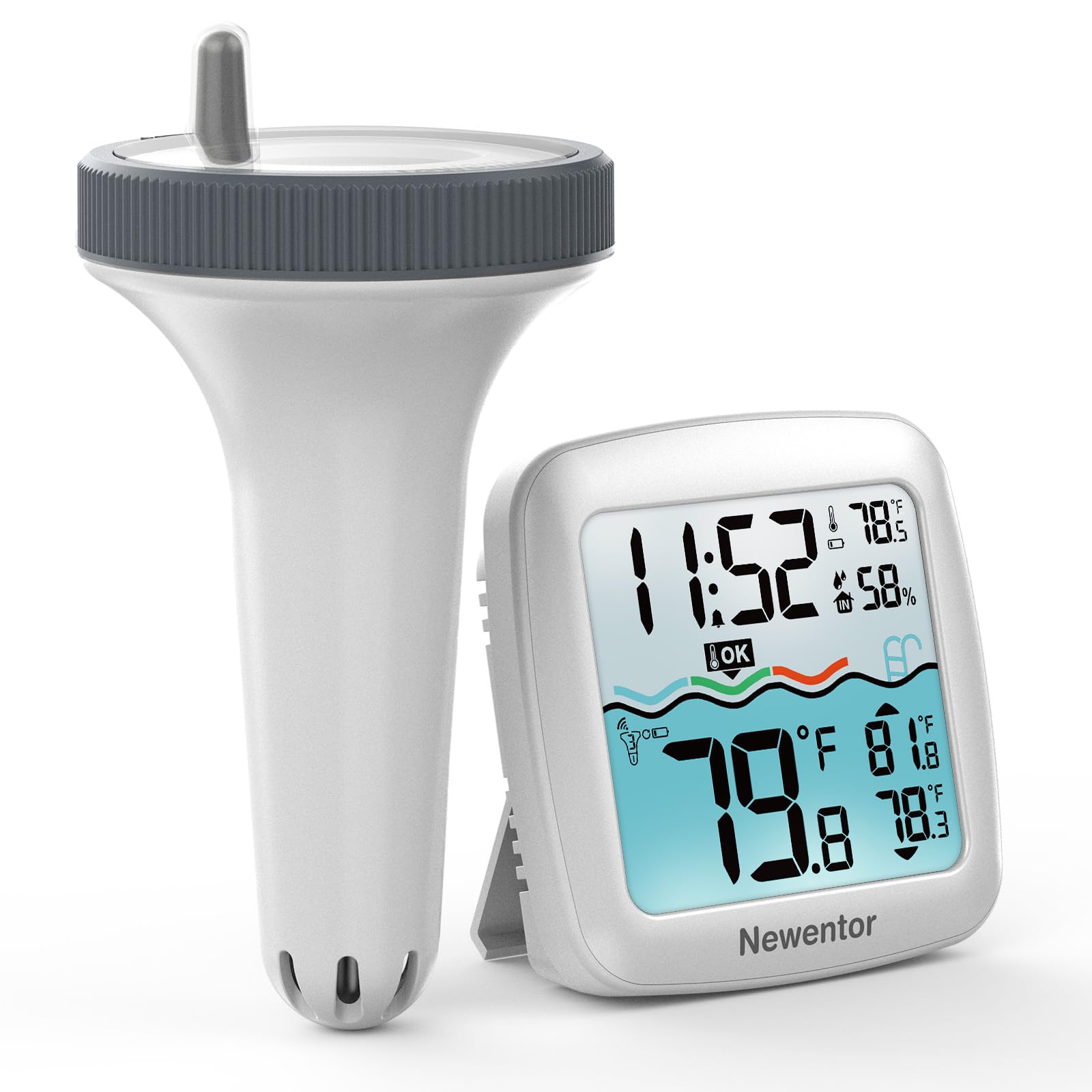
Image: The Newentor PT01 Wireless Pool Thermometer, showing both the floating sensor and the indoor display unit. The sensor is designed to float in water, while the display unit provides readings indoors.
5. Operation
5.1 Reading Temperatures
Once paired, the indoor display unit will show the current indoor air temperature and the water temperature from the floating sensor side-by-side. Readings are updated approximately every 15 seconds.
5.2 Display Features
- Temperature Units: Use the dedicated button on the indoor unit to switch between Fahrenheit (°F) and Celsius (°C).
- Time Display: The indoor unit displays the current time.
- Air Temperature & Humidity: The top half of the screen shows the indoor air temperature and humidity.
- High/Low Records: The bottom half of the screen displays the daily high and low water temperatures.
- Water Temperature Indicator: A color-coded wave design (blue for cold, green for comfortable, red for warm) provides a quick visual indication of the water temperature.
6. Maintenance
6.1 Battery Replacement
Replace batteries in both the floating sensor and indoor display unit when the low-energy alert is displayed or when readings become inconsistent. Follow the battery installation steps in Section 4.1.
6.2 Cleaning
Wipe both units with a soft, damp cloth as needed. Avoid using abrasive cleaners or solvents that could damage the display or housing. Ensure the floating sensor is dry before opening its battery compartment.
6.3 Waterproof Seal
Regularly inspect the rubber seal on the floating sensor's battery compartment for any signs of wear or damage. A well-maintained seal is crucial for preventing water ingress. Reapply a small amount of cooking oil or silicone grease to the seal during battery changes to maintain its integrity.
7. Troubleshooting
- No Reading or Inconsistent Readings:
- Ensure batteries are correctly installed and not depleted in both units. Replace if necessary.
- Verify that both the floating sensor and indoor display unit are set to the same channel.
- Place the units closer together to rule out range issues. The maximum unobstructed range is approximately 150 feet. Obstacles like walls can reduce this range.
- Allow sufficient time for initial pairing (up to 15-20 minutes).
- Slow Temperature Updates:
- The system updates approximately every 15 seconds.
- When the floating sensor is moved to a significantly different temperature, it may take 45-60 seconds for the sensor to register the new temperature, and an additional 15-20 seconds for the base station to display it. This delay is normal.
- Water Inside Floating Sensor:
- Immediately remove the sensor from water and open the battery compartment.
- Remove batteries and allow the unit to dry completely.
- Inspect the rubber seal for damage or improper seating. Ensure it is clean and free of debris.
- Reassemble carefully, ensuring the cap is twisted tightly and the seal is properly seated. Consider applying a small amount of cooking oil or silicone grease to the seal.
8. Specifications
- Brand: Newentor
- Model: PT01
- Display Type: Digital LCD
- Item Length: 5.5 Inches
- Upper Temperature Rating: 158 Degrees Fahrenheit (70°C)
- Waterproof Rating (Sensor): IPX8
- Manufacturer: FUJIAN EMAX INTELLIGENT CO., LTD
- Part Number: PT01-BK-FG-US-5