
XINFUTE RM-L1346
Contents
XINFUTE RM-L1346 Universal Remote Control User Manual
Model: RM-L1346
1. Introduction
Thank you for choosing the XINFUTE RM-L1346 Universal Remote Control. This remote is designed to be a direct replacement and universal fit for various Sharp TV models, including those originally using remote models like RC4847, GA779WJSA, and GA956. It offers straightforward operation without complex programming for most compatible models.
Package Contents:
- 1 x XINFUTE RM-L1346 Universal Remote Control
- Note: Batteries are not included.
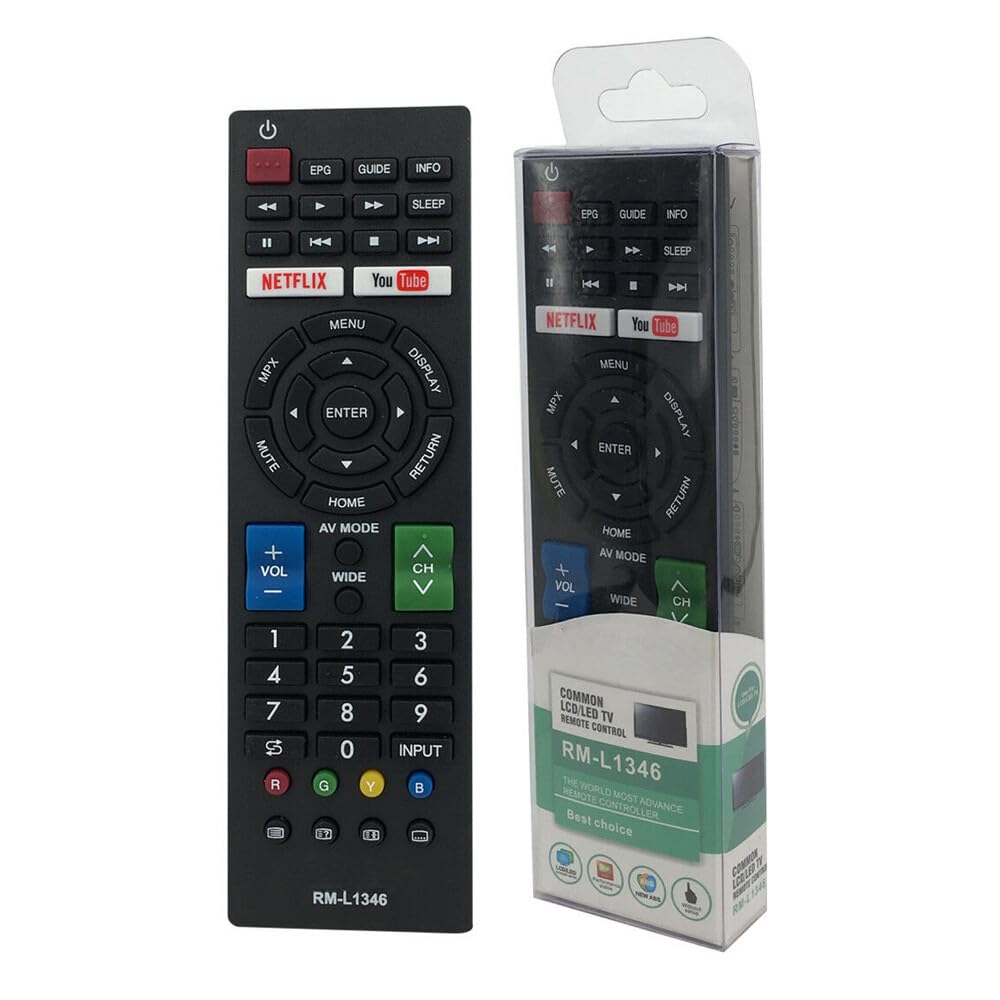
Figure 1: Front view of the RM-L1346 Universal Remote Control.
2. Setup
2.1 Battery Installation
The RM-L1346 remote control requires two (2) AAA batteries (not included). Follow these steps to install them:
- Locate the battery compartment cover on the back of the remote control.
- Press down on the tab and slide the cover downwards to open the compartment.
- Insert two AAA batteries, ensuring the positive (+) and negative (-) terminals align correctly with the markings inside the compartment.
- Slide the battery compartment cover back into place until it clicks securely.
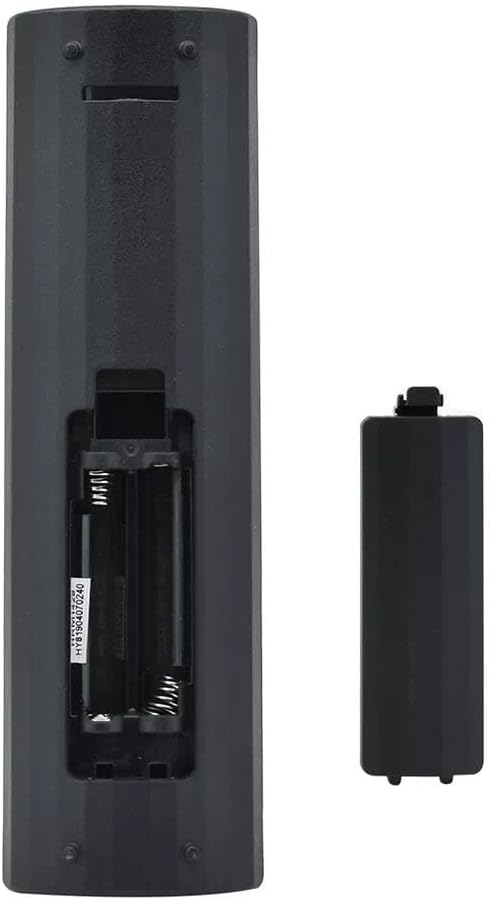
Figure 2: Battery compartment with cover removed.
Important: Always replace both batteries at the same time. Do not mix old and new batteries, or different types of batteries. Remove batteries if the remote will not be used for an extended period.
3. Operating Instructions
The XINFUTE RM-L1346 is a universal replacement remote designed for direct use with most compatible Sharp TV models. No programming is typically required. Simply insert the batteries and point the remote towards your television.
3.1 Basic Functions
- Power Button (⏻): Turns the TV on or off.
- Volume Up/Down (VOL +/-): Adjusts the sound volume.
- Channel Up/Down (CH +/-): Changes TV channels.
- Mute Button (MUTE): Mutes or unmutes the TV sound.
- Input/Source (INPUT): Cycles through available input sources (HDMI, AV, etc.).
- Menu Button (MENU): Accesses the TV's main menu.
- Navigation Buttons (▲ ▼ ◀ ▶, ENTER): Used to navigate menus and confirm selections.
- Home Button (HOME): Returns to the TV's smart home screen or main menu.
- Netflix / YouTube Buttons: Direct access buttons for these streaming services (functionality depends on TV model and internet connection).
- EPG / GUIDE / INFO: Accesses Electronic Program Guide, TV guide, or displays program information.
- Return Button (RETURN): Goes back to the previous screen or menu.
Note: The functionality of certain buttons (e.g., smart TV app buttons like Netflix/YouTube) may vary depending on your specific Sharp TV model and its features.
4. Maintenance
4.1 Cleaning the Remote
To ensure optimal performance and longevity of your remote control, follow these cleaning guidelines:
- Always remove batteries before cleaning.
- Use a soft, dry cloth to wipe the surface of the remote.
- For stubborn dirt, lightly dampen the cloth with water or a mild, non-abrasive cleaner. Do not spray cleaner directly onto the remote.
- Avoid using harsh chemicals, solvents, or abrasive cleaning pads, as these can damage the remote's finish or internal components.
- Ensure the remote is completely dry before reinserting batteries.
4.2 Storage
When not in use for extended periods, store the remote control in a cool, dry place away from direct sunlight and extreme temperatures. Remove the batteries to prevent leakage and potential damage to the remote.
5. Troubleshooting
If you encounter issues with your XINFUTE RM-L1346 remote control, please refer to the following common troubleshooting steps:
5.1 Remote Not Responding
- Check Batteries: Ensure batteries are inserted correctly with the correct polarity (+/-). Replace with fresh AAA batteries.
- Line of Sight: Make sure there is a clear line of sight between the remote's infrared (IR) emitter and the TV's IR receiver. Obstructions can block the signal.
- Remote Test: Point the remote at a digital camera (like a smartphone camera) and press any button. If you see a light flashing from the remote's front, it indicates the IR emitter is working. If not, the remote may be faulty or batteries are completely dead.
- TV Power: Ensure your TV is powered on and not in standby mode.
5.2 Limited Range or Intermittent Functionality
- Battery Level: Weak batteries can reduce the remote's effective range. Replace them.
- Interference: Bright lights, direct sunlight, or other electronic devices can sometimes interfere with IR signals. Try using the remote in a different environment.
- Obstructions: Ensure no objects are blocking the path between the remote and the TV.
5.3 Specific Buttons Not Working
- TV Compatibility: While universal, some advanced or smart TV functions might not be fully supported by all replacement remotes. Refer to your TV's original manual for specific feature requirements.
- Stuck Buttons: Check if any buttons are physically stuck or jammed. Gently clean around the buttons if necessary (refer to Maintenance section).
6. Specifications
| Feature | Specification |
|---|---|
| Model Number | RM-L1346 |
| Brand | XINFUTE |
| Compatible Devices | Sharp Televisions (Universal fit for many models including those originally using RC4847, GA779WJSA, GA956) |
| Power Source | 2 x AAA Batteries (not included) |
| Material | ABS Material |
| Color | As Shown (Typically Black) |
| Product Dimensions | 6 x 3 x 1 inches (approximately) |
| Item Weight | 2.82 ounces (without batteries) |
| Special Feature | Ergonomic design |
7. Warranty and Support
7.1 Warranty Information
This XINFUTE RM-L1346 Universal Remote Control comes with a one-year warranty from the date of purchase. This warranty covers manufacturing defects and ensures the product functions as intended under normal use. Please retain your proof of purchase for warranty claims.
7.2 Customer Support
All products are inspected before shipment. If you are not satisfied with your purchase or require assistance, please contact the seller or retailer within 24 hours of receipt. For further support or warranty claims, please reach out to the XINFUTE customer service through the platform where the purchase was made.
For the latest information and support, you may visit the XINFUTE Store on Amazon.
Documents and downloads
Ask a question about this manual
Ask about setup, troubleshooting, compatibility, parts, safety, or missing instructions. Manuals+ will review the question and use this page’s manual context to help answer it.