
Introduction
Welcome to the realme 14x 5G Smartphone user manual. This guide provides essential information to help you set up, operate, maintain, and troubleshoot your new device. Please read this manual thoroughly to ensure optimal performance and longevity of your smartphone.
What's in the Box
Your realme 14x 5G package includes the following items:
- realme 14x 5G Smartphone
- USB Cable
Product Overview
The realme 14x 5G is a robust smartphone designed for performance and durability. It features a 6.67-inch 120Hz display, an 80MP AI camera, a 6000mAh battery, and is powered by the MediaTek Dimensity 6300 5G chipset. The device also boasts ArmorShell Protection and an IP69 rating for water and dust resistance.
Physical Features
The realme 14x 5G features a sleek design with a durable build. Familiarize yourself with the key physical components of your device.

Image: Front and back view of the realme 14x 5G Smartphone, showcasing its camera module and overall design.

Image: The realme 14x 5G Smartphone highlighting its ultra-slim profile and diamond design on the rear panel.
Setup
Follow these steps to set up your realme 14x 5G Smartphone for first-time use.
1. Insert SIM Card(s)
The realme 14x 5G supports Dual SIM cards. Locate the SIM card tray on the side of your device. Use the provided SIM ejector tool to open the tray. Insert your Nano-SIM card(s) into the designated slots, ensuring the gold contacts face downwards. Gently push the tray back into the device until it clicks into place.
2. Power On
Press and hold the Power button (usually on the right side) until the realme logo appears on the screen. Follow the on-screen prompts to complete the initial setup, including language selection, Wi-Fi connection, and Google account setup.
3. Initial Configuration
During the initial setup, you will be guided through configuring essential settings such as date and time, screen lock (PIN, pattern, or fingerprint), and data transfer from an old device if applicable.
Operating Instructions
Display and Navigation
The realme 14x 5G features a 6.67-inch display with a 120Hz refresh rate for smooth visuals. Navigate the interface using touch gestures: tap to select, swipe to scroll, pinch to zoom.
The display also supports 10 visual protection modes to safeguard your vision during prolonged use.
Camera Operation
Your device is equipped with an 80MP AI Camera. To open the camera, tap the camera icon on your home screen or lock screen. Select your desired mode (Photo, Video, Portrait, etc.) and tap the shutter button to capture images or start recording videos. The AI enhancements help preserve fine details in various scenes.

Image: Close-up of the realme 14x 5G Smartphone's rear camera module, featuring the 80MP AI camera system.
Battery and Charging
The realme 14x 5G is powered by a 6000mAh battery, designed for extended use. It supports 45W fast charging. Use the provided USB cable and a compatible charger for optimal charging speed.

Image: Illustration of the realme 14x 5G's 6000mAh battery and 45W fast charging, showing estimated usage times for various applications.
Performance
The MediaTek Dimensity 6300 5G chipset, built on a 6nm process with an octa-core CPU clocked up to 2.4GHz, ensures fast and efficient performance for all your tasks, from gaming to multitasking.

Image: Diagram illustrating the MediaTek Dimensity 6300 5G chipset, highlighting its 6nm process, 8-cores, and performance enhancements.
Connectivity
The device supports 5G cellular technology and Bluetooth connectivity. It also features AI Signal Adjustment for improved network reception, even in areas with poor coverage.
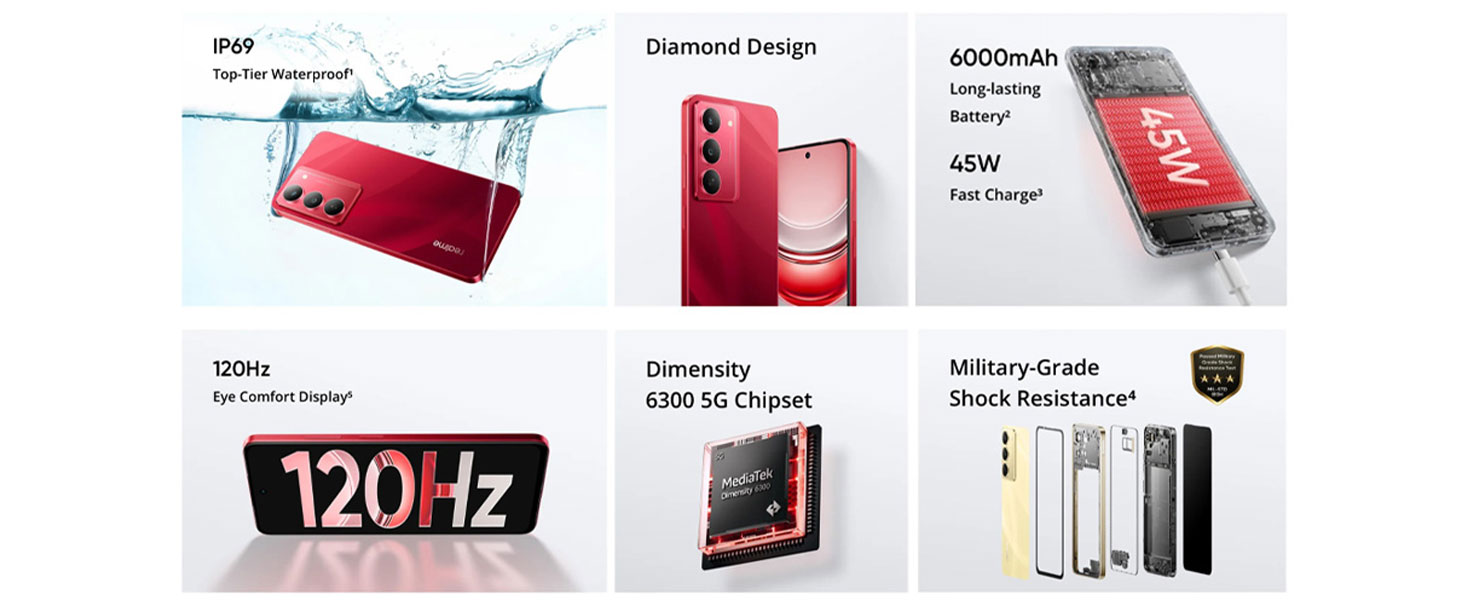
Image: A hand holding the realme 14x 5G Smartphone, demonstrating the AI Signal Adjustment and FreeCall features on the screen.
Maintenance
Protection and Durability
The realme 14x 5G is built with advanced ArmorShell Protection, having passed military-grade impact resistance tests. This provides enhanced fall protection for your device.

Image: A realme 14x 5G Smartphone being dropped, illustrating its military-grade shock resistance and durability.

Image: An illustration showing the internal components of the realme 14x 5G, detailing its ArmorShell Protection with tough corner protection, airbag protection, and reinforced aluminum structure.
Water and Dust Resistance
With an IP69 rating, the realme 14x 5G is waterproof and dustproof, offering protection against water immersion and dust ingress. This allows for stable operation even in challenging environments.

Image: The realme 14x 5G Smartphone submerged in water, demonstrating its IP69 water and dust resistance.

Image: A close-up of the realme 14x 5G Smartphone's internal components, illustrating its SonicWave Water Ejection technology and stable operation at 85°C.
Cleaning Your Device
To clean your smartphone, use a soft, lint-free cloth. Avoid abrasive materials or harsh chemicals. For stubborn smudges, slightly dampen the cloth with water. Ensure all ports are dry before charging.
Troubleshooting
This section addresses common issues you might encounter with your realme 14x 5G Smartphone.
Device Not Powering On
- Ensure the battery is charged. Connect the device to a charger and wait a few minutes before attempting to power it on again.
- Press and hold the Power button for at least 10-15 seconds to perform a forced restart.
Poor Network Signal
- Check if your SIM card is properly inserted.
- Move to an area with better network coverage.
- Restart your device.
- Verify that "AI Smart Signal Adjustment" is enabled in your network settings.
Battery Draining Quickly
- Close unused applications running in the background.
- Reduce screen brightness or set a shorter screen timeout.
- Disable unnecessary features like Wi-Fi, Bluetooth, or GPS when not in use.
- Check battery usage in settings to identify power-hungry apps.
Camera Issues
- Ensure the camera lens is clean and free from obstructions.
- Restart the camera application or the device.
- Check for available software updates.
Device Freezing or Unresponsive
- Perform a forced restart by pressing and holding the Power button for 10-15 seconds.
- If the issue persists, consider performing a factory reset (back up your data first).
Specifications
The realme 14x 5G Smartphone offers robust hardware and software features, detailed below:

Image: An illustration showing the 6GB Dynamic RAM and 128GB Massive Storage of the realme 14x 5G Smartphone.
| Feature | Detail |
|---|---|
| Brand | realme |
| Model | 14x |
| Operating System | Android 14 |
| Processor | MediaTek Dimensity 6300 5G Octa-Core (up to 2.4 GHz) |
| RAM Memory | 6 GB |
| Internal Storage | 128 GB |
| Display Size | 6.67 Inches |
| Display Type | LCD |
| Resolution | 720 x 1600 |
| Refresh Rate | 120 Hz |
| Rear Camera | 80 MP |
| Front Camera | 6 MP |
| Battery Capacity | 6000 mAh |
| Charging | 45W Fast Charging |
| SIM Card Slot | Dual SIM |
| Connector Type | USB Type C |
| Water Resistance Level | IP69 (Waterproof) |
| Dimensions | 16.6 x 7.6 x 0.8 Centimeters |
| Weight | 0.1 Kilograms |
Safety Information
General Safety Guidelines
- Do not expose your device to extreme temperatures, direct sunlight, or excessive moisture.
- Avoid dropping or subjecting the device to severe impact.
- Use only realme-approved chargers and accessories.
- Do not attempt to disassemble or repair the device yourself. Refer to authorized service centers.
- Keep the device away from medical implants and devices.
Battery Safety
- Do not puncture, incinerate, or short-circuit the battery.
- Dispose of batteries according to local regulations.
Hearing Protection
- Avoid prolonged listening at high volume levels to prevent hearing damage.
Warranty and Support
Warranty Information
Your realme 14x 5G Smartphone comes with a 2 Year Manufacturer Warranty from the date of purchase. This warranty covers manufacturing defects under normal use. Please retain your proof of purchase for warranty claims.
Customer Support
For technical assistance, service, or warranty claims, please contact realme customer support. Refer to the official realme website or your purchase documentation for contact details.
Manufacturer: Padget Electronics Pvt Ltd
Packer Contact Information: Padget Electronics Pvt Ltd A-154C, A BLOCK, SECTOR 63, GAUTAM BUDDHA NAGAR, GAUTAM BUDDHA NAGAR, UTTAR PRADESH, India-201305