
BLAVOR DS-S1600
BLAVOR Portable Power Station 1600W (DS-S1600) User Manual
Model: DS-S1600 | Brand: BLAVOR
1. Introduction
This manual provides essential information for the safe and efficient operation of your BLAVOR Portable Power Station 1600W (DS-S1600). Please read all instructions carefully before use and retain this manual for future reference.
2. Key Features
- Integrated 40W Solar Panel: Unique foldable design for convenient solar charging.
- High Capacity & Output: 1024Wh LiFePO4 battery with 1600W rated output (3200W surge) to power a wide range of appliances.
- Durable LiFePO4 Battery: Offers over 3500 charge cycles to 80% capacity, ensuring a long lifespan.
- Multiple Charging Options: Recharge via wall outlet, car socket, built-in solar panel, or external solar panels.
- Versatile Ports: Includes 2x AC outlets, 2x DC5525 output ports, 2x USB-A 18W, 1x 100W USB-C (input/output), and 1x 12V car outlet.
- Informative LCD Display: Tracks input/output power and remaining battery level.
- Portable Design: Features a fixed handle and foldable stand for easy transport and positioning.
3. Product Overview
Familiarize yourself with the components of your BLAVOR Portable Power Station.
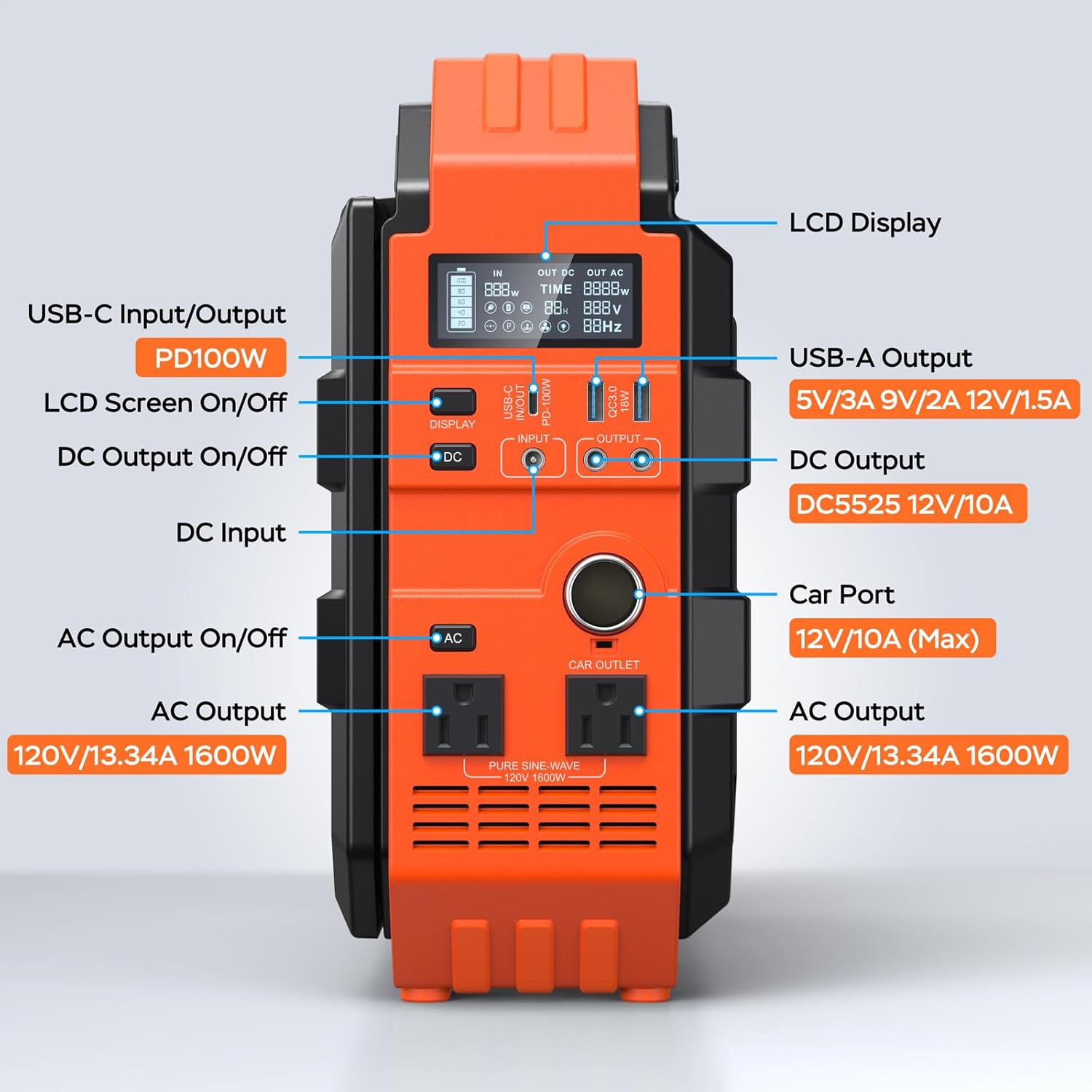
Figure 1: Front Panel Layout of the BLAVOR DS-S1600
- LCD Display: Shows battery level, input/output wattage, voltage, and frequency.
- USB-C Input/Output (PD100W): For fast charging compatible devices or recharging the power station.
- USB-A Output (QC3.0 18W): Two ports for charging USB-compatible devices.
- DC Output (DC5525 12V/10A): Two ports for DC-powered devices.
- DC Input: For charging via external solar panels or other DC sources.
- Car Port (12V/10A Max): Standard car outlet for 12V devices.
- AC Output (120V/13.34A 1600W): Two pure sine wave AC outlets for household appliances.
- AC Output On/Off Button: Activates/deactivates AC outlets.
- DC Output On/Off Button: Activates/deactivates DC outputs.
- LCD Screen On/Off Button: Controls the display backlight.
Included Components:
- 1x BLAVOR S1600 Portable Power Station with built-in solar panel
- 1x DC Power Cord
- 1x Car Charging Cable
- 10x Adapter Heads
- 1x User Manual
- 1x Generator Accessories Carrying Case
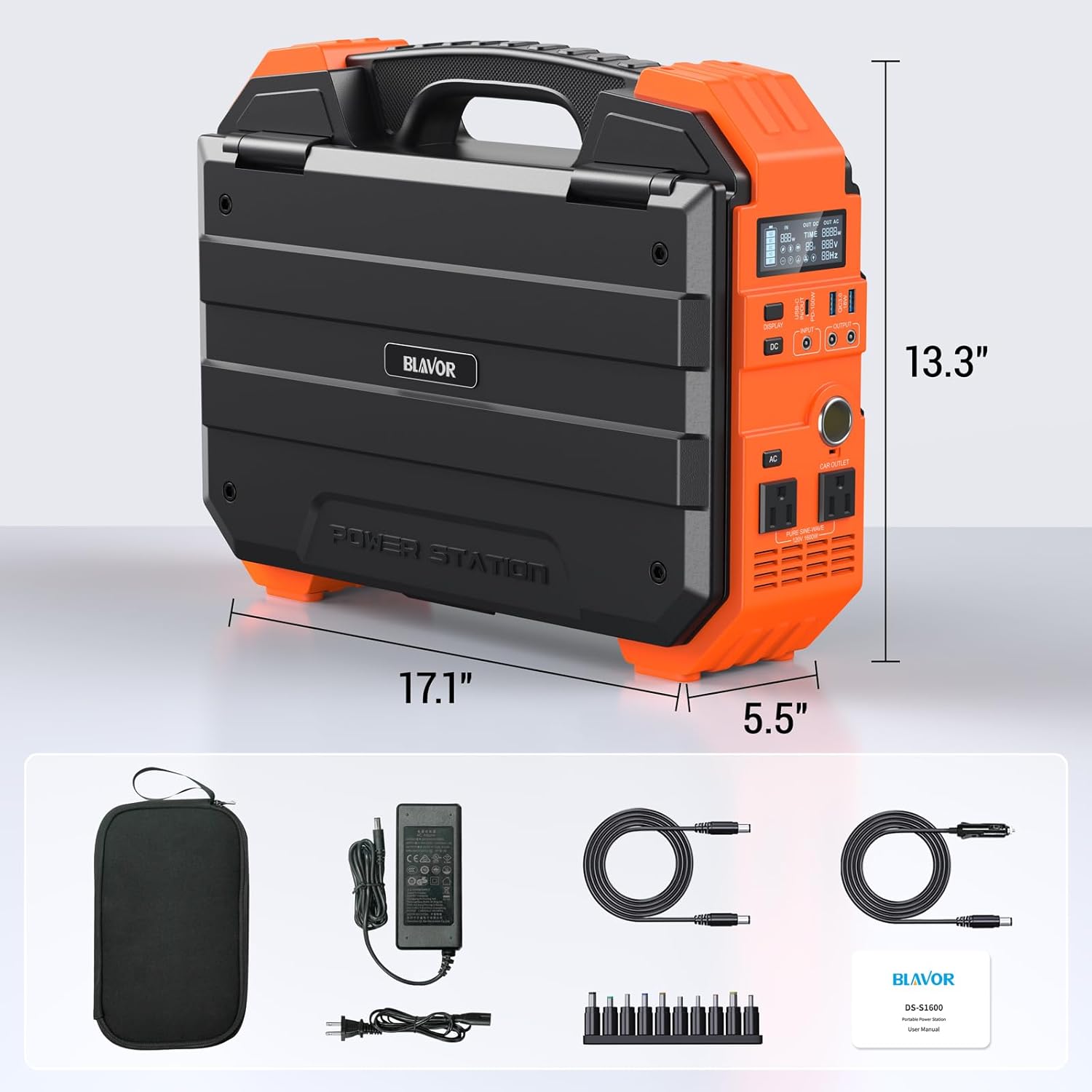
Figure 2: Package Contents
4. Setup
Before first use, ensure the power station is fully charged. Unpack all components and inspect for any damage. Place the unit on a stable, flat surface.
5. Charging Methods
Your BLAVOR DS-S1600 offers multiple ways to recharge:
5.1. Wall Charging
Connect the DC power cord to the DC Input port on the power station and the other end to a standard wall outlet. The LCD display will indicate charging status. Full charge typically takes 5 hours.

Figure 3: Wall Charging
5.2. Car Charging
Use the provided car charging cable to connect the power station's DC Input port to your vehicle's 12V car socket. Full charge typically takes 6-12 hours.

Figure 4: Car Charging
5.3. Built-in Solar Panel Charging
Unfold the integrated 40W solar panel and position it directly towards sunlight. The foldable stand on the back allows for optimal angle adjustment. The LCD display will show the incoming solar wattage.
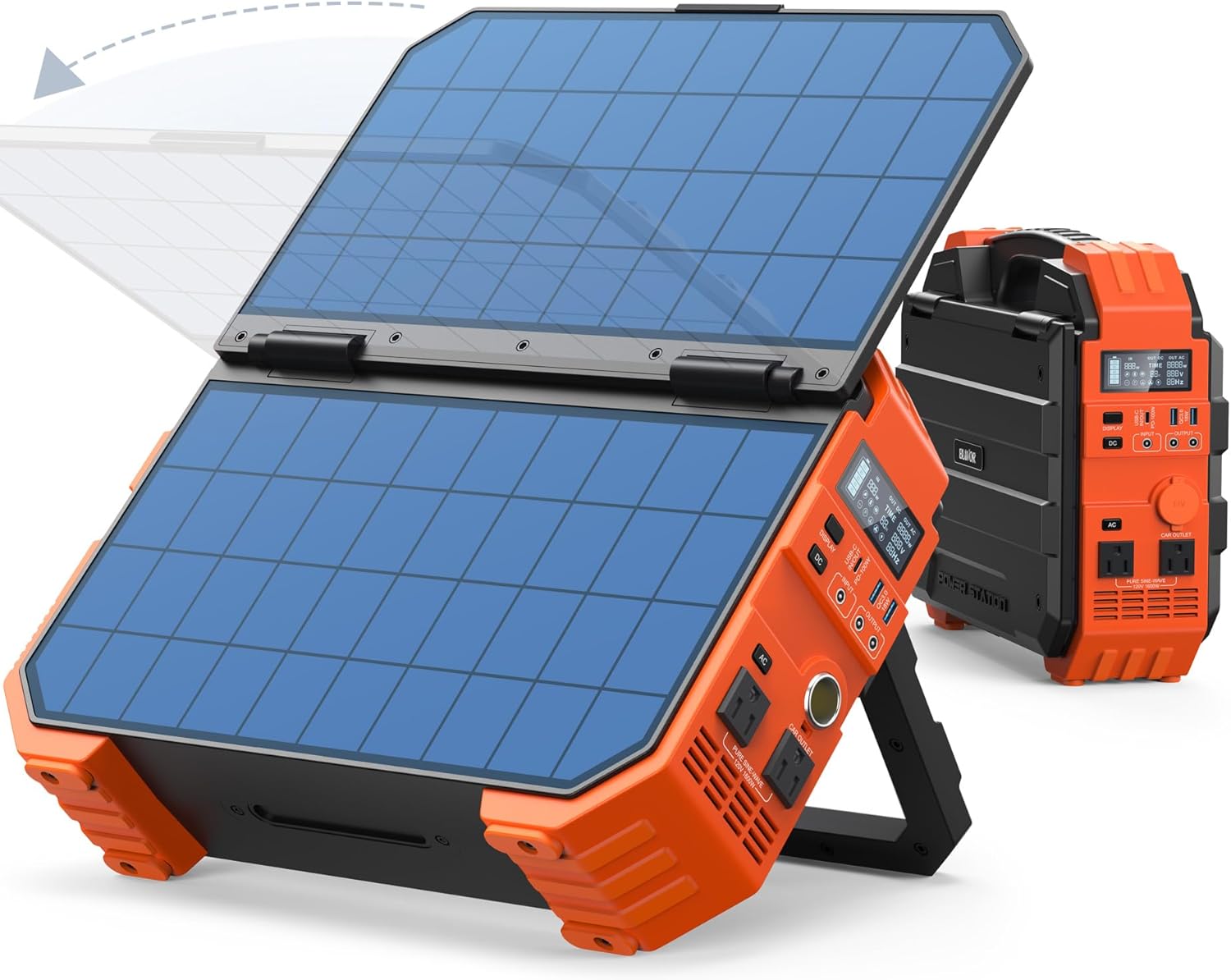
Figure 5: Built-in Solar Panel in Use
Video 1: Demonstration of the built-in solar panel and its functionality.
5.4. External Solar Panel Charging
For faster solar charging, connect an external solar panel (up to 200W, DC12-30V/4.5A) to the DC Input port. This can be used in conjunction with the built-in panel for maximum efficiency. Recharges to full within 5-10 hours with 200W solar input.

Figure 6: External Solar Panel Charging
6. Operating Instructions
To use the power station, press the respective ON/OFF button for the desired output type (AC, DC, USB). The LCD screen will illuminate, showing active outputs and power consumption.
6.1. AC Output
Press the "AC" button to activate the AC outlets. Plug in your appliances. The display will show the wattage being drawn. The power station provides a pure sine wave output, suitable for sensitive electronics. Maximum continuous output is 1600W, with a surge capacity of 3200W.

Figure 7: AC Output in Use
6.2. DC & USB Output
Press the "DC" button to activate the DC5525 ports and the 12V car outlet. USB ports are typically always active or can be activated via the display button. Connect your USB-powered devices to the USB-A or USB-C ports. The USB-C port supports 100W Power Delivery for fast charging compatible laptops and smartphones.

Figure 8: DC and USB Outputs in Use
Video 2: Demonstration of the BLAVOR DS-S1600 powering various devices during a simulated power outage.
7. Usage Scenarios & Capacity Examples
The BLAVOR DS-S1600 is designed for various applications, from home backup to outdoor adventures.
Home Backup:
- Wi-Fi Router (10W): ~87 hours
- TV (110W): ~8 hours
- Refrigerator (120W): ~7 hours
- Microwave (1300W): ~0.6 hours
- CPAP Machine: ~21 hours

Figure 9: Home Backup Use
Outdoor & Camping:
- Phone: ~87 charges
- Air Cooler: ~17.6 hours
- Drone: ~14 hours
- Foldable Kettle: ~1.3 hours
- Car Fridge (80W): ~11 hours
- Electric Grill: ~48 minutes

Figure 10: Outdoor Use
8. Maintenance
- Store the power station in a cool, dry place away from direct sunlight and extreme temperatures.
- Recharge the unit every 3-6 months if not in regular use to maintain battery health.
- Avoid dropping or subjecting the unit to severe impacts. The silicone bumpers offer advanced shock absorption.
- Keep ventilation ports clear of dust and debris to ensure proper cooling.

Figure 11: LiFePO4 Battery Longevity
9. Troubleshooting
- Unit Not Turning On: Ensure the battery is charged. If not, connect to a power source.
- No Output from Ports: Ensure the respective output buttons (AC, DC) are pressed and the LCD screen shows them as active. Check if the device being powered exceeds the power station's output limits.
- Overload Protection Activated: If the unit shuts off, it may be due to an overload. Disconnect some devices and restart the power station. The unit is designed to protect itself from excessive power draw.
- Slow Solar Charging: Ensure solar panels are positioned directly towards sunlight and are not obstructed. Clean the panel surface if dirty.
10. Specifications
| Brand | BLAVOR |
| Model Name | DS-S1600 |
| Battery Type | LiFePO4 |
| Battery Capacity | 1024Wh |
| AC Output | 1600W (Rated), 3200W (Peak) |
| Built-in Solar Panel | 40W |
| USB-C Output/Input | PD 100W |
| USB-A Output | QC3.0 18W (x2) |
| DC Output | DC5525 12V/10A (x2) |
| Car Outlet | 12V/10A (Max) |
| Dimensions | 5.6"L x 13.3"W x 17.2"H |
| Item Weight | 26 Pounds |
11. Warranty & Support
The BLAVOR Portable Power Station DS-S1600 comes with a 3-Year Warranty and lifetime customer support. For any inquiries or assistance, please refer to the contact information provided in your product packaging or visit the official BLAVOR website.
Ask a question about this manual
Ask about setup, troubleshooting, compatibility, parts, safety, or missing instructions. Manuals+ will review the question and use this page’s manual context to help answer it.