1. Introduction
Thank you for choosing the MERACH 3-in-1 Walking Pad Treadmill. This manual provides essential information for the safe and effective use of your new fitness equipment. Please read this manual thoroughly before operation and retain it for future reference.
The MERACH Walking Pad is designed for home and office use, offering a compact and quiet solution for walking and light jogging. Its lightweight design and smart features make it a versatile addition to your daily routine.
2. Safety Information
WARNING: To reduce the risk of serious injury, read all instructions before using this product.
- Always place the walking pad on a flat, stable surface.
- Ensure adequate clear space around the walking pad (at least 0.6 meters on each side and 2 meters at the rear).
- Keep children and pets away from the equipment during operation.
- Do not exceed the maximum user weight of 120 kg (265 lbs).
- Wear appropriate athletic footwear.
- If you feel faint, dizzy, or experience pain, stop exercising immediately.
- Unplug the walking pad from the power outlet when not in use or before cleaning/maintenance.
- Do not use the walking pad if the power cord is damaged.
3. Package Contents
Carefully unpack your MERACH Walking Pad and verify that all items are present and undamaged. If any items are missing or damaged, please contact customer support.
- MERACH Walking Pad Treadmill
- Remote Control
- User Manual
- Hexagonal Key
- Foot Pads (x4)

4. Setup
- Unpack: Remove the walking pad and all accessories from the packaging.
- Placement: Place the walking pad on a firm, level surface. Ensure there is sufficient space around the unit for safe operation.
- Power Connection: Connect the power cord to the walking pad and then plug it into a grounded electrical outlet.
- Initial Check: Before stepping on, ensure the belt is centered and moves freely.


5. Operating Instructions
5.1 Powering On/Off
- To power on, press the main power switch located on the front of the unit. The LED display will illuminate.
- To power off, press the main power switch again.
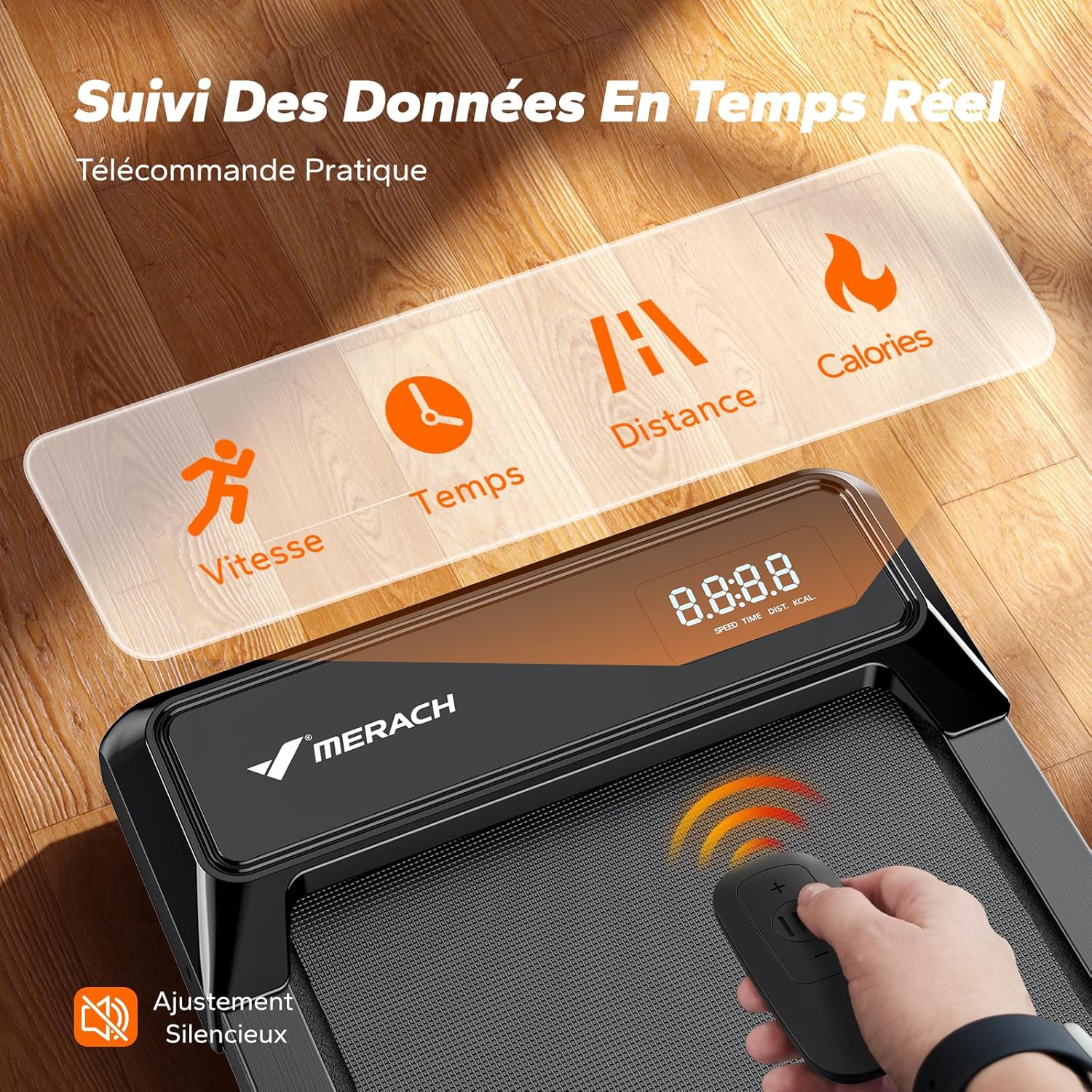
5.2 Using the Remote Control
The included remote control allows you to start, stop, and adjust the speed of the walking pad.
- Start/Stop: Press the 'Start' button to begin the belt movement. Press 'Stop' to halt it.
- Speed Adjustment: Use the '+' and '-' buttons to increase or decrease the speed. The speed range is 1-6 km/h.
- Mode Selection: The remote may include buttons for pre-set programs or modes. Refer to the remote's specific markings.
5.3 MERACH Fitness App Connectivity
Enhance your workout experience by connecting your walking pad to the MERACH Fitness App.
- Download the MERACH Fitness App from your device's app store.
- Ensure Bluetooth is enabled on your device.
- Open the app and follow the on-screen instructions to pair with your MERACH Walking Pad.
- The app provides access to coach-designed workouts, real-time performance tracking (distance, speed, calories), and interactive games.

5.4 Usage Scenarios
The MERACH Walking Pad supports various activities:
- Working: Ideal for use under a standing desk at speeds of 2-3 km/h.
- Walking: Suitable for general walking at speeds of 3-4 km/h.
- Jogging: For light jogging, speeds of 4-6 km/h can be used.

6. Maintenance
Regular maintenance ensures the longevity and optimal performance of your walking pad.
6.1 Cleaning
- Always unplug the walking pad before cleaning.
- Wipe down the surface with a damp cloth. Do not use abrasive cleaners or solvents.
- Regularly vacuum dust and debris from around the motor cover.
6.2 Lubrication
The walking belt requires periodic lubrication to reduce friction and extend its lifespan. Use only silicone oil specifically designed for treadmills.
- Lift the edge of the walking belt and apply a small amount of silicone oil to the center of the deck.
- Run the walking pad at a low speed (e.g., 1 km/h) for a few minutes to distribute the lubricant evenly.
- Frequency of lubrication depends on usage; typically every 3-6 months for moderate use.
6.3 Belt Adjustment
If the walking belt becomes off-center or slips, it may need adjustment. Use the hexagonal key provided.
- Centering: If the belt drifts to one side, turn the corresponding rear roller bolt clockwise a quarter turn. If it drifts to the other side, turn the opposite bolt clockwise a quarter turn. Run the walking pad for a few minutes and re-check.
- Tensioning: If the belt slips, turn both rear roller bolts clockwise a quarter turn simultaneously. Do not overtighten.

7. Troubleshooting
If you encounter issues with your MERACH Walking Pad, refer to the following common problems and solutions:
| Problem | Possible Cause | Solution |
|---|---|---|
| Walking pad does not power on | Power cord not connected; Power switch off; Outlet issue | Check power cord connection; Ensure power switch is on; Test outlet with another device |
| Belt does not move | Emergency stop engaged; Remote control battery low; Motor issue | Ensure emergency stop is disengaged; Replace remote battery; Contact customer support |
| Belt slips or is off-center | Belt tension too loose; Belt alignment issue | Adjust belt tension and alignment as per Section 6.3 |
| Unusual noise during operation | Lack of lubrication; Loose components; Foreign object | Lubricate belt (Section 6.2); Check for loose screws; Inspect for foreign objects under the belt |
| App connection issues | Bluetooth off; App not updated; Device compatibility | Ensure Bluetooth is on; Update app to latest version; Check device compatibility requirements |
If the problem persists after attempting these solutions, please contact MERACH customer support.
8. Specifications
| Feature | Specification |
|---|---|
| Model Number | MR-T21B1 |
| Brand | MERACH |
| Motor Power | 2.5 HP |
| Speed Range | 1-6 km/h |
| Maximum User Weight | 120 kg (265 lbs) |
| Product Dimensions (L x W x H) | 109 x 47 x 11 cm (42.9 x 18.5 x 4.3 inches) |
| Item Weight | 13 kg (28.7 lbs) |
| Frame Material | Aluminum |
| Body Material | ABS+PC |
| Noise Level | < 50 dB |
| Features | Shock absorber, Compact design, Quiet operation |
| Included Components | User Manual, Remote Control |
9. Warranty and Support
The MERACH Walking Pad is covered by a one-year warranty from the date of purchase. This warranty covers manufacturing defects and material faults under normal use.
For any questions, technical assistance, or warranty claims, please contact MERACH customer support. Our team is available 24/7 to provide responsive assistance.
Contact Information: Refer to your purchase documentation or the MERACH official website for the most up-to-date customer support contact details.


