1. Introduction
The LOTOS TIG220ACDCP is a versatile and powerful 13-in-1 AC/DC TIG welder designed for precision welding of various materials, including aluminum, stainless steel, and mild steel. This manual provides essential information for the safe and effective operation, setup, and maintenance of your welding machine.
It is suitable for both professional welders and serious DIY enthusiasts, offering advanced features such as digital controls, dual voltage compatibility, and multiple AC waveform options.
2. Key Features
- 13-in-1 Welding Modes: Includes 9 AC TIG modes (Pulse / Spot / HF × 3 waveforms), 3 DC TIG modes (Pulse / Spot / HF), and 1 MMA Stick mode for comprehensive welding capabilities.
- 3 AC Waveforms: Offers Square Wave for deep penetration on thick aluminum, Sine Wave for smooth and quiet arc with stable control, and Triangle Wave for lower heat input on thin aluminum.
- Digital Control Interface: Features a full LCD display with an encoder knob for precise adjustment of parameters like start/end amps, slope, pre/post flow, AC frequency (20–300Hz), AC balance (20–80%), and pulse settings.
- Dual Voltage Operation: Supports 220A output at 240V and 140A at 120V with automatic voltage compensation for stable arc performance.
- Wide Welding Range: Capable of welding aluminum and steel from 1/16" up to 3/8" thick.
- HF and Lift Start: Provides clean arc ignition across AC and DC modes without contamination.
- Pulse TIG Control: Adjustable pulse frequency, peak duration, and base current for enhanced control on thin materials and reduced warping.
- Memory Support: Stores up to 10 custom profiles for quick recall of preferred welding parameters.

Image: Overview of the 13-in-1 welding modes, including various AC and DC TIG options and Stick welding.

Image: Detailed explanation of Square, Sine, and Triangle AC waveforms and their applications in welding.
3. What's Included
The LOTOS TIG220ACDCP package includes the following components:
- 1 x TIG220ACDCP 220A TIG Welder Unit
- 1 x 13ft TIG Torch
- 1 x 6ft Ground Clamp
- 1 x 6ft MMA Electrode Holder
- 1 x Argon Gas Hose
- 1 x 220V to 110V Adapter
- 1 x Tungsten Electrode
- TIG Consumables (various)
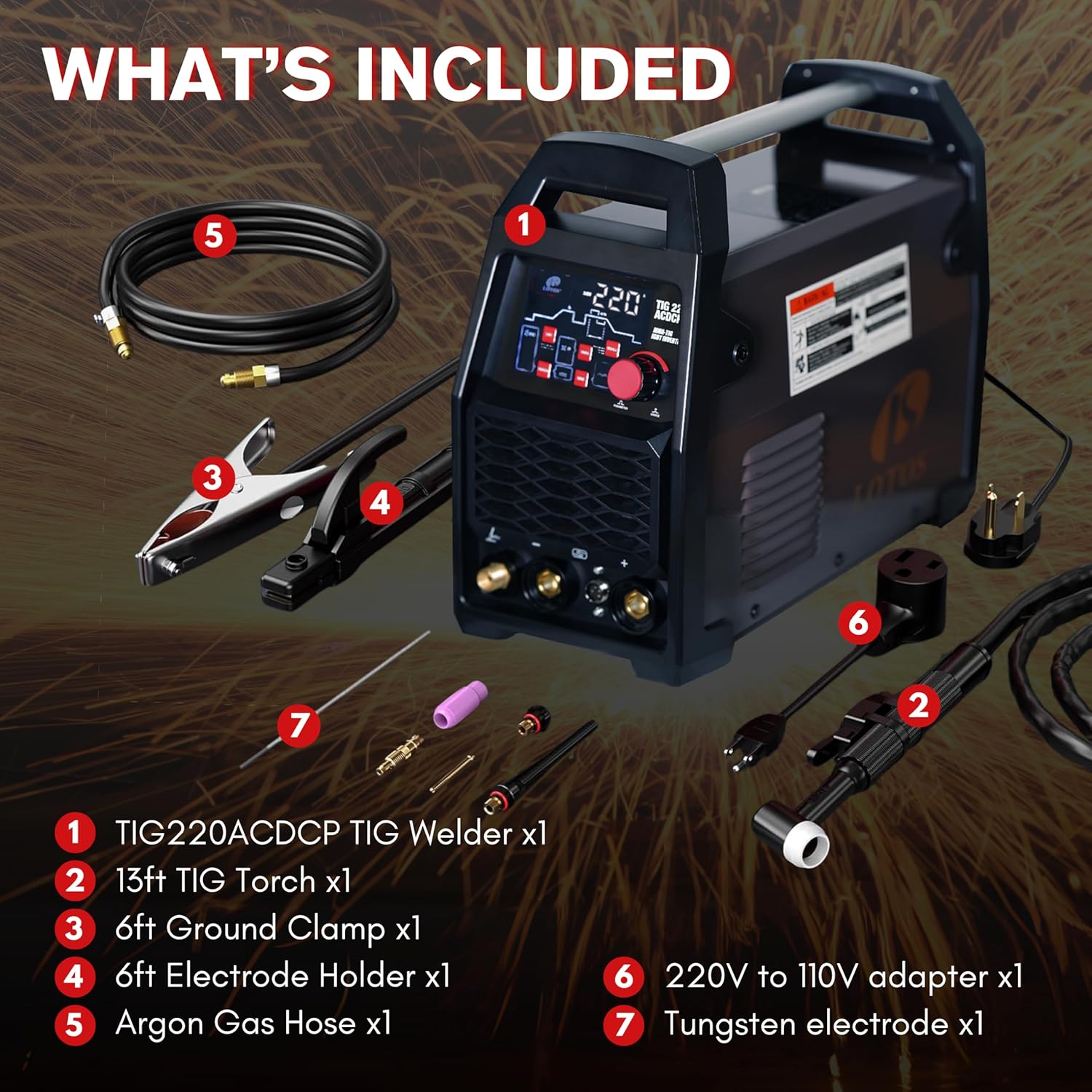
Image: Visual representation of all components included with the LOTOS TIG220ACDCP welder.
4. Setup Instructions
4.1. Safety Precautions
Always ensure proper ventilation, wear appropriate personal protective equipment (PPE) including welding helmet, gloves, and protective clothing. Disconnect power before making any connections or adjustments.
4.2. Power Connection
- Identify your power source: The TIG220ACDCP supports both 110V and 220V.
- For 220V operation, connect the welder directly to a compatible 220V outlet.
- For 110V operation, use the provided 220V to 110V adapter to connect the welder to a 110V outlet.
- Ensure the power outlet is properly grounded and capable of handling the welder's current requirements.
4.3. Gas Connection (TIG Welding)
- Connect the Argon Gas Hose to the gas inlet on the rear of the welder.
- Connect the other end of the gas hose to your Argon gas cylinder regulator.
- Ensure all connections are tight to prevent gas leaks.
- Set the gas flow rate on your regulator according to your welding application (typically 15-25 CFH for TIG).
4.4. Torch and Ground Clamp Connection
- Connect the 13ft TIG Torch to the appropriate TIG torch connector on the front panel of the welder.
- Connect the 6ft Ground Clamp cable to the ground terminal on the front panel.
- For MMA (Stick) welding, connect the 6ft MMA Electrode Holder to the positive terminal and the Ground Clamp to the negative terminal.
5. Operating Instructions
5.1. Control Panel Overview
The LOTOS TIG220ACDCP features an intuitive digital control interface with an LCD display and a single encoder knob for parameter adjustments.

Image: Close-up view of the digital control panel with LCD display, buttons, and encoder knob.
5.2. Selecting Welding Mode
Use the "PROCESS" button to cycle through the available welding modes: AC TIG (Pulse/Spot/HF), DC TIG (Pulse/Spot/HF), and MMA Stick.
5.3. Adjusting Parameters
Once a mode is selected, use the encoder knob to navigate through and adjust various welding parameters displayed on the LCD screen. Press the knob to confirm selections or switch between parameters.
- Amperage: Set the desired welding current.
- Pre-flow/Post-flow: Adjust the gas flow duration before and after welding.
- Slope Up/Down: Control the ramp-up and ramp-down time of the welding current.
- AC Frequency: (AC TIG only) Adjust for arc cone width and cleaning action.
- AC Balance: (AC TIG only) Controls the ratio of electrode negative (EN) to electrode positive (EP) for cleaning action.
- Pulse Settings: (Pulse modes only) Adjust pulse frequency, peak current, base current, and pulse width.
5.4. Saving and Recalling Profiles
The welder allows you to save up to 10 custom welding profiles for quick access:
- Save: Set your desired parameters, then press and hold the "SAVE" button for 3 seconds. Select a memory slot to store the profile.
- Recall: Press the "RECALL" button and use the encoder knob to select the desired saved profile.
5.5. Welding Techniques
Refer to standard welding practices and safety guidelines for specific techniques related to TIG and Stick welding. Always practice on scrap material before welding on your final workpiece.
6. Maintenance
Regular maintenance ensures the longevity and optimal performance of your LOTOS TIG220ACDCP welder.
- Cleaning: Periodically clean the exterior of the welder with a dry, soft cloth. Ensure ventilation openings are free from dust and debris.
- Internal Cleaning: For advanced users, carefully open the casing (after disconnecting power) and use compressed air to blow out dust from internal components. This should be done by qualified personnel.
- Cable Inspection: Regularly inspect all cables (power, torch, ground) for cuts, fraying, or damage. Replace damaged cables immediately.
- Consumables: Replace TIG torch consumables (collets, collet bodies, ceramic cups, tungsten electrodes) as they wear out to maintain arc quality.
- Gas Connections: Check gas hose and regulator connections for leaks regularly using a leak detection solution.
7. Troubleshooting
| Problem | Possible Cause | Solution |
|---|---|---|
| No Power | Power cable disconnected, circuit breaker tripped, faulty outlet. | Check power connections, reset circuit breaker, try a different outlet. |
| No Arc / Weak Arc | Improper ground connection, incorrect gas flow, worn tungsten, wrong settings. | Ensure good ground contact, check gas pressure/flow, sharpen/replace tungsten, verify welding parameters. |
| Overheat Protection Activated | Exceeded duty cycle, poor ventilation. | Allow welder to cool down, ensure clear airflow around the machine. |
| Poor Weld Quality | Contaminated material, incorrect parameters, improper technique. | Clean workpiece thoroughly, adjust settings (amperage, gas flow, AC balance), refine welding technique. |
8. Specifications
| Feature | Detail |
|---|---|
| Model | TIG220ACDCP |
| Input Voltage | 110V/220V Dual Voltage |
| Max Output Current | 220A (at 240V), 140A (at 120V) |
| Welding Modes | AC TIG (Pulse/Spot/HF), DC TIG (Pulse/Spot/HF), MMA Stick |
| AC Waveforms | Square, Sine, Triangle |
| AC Frequency Range | 20-300Hz |
| AC Balance Range | 20-80% |
| Welding Thickness (Aluminum/Steel) | 1/16" to 3/8" |
| Item Weight | 26.9 pounds |
| Product Dimensions | 16.5 x 7.5 x 14 inches |
| Manufacturer | LOTOS Technology |
9. Warranty and Support
LOTOS stands behind its products with comprehensive warranty and support services.
- Warranty: The LOTOS TIG220ACDCP includes a 30-day refund guarantee and a 3-year limited warranty (1 year NEW replacement).
- Customer Support: A US-based support team is available by phone or email to assist with any questions or issues.
- For detailed warranty terms and contact information, please refer to the official LOTOS website or the documentation included with your product.


