
Carisma 16518
Carisma Arc-3 Brushless ESC User Manual
Model: 16518
1. Introduction
The Carisma Arc-3 Brushless Electronic Speed Controller (ESC) is designed for use with 2-3S LiPo batteries, providing reliable power delivery for your remote-controlled vehicle. This ESC features multiple protection functions to ensure safe operation and a built-in Switch Mode BEC for stable power supply to your receiver and servos. It is equipped with a high-speed fan for efficient cooling and an external power switch for convenience.
Important Note: This product is NOT waterproof. Do not operate under wet conditions.
2. Features
- 3S friendly sensorless brushless ESC compatibility.
- Multiple protection functions:
- Low Voltage Protection
- ESC Overheating Protection
- Power Overload Protection
- Built-in Switch Mode BEC: Continuous current 3.0A, output voltage 6V.
- High-speed fan controlled cooling system.
- External power switch for easy control.
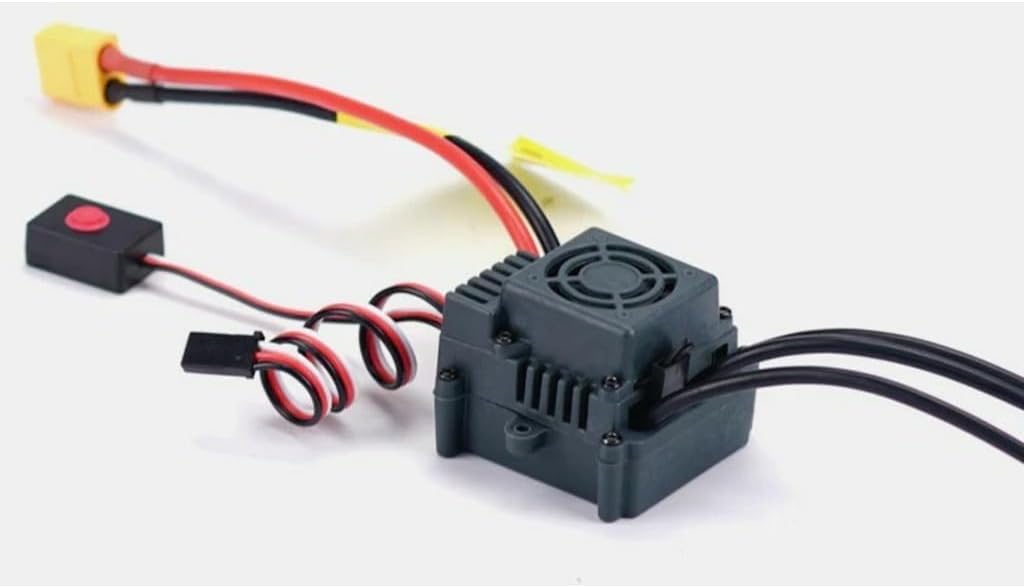
Figure 1: The Carisma Arc-3 Brushless ESC. This image shows the compact grey unit with a cooling fan on top, connected wires (red, black, yellow) leading to a battery connector (yellow XT60 style), and a separate black box with a red button for the external power switch. Additional red and black twisted wires with a servo connector are also visible.
3. Safety Precautions
- Always disconnect the battery from the ESC when not in use to prevent accidental activation.
- Ensure all connections are secure and correct before powering on the system. Incorrect polarity can damage the ESC and battery.
- Do not operate the ESC in wet conditions as it is not waterproof. Exposure to moisture will cause damage and void the warranty.
- Keep the ESC away from heat sources and ensure adequate ventilation to prevent overheating.
- Use only compatible batteries (2-3S LiPo) and motors with this ESC.
- Children should be supervised when operating RC equipment.
4. Setup and Installation
- Mounting the ESC: Securely mount the ESC in your vehicle using double-sided tape or screws, ensuring good airflow around the unit, especially the cooling fan.
- Motor Connection: Connect the three motor wires from the ESC to your brushless motor. The order of connection may affect motor rotation direction; if the motor spins in the wrong direction, swap any two of the three wires.
- Receiver Connection: Plug the BEC (Battery Eliminator Circuit) cable from the ESC into the throttle channel (usually Channel 2) of your RC receiver.
- Battery Connection: Connect your 2S or 3S LiPo battery to the battery input wires of the ESC. Ensure correct polarity (red to positive, black to negative).
- External Power Switch: Position the external power switch in an easily accessible location on your vehicle.
- Radio Calibration: Before first use, calibrate the ESC with your radio system. Refer to your radio's manual for specific calibration steps, typically involving setting throttle endpoints.
5. Operating Instructions
- Power On: Turn on your radio transmitter first. Then, connect the battery to the ESC and press the external power switch to turn on the ESC.
- Initial Check: After powering on, listen for the ESC's initialization tones. Confirm that the steering and throttle respond correctly to your transmitter inputs.
- Operation: Operate your RC vehicle as desired. The ESC will manage power delivery to the motor based on your throttle input.
- Low Voltage Cutoff: The ESC features low voltage protection. When the battery voltage drops to a critical level, the ESC will reduce or cut off power to prevent over-discharge of the battery. This is indicated by a reduction in power or the vehicle stopping.
- Power Off: Always turn off the ESC using the external power switch first, then disconnect the battery. Finally, turn off your radio transmitter.
6. Maintenance
- Cleaning: Regularly clean the ESC, especially the cooling fan, to remove dust and debris. Use a soft brush or compressed air.
- Inspection: Periodically inspect all wires and connectors for signs of wear, fraying, or corrosion. Replace damaged components immediately.
- Storage: Store the ESC in a dry, cool place away from direct sunlight and extreme temperatures.
- Avoid Moisture: As the ESC is not waterproof, ensure it is kept dry at all times. If it accidentally gets wet, disconnect power immediately and allow it to dry completely before attempting to use it again.
7. Troubleshooting
| Problem | Possible Cause | Solution |
|---|---|---|
| ESC does not power on. | Battery not connected, battery discharged, external switch off, faulty connection. | Check battery connection and charge, ensure external switch is on, inspect all wiring. |
| Motor not responding or erratic. | Incorrect motor wiring, ESC not calibrated, radio interference, faulty motor. | Verify motor wire connections, recalibrate ESC, check radio system, test motor separately. |
| ESC overheats. | Insufficient airflow, motor/gear ratio too high, fan blocked, excessive load. | Ensure proper ventilation, check fan for obstructions, adjust gear ratio, reduce load. |
| Vehicle stops suddenly. | Low voltage cutoff activated, power overload protection activated. | Recharge battery, reduce load on the system. |
8. Specifications
| Attribute | Value |
|---|---|
| Model | 16518 (Arc-3) |
| Compatibility | Sensorless Brushless Motors |
| Battery Input | 2-3S LiPo |
| BEC Output | 6V / 3.0A (Switch Mode) |
| Cooling System | High Speed Fan Controlled |
| Protection Functions | Low Voltage, Overheating, Power Overload |
| Waterproof | No |
| Product Dimensions | 1 x 1 x 1 inches (approximate) |
| Item Weight | 1 pounds (approximate) |
9. Warranty and Support
For warranty information and technical support, please refer to the official Carisma website or contact your local distributor. Keep your proof of purchase for warranty claims.
For further assistance, you may visit the Carisma RC official website.
Ask a question about this manual
Ask about setup, troubleshooting, compatibility, parts, safety, or missing instructions. Manuals+ will review the question and use this page’s manual context to help answer it.