
Athearn HO GP9 Locomotive Instruction Manual
Model: ATHG82269 (C&O #6173)
Manufacturer: Athearn
Introduction
This manual provides essential information for the setup, operation, and maintenance of your Athearn HO scale GP9 locomotive, model ATHG82269, representing C&O #6173. This model is a detailed replica of EMD's GP9, active from 1941-1990, and comes equipped with DCC/21-Pin NEM, LED lighting, and sound readiness.
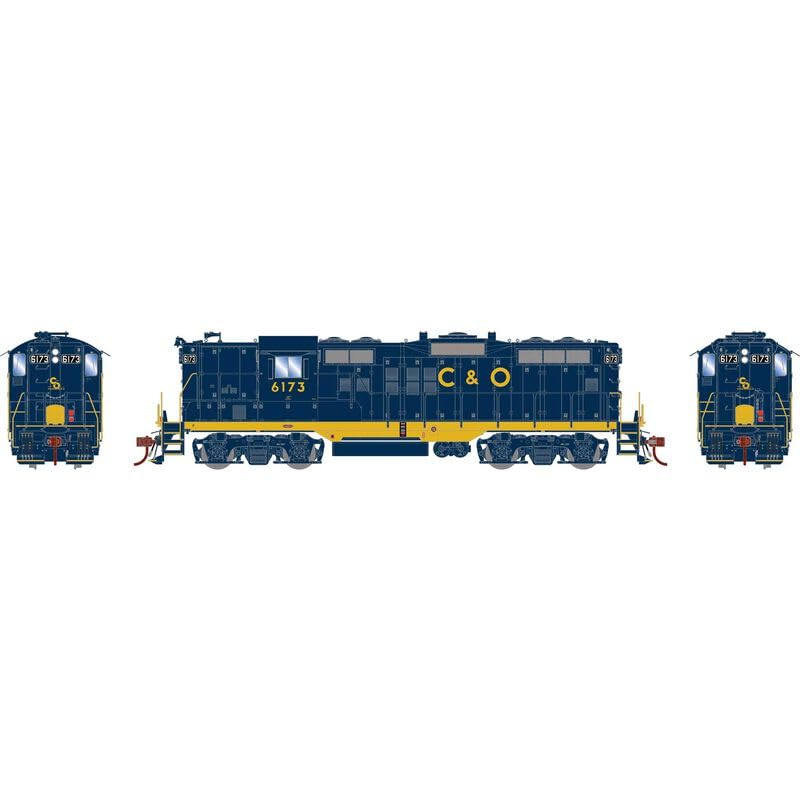
Image: Athearn HO GP9 C&O #6173 Locomotive. This image displays the Athearn HO scale GP9 locomotive, model ATHG82269, in C&O #6173 livery. The locomotive features a dark blue body with yellow lettering and stripes, characteristic of the Chesapeake and Ohio Railway.
Package Contents
Before proceeding, please verify that all components are present in the package:
- Athearn HO GP9 Locomotive (ATHG82269)
- DCC decoder (pre-installed)
- LED lighting system (integrated)
- Sound system (ready for operation)
- Instruction Manual (this document)
Setup
- Unpacking: Carefully remove the locomotive from its packaging. Retain all packaging materials for future storage or transport.
- Inspection: Visually inspect the locomotive for any signs of damage during shipping. Ensure all wheels and couplers are intact and properly aligned.
- Track Placement: Place the locomotive gently on a clean, powered HO scale track. Ensure all four axles are correctly seated on the rails.
- DCC System Connection: This locomotive is equipped with a DCC/21-Pin NEM decoder. Connect your DCC system to the track as per your DCC system's instructions. The locomotive should be recognized by your DCC controller.
Operating Instructions
This locomotive is designed for operation on HO scale layouts using a Digital Command Control (DCC) system.
- Power On: Turn on your DCC system. The locomotive's LED lighting may illuminate briefly during power-up.
- Address Selection: Use your DCC controller to select the locomotive's address. The default address is typically 3, but it may vary. Refer to your DCC system's manual for changing locomotive addresses if needed.
- Controlling Speed: Use the throttle on your DCC controller to increase or decrease the locomotive's speed. Start with low speeds to ensure smooth operation.
- Activating Functions:
- Lights: The LED headlights and taillights can typically be controlled using function button F0.
- Sound: This locomotive is sound-ready. If equipped with a sound decoder, various sound functions (e.g., horn, bell, engine sounds) can be activated via your DCC controller's function buttons (F1-F28, depending on the decoder). Consult your DCC system's manual and the decoder's specific documentation for function mapping.
- Direction Control: Use the direction button on your DCC controller to change the locomotive's direction of travel.
Maintenance
- Cleaning Wheels: Periodically clean the locomotive's wheels and track to ensure good electrical contact and smooth operation. Use a soft cloth or a specialized track cleaning tool.
- Lubrication: Light lubrication of moving parts (gears, axles) may be required after extended periods of operation. Use only model train specific lubricants. Refer to advanced maintenance guides for detailed lubrication points.
- Storage: When not in use, store the locomotive in its original packaging or a protective case, away from dust, direct sunlight, and extreme temperatures.
Troubleshooting
| Problem | Possible Cause | Solution |
|---|---|---|
| Locomotive does not move. | No power to track; dirty track/wheels; incorrect DCC address. | Check power supply; clean track and wheels; verify DCC address. |
| Lights flicker or are dim. | Poor electrical contact; dirty wheels/track. | Clean wheels and track thoroughly. |
| Sound not working. | Sound function not activated; volume set to zero; decoder issue. | Activate sound function (e.g., F1); check volume settings on DCC controller; consult decoder manual. |
| Locomotive derails frequently. | Uneven track; misaligned wheels; excessive speed on curves. | Inspect track for levelness; check wheel alignment; reduce speed. |
Specifications
- Model: ATHG82269
- Prototype: EMD GP9
- Road Name: C&O (#6173)
- Scale: HO Scale
- Axles: 4
- Control System: DCC/21-Pin NEM equipped
- Lighting: LED lighting
- Sound: Sound ready
- Manufacturer: Horizon Hobby (Athearn)
- Recommended Age: 14 months and up
- ASIN: B0F7MTLWVM
Warranty and Support
Athearn products are manufactured to high standards. For specific warranty information, please refer to the documentation included with your purchase or visit the official Athearn website. For technical support or service inquiries, please contact Athearn customer service directly.
Note: Unauthorized modifications or improper use may void your warranty. Always follow the instructions provided in this manual.
