
YITAHOME MAYIHG8L6g
YITAHOME TV Stand User Manual
Model: MAYIHG8L6g
Introduction
This manual provides detailed instructions for the assembly, operation, and maintenance of your YITAHOME TV Stand with LED Lights & Charging Station. Please read this manual thoroughly before assembly and use to ensure proper function and safety.

Figure 1: YITAHOME TV Stand Overview
The YITAHOME TV Stand is designed to accommodate TVs up to 70 inches, featuring a farmhouse aesthetic with cross-pattern doors, integrated LED lighting, and a convenient charging station.
Important Safety Information
Please observe the following safety precautions to prevent injury or damage to the product.
- Always keep the TV stand away from heat sources.
- Never place heavy objects on the open shelves beyond their stated weight capacity.
- Use the built-in charging station with caution. Unplug it when not in use or during electrical storms.
- Keep the TV stand away from children and pets to prevent accidents, especially during assembly and when the unit is loaded with electronics.
- Ensure all connections for the LED lights and charging station are secure before use.
Components and Features
The YITAHOME TV Stand is constructed from engineered wood and features a sturdy design with several integrated functionalities.
- Modern Aesthetics: Blends farmhouse charm with contemporary flair, featuring eye-catching cross-pattern cabinet doors that conceal clutter.
- Open-Back Design: Facilitates easy cable management for electronic devices.
- Integrated LED Light Strip: App-controlled with multiple modes and vibrant colors for customizable ambiance.
- Built-in Charging Station: Includes 2 three-prong outlets, 1 USB port, and 1 Type-C port for convenient device charging.
- Ample Storage: Provides generous space for media devices, accessories, books, and more.
- Adjustable Feet: Ensures stability on uneven floors.
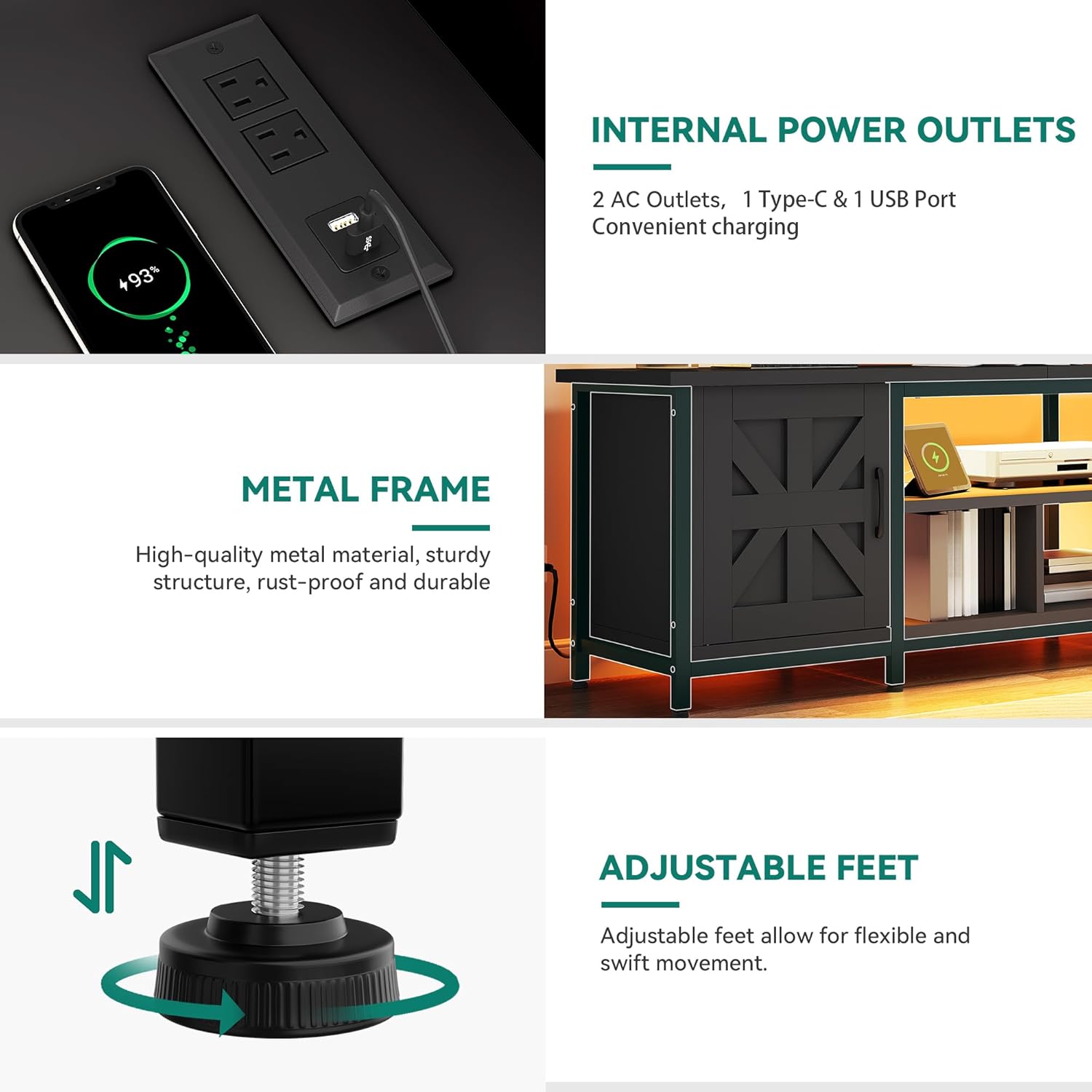
Figure 2: Key Features - Charging Station, Metal Frame, and Adjustable Feet
This image highlights the integrated charging station for powering devices, the robust metal frame for durability, and the adjustable feet for stability on various floor surfaces.
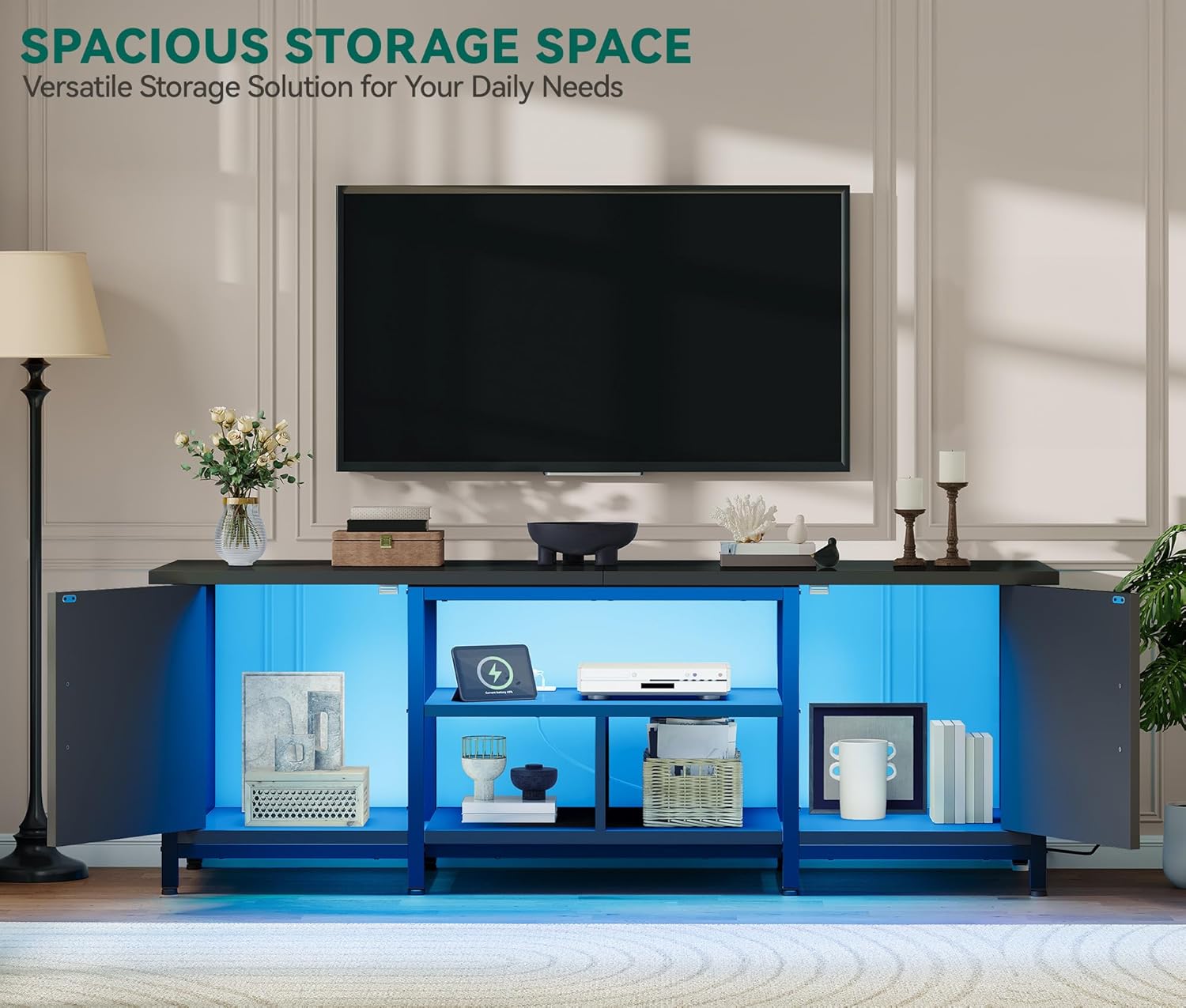
Figure 3: Spacious Storage Solution
The TV stand offers versatile storage options with both open shelves and concealed cabinets, ideal for organizing media components and other items.
Setup and Assembly
The YITAHOME TV Stand is designed for straightforward assembly. Please ensure you have all components and tools ready before beginning.
Before You Begin:
- Unpack all components and verify against the parts list provided in the packaging.
- Clear a spacious area for assembly.
- Keep small parts out of reach of children.
Assembly Steps:
- Follow the step-by-step instructions and diagrams included in your product packaging.
- Assemble the main frame structure first, ensuring all connections are tight and secure.
- Attach the shelves and cabinet doors as per the instructions.
- Install the LED light strip and charging station according to the provided wiring diagrams. Ensure all electrical connections are made correctly and safely.
- Adjust the feet to level the TV stand on your floor surface, ensuring stability.
Note: Assembly typically requires two people for ease and safety.
Operating Instructions
LED Light System:
The integrated LED light strip can be controlled via a remote or a dedicated smartphone application.
- Remote Control: Use the provided remote to power on/off, change colors, adjust brightness, and select various lighting modes (e.g., static, flash, fade).
- App Control: Download the recommended app (refer to packaging for QR code or app name) from your device's app store. Connect the LED lights via Bluetooth or Wi-Fi as instructed in the app. The app offers advanced control, including custom color mixing, music synchronization, and timing functions.

Figure 4: LED Light Control Options
The LED lighting system offers versatile control via both a physical remote and a smartphone application, allowing for dynamic color and mode adjustments.
Charging Station:
The built-in charging station provides convenient power access for your electronic devices.
- Plug the TV stand's main power cord into a standard wall outlet.
- Utilize the 2 three-prong AC outlets for larger electronics like gaming consoles or soundbars.
- Use the 1 USB port and 1 Type-C port for charging smartphones, tablets, and other compatible USB-powered devices.
- Ensure devices are compatible with the charging station's power output to prevent damage.
Maintenance
Regular maintenance will help preserve the appearance and functionality of your TV stand.
- Cleaning: Wipe surfaces with a soft, damp cloth. Avoid harsh chemicals or abrasive cleaners that may damage the finish.
- Dusting: Regularly dust the surfaces and inside the cabinets to prevent buildup.
- Hardware Check: Periodically check all screws and fasteners to ensure they remain tight. Retighten if necessary.
- Cable Management: Ensure cables are neatly organized and not pinched or strained, especially around the open-back design.
Troubleshooting
| Problem | Possible Cause | Solution |
|---|---|---|
| LED lights not turning on. | Power cord not plugged in; loose connection; remote battery dead; app not connected. | Ensure the TV stand's power cord is securely plugged into a working outlet. Check all LED strip connections. Replace remote battery. Re-pair the app with the LED lights. |
| Charging station not working. | Power cord not plugged in; device not compatible; charging station overloaded. | Verify the main power cord is connected. Ensure your device is compatible with the charging ports. Avoid plugging in too many high-power devices simultaneously. |
| Stand is wobbly. | Uneven floor; loose assembly screws. | Adjust the leveling feet at the bottom of the stand. Check and tighten all assembly screws. |
| Cabinet doors misaligned. | Hinges not properly adjusted or installed. | Refer to the assembly instructions for hinge adjustment. Loosen and re-tighten hinge screws as needed to align doors. |
Specifications
| Attribute | Detail |
|---|---|
| Brand | YITAHOME |
| Model Number | MAYIHG8L6g |
| Color | Black |
| Material | Engineered Wood |
| Product Dimensions (L x W x H) | 63 x 15.7 x 21.6 inches (160 x 40 x 55 cm) |
| Item Weight | 57.5 pounds (26.08 kg) |
| TV Size Compatibility | Up to 70 inches |
| Charging Station | 2 AC Outlets, 1 USB Port, 1 Type-C Port |
| Assembly Required | Yes |

Figure 5: Product Dimensions and TV Compatibility
This diagram illustrates the precise measurements of the TV stand and indicates its suitability for televisions up to 70 inches.
Warranty and Support
For warranty information, technical support, or replacement parts, please contact YITAHOME customer service.
Refer to your purchase documentation or the YITAHOME official website for the most current contact details and warranty terms.
Online Support: Visit the YITAHOME Store on Amazon
Related Documents - MAYIHG8L6g
 |
YITAHOME HZHCJJ-V1 TV Stand Assembly Instructions Comprehensive assembly instructions for the YITAHOME HZHCJJ-V1 TV Stand, a farmhouse-style entertainment center with double barn doors. Includes a detailed parts list and step-by-step guidance for assembly. |
 |
YITAHOME TV Stand Assembly Instructions (HZHCJJ-V2) Comprehensive assembly guide for the YITAHOME HZHCJJ-V2 TV Stand, featuring a parts list and detailed step-by-step instructions for building the entertainment center. |
 |
DGHR-V1 TV Stand and Fireplace Mantel Assembly Instructions | Yitahome Detailed assembly guide for the Yitahome DGHR-V1 TV Stand and Fireplace Mantel. Includes parts list, step-by-step instructions, safety warnings, and hardware details. |
 |
YITAHOME GZPFK-V1 TV Stand Assembly Instructions Step-by-step assembly guide for the YITAHOME GZPFK-V1 TV Stand, including parts list, hardware details, and installation procedures for the LED lighting system. Model 6024. |
 |
YITAHOME SGSHK-V1 TV Stand Assembly Instructions Assembly instructions for the YITAHOME SGSHK-V1 TV Stand, also known as FTLFTS-6011. This guide details the parts list and step-by-step assembly process for the entertainment center. |
 |
Assembly Instructions for YITAHOME Coffee Table (FTLFCT-6038, FTLFCT-6039, FTLFCT-6043) Step-by-step assembly instructions for the YITAHOME Farmhouse Coffee Table, featuring a lift top, storage, and sliding barn doors. Includes a detailed parts list and hardware guide. |
Ask a question about this manual
Ask about setup, troubleshooting, compatibility, parts, safety, or missing instructions. Manuals+ will review the question and use this page’s manual context to help answer it.