
Introduction
This manual provides instructions for the XINFUTE remote control, designed for use with the Soundwings FW1866 26 Inch 2.0 Channel Soundbar. Please read this manual thoroughly before using the remote control to ensure proper operation and longevity.

Figure 1: Front view of the XINFUTE remote control. This image displays the ergonomic design and button layout, including power, volume, input selection (Optical, Bluetooth, USB, AUX), and media playback controls (Play/Pause, Skip, Music, Movie, Talk).
Setup
Battery Installation
The remote control requires two AAA alkaline batteries (not included) for operation. Follow these steps to install the batteries:
- Locate the battery compartment on the back of the remote control.
- Press down on the tab and slide the battery cover downwards to open it.
- Insert two AAA batteries, ensuring the positive (+) and negative (-) terminals align correctly with the markings inside the compartment.
- Slide the battery cover back into place until it clicks securely.

Figure 2: Back view of the remote control, illustrating the battery compartment and release mechanism. The image shows a marking for 'CR2025 3V', however, the product specifications state that 2 AAA batteries are required for this remote control. Please use 2 AAA batteries.
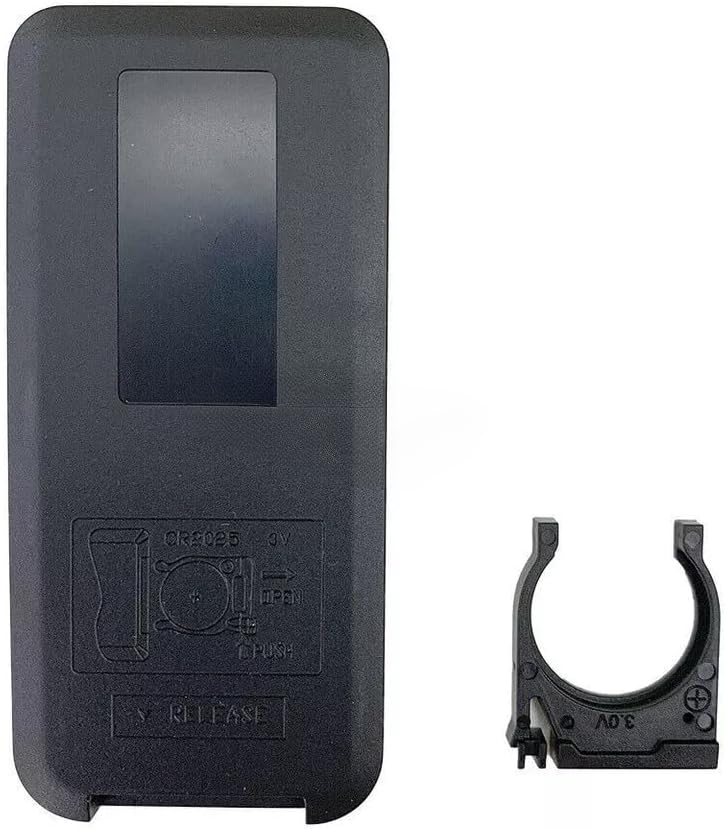
Figure 3: Back view of the remote control with the battery holder removed, showing the internal battery slot. As with Figure 2, this image also depicts a CR2025 battery holder, but please refer to the product specifications which require 2 AAA batteries.
Important: Ensure correct battery polarity. Incorrect installation may prevent the remote from functioning. Remove batteries if the remote will not be used for an extended period to prevent leakage.
Operating Instructions
The XINFUTE remote control provides full functionality for your Soundwings FW1866 Soundbar. Point the remote directly at the soundbar's infrared receiver for optimal performance. The maximum effective range is approximately 5 meters.
Button Functions:
- Power Button (⏻): Turns the soundbar on or off.
- Mute Button (🔇): Mutes or unmutes the soundbar audio.
- Volume Up (VOL+): Increases the soundbar volume.
- Volume Down (VOL-): Decreases the soundbar volume.
- OPTICAL: Selects the Optical input source.
- BLUETOOTH (Ⓑ): Selects the Bluetooth input source.
- USB: Selects the USB input source.
- AUX: Selects the AUX input source.
- Previous Track (⏮): Skips to the previous track (for media playback).
- Play/Pause (⏯): Plays or pauses media playback.
- Next Track (⏭): Skips to the next track (for media playback).
- MUSIC: Activates Music sound mode.
- MOVIE: Activates Movie sound mode.
- TALK: Activates Talk/Voice sound mode.
Maintenance
To ensure the longevity and proper functioning of your remote control, follow these maintenance guidelines:
- Cleaning: Wipe the remote control with a soft, dry cloth. Do not use liquid cleaners, abrasive pads, or chemical solvents, as these can damage the surface or internal components.
- Storage: Store the remote in a cool, dry place away from direct sunlight and extreme temperatures.
- Battery Care: If the remote will not be used for an extended period (e.g., one month or more), remove the batteries to prevent potential leakage and damage.
- Avoid Drops: Protect the remote from physical impact, as drops can damage internal circuitry.
Troubleshooting
If you experience issues with your remote control, refer to the following common problems and solutions:
- Remote is not responding:
- Check if the batteries are installed correctly with the correct polarity.
- Replace old batteries with new AAA alkaline batteries.
- Ensure there are no obstructions between the remote control and the soundbar's infrared receiver.
- Make sure you are within the effective operating range (approximately 5 meters) and pointing the remote directly at the soundbar.
- Specific buttons are not working:
- Clean the remote control surface, especially around the unresponsive buttons, to remove any dirt or debris that might be preventing proper contact.
- If only certain buttons are not working after checking batteries, the remote may be faulty.
- Soundbar does not turn on/off or change input:
- Verify that the soundbar itself is powered on and not in standby mode.
- Ensure the remote is compatible with your specific Soundwings FW1866 soundbar model.
Specifications
| Brand | XINFUTE |
| Model Number | FW1866 |
| Compatible Devices | Soundwings FW1866 26 Inch 2.0 Channel Soundbar |
| Connectivity Technology | Infrared |
| Maximum Range | 5 Meters |
| Number of Batteries Required | 2 AAA batteries |
| Battery Type | Alkaline |
| Material | ABS Material |
| Item Weight | 0.08 Kilograms |
| Item Dimensions (L x W x H) | 6"L x 3"W x 1"H |
Warranty Information
This XINFUTE remote control comes with a one-year warranty from the date of purchase. This warranty covers manufacturing defects under normal use. It does not cover damage caused by misuse, accidents, unauthorized modifications, or battery leakage.
Please retain your proof of purchase for warranty claims.
Customer Support
For any questions, concerns, or issues not addressed in this manual, please contact XINFUTE customer support. All products are inspected before shipment. If you are not satisfied with your purchase, you may contact us within 24 hours of receipt.
For support, please refer to the seller's contact information on the platform where the purchase was made.