
1. Introduction
The Anda Seat Kaiser 3 XL Gaming Chair is engineered for ergonomic support and comfort, designed for extended periods of use in gaming or office environments. This manual provides essential information for the proper assembly, operation, and maintenance of your chair to ensure optimal performance and longevity.
Please read this manual thoroughly before assembly and use. Keep it for future reference.
2. Safety Information
- Ensure all components are present and undamaged before assembly. Do not use if any parts are missing or broken.
- Follow assembly instructions carefully. Incorrect assembly can lead to instability and potential injury.
- Do not stand on the chair or use it as a step stool.
- Avoid placing heavy objects on the chair that exceed its maximum weight capacity of 395 lbs (179 kg).
- Keep fingers and clothing clear of moving parts during adjustment.
- Use the chair on a flat, stable surface.
- Periodically check all screws and bolts to ensure they are tightened.
3. Package Contents
Verify that all the following components are included in your package:
- Seat Base
- Backrest
- Chair Base (5-star aluminum)
- Gas Lift Cylinder
- Gas Lift Cover
- Caster Wheels (5x)
- Magnetic 4D Armrests (pre-installed on some models)
- Magnetic Memory Foam Neck Pillow
- Side Covers (for backrest attachment points)
- Assembly Tool Kit (Allen keys, screws)
4. Assembly Instructions
Assembly of the Anda Seat Kaiser 3 XL is designed to be straightforward. Some components, such as the armrests, may come pre-installed for convenience.
- Unpack Components: Carefully remove all parts from the packaging. Lay them out on a clean, soft surface to prevent scratches.
- Attach Caster Wheels: Insert the five caster wheels into the holes at the end of each leg of the chair base. Push firmly until they click into place.
- Install Gas Lift: Place the gas lift cylinder into the center hole of the chair base. Cover it with the gas lift cover.
- Attach Seat to Gas Lift: Carefully place the assembled seat base onto the gas lift cylinder. Ensure it is centered and stable.
- Attach Backrest: Align the backrest with the seat base's attachment points. Secure it using the provided screws and Allen key. Ensure all screws are tightened evenly.
- Install Side Covers: Once the backrest is secured, attach the magnetic side covers over the screw points.
- Attach Magnetic Neck Pillow: Position the magnetic neck pillow on the backrest at your desired height. It will securely attach to the chair's magnetic surface.

Image: Fully assembled Anda Seat Kaiser 3 XL Gaming Chair, showcasing its design and fabric finish.
5. Operating Instructions (Adjustments)
The Anda Seat Kaiser 3 XL offers multiple adjustment options for personalized comfort.
5.1. Chair Height Adjustment
To adjust the chair height, locate the lever on the right side beneath the seat. Pull the lever up while seated to lower the chair, or pull it up while standing to raise the chair. Release the lever to lock the height.
5.2. Backrest Recline
The backrest can recline from 90° to 160°. To recline, pull the recline lever on the right side of the chair (near the seat base) upwards and lean back to your desired angle. Release the lever to lock the backrest in position.

Image: Illustration demonstrating the ergonomic design and the 90° to 165° recline capability of the Kaiser 3 XL chair.
5.3. 4D Magnetic Armrests
The MagSwap 4D armrests offer extensive adjustability:
- Height Adjustment: Press the button on the side of the armrest and move it up or down.
- Forward/Backward: Slide the armrest pad forward or backward.
- Left/Right Swivel: Rotate the armrest pad left or right.
- Inward/Outward: Slide the entire armrest assembly closer to or further from the seat.
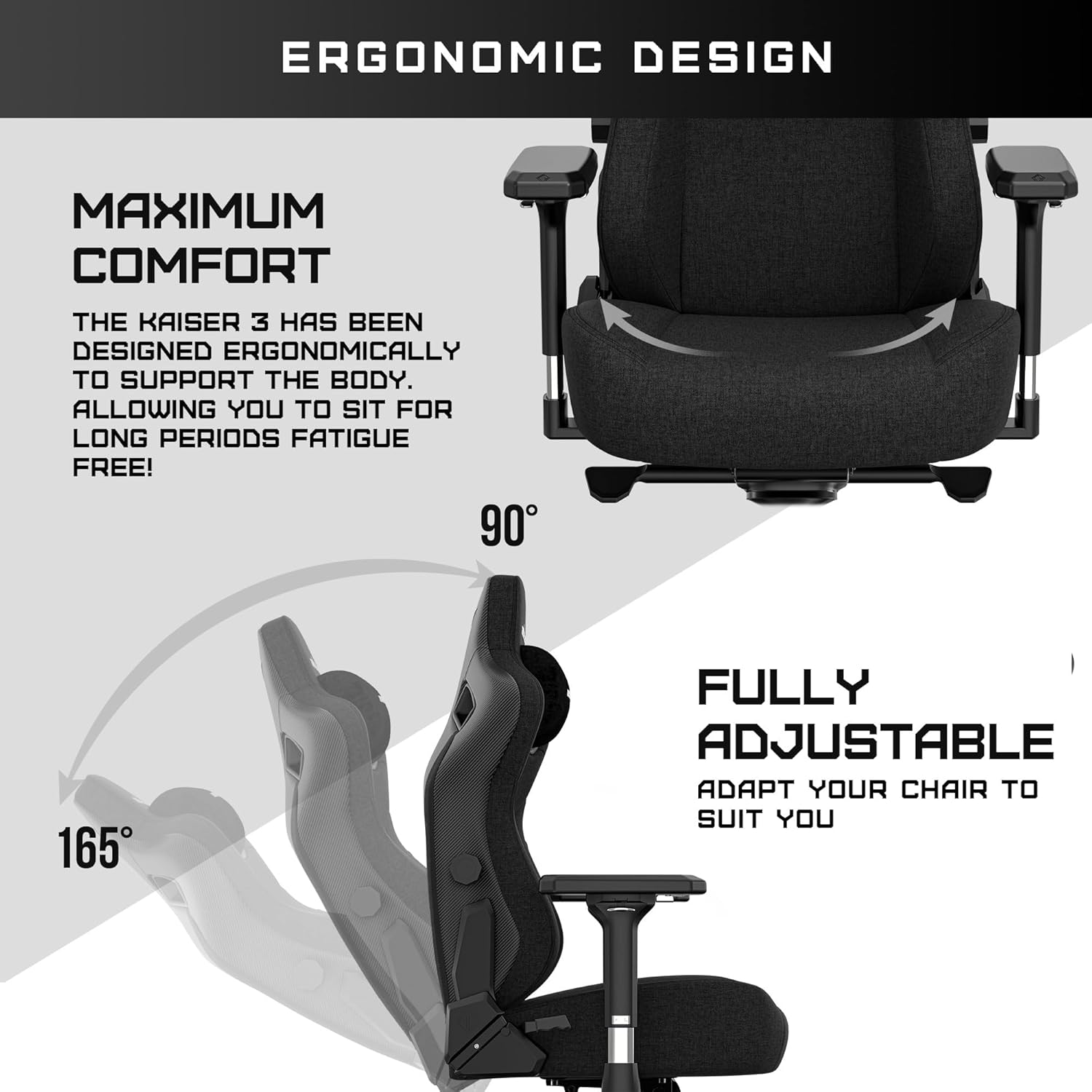
Image: Detailed view of the MagSwap 4-way adjustable armrests, highlighting their magnetic attachment and multi-directional movement.
5.4. Adaptive Lumbar Support
The Kaiser 3 XL features built-in 4-way adaptive lumbar support. Use the adjustment knobs on the sides of the backrest to customize the support:
- Up & Down: Adjusts the vertical position of the lumbar support.
- In & Out: Adjusts the protrusion (depth) of the lumbar support.

Image: Diagram illustrating the built-in 4-way adaptive lumbar support, showing adjustments for both vertical position and depth.
5.5. Magnetic Neck Pillow
The memory foam neck pillow attaches magnetically to the backrest, allowing for easy vertical adjustment to suit your height and preference. It contains a cooling pad for enhanced comfort.

Image: Close-up of the magnetic memory foam neck pillow, highlighting its cooling gel insert and magnetic attachment to the chair's backrest.
6. Maintenance
Regular maintenance will help preserve the appearance and functionality of your Anda Seat Kaiser 3 XL Gaming Chair.
6.1. Cleaning the Fabric
The chair features premium Eversoft Linen Fabric, which is designed to be scratch and stain resistant.
- For light cleaning, use a soft cloth dampened with mild soap and water. Gently wipe the affected area.
- Avoid using harsh chemicals, abrasive cleaners, or solvents, as these can damage the fabric.
- For spills, blot immediately with a clean, dry cloth. Do not rub.
- Allow the fabric to air dry completely before use.

Image: Close-up detail of the premium Eversoft Linen Fabric, emphasizing its texture and quality.
6.2. General Care
- Periodically inspect all screws and bolts. Tighten any that have become loose.
- Clean the caster wheels regularly to prevent accumulation of dust and debris, which can affect mobility.
- Avoid prolonged exposure to direct sunlight to prevent fading of the fabric.
7. Troubleshooting
If you encounter any issues with your Anda Seat Kaiser 3 XL, refer to the following common solutions:
7.1. Chair Squeaks or Wobbles
- Solution: Check all assembly screws and bolts. Tighten any loose fasteners. Apply a small amount of silicone lubricant to moving metal parts if squeaking persists.
7.2. Gas Lift Not Adjusting Height
- Solution: Ensure the height adjustment lever is fully engaged or disengaged. If the issue persists, the gas lift cylinder may need replacement. Contact customer support.
7.3. Caster Wheels Not Rolling Smoothly
- Solution: Remove any hair, dust, or debris wrapped around the wheel axles. Clean the wheels with a damp cloth.
7.4. Backrest Not Reclining or Locking
- Solution: Verify that the recline lever is functioning correctly and not obstructed. Ensure no foreign objects are lodged in the reclining mechanism.
8. Specifications
| Feature | Specification |
|---|---|
| Model Name | Kaiser 3 XL |
| Item Model Number | AD12YDC-XL-01 |
| Product Dimensions (D x W x H) | 22.04" x 21.65" x 53.94" (56cm x 55cm x 137cm) |
| Seat Depth | 19.29 inches (49cm) |
| Item Weight | 70.6 pounds (32 kg) |
| Maximum Weight Capacity | 395 lbs (179 kg) |
| Recommended Maximum Height | 6'8" (203 cm) |
| Recline Angle | 90° to 160° (7 positions) |
| Material | Premium Eversoft Linen Fabric |
| Armrests | Magnetic 4D Adjustable |
| Lumbar Support | Built-in 4-way Adaptive |
| Neck Pillow | Magnetic Memory Foam with Cooling Pad |
| Base | Aluminum 5-point base |
| Caster Wheels | 65mm Silent and Smooth |
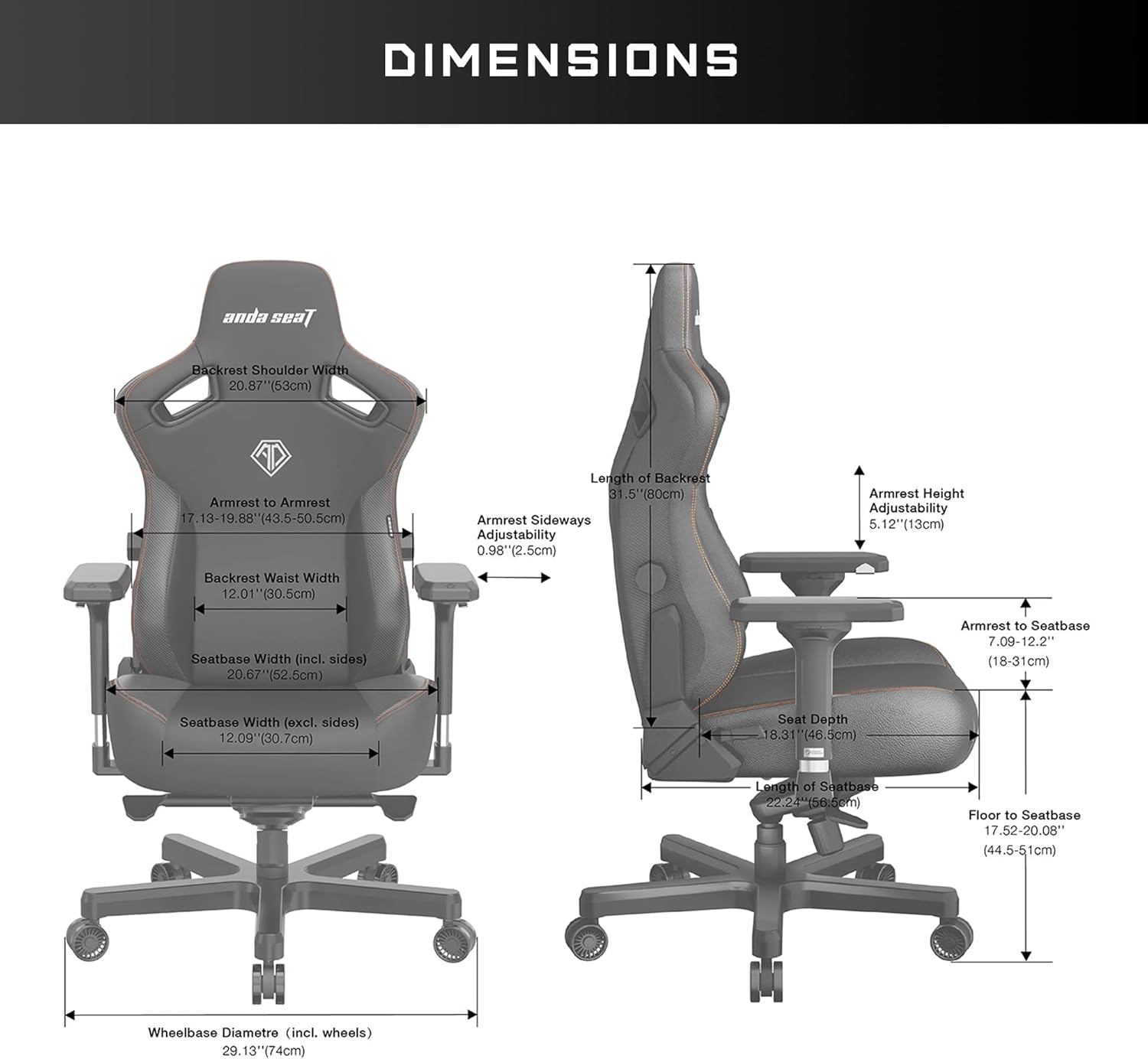
Image: Detailed diagram showing the dimensions of the Anda Seat Kaiser 3 XL Gaming Chair, including seat width, backrest height, and armrest adjustability ranges.
9. Warranty and Support
Anda Seat provides the following warranty coverage for the Kaiser 3 XL Gaming Chair:
- Steel Framework: Lifetime coverage.
- All Other Parts: 2-year coverage.
For warranty claims, technical support, or inquiries regarding replacement parts, please contact Anda Seat customer service. Refer to the official Anda Seat website or your purchase documentation for contact information.