
1. Introduction
This manual provides essential instructions for the safe operation, setup, maintenance, and troubleshooting of your wheelfun UDI RC UD1610 Pro 1/16 Scale Brushless 4WD RC Monster Truck. Please read this manual thoroughly before operating the vehicle to ensure proper function and longevity.
The UD1610 Pro is a high-performance 1/16 scale off-road vehicle designed for hobby enthusiasts. It features a robust construction with a thickened PVC car shell and nylon/PC plastic components, equipped with hydraulic shock absorbers and universal metal dog bones for durability and performance.
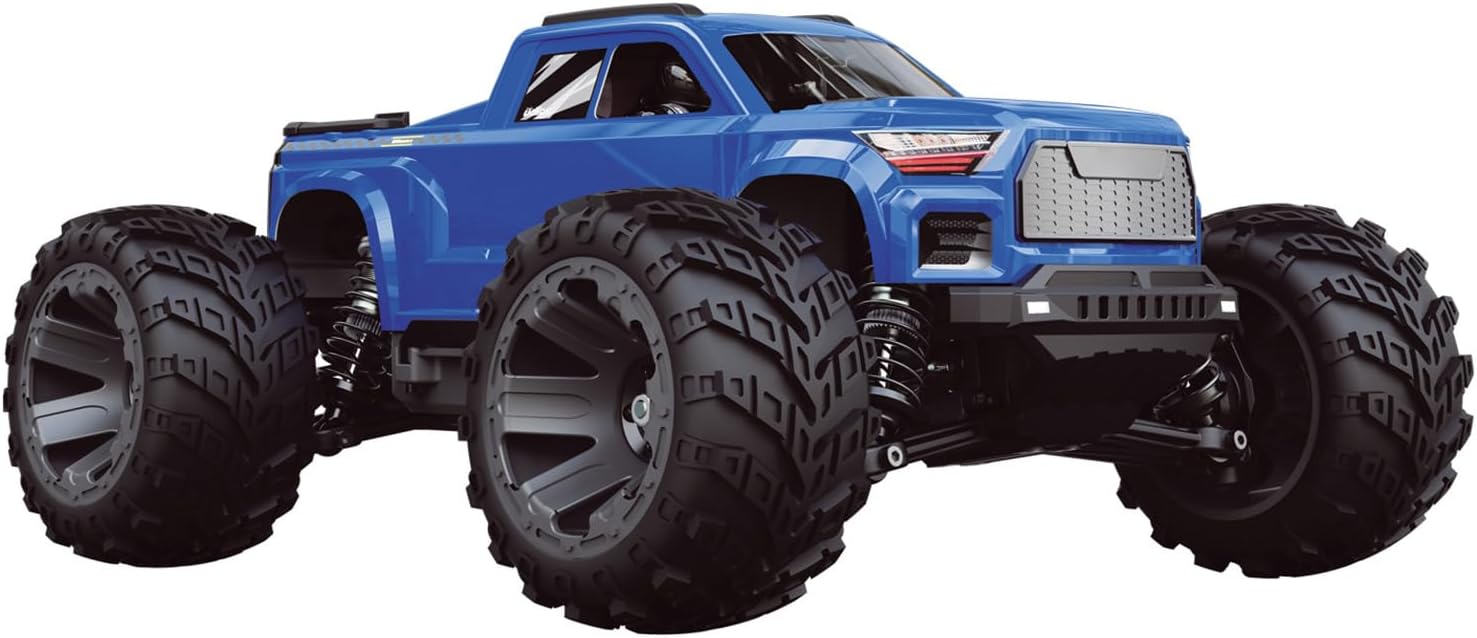
Image 1.1: The wheelfun UDI RC UD1610 Pro 1/16 Scale Brushless 4WD RC Monster Truck, showcasing its robust design and large tires.
2. Package Contents
Verify that all items listed below are included in your package:
- 1x 1/16 RC Car with Light System
- 1x Battery (7.4V)
- 1x Remote Controller
- 1x USB Charging Cable
Items not included:
- Sound System
- AA Batteries (4 required for the remote controller)
3. Setup
3.1. Battery Installation and Charging
- Remote Controller Batteries: Open the battery compartment on the remote controller and insert 4 AA batteries, ensuring correct polarity. Close the compartment.
- Vehicle Battery Charging: Connect the provided 7.4V vehicle battery to the USB charging cable. Connect the USB cable to a suitable USB power source (e.g., computer USB port, USB wall adapter). The charging time is approximately 3 hours. Do not overcharge the battery.
- Vehicle Battery Installation: Once fully charged, carefully connect the vehicle battery (2S XT60 7.4V) to the ESC (Electronic Speed Controller) connector inside the vehicle's battery compartment. Secure the battery to prevent movement during operation.
3.2. Initial Checks
- Ensure all screws are tightened and components are securely attached.
- Verify that the car shell, differential lock, and drive shaft are correctly assembled. These components are designed for quick assembly and disassembly.
- Check for any obstructions in the wheels or suspension system.
4. Operating Instructions
4.1. Powering On
- Turn on the remote controller first.
- Turn on the power switch on the RC vehicle. The vehicle and controller should automatically pair.
4.2. Controls
The UD1610 Pro features full proportional synchronous control functions:
- Forward: Push the throttle trigger forward.
- Backward: Pull the throttle trigger backward.
- Left Turning: Turn the steering wheel on the remote controller left.
- Right Turning: Turn the steering wheel on the remote controller right.

Image 4.1: Front view of the wheelfun UDI RC UD1610 Pro, highlighting its front bumper and headlights.
4.3. Performance
- With the standard 7.4V battery, the vehicle can reach speeds of approximately 50 km/h.
- When using an 11.1V battery (not included), speeds can reach around 65 km/h.
4.4. Safety Precautions
- Operate the vehicle in open areas, away from people, pets, and obstacles.
- Do not operate in wet conditions or near water.
- Always turn off the vehicle and remote controller when not in use.
- This product is recommended for ages 14+.
5. Maintenance
Regular maintenance ensures optimal performance and extends the lifespan of your RC truck.
- Cleaning: After each use, clean the vehicle to remove dirt, dust, and debris. Use a soft brush or compressed air. Avoid using water directly on electronic components.
- Component Inspection: Regularly inspect the car shell, differential lock, drive shaft, and other plastic parts for damage or wear. The thickened PVC car shell and nylon/PC plastic parts are designed for durability.
- Motor and ESC: The 2845-3900Kv brushless motor and 45A brushless ESC are equipped with aluminum heat sinks to manage temperature and extend their service life. Ensure these heat sinks are free from obstructions.
- Shock Absorbers: Check the hydraulic shock absorbers for leaks or damage.
- Battery Care: Store batteries in a cool, dry place. Do not leave batteries fully charged or fully discharged for extended periods.
6. Troubleshooting
| Problem | Possible Cause | Solution |
|---|---|---|
| Vehicle does not respond to remote controller. |
|
|
| Reduced speed or power. |
|
|
| Steering issues. |
|
|
The vehicle has protection against battery overcharge and overcurrent. If the vehicle stops unexpectedly, check for these conditions.
7. Specifications
| Feature | Detail |
|---|---|
| Item Condition | New, Painted, and Assembled |
| Vehicle Scale | 1:16 |
| Material | Plastic & Metal (Thickened PVC car shell, Nylon and PC plastic parts) |
| Vehicle Size (L*W*H) | 292mm * 225mm * 127mm |
| Net Weight | 1155g |
| Color | Blue |
| Wheelbase | 180mm |
| Tire Width | 180mm |
| Battery | 2S XT60 7.4V (Standard) |
| Motor | 2845-3900Kv Brushless Motor |
| ESC | 45A Brushless ESC |
| Servo | 17G |
| Charging Time | Approximately 3 hours |
| Remote Control Distance | Approximately 120m |
| ID | UDL-UD1610Pro-Rtr-Bu |
| Recommended Age | 14+ |
| Product Dimensions | 14 x 12 x 8 inches |
| Item Weight | 4.4 pounds |
8. Warranty and Support
No specific warranty information is provided in the product details. For warranty inquiries or technical support, please contact the manufacturer, wheelfun, or your point of purchase.
Manufacturer: wheelfun
For further assistance, please refer to the seller's contact information on the platform where the product was purchased.