
1. Introduction
The TMEHM S660pro is a versatile 3-in-1 device designed to enhance sleep and relaxation. It combines 8 mixable nature sounds, a portable Bluetooth speaker, and a 12-color night light with adjustable brightness. This manual provides detailed instructions for setup, operation, and maintenance to ensure optimal performance.
2. Important Safety Information
- Fully charge the device before first use.
- Keep away from water and heat sources.
- Do not cover the product to avoid damage.
- Children must use under adult supervision.
3. Package Contents
Ensure all items are present in the package:
- TMEHM S660pro Sleep Sound Machine
- USB Type-C Charging Cable
- Power Adapter
- User Manual (this document)

Image: TMEHM S660pro device, USB-C charging cable, and power adapter included in the package.
4. Product Overview
Familiarize yourself with the device's components and controls.
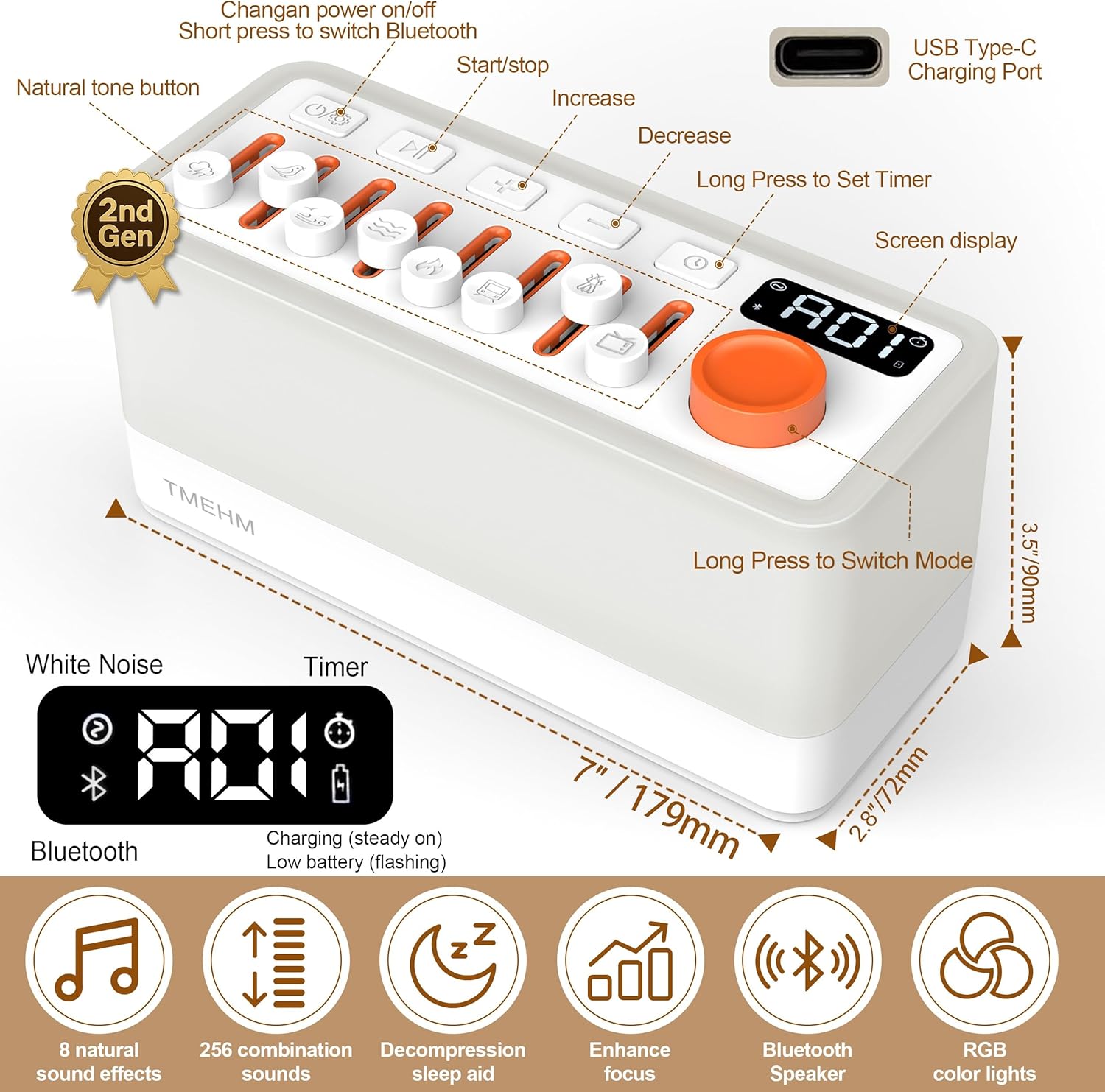
Image: Top view of the TMEHM S660pro showing the control panel with individual sound sliders, power button, play/pause, volume controls, timer button, and the main knob for light/timer adjustments. Dimensions are also indicated.
Control Panel Features:
- Power Button: Press and hold to turn on/off. Short press to switch Bluetooth.
- Sound Sliders: Individual sliders for 8 natural sound effects (rain, birdsong, ocean waves, stream, campfire, train, crickets, TV static). Adjust volume for each sound.
- Play/Pause Button: Controls playback for Bluetooth audio.
- Volume Buttons (+/-): Adjust overall volume.
- Timer Button: Short press to set sleep timer (5-180 minutes).
- Light Button (Knob Switch): Rotate to adjust warm night light brightness (30 levels). Press and hold to switch to color ambient light mode (11 colors).
- Screen Display: Shows timer settings, light brightness, and mode indicators.
- USB Type-C Charging Port: Located on the back for charging.
5. Setup
5.1 Initial Charge
Before first use, fully charge the device using the provided USB Type-C cable and power adapter. The battery indicator on the screen will show charging status.

Image: The TMEHM S660pro connected to its USB-C charging cable and power adapter.
5.2 Power On/Off
Press and hold the Power button (leftmost button on the top panel) for 2 seconds to turn the device on or off.
6. Operating Instructions
6.1 Natural Sound Playback
The device features 8 unique non-looping natural sounds: rain, birdsong, ocean waves, stream, campfire, train, crickets, and TV static. Each sound has an independent volume control.
- To activate a sound, push up the corresponding slider button.
- Adjust the volume of each individual sound by moving its slider up (increase) or down (decrease).
- Combine multiple sounds by activating their respective sliders to create up to 256 unique soundscapes.

Image: The TMEHM S660pro displaying the 8 individual sound sliders and their corresponding nature sound icons.
Video: This video demonstrates the various features of the TMEHM S660pro, including sound selection and light adjustments.
6.2 Night Light Function
The device offers both warm white light and multiple color ambient light modes.
- Warm White Light: Rotate the main knob switch (rightmost knob) to adjust the brightness of the warm white light across 30 levels. The display will show the current brightness level (e.g., F01-F30).
- Color Ambient Light: Press and hold the main knob switch to cycle through 11 different color modes. The light will transition between colors.
- Breathing Therapy Mode: This mode is integrated with the color ambient lights. Follow the light's gentle breathing pattern to aid relaxation.
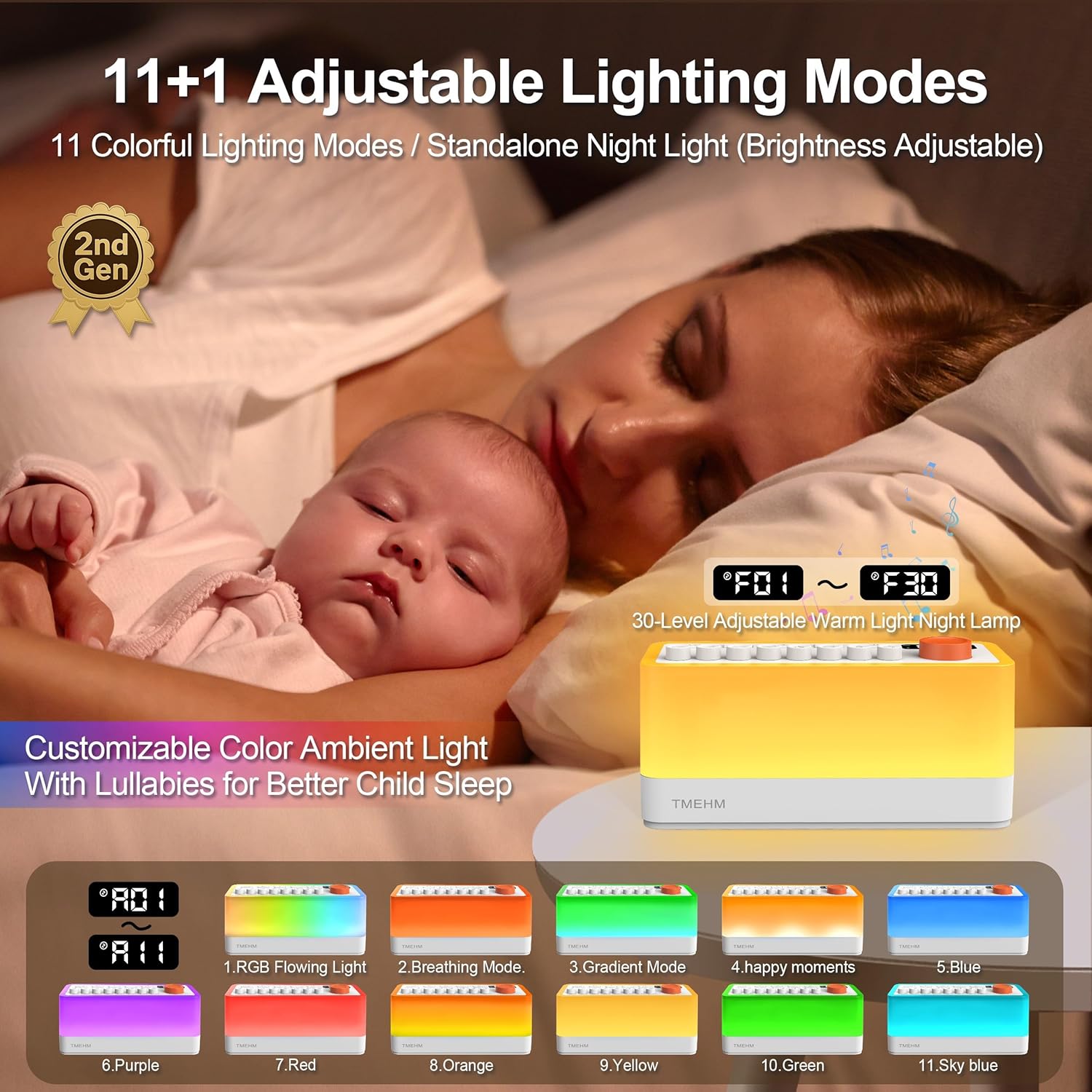
Image: The TMEHM S660pro functioning as a night light in a bedroom setting, illustrating its use for sleep assistance.

Image: A visual representation of the 11 adjustable light color modes available on the TMEHM S660pro.
6.3 Bluetooth Speaker Function
Connect your smartphone or other Bluetooth-enabled device to the S660pro to play your own audio.
- Short press the Power button to switch to Bluetooth mode. The display will indicate Bluetooth pairing mode.
- On your device, enable Bluetooth and search for "S660pro".
- Select "S660pro" to pair. Once connected, you will hear a confirmation sound.
- Play your desired audio from your connected device. Use the Play/Pause button and Volume buttons on the S660pro or your connected device to control playback.

Image: The TMEHM S660pro highlighting its dual speakers and a smartphone screen showing a successful Bluetooth connection to "S660pro".
Video: This video provides a detailed analysis of each function of the TMEHM S660pro, including Bluetooth connectivity and sound mixing.
6.4 Sleep Timer Settings
The auto-off timer can be set from 5 to 180 minutes, with gradual sound fading.
- Short press the Timer button (clock icon) to activate the timer.
- Rotate the main knob switch to select the desired duration in 5-minute increments (e.g., 005, 010, ..., 180).
- The device will automatically turn off after the set time, with the sound gradually fading out.

Image: The TMEHM S660pro displaying the timer function, set to assist sleep.
7. Maintenance
- Clean the device with a soft, dry cloth. Do not use liquid cleaners or aerosols.
- Avoid exposing the device to extreme temperatures or direct sunlight.
- Store in a cool, dry place when not in use for extended periods.
8. Troubleshooting
| Problem | Possible Cause | Solution |
|---|---|---|
| Device does not power on. | Low battery or not charged. | Charge the device fully using the provided adapter and cable. |
| No sound from natural sounds. | Individual sound slider is down or overall volume is low. | Push up the desired sound slider(s) and increase the overall volume using the '+' button. |
| Bluetooth not connecting. | Device not in Bluetooth mode or out of range. | Short press the Power button to enter Bluetooth mode. Ensure your device is within range (approx. 10 meters) and "S660pro" is selected. |
| Night light not working. | Light brightness set to minimum. | Rotate the main knob switch to increase brightness. |
9. Specifications
| Feature | Detail |
|---|---|
| Product Dimensions | 7 x 2.8 x 3.5 inches |
| Item Weight | 16 ounces (1 Pound) |
| Model Name | S660pro |
| Brand Name | TMEHM |
| Power Source | Battery Powered (2600mAh) |
| Connector Type | USB Type-C |
| Color | White |
| Material Type | Acrylonitrile Butadiene Styrene (ABS) |
| Sleep Sounds | 8 mixable nature sounds (non-looping) |
| Night Light | 30-level warm light, 11 color modes, breathing therapy |
| Timer Settings | 5 to 180 minutes (5-minute increments) |
| Bluetooth Version | 5.0 |
| Battery Life | Up to 10 hours playtime |

Image: A visual representation of the TMEHM S660pro's main parameters and specifications.
10. Warranty Information
The TMEHM S660pro comes with a manufacturer's warranty. Replacement with a new unit is provided within one year for non-human damage.
For warranty claims, please retain your proof of purchase and contact customer support.
11. Customer Support
For any questions, technical assistance, or support regarding your TMEHM S660pro, please visit the official TMEHM store or contact their customer service through the platform of purchase.
Official TMEHM Store: TMEHM Amazon Store