
Introduction
The Wodgreat USB Bluetooth 5.0 Transmitter Receiver is a versatile wireless audio adapter designed to add Bluetooth functionality to non-Bluetooth devices. It operates in two modes: Transmitter (TX) and Receiver (RX), allowing for seamless audio streaming between various devices. Featuring Bluetooth 5.0 technology, an LCD screen for easy operation, and a built-in microphone for hands-free calling in RX mode, this device offers enhanced audio connectivity for your home, car, and personal entertainment systems.
What's in the Box
- Bluetooth transmitter receiver
- 3.5mm audio cable
- User Manual
Product Overview
The Wodgreat USB Bluetooth 5.0 Transmitter Receiver is a compact and portable device that enhances your audio experience. Its key features include:
- Bluetooth 5.0 Technology: Ensures a faster, more stable signal and high-quality audio transmission with a strong connection up to 33 feet (10 meters) without obstacles.
- 2-in-1 Functionality: Easily switches between Transmitter (TX) and Receiver (RX) modes.
- LCD Screen: Provides visual feedback for mode selection, device pairing, and status, making operation clear and fast.
- Built-in Microphone: Supports hands-free calling when in Receiver (RX) mode, ideal for car audio systems.
- USB Power Supply: Powered via a USB port, eliminating the need for internal batteries and ensuring continuous operation.

Image: The Wodgreat Bluetooth adapter showcasing its unique LCD display and key features like Receive/Transmit 2-in-1, Plug & Play, Low latency, Handsfree Call, Bluetooth 5.0, One key to boot, Widely compatible, and USB Power Supply.
Setup and Operation
Switching Between TX and RX Modes
To switch between Transmitter (TX) and Receiver (RX) modes, press the '>' and '<' buttons on the device simultaneously. The LCD screen will indicate the current mode.
Transmitter (TX) Mode Setup
In TX mode, the adapter streams audio from non-Bluetooth devices (e.g., TV, PC, MP3/MP4 player) to Bluetooth headphones or speakers.
- Power On: Plug the Bluetooth adapter into a USB port for power.
- Connect Audio Source: Use the included 3.5mm audio cable to connect the adapter's 3.5mm port to the audio output (AUX OUT) of your TV, PC, or other audio source.
- Activate TX Mode: Ensure the device is in TX mode (indicated on the LCD screen). If not, press '>' and '<' simultaneously to switch.
- Pair with Bluetooth Device: Put your Bluetooth headphones or speaker into pairing mode. The adapter will search for nearby Bluetooth devices. Select your device from the list displayed on the LCD screen to pair.
- Enjoy Audio: Once paired, audio from your source device will be transmitted wirelessly to your Bluetooth headphones or speaker.

Image: A visual representation of the 2-in-1 Bluetooth 5.0 Adapter's Transmitter Mode (TX), illustrating connections from devices like computers, TVs, MP3/MP4 players, and airplane entertainment systems to Bluetooth headphones, AirPods, Bluetooth speakers, and soundbars.
Receiver (RX) Mode Setup
In RX mode, the adapter receives audio from your smartphone or tablet and plays it through non-Bluetooth car audio systems, home stereos, or wired speakers.
- Power On: Plug the Bluetooth adapter into a USB port for power (e.g., car USB port, USB wall adapter).
- Connect Audio Output: Use the included 3.5mm audio cable to connect the adapter's 3.5mm port to the audio input (AUX IN) of your car stereo, home stereo, or wired speaker.
- Activate RX Mode: Ensure the device is in RX mode (indicated on the LCD screen). If not, press '>' and '<' simultaneously to switch.
- Pair with Smartphone/Tablet: On your smartphone or tablet, enable Bluetooth and search for available devices. Select the Wodgreat adapter from the list to pair.
- Stream Music: Once paired, you can stream music wirelessly from your smartphone or tablet to your connected audio system.
- Hands-free Calling: In RX mode, the built-in microphone allows for hands-free calls through your connected car or home stereo system.
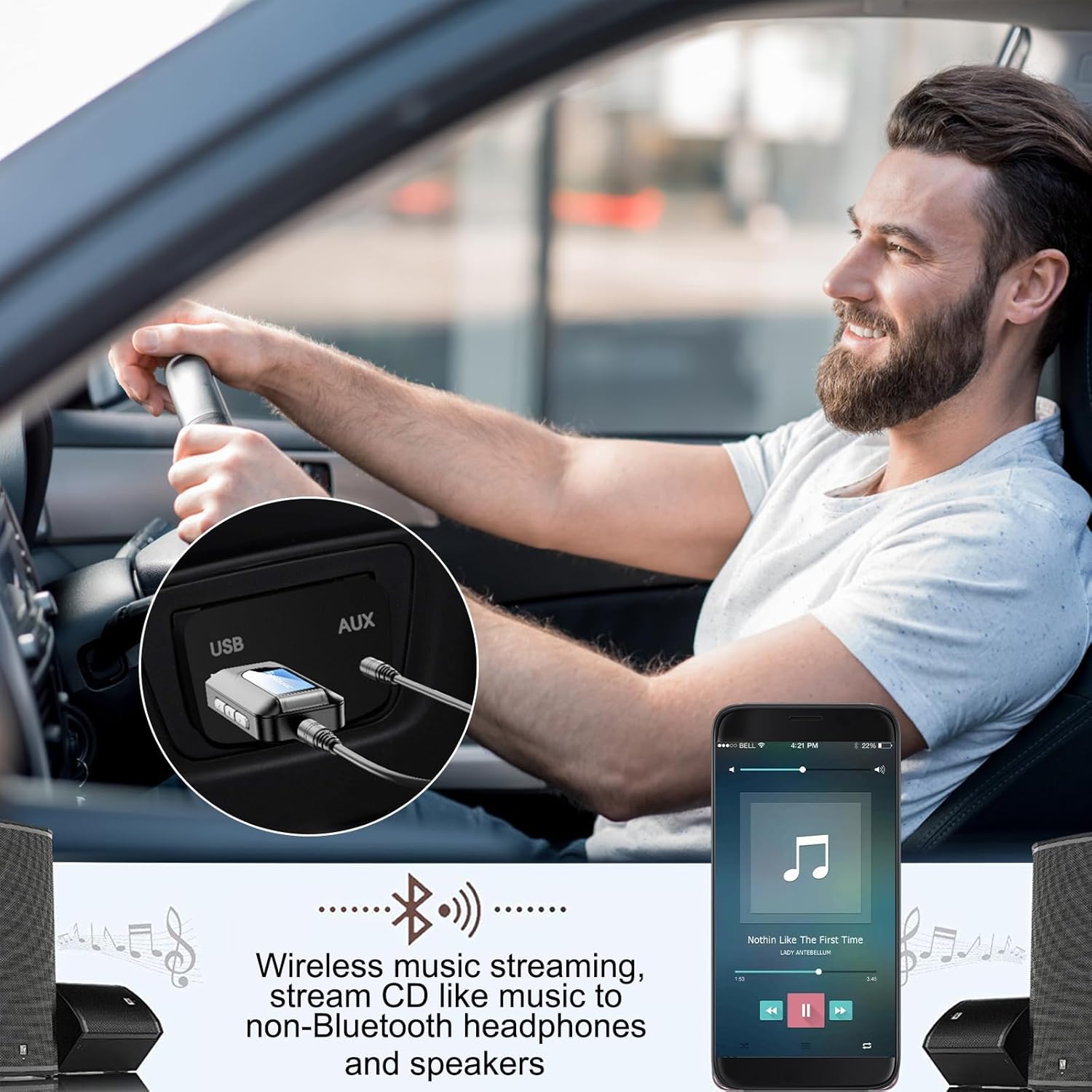
Image: A man driving, with the Wodgreat Bluetooth adapter connected to the car's USB and AUX ports, enabling wireless music streaming from a smartphone to the car's speakers. This illustrates the Receiver Mode (RX) in a vehicle setting.
Maintenance
To ensure the longevity and optimal performance of your Wodgreat USB Bluetooth 5.0 Transmitter Receiver, follow these maintenance guidelines:
- Keep Clean: Wipe the device with a soft, dry cloth. Avoid using harsh chemicals or abrasive cleaners.
- Avoid Moisture: Do not expose the device to water, rain, or excessive humidity.
- Store Properly: When not in use, store the adapter in a cool, dry place away from direct sunlight and extreme temperatures.
- Handle with Care: Avoid dropping or subjecting the device to strong impacts.
Troubleshooting
If you encounter issues with your Wodgreat USB Bluetooth 5.0 Transmitter Receiver, refer to the following common problems and solutions:
| Problem | Solution |
|---|---|
| Device does not power on. | Ensure the USB connector is fully inserted into a working USB port. Try a different USB port or power source. |
| Cannot pair with a Bluetooth device. |
|
| No audio or poor audio quality. |
|
| Cannot switch between TX/RX modes. | Press the '>' and '<' buttons simultaneously and hold briefly until the mode changes on the LCD screen. |
Specifications
- Brand: Wodgreat
- Model: USB Bluetooth 5.0 Transmitter Receiver
- Bluetooth Version: 5.0
- Hardware Interface: 3.5mm Audio, USB
- Compatible Devices: Headphones, Smartphones, Speakers, TV, PC, Car Audio Systems
- Operating Modes: Transmitter (TX), Receiver (RX)
- Wireless Range: Up to 33 ft (10 meters) without obstacles
- Power Supply: USB Powered
- Item Weight: 5 Grams (0.176 ounces)
- Package Dimensions: 4.02 x 2.6 x 0.67 inches
Warranty and Support
Wodgreat products are designed for reliability and performance. This product comes with a 90-day free return policy and a 2-year after-sales service period.
For any questions, technical assistance, or support needs, please contact our dedicated support team. Our team is trained to provide timely solutions and assistance.
Please refer to the contact information provided with your purchase or visit the official Wodgreat website for further details.