1. Introduction
The Wintact WT327A is a digital non-contact infrared thermometer designed for safe and accurate surface temperature measurement. It features a laser for precise targeting, adjustable emissivity, and various measurement modes, making it suitable for a wide range of applications from kitchen cooking to industrial inspections.

Image 1.1: The Wintact WT327A Infrared Thermometer Gun with included AAA batteries.
2. Safety Information
Please read and understand all safety warnings before using this device. Failure to do so may result in injury or damage to the device.
- Laser Safety: This device uses a Class 2 laser. Do not stare directly into the laser beam or point it at people or animals. Avoid direct eye exposure.
- Non-Contact Measurement: The thermometer measures surface temperature from a distance. Do not touch hot surfaces with the device.
- Operating Environment: Do not use the device in environments with explosive gas, steam, or dust.
- Maintenance: Do not attempt to disassemble or modify the device. Refer all servicing to qualified personnel.
- Not for Medical Use: This thermometer is not intended for measuring human body temperature.

Image 2.1: This device is not intended for measuring human body temperature.
3. Package Contents
Verify that all items are present upon opening the package:
- 1x Wintact Infrared Thermometer Gun (WT327A)
- 2x AAA Batteries
- 1x English User Manual
4. Product Features
The Wintact WT327A thermometer offers several key features for versatile and accurate temperature measurement:
- Wide Temperature Range: Measures from -58℉ to 752℉ (-50℃ to 400℃).
- Fast Response Time: Provides readings in approximately 0.5 seconds.
- High Accuracy: ±1.5℃ (2.7℉) error margin for reliable results.
- Adjustable Emissivity: User-adjustable from 0.1 to 1.0 for various surface types.
- Distance-to-Spot Ratio (D:S): 12:1 ratio for safe and accurate measurements from a distance.
- Laser Targeting: Built-in laser for precise aiming.
- Backlit Display: Improves readability in low-light conditions.
- Data Hold Function: Freezes the current measurement on the display.
- Max/Min Temperature Modes: Displays the maximum or minimum temperature recorded during a measurement session.
- High and Low Temperature Alarms: Alerts the user when temperatures exceed or fall below set thresholds.
- Ambient Temperature Measurement: Capable of measuring surrounding air temperature.
- Auto-Off Function: Automatically powers off after 7 seconds of inactivity to conserve battery life.
- Low Battery Indication: Notifies when batteries need replacement.

Image 4.1: Overview of the Wintact WT327A's multifunctional capabilities.
5. Setup
5.1 Battery Installation
The Wintact WT327A requires two AAA batteries for operation. To install or replace batteries:
- Locate the battery compartment cover on the handle of the thermometer.
- Open the cover by sliding or lifting it according to the indicator.
- Insert two AAA batteries, ensuring correct polarity (+/-).
- Close the battery compartment cover securely.
The device will automatically power on once batteries are correctly installed.
6. Operating Instructions
6.1 Taking a Measurement
To measure the surface temperature of an object:
- Point the thermometer at the target surface. Ensure the laser is aimed at the desired measurement spot.
- Press and hold the trigger. The display will show the real-time temperature reading.
- Release the trigger to hold the last measured temperature on the display (Data Hold function).

Image 6.1: Non-contact measurement of a hot pizza in an oven.
6.2 Unit Switching (℉/℃)
To switch between Fahrenheit (℉) and Celsius (℃):
- With the device powered on, press the ℉/℃ button (usually located near the display) to toggle between the two units.
6.3 Emissivity Adjustment
Emissivity is a measure of an object's ability to emit infrared energy. Different materials have different emissivities. For accurate readings, adjust the emissivity setting to match the target surface.
- Press the 'MODE' button until 'EMS' or 'Emissivity' is displayed.
- Use the up/down arrow buttons to adjust the emissivity value (typically from 0.1 to 1.0).
- Refer to the emissivity table below for common materials.
| Material | Emissivity Value |
|---|---|
| Food & Organic Materials | 0.95 - 0.98 |
| Water: frost crystals | 0.98 |
| Ice, Oil, Polypropylene, Rubber | 0.97 |
| Asbestos, Charcoal, Slate, Limestone | 0.96 |
| Water, Concrete, Carbon, Paint | 0.95 |
| Tile: floor, asbestos, Paint | 0.94 |
| Paper, Quartz, Soil: frozen | 0.93 |
| Glass, Concrete, Porcelain, Tape, Brick | 0.92 |
| Gypsum, Water: snow, Fibre board | 0.85 |
| Stainless Steel | 0.59 |
| Steel: rolled freshly | 0.24 |
| Aluminium, Tin, Copper: polished | 0.05 |
| Brass: highly polished | 0.03 |

Image 6.2: Emissivity values for various materials.
6.4 Max/Min Temperature Modes
To view the maximum or minimum temperature recorded during a continuous measurement:
- While holding the trigger, press the 'MODE' button repeatedly to cycle through available modes, including MAX (maximum) and MIN (minimum) temperature.
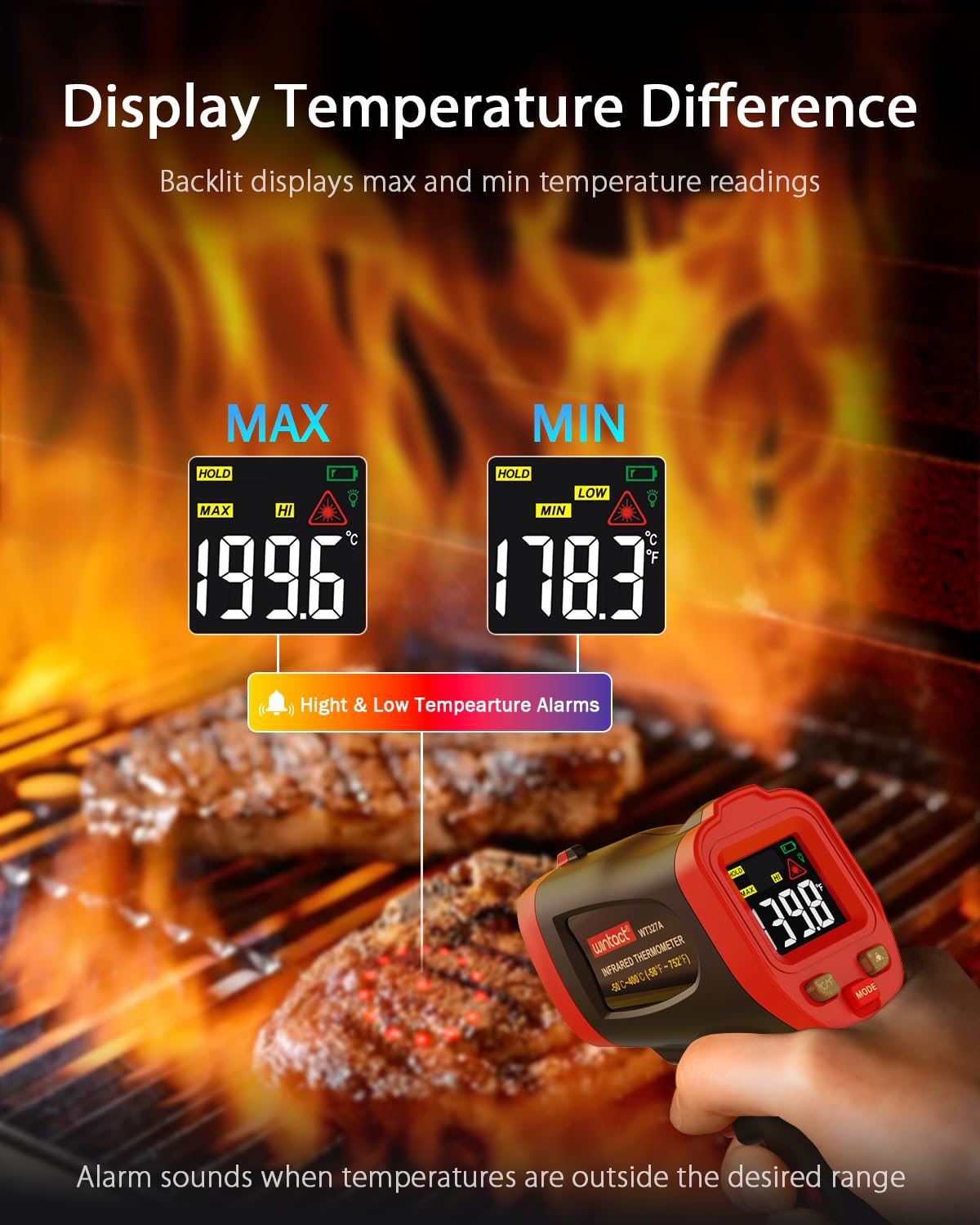
Image 6.3: Displaying Max and Min temperature readings.
6.5 High and Low Temperature Alarms
The device can be set to alert you when the measured temperature goes above a high limit or below a low limit.
- Press the 'MODE' button until 'HAL' (High Alarm) or 'LAL' (Low Alarm) is displayed.
- Use the up/down arrow buttons to set the desired temperature threshold.
- An audible and/or visual alarm will activate if the measured temperature crosses the set limit.

Image 6.4: High and Low Temperature Alarms in action.
6.6 Ambient Temperature Measurement
The WT327A can also measure the ambient air temperature. The response time for ambient temperature measurement is approximately 10 seconds.
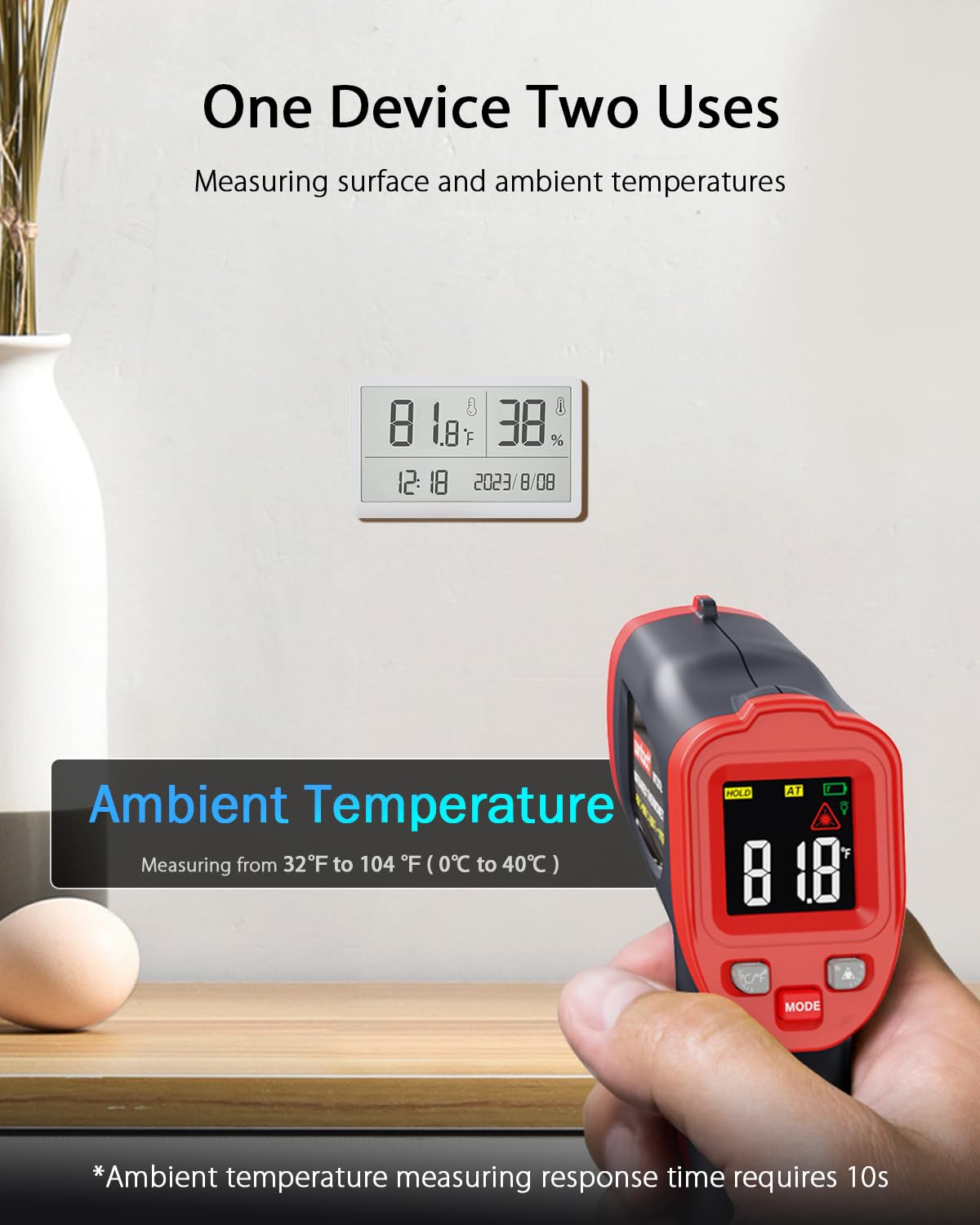
Image 6.5: Measuring ambient temperature.
7. Maintenance
7.1 Cleaning
- To clean the device, wipe it with a soft, damp cloth. Do not use abrasive cleaners or solvents.
- Ensure the lens is clean and free of dust or debris for accurate readings. Use a soft brush or compressed air for the lens.
7.2 Storage
- Store the thermometer in a cool, dry place away from direct sunlight and extreme temperatures.
- If storing for an extended period, remove the batteries to prevent leakage.
8. Troubleshooting
If you encounter issues with your Wintact WT327A thermometer, refer to the following common problems and solutions:
- No Display/Device Not Turning On:
- Check if batteries are installed correctly with proper polarity.
- Replace with new AAA batteries.
- Inaccurate Readings:
- Ensure the lens is clean.
- Adjust the emissivity setting to match the target material (refer to Section 6.3).
- Ensure the distance-to-spot ratio is appropriate for your measurement distance. For best results, measure from 14.17 inches (36 cm) away.
- Avoid measuring through steam or smoke, as this can interfere with readings.
- Laser Not Visible:
- The laser is activated when the trigger is pressed. Ensure the trigger is held down.
- Check battery level.

Image 8.1: Avoid measuring through steam for accurate results.
9. Specifications
| Specification | Value |
|---|---|
| Model Number | WT327A |
| Temperature Range | -58℉ to 752℉ (-50℃ to 400℃) |
| Accuracy | ±1.5℃ (2.7℉) |
| Distance-to-Spot Ratio (D:S) | 12:1 |
| Emissivity | Adjustable 0.1-1.0 |
| Response Time | 0.5 seconds |
| Power Supply | 2x AAA Batteries (included) |
| Auto-Off | 7 seconds of inactivity |
| Product Dimensions | 3.59 x 1.57 x 6.14 inches |
| Item Weight | 4.59 ounces |
| Outer Material | Plastic |
| Display Type | Digital |
| Special Feature | High & Low Temperature Alarm |

Image 9.1: Physical dimensions of the Wintact WT327A.
10. Warranty and Customer Service
The Wintact WT327A Infrared Temperature Thermometer Gun comes with a 1-year warranty. For warranty claims, technical support, or any inquiries, please contact Wintact customer service. Details can typically be found on the product packaging or the official Wintact website.
Wintact offers friendly 24/7 customer service to assist you with any product-related questions or issues.


