
1. Introduction
This manual provides detailed instructions for the safe and effective use of your FeiyuTech SCORP 3 KIT 3-Axis Camera Stabilizer. Please read this manual thoroughly before operating the device to ensure optimal performance and to prevent damage. The FeiyuTech SCORP 3 KIT is designed to provide smooth, stable footage for a wide range of cameras, including DSLRs and mirrorless models from Canon, Sony, Panasonic, Nikon, and Fujifilm.
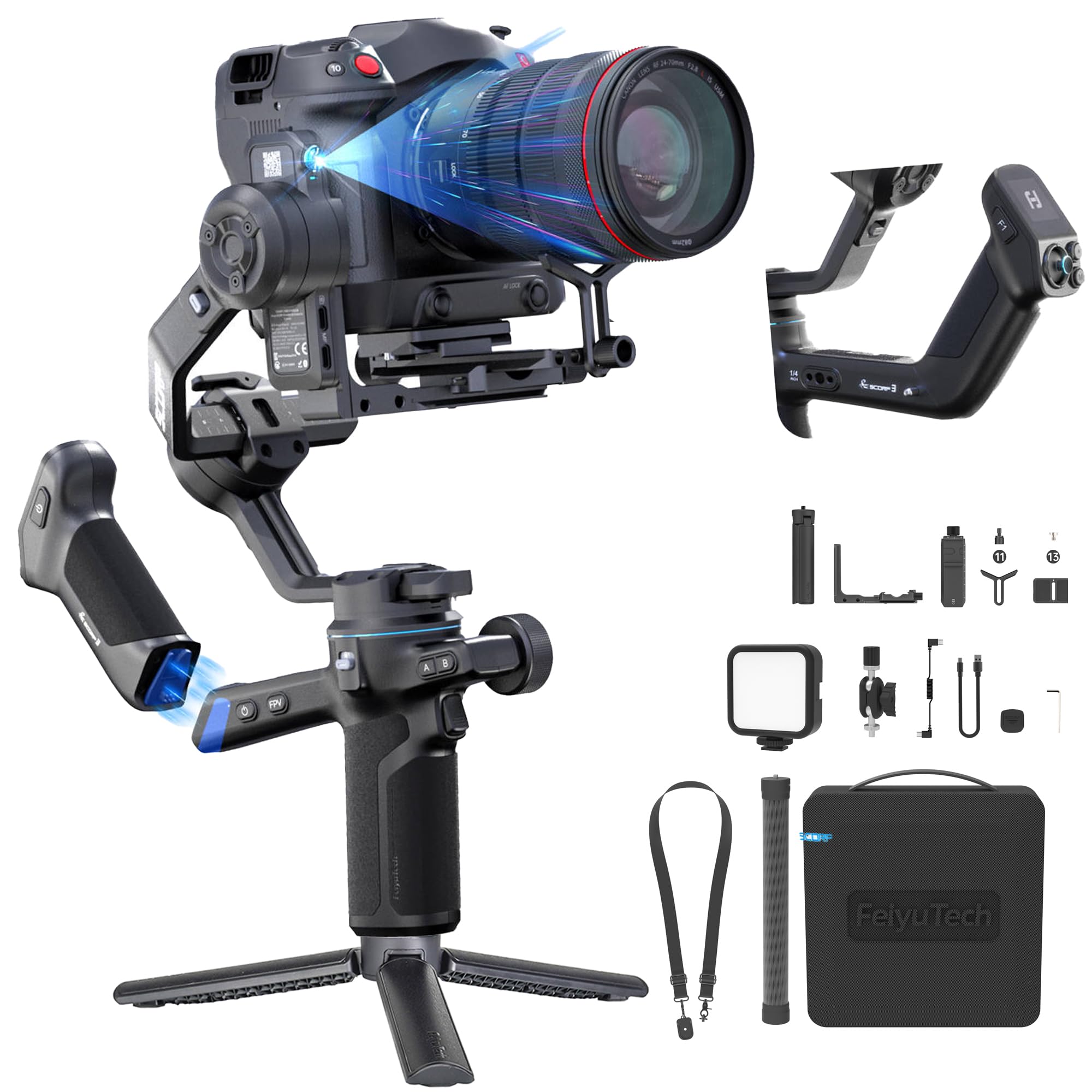
Image: FeiyuTech SCORP 3 KIT 3-Axis Camera Stabilizer, showcasing its ergonomic design and camera mounting.
2. What's in the Box
Verify that all the following items are included in your FeiyuTech SCORP 3 KIT package:

Image: A visual representation of all components included in the FeiyuTech SCORP 3 KIT.
- Main Body
- USB-C to Type-C Camera Control Cable
- USB-C Charging Cable
- Dust Cover
- Allen Key
- Fill Light
- Articulating Arm
- Tripod
- Fixed Plate
- Quick Release Plate
- Camera Fixing Screws (x2)
- Lens Holder
- Upper Quick Release Plate
- Storage Bag
- Extension Rod
- Weight Reducing Shoulder Strap
3. Setup
3.1 Mounting the Camera
Attach your camera to the quick release plate. Ensure the camera is securely fastened. The gimbal supports a modular structure allowing for flexible camera positioning.

Image: Illustration of the gimbal's extended axis arms and repositionable mounting slider for various camera and lens combinations.
3.2 Balancing the Gimbal
Proper balancing is crucial for optimal performance and battery life. Unlock each axis one by one using the quick-lock motor locks and adjust the camera position until it remains level in all directions. The gimbal features a snap-on locking system for quick and secure setup.

Image: Close-up of the quick-lock 3-axis motor locks, designed for fast and secure adjustments.
3.3 Powering On/Off
Press and hold the power button to turn the gimbal on or off. Ensure the gimbal is balanced before powering on to prevent motor strain.
3.4 Initial Calibration
After balancing and powering on, the gimbal may perform an automatic calibration. If manual calibration is needed, refer to the touchscreen menu for the calibration option.
3.5 Connecting via Bluetooth
The gimbal can connect directly to your camera via Bluetooth for shutter control. Refer to your camera's manual for Bluetooth pairing instructions. Once paired, you can tap to focus, start, or stop recording directly from the gimbal.

Image: Demonstrates the Bluetooth shutter feature, allowing direct camera control from the gimbal handle.
4. Operation
4.1 Operating Modes
The FeiyuTech SCORP 3 KIT offers various operating modes to suit different shooting scenarios:
- Pan Follow (PF): The camera pans left and right with your movement, while tilt and roll axes are locked.
- Pan & Tilt Follow (PTF): The camera follows your pan and tilt movements, while the roll axis is locked.
- FPV (First Person View): All three axes follow your movement, providing a dynamic, immersive perspective.
- Lock (L): All three axes are locked, keeping the camera pointed in a fixed direction.
- Flash Follow: Provides rapid response to movements for quick transitions.
4.2 Using the 1.3" Touchscreen
The 1.3-inch HD touchscreen provides an intuitive interface for mode switching and parameter adjustments. Navigate through menus and settings with ease.

Image: A user interacting with the 1.3-inch touchscreen for quick settings adjustments.
4.3 AI Tracking and Gesture Control
The integrated AI tracking module allows the gimbal to automatically follow a subject without external accessories. Simply activate it and begin shooting. Gesture control enables remote shooting and creative framing:
- Open Palm: Shoot / Record
- OK Gesture: Start / Stop Face Tracking
- Thumbs Opposite Direction: Start / Stop Tracking
- Double L-Shaped Gesture: Custom Framing
- Double Thumbs-up Gesture: Turn off gesture control

Image: The gimbal actively tracking a subject using its built-in AI module, with an on-screen indicator.

Image: Visual guide to various hand gestures for controlling the gimbal's tracking and recording functions.
4.4 Detachable Teapot Handle
The integrated teapot-style handle provides ergonomic comfort. When detached, it functions as a remote control, allowing for remote operation and parameter adjustment, ideal for solo creators.

Image: Demonstrates the detachable teapot handle being used both attached for ergonomic grip and detached as a remote control.
4.5 Vertical Shooting
The modular design allows for quick, tool-free rotation of the camera and mounting slider by 90 degrees, enabling native vertical shooting for social media content.
4.6 App Control
Connect the gimbal to the Feiyu SCORP app for advanced control, parameter customization, and firmware updates. The app offers creative tools such as panorama, automatic rotation, and time-lapse functions.

Image: Screenshots of the Feiyu SCORP app interface, showing various creative control options like panorama and time-lapse.
5. Maintenance
5.1 Cleaning
Regularly clean the gimbal with a soft, dry cloth. Avoid using liquid cleaners or solvents that could damage the finish or internal components. Ensure no dust or debris accumulates in the motor joints.
5.2 Storage
When not in use, store the gimbal in its provided storage bag or case to protect it from dust and physical damage. Ensure all axes are locked before storage. Store in a cool, dry place away from direct sunlight.
5.3 Battery Care
The gimbal features a 14-hour battery life. For optimal battery longevity, avoid fully discharging the battery frequently. Charge the battery regularly, even if the gimbal is not in use for extended periods (e.g., every 3 months). Use only the provided USB-C charging cable.

Image: Close-up of the gimbal's status indicator lights, showing battery level and axis status.
6. Troubleshooting
6.1 Gimbal Not Powering On
- Ensure the battery is charged. Connect the gimbal to a power source using the USB-C charging cable.
- Verify the power button is pressed and held for the required duration.
6.2 Unstable Footage / Vibrations
- Re-balance the camera on all three axes. Improper balancing is a common cause of instability.
- Check that all motor locks are disengaged before operation.
- Ensure the camera payload does not exceed the maximum capacity of 3.5 kg.
- Perform a gimbal calibration via the touchscreen menu or the Feiyu SCORP app.
6.3 Bluetooth Connection Issues
- Ensure Bluetooth is enabled on both the gimbal and your camera.
- Delete previous pairings on both devices and attempt to re-pair.
- Ensure the camera is compatible with the gimbal's Bluetooth control features.
6.4 AI Tracking Not Working
- Ensure the AI tracking module is activated.
- Check lighting conditions; extreme low light may affect tracking performance.
- Ensure the subject is clearly visible and within the gimbal's field of view.
7. Specifications
| Feature | Detail |
|---|---|
| Manufacturer | FeiyuTech |
| Model Number | SCORP 3 KIT |
| Product Dimensions | 30.4 x 20.4 x 14.6 cm |
| Item Weight | 1 kg |
| Color | Black |
| Compatible Devices | DSLR, Mirrorless (Canon, Sony, Panasonic, Nikon, Fujifilm) |
| Folded Dimensions | 8.9 x 6.89 x 13.56 inches |
| Max Payload | 3.5 kg (7.7 lbs) |
| Battery Life | Up to 14 hours |
| Touchscreen | 1.3-inch HD OLED |
| Stabilization | 3-Axis (Pan, Tilt, Roll) |
| Special Features | Built-in AI Tracking, Gesture Control, Detachable Teapot Handle, Quick Vertical Shooting, Bluetooth Shutter |
8. Warranty & Support
8.1 Warranty Information
The FeiyuTech SCORP 3 KIT comes with a standard manufacturer's warranty. Please refer to the warranty card included in your package or visit the official FeiyuTech website for detailed warranty terms and conditions.
8.2 Customer Support
For technical assistance, troubleshooting, or any inquiries regarding your FeiyuTech SCORP 3 KIT, please contact FeiyuTech customer support through their official website or the contact information provided in your product documentation. Ensure you have your product model number and purchase details ready when contacting support.


