
1. Introduction
The Lexibook My Best-E Dog Console (Model JLMBDOG) is an interactive virtual pet designed to provide an engaging experience. This manual provides essential information for setting up, operating, and maintaining your digital companion. Please read these instructions carefully before use.
2. Safety Information
- WARNING: CHOKING HAZARD - Small parts. Not for children under 3 years.
- Do not attempt to disassemble or modify the device.
- Keep the device away from water and excessive moisture.
- Avoid exposing the device to extreme temperatures or direct sunlight.
- Dispose of batteries responsibly according to local regulations.
3. Package Contents
Ensure all items are present in the package:
- 1 x Lexibook My Best-E Dog Console (Model JLMBDOG)
- 1 x User Manual (English)
- Note: Battery may or may not be pre-installed. Refer to the Setup section for battery installation.
4. Product Overview
The My Best-E Dog Console is a compact, portable virtual pet device featuring an LCD screen and a keyring for easy transport.

Figure 4.1: Lexibook My Best-E Dog Console in its retail packaging. The packaging displays the device, its name, and age recommendation.
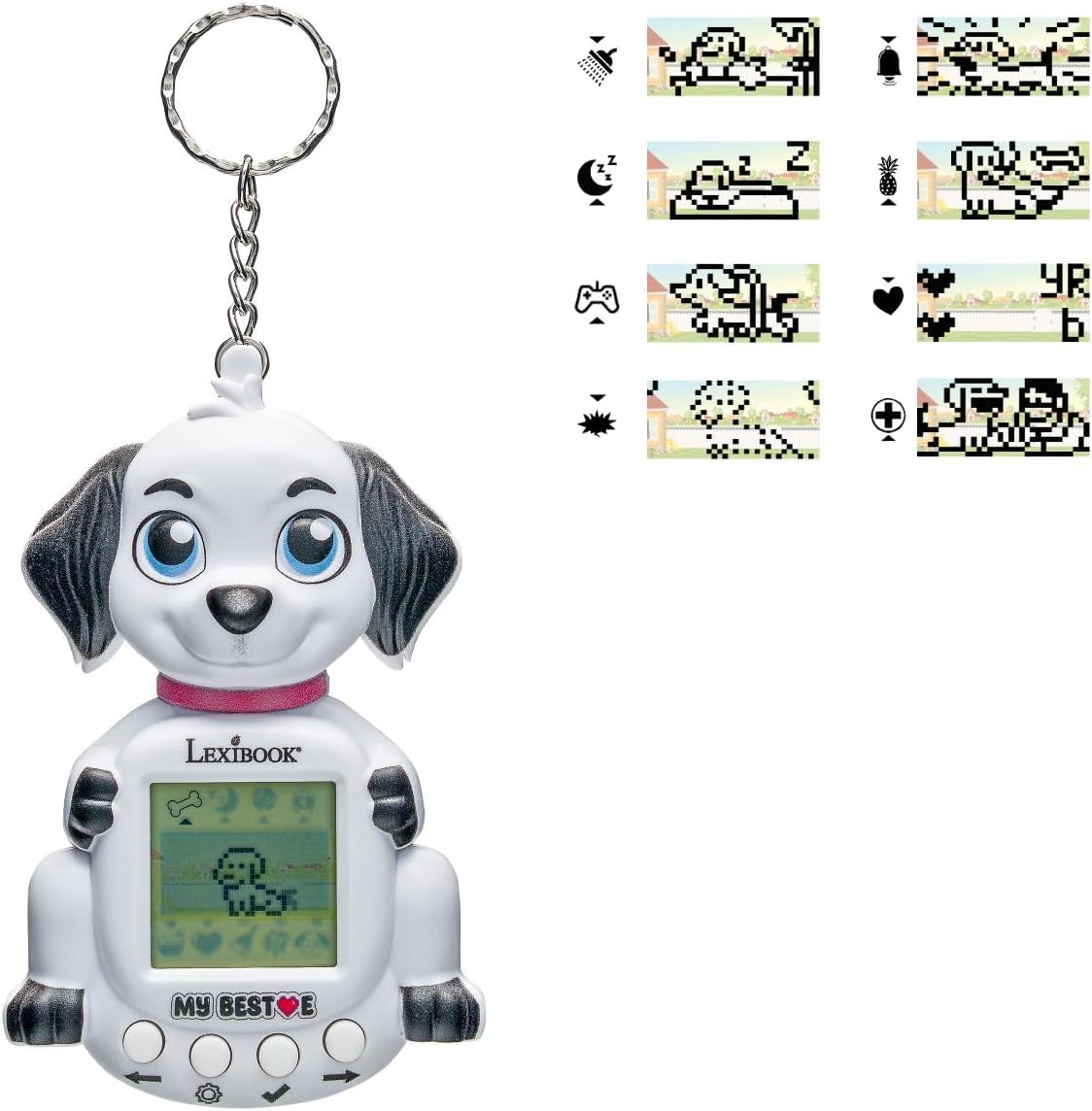
Figure 4.2: Front view of the Lexibook My Best-E Dog Console. This image highlights the LCD screen displaying a virtual dog, along with the control buttons located below the screen. Various icons representing actions like feeding, washing, and playing are visible.

Figure 4.3: Back view of the Lexibook My Best-E Dog Console. This image shows the rear of the device, including the battery compartment cover and speaker holes. The keyring attachment is visible at the top.
4.1 Components
- LCD Screen: Displays your virtual dog and interaction icons.
- Control Buttons: Used for navigation and selecting actions. (Typically 3-4 buttons below the screen).
- Keyring: For portability.
- Battery Compartment: Located on the back of the device.
5. Setup
5.1 Battery Installation
The Lexibook My Best-E Dog Console requires one (1) CR2032 Lithium-Ion button cell battery (not always included).
- Locate the battery compartment on the back of the device (refer to Figure 4.3).
- Using a small Phillips head screwdriver, carefully unscrew the battery compartment cover.
- Insert one (1) CR2032 battery with the positive (+) side facing upwards.
- Replace the battery compartment cover and secure it with the screw.
- The device should power on automatically or after pressing a button.
Important: Ensure correct battery polarity. Do not mix old and new batteries or different types of batteries. Remove batteries if the device will not be used for an extended period.
6. Operating Instructions
6.1 Power On/Off
- Power On: After battery installation, the device should turn on. If not, press any button.
- Power Off: The device typically enters a low-power sleep mode after a period of inactivity. There is usually no manual power-off button for virtual pets of this type; removing the battery is the only way to fully power down.
6.2 Basic Navigation and Interaction
The console features several buttons (usually 3-4) below the LCD screen. These buttons are used to navigate menus and select actions for your virtual dog.
- Left/Right Buttons: Used to scroll through available actions or menu options.
- Select/Confirm Button: Used to choose an action or confirm a selection.
- Cancel/Back Button: (If present) Used to return to the previous screen or cancel an action.
6.3 Caring for Your Virtual Dog
Your virtual dog requires regular care to stay happy and healthy. Monitor its needs on the LCD screen and perform the following actions:
- Feeding: Select the food icon (e.g., a bone or bowl) to feed your dog. Regular feeding keeps its hunger level down.
- Washing: Select the shower or bath icon to clean your dog. This helps maintain its hygiene.
- Playing: Select the game or ball icon to play with your dog. Playing increases its happiness and can help it grow.
- Sleeping: When your dog is tired, it will indicate a need for sleep. Select the sleep icon (e.g., a crescent moon or Zzz) to put it to rest.
- Health Monitoring: The screen may display indicators for your dog's health, happiness, and hunger levels. Address these needs promptly.
- Growth: Consistent care will allow your virtual dog to grow and evolve over time.
7. Maintenance
7.1 Cleaning
To clean the device, use a soft, dry cloth. Do not use abrasive cleaners, solvents, or immerse the device in water.
7.2 Storage
When not in use for extended periods, store the console in a cool, dry place, away from direct sunlight. Consider removing the battery to prevent leakage.
8. Troubleshooting
| Problem | Possible Cause | Solution |
|---|---|---|
| Device does not turn on. | Battery is dead or incorrectly installed. | Check battery polarity. Replace with a new CR2032 battery. |
| Screen is blank or unresponsive. | Low battery, device frozen, or internal error. | Replace battery. If issue persists, remove battery for 30 seconds and reinsert to reset. |
| Buttons are not responding. | Device frozen or low battery. | Replace battery. Remove and reinsert battery to reset the device. |
| Virtual dog is unhappy or sick. | Neglected care (hunger, hygiene, play). | Perform necessary actions: feed, wash, play, and ensure it gets enough sleep. |
9. Specifications
- Model: JLMBDOG
- Brand: LEXiBOOK
- Power Source: 1 x CR2032 Lithium-Ion Battery (Battery Powered)
- Display Type: LCD
- Material: Plastic
- Item Weight: Approximately 0.05 Kilograms (1.76 ounces)
- Product Dimensions: Approximately 4.07 x 32.87 x 0.94 inches (Note: The listed product dimensions may refer to packaging. The device itself is compact.)
- Recommended Age: 5 years and up
- Release Date: October 15, 2025
10. Warranty and Support
For warranty information, technical support, or any questions regarding your Lexibook My Best-E Dog Console, please refer to the contact information provided on the product packaging or visit the official Lexibook website.
Lexibook Official Website: www.lexibook.com