
1. Introduction and Overview
This manual provides essential information for the safe and efficient installation, operation, and maintenance of your Fitop YSF-110C1 Bathroom Exhaust Fan with LED Light. This unit is designed to improve air quality by quickly removing moisture and odors from bathrooms, while also providing versatile lighting options.
2. Safety Information
Please read all instructions carefully before installation and use. Failure to follow these instructions may result in electric shock, fire, or personal injury. Keep this manual for future reference.
- Always disconnect power at the circuit breaker before servicing or installing the unit.
- Installation should be performed by a qualified electrician in accordance with all local and national electrical codes.
- Ensure the unit is properly grounded.
- Do not use this fan in areas where it may be exposed to water spray or direct contact with water.
- This product is ETL certified for safety.
3. Product Features
- Powerful & Quiet Ventilation: Provides 130 CFM airflow, suitable for rooms up to 100-130 sq. ft., operating at a quiet 1.5 Sones.
- Integrated LED Lighting: Features a built-in 1300-lumen LED light for bright, energy-efficient illumination.
- Adjustable Color Temperature: Offers three main color temperature settings (2700K warm white, 4000K bright white, 6500K cool white) and a 2200K soft night light.
- Light Memory Function: Automatically saves the last selected color temperature if the unit is powered off for more than 3 seconds.
- Durable Construction: Constructed with galvanized steel housing, a zinc alloy frame, and a tough PC diffuser for corrosion resistance and longevity in high-humidity environments.
- Easy Installation: Designed for hassle-free ceiling mounting without complex wiring or extra cutting.

Figure 3.1: Key features of the Fitop Bathroom Exhaust Fan with Light.

Figure 3.2: Internal components and durable construction.
4. Setup and Installation
The Fitop YSF-110C1 is designed for straightforward ceiling installation. Ensure your ceiling cutout is 9.25" L × 9.25" W × 5.9" H and the duct requires a standard 4" diameter. The light housing measures 10.25" × 10.25".
4.1 Pre-Installation Checklist
- Verify ceiling opening and duct size.
- Gather necessary tools: screwdriver, tape measure, drywall saw, hammer, safety glasses.
- Ensure power is disconnected at the circuit breaker.
4.2 Installation Steps
- Prepare Ceiling Opening: Cut a ceiling opening of 9.25 inches by 9.25 inches.
- Install Side Rails: Attach the side rails to the fan housing.
- Insert Housing: Insert the fan housing into the ceiling opening. Extend the rails and secure them to the ceiling joists with screws.
- Electrical Connection: Open the junction box cover. Connect the black (live), white (neutral), and green (ground) wires from your electrical supply to the corresponding wires on the fan. Secure connections with wire nuts.
- Duct Connection: Attach the 4-inch diameter ductwork to the fan's exhaust connector. Secure with tape or clamps to ensure an airtight seal.
- Attach Light Cover: Snap the wires from the light cover into the motor's receptacle. Insert the spring clips on the light cover into the corresponding slots on the fan housing until it sits flush with the ceiling.
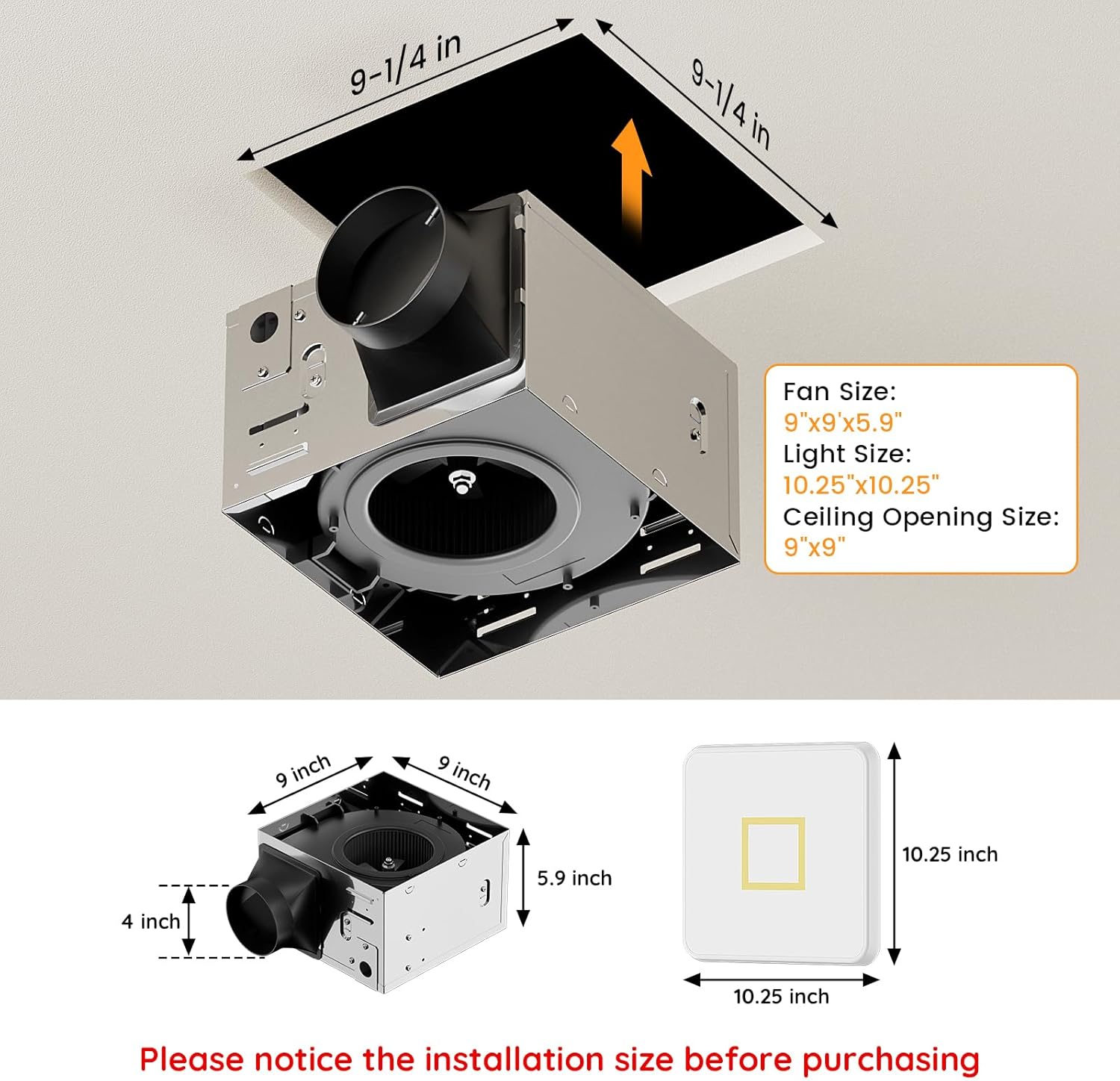
Figure 4.1: Product dimensions for installation.
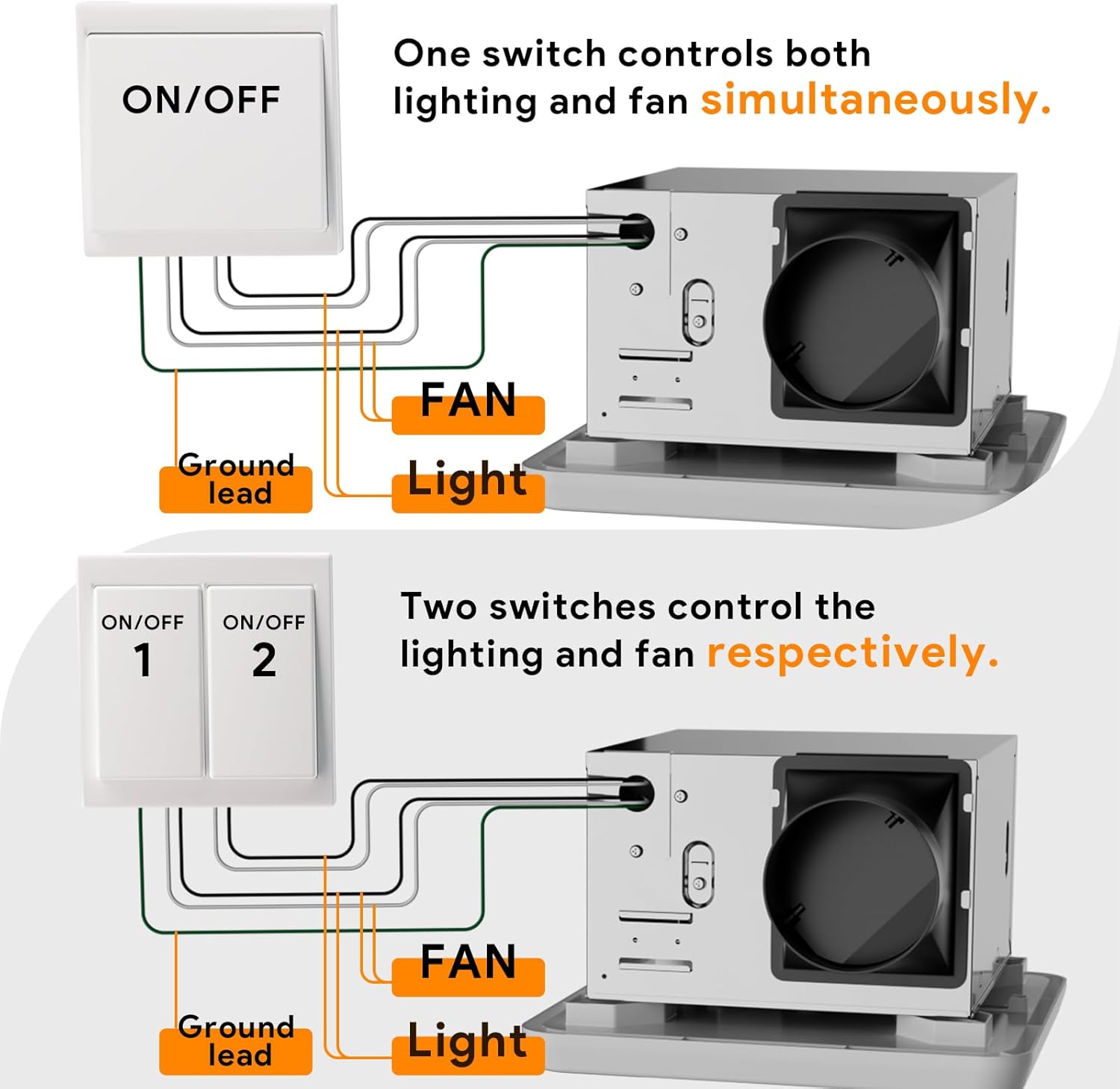
Figure 4.2: Wiring options for simultaneous or separate control of fan and light.
Video 4.1: Official installation guide for the Fitop Bathroom Exhaust Fan with Light. This video demonstrates the steps for installing the fan housing, connecting electrical wires, attaching ductwork, and securing the light cover.
5. Operating Instructions
The Fitop YSF-110C1 fan and light functions are controlled via your standard wall switch.
5.1 Fan Operation
Turn the wall switch ON to activate the exhaust fan. The fan will begin to remove moisture and odors from the room. Turn the switch OFF to deactivate the fan.
5.2 Light Operation and Color Temperature Adjustment
The LED light offers multiple color temperature settings and a night light function. To cycle through the settings:
- Turn the wall switch ON to activate the light. It will default to the last used setting due to the memory function.
- To change the color temperature, quickly toggle the wall switch OFF and then ON again. Each quick toggle will cycle through the following settings: 2700K (warm white), 4000K (bright white), 6500K (cool white), and 2200K (soft night light).
- The light features a memory function. If the light is turned OFF for more than 3 seconds, it will remember the last selected color temperature and resume that setting when turned ON again.

Figure 5.1: Demonstrating the three main color temperature settings (2700K, 4000K, 6500K) and how to switch between them using a wall switch.

Figure 5.2: The soft 2200K nightlight mode.
6. Maintenance
Regular maintenance ensures optimal performance and longevity of your exhaust fan.
6.1 Cleaning the Grille and Light Diffuser
- Disconnect power to the unit at the circuit breaker.
- Carefully pull down the light diffuser to release the spring clips and remove it from the housing.
- Wipe the grille and light diffuser with a soft, damp cloth. Do not use abrasive cleaners or solvents.
- Ensure all parts are completely dry before reattaching.
- Reinsert the spring clips into the housing and push the diffuser up until it snaps into place.
6.2 Motor and Fan Blade Cleaning
Periodically inspect the fan blades and motor for dust and debris accumulation. If cleaning is necessary, follow these steps:
- Disconnect power to the unit at the circuit breaker.
- Remove the light diffuser as described above.
- Use a vacuum cleaner with a brush attachment or a soft brush to gently remove dust from the fan blades and motor housing. Avoid bending the fan blades.
- Do not apply water or liquid cleaners directly to the motor or electrical components.
- Reassemble the light diffuser.
7. Troubleshooting
If you experience issues with your Fitop exhaust fan, refer to the following table for common problems and solutions.
| Problem | Possible Cause | Solution |
|---|---|---|
| Fan does not operate | No power supply; Loose wiring; Motor malfunction | Check circuit breaker; Verify wiring connections; Contact qualified electrician for motor inspection. |
| Light does not turn on | No power supply; Loose wiring; LED module failure | Check circuit breaker; Verify wiring connections; Contact customer support. |
| Fan is noisy | Accumulated dust/debris on blades; Loose mounting screws; Obstruction in ductwork | Clean fan blades (see Maintenance); Tighten mounting screws; Check ductwork for blockages. |
| Poor ventilation | Blocked ductwork; Fan size inadequate for room; Dirty fan blades | Check and clear ductwork; Ensure fan is correctly sized for the room; Clean fan blades. |
| Light color does not change | Incorrect toggling of switch | Ensure quick OFF/ON toggles to cycle through settings. |
8. Specifications
| Feature | Specification |
|---|---|
| Model Name | YSF-110C1 |
| Brand | Fitop |
| Airflow (CFM) | 130 CFM |
| Sound Level (Sones) | 1.5 Sones |
| LED Light Output | 1300 Lumens |
| Color Temperatures | 2700K, 4000K, 6500K (main); 2200K (night light) |
| Power Source | AC |
| Voltage | 120 Volts (AC) |
| Wattage | 47 watts |
| Fan Size | 9 Inch |
| Product Dimensions | 12.6"D x 9.84"W x 12.6"H |
| Ceiling Cutout | 9.25" L × 9.25" W × 5.9" H |
| Duct Diameter | 4 inches |
| Mounting Type | Ceiling Mount |
| Certifications | ETL Certified |
9. Warranty and Support
For warranty information or technical support, please refer to the documentation included with your product or contact Fitop customer service. Keep your purchase receipt as proof of purchase.
For further assistance, please visit the official Fitop store: Fitop Store on Amazon.