
1. Introduction
This manual provides detailed instructions for the proper use, setup, and maintenance of your TTARTISAN 35mm F1.4 APS-C Tilt Shift Lens. Please read this manual thoroughly before using the lens to ensure optimal performance and longevity.
The TTARTISAN 35mm F1.4 APS-C Tilt Shift Lens is a manual focus lens designed for creative photography. It features both tilt and rotation mechanisms, allowing for precise control over the plane of focus and perspective. The F1.4 large aperture enables excellent low-light performance and shallow depth of field effects.
2. Product Features
- Tilt Mechanism: Allows the front lens group to tilt up to 8 degrees left or right. This mechanism enables control over the direction of the focus plane, offering greater flexibility in composition and creative effects.
- 360° Rotating Mechanism: Works in conjunction with the tilt mechanism, allowing the focus plane to be adjusted across a full 360 degrees. The rotating mechanism is marked in 15-degree increments with limit stops, ensuring precise angle control.
- F1.4 Large Aperture: The F1.4 large aperture allows for significant light gathering, producing pleasing background blur (bokeh) and enabling photography in low-light conditions.
- De-clicked Aperture Ring: The lens is designed with an infinite (de-clicked) aperture ring, which facilitates smooth aperture adjustments during video recording.
- Compatibility: This lens is compatible with Canon RF-mount APS-C cameras such as the R7, R10, R50, and R100. For full-frame Canon RF cameras (e.g., EOS R, RP, R5, R5C, R6, R6 Mark II, R3), the camera must be set to APS-C mode for proper operation.
3. Package Contents
Please verify that all items listed below are included in your package:
| Item | Quantity |
|---|---|
| TTARTISAN Tilt APS-C 35mm F1.4 Lens | 1 |
| Front Lens Cap | 1 |
| Rear Lens Cap | 1 |
| Product Box | 1 |
| User Manual | 1 |
| Warranty Card | 1 |
If any items are missing or damaged, please contact customer support.

Image: Package contents list.
4. Setup
4.1 Attaching the Lens to Your Camera
- Ensure your camera is powered off.
- Remove the rear lens cap from the TTARTISAN lens and the body cap from your camera.
- Align the red dot on the lens barrel with the red dot on your camera's lens mount.
- Gently insert the lens into the camera mount and rotate it clockwise until it clicks into place. Do not force the lens.
- Remove the front lens cap. Your lens is now ready for use.
4.2 Detaching the Lens from Your Camera
- Ensure your camera is powered off.
- Attach the front lens cap to the lens.
- While pressing the lens release button on your camera body, rotate the lens counter-clockwise until it detaches.
- Immediately attach the rear lens cap to the lens and the body cap to your camera to protect the sensor from dust.

Image: TTARTISAN 35mm F1.4 APS-C Tilt Shift Lens.

Image: Lens mounted on a camera.
5. Operating the Lens
5.1 Manual Focus
This is a manual focus lens. Rotate the focus ring (the ring closest to the front of the lens with distance markings) to adjust the focus. Use your camera's focus peaking or magnification features for precise focusing.
5.2 Aperture Control
The lens features a manual aperture ring (the ring with F-stop markings). Rotate this ring to select your desired aperture. The de-clicked design allows for smooth, stepless aperture changes, which is beneficial for video recording.
5.3 Tilt Mechanism
The tilt mechanism allows you to shift the plane of focus. To use the tilt function:
- Locate the tilt adjustment knob on the side of the lens barrel.
- Loosen the locking screw (if present) for the tilt mechanism.
- Gently tilt the front part of the lens up to 8 degrees in either direction. Observe the effect through your camera's viewfinder or LCD screen.
- Once the desired tilt angle is achieved, tighten the locking screw to secure the position.

Image: Diagram explaining the tilt mechanism and its effect on the focus plane.

Image: Examples of focus control using the tilt function for portraits.
5.4 360° Rotation Mechanism
The rotation mechanism allows you to change the orientation of the tilt effect without remounting the lens. To use the rotation function:
- Locate the rotation locking ring or mechanism on the lens barrel.
- Loosen the rotation locking mechanism.
- Rotate the lens barrel to the desired angle. The lens has markings at 15-degree increments for precise positioning.
- Tighten the rotation locking mechanism to secure the lens in place.

Image: Demonstrating the 360° rotating mechanism.
5.5 Creating Miniature Effects
By applying a strong tilt, you can create a 'miniature world' effect, making real-world scenes appear like small models. This is achieved by limiting the depth of field to a narrow band, simulating the effect of close-up photography on small objects.

Image: Examples of the miniature world effect.

Image: Example of F1.4 large aperture bokeh in a night scene.
6. Maintenance
6.1 Cleaning the Lens
- Use a soft, lint-free cloth or a lens brush to remove dust from the lens surfaces.
- For stubborn smudges or fingerprints, apply a small amount of lens cleaning solution to a clean microfiber cloth and gently wipe the lens in a circular motion.
- Never use abrasive materials or harsh chemicals to clean the lens.
- Avoid touching the glass elements directly with your fingers.
6.2 Storage
- Always attach the front and rear lens caps when the lens is not in use.
- Store the lens in a cool, dry place, away from direct sunlight and extreme temperatures.
- If storing for an extended period, consider using a dehumidifying cabinet or silica gel packets to prevent mold growth.
6.3 General Precautions
- Avoid exposing the lens to water or high humidity.
- Do not drop the lens or subject it to strong impacts.
- Keep the lens away from strong magnetic fields.
- Do not attempt to disassemble or repair the lens yourself. Contact authorized service personnel if repairs are needed.

Image: Warning label regarding product care.
7. Troubleshooting
- Lens not mounting: Ensure the red dots on the lens and camera body are aligned, and rotate until a click is heard. Do not force. Check for any obstructions on the mount.
- Image is blurry: This is a manual focus lens. Ensure you are manually focusing correctly using your camera's focus aids. Check that the aperture is set appropriately for your desired depth of field.
- Tilt/Rotation mechanism is stiff: Ensure any locking screws or rings are loosened before attempting to adjust the tilt or rotation. Do not apply excessive force.
- No image or dark image: Check your camera settings. Ensure the camera is set to manual exposure mode or aperture priority mode, and that 'Shoot without lens' or a similar setting is enabled if your camera requires it for manual lenses. Adjust ISO, shutter speed, and aperture as needed.
If you encounter issues not covered here, please refer to the warranty and support section.
8. Specifications
| Feature | Specification |
|---|---|
| Focal Length | 35mm |
| Maximum Aperture | F1.4 |
| Minimum Aperture | F16 |
| Frame | APS-C |
| Angle of View | 45° |
| Optical Design | 7 Elements in 6 Groups |
| Mount | Canon RF |
| Filter Size | 52mm |
| Closest Focus Distance | 0.35m |
| Diaphragm Blades | 10pcs |
| Focus Method | Manual Focus (MF) |
| Tilt Angle | 8° |
| Rotation Angle | 360° |
| Weight | Approx. 341-350g (1.48 pounds) |
| Product Dimensions | 2.6 x 2.6 x 2.6 inches |
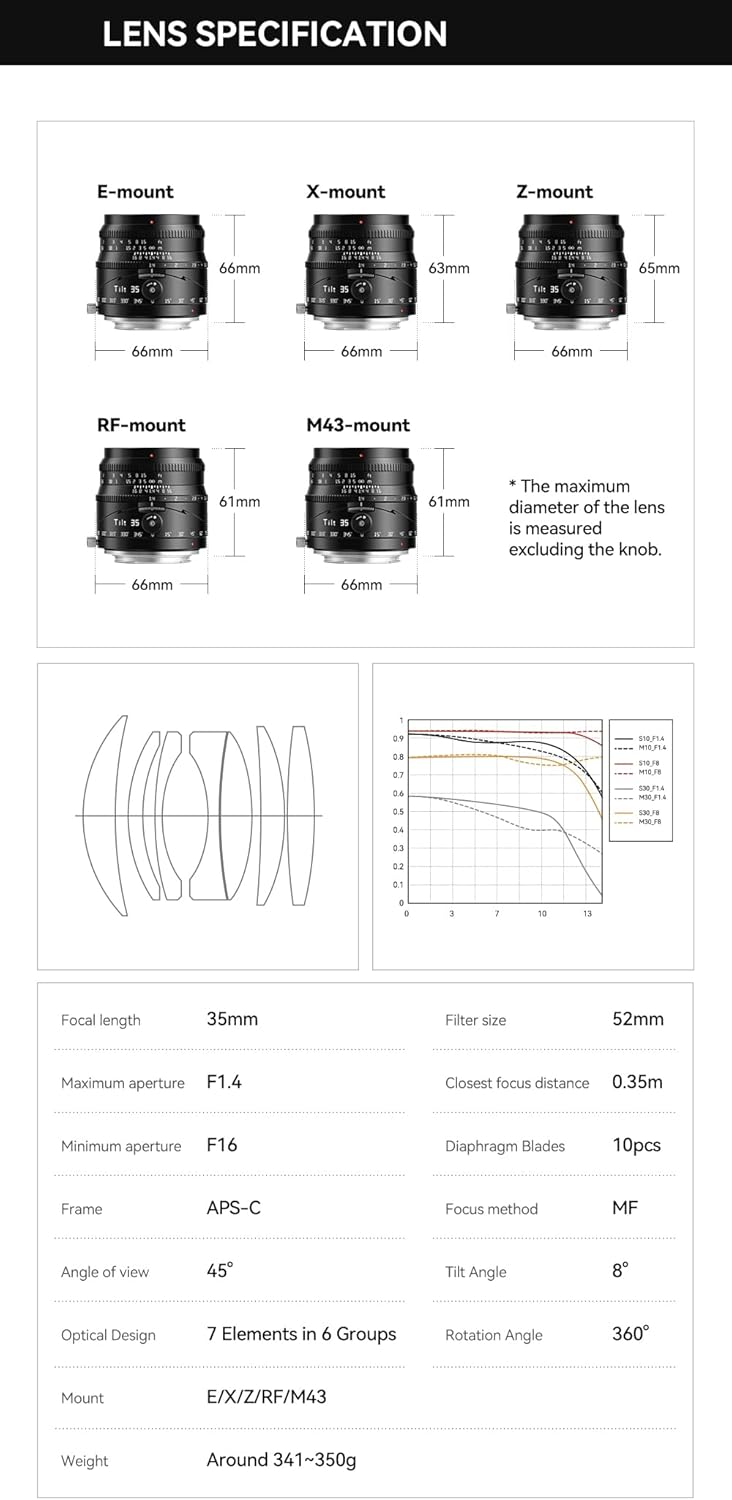
Image: Lens specifications diagram.
9. Warranty and Support
Your TTARTISAN 35mm F1.4 APS-C Tilt Shift Lens comes with a warranty as specified on the included warranty card. Please retain your proof of purchase for warranty claims.
For technical support, service, or warranty inquiries, please refer to the contact information provided on your warranty card or visit the official TTARTISAN website. Do not attempt to repair the lens yourself, as this may void your warranty.


