
BAFANG DPC010
BAFANG DPC010 eBike Display User Manual
Model: DPC010 | Brand: BAFANG
1. Product Overview
The BAFANG DPC010 is a high-definition 4.0-inch TFT color display designed for BAFANG mid-drive eBike motors. It provides essential riding data, intelligent features, and robust construction for an enhanced cycling experience.
Key Features:
- Specific Compatibility: Designed exclusively for BAFANG M620, M600, M560, M510, and M420 mid-drive motors using CAN protocol. Not compatible with other motor types or protocols.
- High-Definition Display: A 4.0-inch TFT HD screen provides clear and easy-to-read data including speed, mileage, battery level, error codes, power output, and customizable interface styles.
- Automatic Backlight: The display automatically adjusts its brightness based on ambient light conditions, ensuring optimal visibility in various environments.
- USB Charging Port: Features a built-in 5V/1A (Type-C) USB output for convenient charging of smartphones or other devices on the go.
- IPX7 Waterproof Rating: Ensures reliable operation even in light rain and wet conditions, making it suitable for diverse weather.
- Multiple Interface Styles: Offers three distinct interface themes for personalized display preferences.
- Multi-language Support: Supports UK English, German, Dutch, French, Italian, and Czech languages.

Figure 1: BAFANG DPC010 eBike Display showing primary data.
2. Setup and Installation
Proper installation is crucial for the optimal performance and longevity of your DPC010 display. Please follow these steps carefully.
2.1 Compatibility Check
Before installation, verify that your eBike motor is one of the compatible BAFANG mid-drive models (M620, M600, M560, M510, M420) and uses the CAN protocol. This display is not compatible with UART protocol motors or other brands.

Figure 2: Compatibility overview for DPC010 display, highlighting CAN protocol and specific BAFANG mid-drive motors.
2.2 Physical Installation
The display can be mounted on handlebars with diameters of Ø 22.2mm, 25.4mm, 31.8mm, or 35mm. Ensure the mounting bracket is securely fastened and the display is positioned for optimal viewing while riding.

Figure 3: Dimensions of the DPC010 display and its mounting components.
2.3 Wiring Connection
Connect the display cable to the corresponding 1T4 cable from your motor. It is essential that the wiring diagram of your motor's cable matches the display's requirements. Incorrect wiring can prevent the display from functioning.
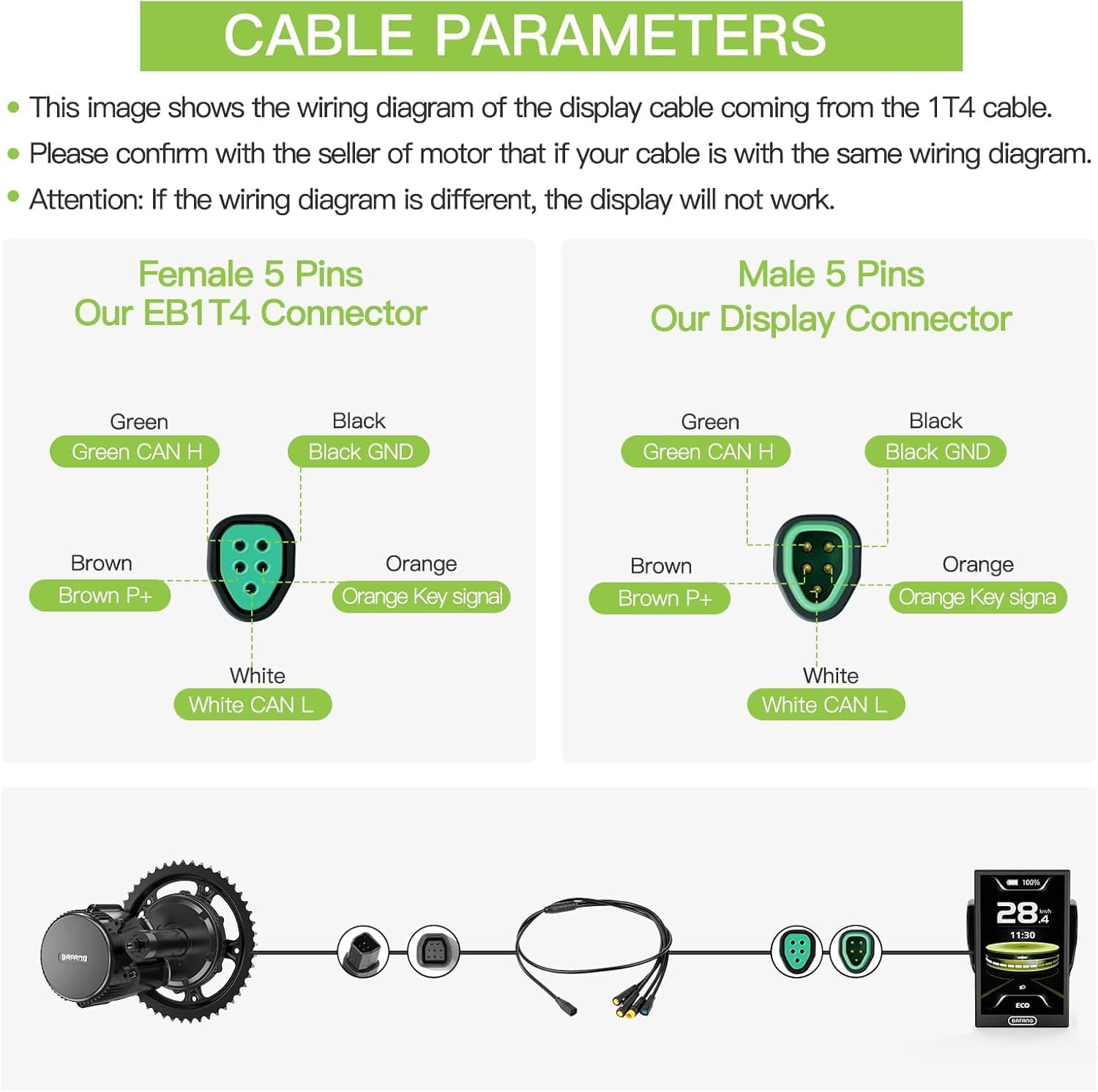
Figure 4: Cable parameters and wiring diagram for the DPC010 display connection.
3. Operating Instructions
This section details how to operate your BAFANG DPC010 display and utilize its various functions.
3.1 Display Content
The DPC010 display provides comprehensive information at a glance, including:
- Current Speed
- Total Mileage (Odometer)
- Trip Distance
- Battery Level Indicator
- Motor Power Output
- Error Codes (if applicable)
- Time
- Assistance Level (PAS Level)

Figure 5: Detailed view of DPC010 display content and features.
3.2 Interface Styles and Language Settings
The display offers three distinct interface styles to customize your viewing experience. You can also select from multiple languages: UK English, German, Dutch, French, Italian, and Czech.

Figure 6: Examples of the three customizable interface styles.
3.3 Automatic Backlight and Headlight Control
The display features an automatic backlight function that adjusts brightness based on ambient light. Additionally, it supports automatic headlight control, which can be configured through the display settings.
3.4 USB Charging Function
A Type-C USB port is integrated into the display, providing 5V/1A output for charging your mobile devices while riding. This feature is useful for navigation or communication during longer trips.

Figure 7: USB Type-C charging port in use.
3.5 App Integration
The DPC010 display can connect with a dedicated smartphone application (e.g., BAFANG GO+) for advanced settings, ride tracking, and data analysis. Search for the official app on your device's app store.

Figure 8: Smartphone app integration for advanced control and data.
4. Maintenance
To ensure the longevity and proper functioning of your DPC010 display, follow these simple maintenance guidelines.
- Cleaning: Wipe the display screen and body with a soft, damp cloth. Avoid using abrasive cleaners, solvents, or harsh chemicals, as these can damage the screen or casing.
- Water Exposure: While the display is IPX7 waterproof, avoid submerging it in water or exposing it to high-pressure water jets. Dry the display thoroughly if it gets wet.
- Storage: When not in use for extended periods, store the eBike and display in a cool, dry place away from direct sunlight and extreme temperatures.
- Cable Inspection: Periodically check all cables and connectors for any signs of wear, damage, or corrosion. Ensure connections are secure.
5. Troubleshooting
This section provides solutions to common issues you might encounter with your DPC010 display.
| Problem | Possible Cause | Solution |
|---|---|---|
| Display does not power on. |
|
|
| Display shows an error code. |
|
|
| USB charging port not working. |
|
|
6. Specifications
| Feature | Detail |
|---|---|
| Model Name | DPC010 Color Display |
| Screen Size | 4.0 Inches |
| Display Type | TFT HD Screen |
| Resolution | 480*800 Pixels |
| Color | Black |
| Material | ABS |
| Waterproof Rating | IPX7 |
| USB Output | 5V/1A (Type-C) |
| Compatible Motors | BAFANG M620, M600, M560, M510, M420 (CAN Protocol) |
| Installation Diameter | Ø 22.2 / 25.4 / 31.8 / 35 mm |
| Languages Supported | UK English, German, Dutch, French, Italian, Czech |
| Included Components | DPC010 Color Display (1 unit) |
7. Warranty Information
This BAFANG DPC010 eBike Display comes with a 1 Year Manufacturer Warranty from the date of purchase. This warranty covers defects in materials and workmanship under normal use.
The warranty does not cover damage resulting from:
- Improper installation or connection.
- Accidents, misuse, abuse, or neglect.
- Unauthorized repairs or modifications.
- Normal wear and tear.
- Use with incompatible motors or systems.
Please retain your proof of purchase for warranty claims.
8. Customer Support
For further assistance, technical support, or warranty claims, please contact the seller or manufacturer directly. Have your product model (DPC010) and proof of purchase ready when contacting support.
You may also find additional resources and FAQs on the official BAFANG website or the website of your product retailer.
Related documentsDPC010


Ask a question about this manual
Ask about setup, troubleshooting, compatibility, parts, safety, or missing instructions. Manuals+ will review the question and use this page’s manual context to help answer it.