
1. Introduction
The Fortinet FortiSwitch FS-124G-FPOE is a high-performance Ethernet switch designed for enterprise branch offices and small businesses. It offers an unparalleled combination of security, ease of use, and scalability, making it an ideal choice for robust Ethernet infrastructure. This manual provides essential information for the proper installation, operation, and maintenance of your FortiSwitch.
2. Safety Information
Please read all safety instructions before operating the device. Failure to follow these instructions may result in electric shock, fire, or damage to the product.
- Ensure the power source voltage matches the device's requirements (100-240V AC, 50/60Hz).
- Do not expose the device to water or excessive humidity.
- Do not open the device casing. Refer all servicing to qualified personnel.
- Install the device in a well-ventilated area to prevent overheating.
- Use only the power cord supplied with the device or an approved replacement.
3. Package Contents
Verify that your package contains the following items. If any item is missing or damaged, please contact your vendor.
- Fortinet FortiSwitch FS-124G-FPOE Unit
- Power Cord
- Rack-mount Kit (screws and brackets)
- Quick Start Guide (or similar documentation)
4. Physical Overview
Familiarize yourself with the ports, indicators, and physical features of your FortiSwitch.
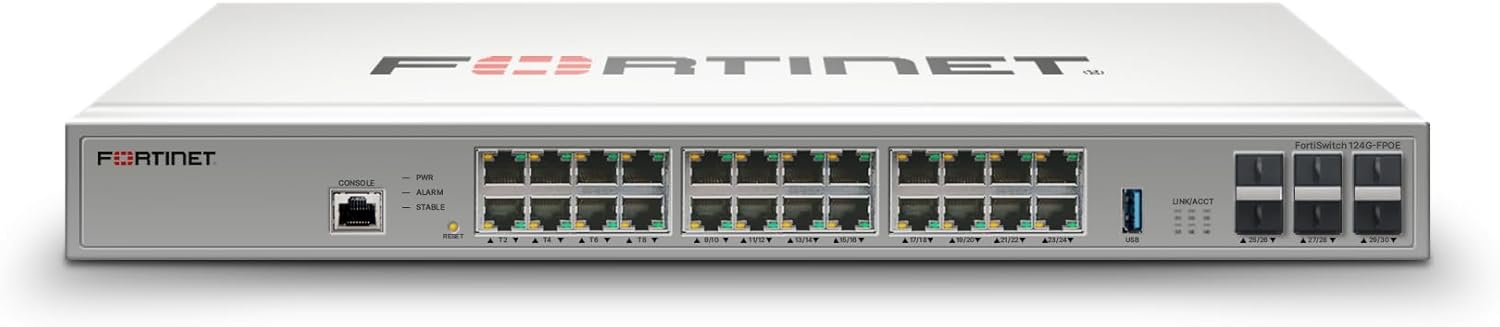
Figure 4.1: Front Panel Layout. This image displays the front panel of the FortiSwitch FS-124G-FPOE, highlighting the 24 Gigabit Ethernet ports, the console port for management, and LED indicators for power (PWR), alarm (ALARM), and status (STABLE).

Figure 4.2: Front and Rear Panel. This image provides a view of both the front and rear panels of the FortiSwitch. The rear panel shows the power input connector (100-240V AC, 50/60Hz) and ventilation.

Figure 4.3: Product Dimensions. This diagram illustrates the physical dimensions of the FortiSwitch FS-124G-FPOE, indicating a height of 1.71 inches, depth of 12.2 inches, and width of 17.3 inches. The weight is specified as 10.72 pounds.
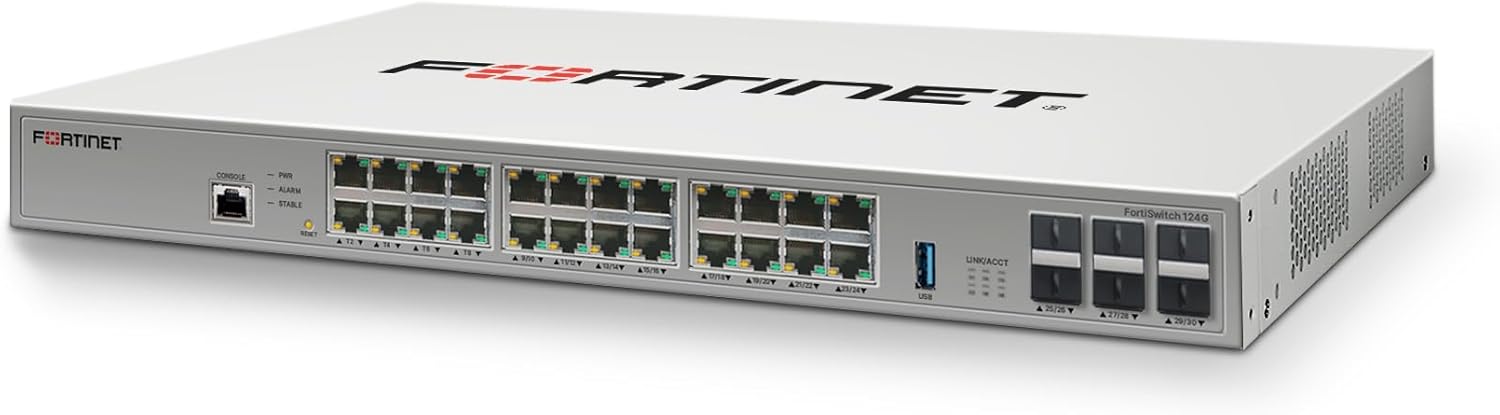
Figure 4.4: Angled Front View. An angled perspective of the FortiSwitch FS-124G-FPOE, providing a comprehensive view of its front panel, including all 24 Ethernet ports and management interfaces.
5. Setup
5.1 Unpacking
Carefully remove the FortiSwitch from its packaging. Inspect the device for any signs of damage. Retain the packaging materials for future transport or storage.
5.2 Mounting
The FortiSwitch FS-124G-FPOE is designed for rack-mounting. Use the provided rack-mount kit to secure the device in a standard 19-inch equipment rack. Ensure adequate airflow around the unit.
5.3 Connecting Power
- Connect one end of the power cord to the AC power inlet on the rear panel of the FortiSwitch.
- Connect the other end of the power cord to a grounded electrical outlet.
- The device will power on automatically. Observe the PWR LED on the front panel; it should illuminate to indicate power.
5.4 Connecting Network Cables
Connect your network devices (PCs, servers, access points, etc.) to the RJ45 Ethernet ports on the front panel using standard Ethernet cables. The FS-124G-FPOE supports Gigabit Ethernet (1 Gbps) and Power over Ethernet (PoE/PoE+) on its ports.
5.5 Initial Configuration
For initial configuration and management, connect a console cable to the console port on the front panel and use a terminal emulator on a computer. Alternatively, once the device obtains an IP address (via DHCP or static assignment), you can access the web-based management interface via a web browser.
6. Operating Instructions
6.1 LED Indicators
- PWR (Power): Indicates the power status of the device. Lit when power is supplied.
- ALARM: Indicates a system alarm or fault. Refer to the device's management interface for details.
- STABLE: Indicates the system's operational status. Lit when the system is stable and functioning correctly.
- Port LEDs: Each Ethernet port has LEDs indicating link status and activity.
6.2 Basic Operation
Once powered on and connected, the FortiSwitch will begin forwarding network traffic. You can manage the switch through its web interface or command-line interface (CLI) to configure VLANs, QoS, security policies, and other advanced features.
7. Maintenance
7.1 Cleaning
Periodically clean the exterior of the switch with a soft, dry cloth. Do not use liquid or aerosol cleaners. Ensure ventilation openings are free from dust and obstructions.
7.2 Firmware Updates
Regularly check the Fortinet support website for the latest firmware updates. Keeping your device's firmware up-to-date ensures optimal performance, security, and access to new features. Follow the instructions provided by Fortinet for firmware upgrade procedures.
7.3 Environmental Considerations
Operate the switch within its specified environmental ranges (temperature, humidity). Avoid placing the device near heat sources or in direct sunlight.
8. Troubleshooting
8.1 No Power
- Check if the power cord is securely connected to both the switch and the electrical outlet.
- Verify that the electrical outlet is functional by plugging in another device.
- Ensure the power switch (if present) is in the 'ON' position.
8.2 No Network Connectivity
- Verify that the Ethernet cables are properly connected to both the switch and the network device.
- Check the port LEDs on the switch; they should be lit for an active link.
- Ensure the connected device is powered on and configured correctly.
- Try connecting the device to a different port or using a different Ethernet cable.
8.3 Slow Performance
- Check for network congestion.
- Ensure all connected devices are operating at their optimal speed (e.g., Gigabit Ethernet).
- Verify duplex settings on both the switch port and the connected device.
- Consult the FortiSwitch management interface for port statistics and error rates.
9. Specifications
| Feature | Description |
|---|---|
| Model Number | FS-124G-FPOE |
| Brand | FORTINET |
| Number of Ports | 24 |
| Interface Type | RJ45, Uplink Port |
| Data Transfer Rate | 1 Gigabits Per Second |
| Product Dimensions (L x W x H) | 12.2" x 17.3" x 1.7" |
| Item Weight | 10.71 Pounds |
| Voltage | 120 Volts (AC 100-240V, 50/60Hz) |
| Maximum Power Consumption | 880 Watts |
| UPC | 195875318180 |
10. Warranty and Support
Fortinet products are covered by a limited warranty. For detailed warranty information, product registration, and technical support, please visit the official Fortinet website or contact your authorized Fortinet reseller. Keep your purchase receipt for warranty claims.
Fortinet Support Website: www.fortinet.com/support


