
Introduction
Welcome to the HONOR 400 Lite 5G Smartphone user manual. This guide provides essential information for setting up, operating, maintaining, and troubleshooting your new device. Please read this manual thoroughly to ensure optimal performance and longevity of your smartphone.
What's in the Box
Upon unboxing your HONOR 400 Lite, you should find the following items:
- HONOR 400 Lite 5G Smartphone
- USB Cable
- SIM Ejector Tool
- Quick Start Guide
- Warranty Card
Note: The specific contents may vary by region.
Device Overview
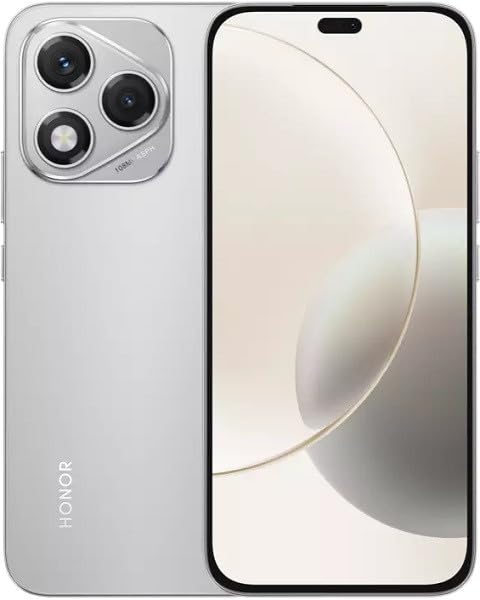
Image: The HONOR 400 Lite 5G Smartphone in Velvet Grey, showcasing its sleek design and camera module on the rear.
The HONOR 400 Lite features a 6.7-inch AMOLED display with a resolution of 1080 x 2412 pixels. The device is equipped with a powerful camera system, including a 108 MP main sensor. Its ergonomic design ensures a comfortable grip and easy access to all physical buttons and ports.
Setup
1. SIM Card Installation
- Locate the SIM card tray on the side of your device.
- Insert the SIM ejector tool into the small hole next to the tray and press firmly until the tray pops out.
- Place your Nano-SIM card(s) and/or eSIM (if applicable) into the tray with the gold contacts facing down, ensuring they are correctly aligned.
- Carefully push the tray back into the device until it clicks into place.
Important: This smartphone is designed for GSM networks only and is not compatible with CDMA networks (e.g., Verizon, Sprint, US Cellular in the USA). Please verify network compatibility with your service provider before use.
2. Initial Power On
- Press and hold the Power button (usually on the right side) until the HONOR logo appears.
- Follow the on-screen prompts to complete the initial setup, including language selection, Wi-Fi connection, and Google account setup.
Operating Your Device
Display Features
The 6.7-inch AMOLED display offers vibrant colors and deep blacks. Utilize gestures for navigation, access quick settings by swiping down from the top, and customize your home screen layout and widgets to personalize your experience.
Camera Usage
Your HONOR 400 Lite is equipped with a high-resolution 108 MP main camera. Open the Camera app to access various modes such as Photo, Video, Portrait, and more. Tap on the screen to focus and use the on-screen shutter button to capture images or start recording videos. Explore settings for advanced options like HDR and AI enhancements.
Battery and Charging
The device is powered by a 5230mAh non-removable battery. Use the provided USB cable to charge your device. Connect the USB-C end to your phone and the USB-A end to a compatible power adapter (not always included, check box contents) or computer USB port. For optimal charging speed, use a compatible fast charger.
Maintenance
- Software Updates: Regularly check for and install system updates to ensure your device has the latest features, security patches, and performance improvements. Go to Settings > System & updates > Software update.
- Cleaning: Use a soft, lint-free cloth to clean the screen and body of your phone. Avoid harsh chemicals or abrasive materials.
- Storage Management: Periodically clear unnecessary files and apps to free up storage space and maintain optimal performance.
Troubleshooting
If you encounter issues with your HONOR 400 Lite, try the following common troubleshooting steps:
- Device Unresponsive: Press and hold the Power button for about 10 seconds to force a restart.
- App Crashing: Clear the app's cache and data (Settings > Apps > [App Name] > Storage > Clear cache/Clear data) or reinstall the app.
- Battery Drain: Check battery usage in Settings to identify power-hungry apps. Reduce screen brightness and disable unnecessary features like GPS or Wi-Fi when not in use.
- Network Issues: Ensure your SIM card is correctly inserted. Try toggling Airplane Mode on and off. If issues persist, contact your network provider.
Specifications
| Model Name | Honor 400 Lite |
| Display | 6.7 inches AMOLED, 1080 x 2412 pixels |
| Processor | Mediatek Dimensity 7025 Ultra (6 nm), Octa-core (2x2.5 GHz Cortex-A78 & 6x2.0 GHz Cortex-A55) |
| RAM | 12GB |
| Internal Storage | 256GB (non-expandable) |
| Rear Camera | 108 MP, f/1.8, (wide), 1/1.67", PDAF; 16 MP, f/2.5, (wide) |
| Operating System | Android 15 |
| Battery | 5230mAh, non-removable |
| Network Compatibility | 2G, 3G, 4G, 5G (GSM Only) |
| Color | Velvet Grey |
| Special Features | Dual SIM |
Warranty and Support
Your HONOR 400 Lite smartphone comes with a standard manufacturer's warranty. Please refer to the included Warranty Card for detailed terms and conditions, including coverage period and service procedures. For technical support or further assistance, please visit the official HONOR support website or contact their customer service.
Keep your proof of purchase for warranty claims.


