
1. Introduction
Welcome to the user manual for your new TECNO POVA Curve 5G smartphone. This guide provides detailed instructions on how to set up, operate, maintain, and troubleshoot your device. Please read this manual thoroughly to ensure optimal performance and longevity of your smartphone.

Overview of TECNO POVA Curve 5G's main features including 144Hz Curved AMOLED display, Slimmest 7.45mm design, D7300 Ultimate Processor, ELLA AI, No Network Communication, and 64MP Sony IMX682 camera.
2. Getting Started
2.1 What's in the Box
- TECNO POVA Curve 5G Smartphone
- Phone Case
- Power Adapter (45W Flash Charging)
- SIM Tray Ejector
- USB Cable
2.2 Device Layout
Familiarize yourself with the physical components of your TECNO POVA Curve 5G.

Front and rear view of the TECNO POVA Curve 5G, highlighting the curved display and camera module.
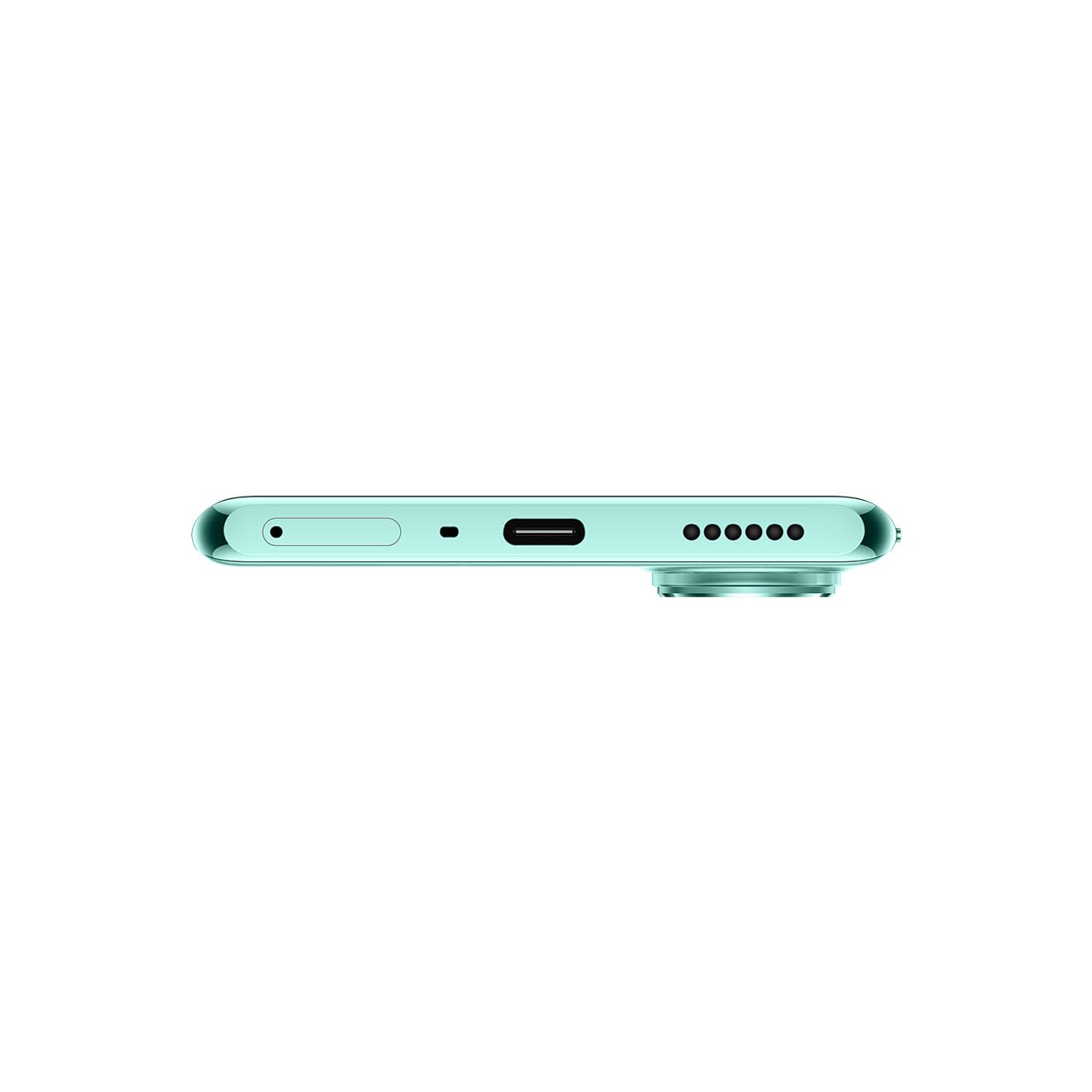
Bottom view of the device, showing the USB-C port, microphone, and speaker grille.

Side view of the device, illustrating its slim profile and button placement.
2.3 Initial Setup
Powering On/Off: Press and hold the power button on the side of the device until the TECNO logo appears to power on. To power off, press and hold the power button, then select 'Power off' from the options.
Charging the Battery: Connect the provided USB cable to the phone's USB-C port and the 45W power adapter. Plug the adapter into a wall outlet. The device supports 45W Flash Charging, allowing for rapid charging from 0 to 50% in approximately 15 minutes.
SIM Card Installation: Use the SIM tray ejector tool to open the SIM card tray. Insert your Nano-SIM card(s) into the designated slots. Ensure the SIM card is correctly oriented before reinserting the tray into the device.
3. Operating Instructions
3.1 Display and Interaction
The TECNO POVA Curve 5G features a 144Hz Curved AMOLED Display, offering a smooth and responsive visual experience. The curved edges provide an immersive viewing experience for scrolling, gaming, and media consumption.

Close-up view of the 144Hz Curved AMOLED Display, emphasizing its smooth visual capabilities.
3.2 Performance and Storage
Powered by the MediaTek D7300 Ultimate chipset (4nm process), the device ensures efficient and fast performance. With 16GB RAM (including memory fusion) and 128GB ROM, multitasking is smooth, applications load quickly, and gaming remains lag-free.

Visual representation of the MediaTek D7300 Ultimate Processor and the memory configuration (up to 16GB RAM, 128GB ROM).
3.3 Camera Features
Capture high-quality photos with the 64MP Sony IMX682 rear camera, designed to capture vivid details. The 13MP front camera ensures sharp and clear selfies.

Close-up of the 64MP Sony IMX682 camera module on the TECNO POVA Curve 5G.
3.4 AI Capabilities (ELLA)
The TECNO POVA Curve 5G introduces ELLA, an advanced AI assistant with support for Indian languages. ELLA offers features such as voice-print suppression, auto-call answering, and general call assistance, enhancing user interaction and productivity.

Illustration of ELLA AI's Indian language support, showing various language options.
3.5 Connectivity and Network
The device supports Bluetooth, Infrared, USB, and Wi-Fi connectivity. A notable feature is India's first No Network Communication*, allowing communication up to 800m even without traditional network coverage. The Intelligent Signal Hub System optimizes signal reception.

Visual depicting the 'No Network Communication' feature and the Intelligent Signal Hub System.
4. Maintenance
The TECNO POVA Curve 5G has an IP64 rating, indicating resistance to dust and splashes. While it offers enhanced durability, it is not fully waterproof. Avoid submerging the device in water or exposing it to excessive moisture.
To clean your device, use a soft, lint-free cloth. Avoid using harsh chemicals or abrasive materials that could damage the screen or finish. Keep the device away from extreme temperatures and direct sunlight.
5. Troubleshooting
If you encounter issues with your TECNO POVA Curve 5G, consider the following basic troubleshooting steps:
- Device not responding: Press and hold the power button for about 10-15 seconds to force a restart.
- Battery draining quickly: Close unused apps, reduce screen brightness, disable unnecessary connectivity features (Wi-Fi, Bluetooth, GPS) when not in use.
- Network connectivity issues: Check if your SIM card is properly inserted. Try toggling Airplane Mode on and off. Restart the device.
- Apps crashing: Clear the cache and data of the problematic app in Settings > Apps. If the issue persists, reinstall the app.
- Slow performance: Free up storage space by deleting unnecessary files and apps. Regularly clear app caches.
For more complex issues, refer to the official TECNO support website or contact customer service.
6. Technical Specifications
| Feature | Specification |
|---|---|
| Operating System | Android 15 |
| RAM | 8 GB (Up to 16 GB with Memory Fusion) |
| Internal Storage (ROM) | 128 GB |
| Processor | MediaTek D7300 Ultimate (4nm) |
| Display | 144Hz Curved AMOLED Display, 1080 x 2436 Resolution |
| Rear Camera | 64MP Sony IMX682 |
| Front Camera | 13MP |
| Battery Capacity | 5500mAh |
| Charging | 45W Flash Charging |
| Dimensions (LxWxH) | 16.4 x 7.5 x 0.7 cm |
| Weight | 177 g |
| Connectivity | Bluetooth, Infrared, USB-C, Wi-Fi |
| Special Features | IP64 Rating, ELLA AI with Indian Language Support, No Network Communication* |
| Model Number | LJ8K |
7. Warranty and Support
Your TECNO POVA Curve 5G smartphone comes with a manufacturer's warranty. Please refer to the warranty card included in your product packaging for specific terms and conditions. For technical support, service, or warranty claims, please contact TECNO customer service or visit their official website. Keep your purchase receipt as proof of purchase.
No official product videos were provided in the input data for embedding in this manual.
