
GODOX V480C
Contents
Godox V480C TTL Camera Flash for Canon User Manual
Model: V480C
Introduction
The Godox V480C is a high-performance TTL camera flash designed for Canon cameras. It offers advanced features such as a powerful GN50 output, rapid 1.7-second recycle time, and support for High-Speed Sync (HSS) up to 1/8000s. Equipped with a 2.0-inch color touchscreen and a built-in Godox 2.4GHz X wireless system, the V480C provides intuitive control and versatile lighting options. This manual provides detailed instructions for its proper use and maintenance.

Image: Two Godox V480 flash units are displayed, one mounted on a camera and another on a stand, illustrating the compact design and key features like GN50, HD touchscreen, and 2.4 GHz wireless.
What's in the Box
Verify that all items are present upon unboxing your Godox V480C flash unit.
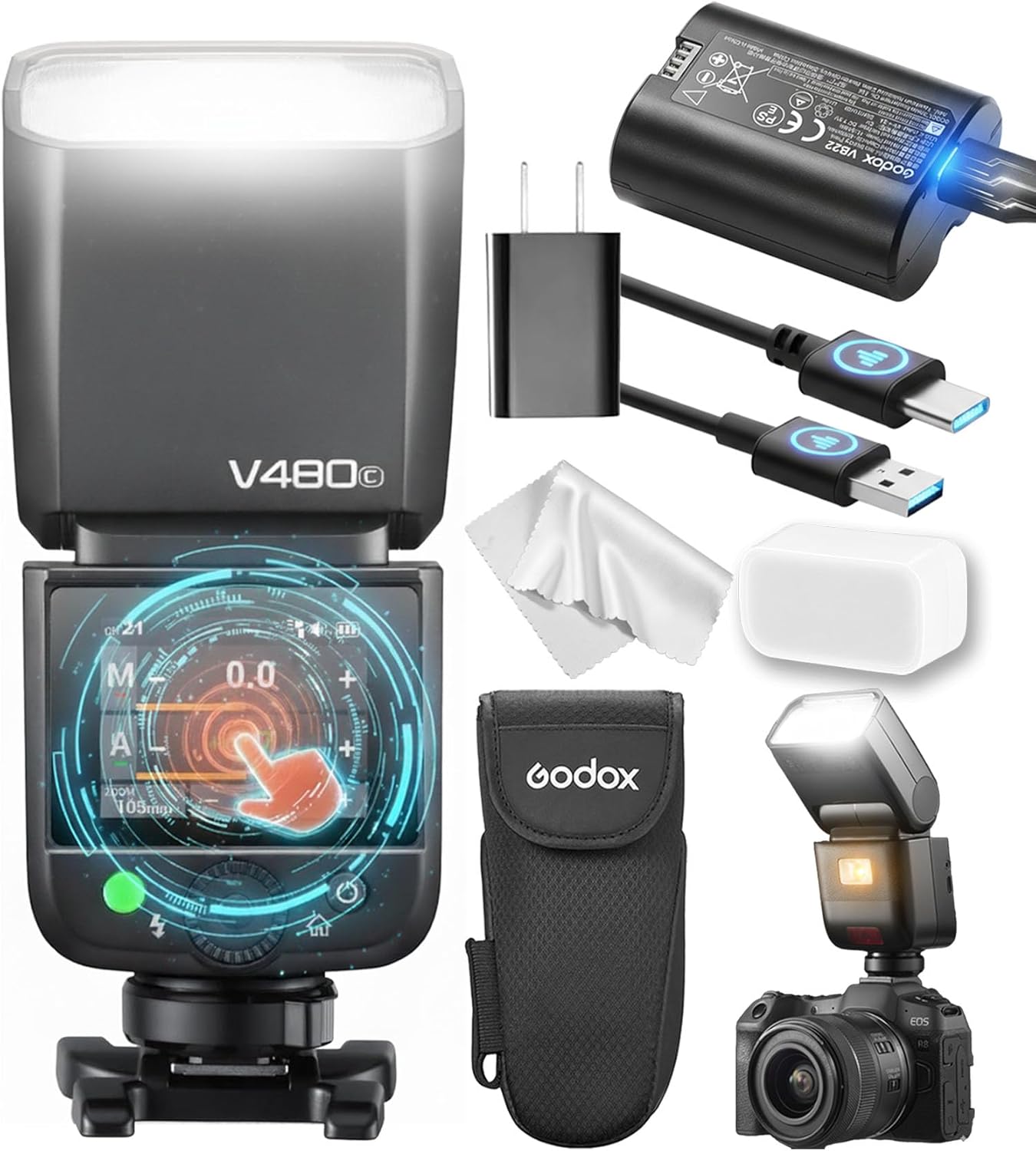
Image: The Godox V480C flash unit, a rechargeable Li-ion battery, USB-C charging cable, power adapter, diffuser, mini stand, and a storage bag are shown.
- Light Body (V480C Flash Unit) x1
- Storage Bag x1
- Diffuser x1
- Adapter x1
- Mini Stand x1
- Lithium Battery (7.2V/2200mAh) x1
- USB-C Charging Cable x1

Image: A detailed layout of the Godox V480C flash unit and its accessories, including the flash, battery, charger, cables, diffuser, and stand.
Setup
1. Battery Installation and Charging
The V480C uses a high-capacity 7.2V/2200mAh rechargeable Li-ion battery. Ensure the battery is fully charged before first use.
- Open the battery compartment cover on the flash unit.
- Insert the Li-ion battery, ensuring correct polarity.
- Close the battery compartment cover securely.
- To charge, connect the USB-C charging cable to the battery's USB-C port and then to the provided power adapter or a compatible USB power source.
- The battery indicator on the flash or battery itself will show charging status. A full charge provides approximately 650 full-power flashes.

Image: A close-up of the Godox V480C's 7.2V/2200mAh Li-ion battery, highlighting its USB-C charging port and capacity.
2. Mounting on Camera
Attach the V480C to your Canon camera's hot shoe.
- Slide the flash unit's mounting foot into the camera's hot shoe.
- Rotate the locking ring or lever on the flash unit clockwise until it is securely fastened. Do not overtighten.
Operating Instructions
1. Power On/Off
Press and hold the power button to turn the flash unit on or off.
2. Touchscreen Interface
The 2.0-inch color touchscreen allows for intuitive navigation and setting adjustments. Tap, swipe, or use the tactile buttons for precise control.

Image: A hand demonstrates interacting with the Godox V480C's 2.0-inch color touchscreen, showing exposure compensation settings.
Image: A close-up view of the V480C's touchscreen, showing various flash settings and controls.
3. Flash Modes
The V480C supports multiple flash modes for diverse photographic needs.
- TTL (Through-The-Lens) Mode: Automatic flash exposure based on camera metering.
- Manual Mode: Allows manual adjustment of flash output from 1/1 to 1/256 power.
- Multi Mode (Stroboscopic Flash): Fires a series of rapid flashes during a single exposure for creative motion effects.
- High-Speed Sync (HSS): Enables flash synchronization with shutter speeds up to 1/8000s, useful for freezing action or overpowering ambient light.
- Front/Rear-Curtain Sync: Synchronizes the flash with either the beginning or end of the shutter opening.

Image: A photographer captures a portrait using the Godox V480C flash, demonstrating its use in various flash modes.
4. 2.4GHz Wireless System (Sender & Receiver)
The built-in Godox 2.4GHz X System allows the V480C to function as both a sender and receiver, controlling multiple flashes up to 100 meters away across 32 channels.
- Set the V480C to Master mode to control other Godox X system flashes.
- Set the V480C to Slave mode to be triggered by a Godox X system transmitter (e.g., XPro, X2T, X3).
- Ensure all units are set to the same channel and group for proper communication.

Image: A photographer uses the Godox V480C on-camera while another V480 unit is positioned off-camera with an umbrella, demonstrating wireless functionality.
5. 10-Level LED Modeling Lamp
The integrated 2W LED modeling lamp (5300K) provides continuous light with 10 adjustable brightness levels, aiding in focus and pre-visualization of lighting effects.
- Activate the modeling lamp via the touchscreen or a dedicated button.
- Adjust brightness levels as needed to preview shadows and highlights.
- The built-in slide-out catchlight panel can be used to add sparkle to eyes.

Image: A photographer uses the Godox V480C with its modeling lamp active to illuminate a subject, demonstrating its utility for light preview.
Image: A close-up of the Godox V480C's modeling lamp, showing the light source.
6. Smart Distance Readout
The V480C's display provides a real-time effective flash range, helping you determine if your subject is within optimal reach for proper exposure.

Image: The Godox V480C mounted on a camera, with its screen displaying the Smart Distance Readout feature, indicating the effective flash range.
7. Flexible Bounce Head and Diffuser
The flash head can tilt from -7° to 120° and swivel 330°, allowing for versatile light direction. Use the included snap-on wide-angle diffuser for softer, broader light.
Image: The Godox V480C flash unit with its wide-angle diffuser attached, demonstrating how to soften the light output.
Maintenance
1. Cleaning
- Use a soft, dry cloth to clean the flash body and screen.
- For stubborn marks, lightly dampen the cloth with water or a mild cleaning solution. Avoid harsh chemicals.
- Keep the hot shoe contacts clean and free of debris.
2. Battery Care
- Store the battery in a cool, dry place when not in use.
- Avoid fully discharging the battery for extended periods.
- Charge the battery regularly, even if not in use, to maintain its lifespan.
3. Firmware Updates
The V480C supports firmware updates via its USB-C port. Visit the official Godox website for the latest firmware and instructions.
Troubleshooting
| Problem | Possible Cause | Solution |
|---|---|---|
| Flash does not fire. | Low battery; incorrect mode; flash not securely mounted; camera settings. | Charge battery; check flash mode (TTL/Manual); ensure flash is firmly attached to hot shoe; verify camera flash settings. |
| Flash output is too weak/strong. | Incorrect exposure compensation; manual power setting too low/high; subject too far/close. | Adjust exposure compensation; change manual power setting; ensure subject is within effective flash range. |
| Wireless trigger not working. | Incorrect channel/group; distance too far; interference. | Verify flash and trigger are on the same channel and group; reduce distance between units; try a different channel. |
| Flash overheats. | Excessive rapid firing. | Allow the flash to cool down. Reduce the frequency of full-power flashes. |
Specifications
| Feature | Detail |
|---|---|
| Model | V480C |
| Guide Number (GN) | GN50 (ISO 100, 105mm focal length) |
| Recycle Time | Approx. 1.7 seconds |
| Full-Power Flashes | Approx. 650 |
| High-Speed Sync (HSS) | Up to 1/8000s |
| Wireless System | Godox 2.4GHz X System |
| Wireless Range | Up to 100 meters |
| Channels | 32 |
| Modeling Lamp | 2W LED (5300K), 10 levels adjustable |
| Display | 2.0-inch Color Touchscreen |
| Bounce Head | Tilt: -7° to 120°, Swivel: 330° |
| Battery | 7.2V/2200mAh Li-ion (included) |
| Charging Port | USB-C |
| Dimensions | 2.81 x 2.99 x 8.07 inches |
| Weight | 12.7 ounces |
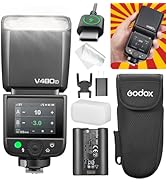
Image: Side view of the Godox V480C packaging, listing key features and specifications with icons.
Warranty and Support
For warranty information, technical support, or service inquiries, please refer to the warranty card included with your product or visit the official Godox website. Keep your purchase receipt as proof of purchase.
Official Godox Website: www.godox.com
Ask a question about this manual
Ask about setup, troubleshooting, compatibility, parts, safety, or missing instructions. Manuals+ will review the question and use this page’s manual context to help answer it.