1. Introduction
Thank you for choosing the Cecotec Pumba 8500 CleanKitty Smart Self-Cleaning Cat Litter Box. This innovative device is designed to simplify pet care by providing an automated, hygienic, and odor-controlled environment for your cat. Featuring a triple deodorization system, Wi-Fi connectivity for app control, a silent operation, and advanced infrared safety sensors, the Pumba 8500 CleanKitty Smart ensures comfort for your pet and convenience for you.
Important Safety Information:
Please read these instructions carefully before using the product. Ensure all safety guidelines are followed to prevent accidents and ensure optimal performance. Keep this manual for future reference.
2. Product Overview
The Cecotec Pumba 8500 CleanKitty Smart is an advanced self-cleaning litter box designed for maximum convenience and hygiene.
Key Features:
- Self-Cleaning Function: Offers programmable, automatic, and manual cleaning options, eliminating the need for daily scooping.
- Triple Deodorization System: Incorporates an ionic sterilizer to effectively eliminate unpleasant odors, ensuring a fresh home environment.
- Extra-Large Capacity: Features a 65-liter interior drum for your cat's comfort and a 9-liter waste container, allowing up to 15 days of hands-free operation.
- Weight Sensor: Provides advanced health monitoring by tracking your pet's weight.
- Infrared Safety System: Intelligent detection prevents accidents. The unit automatically stops if your pet approaches during operation.
- Wi-Fi & App Control: Control all functions and monitor data directly from your mobile device.
- Silent Operation: Designed to operate quietly, ensuring your pet is not startled and feels secure.

Figure 2.1: The Cecotec Pumba 8500 CleanKitty Smart litter box with a cat comfortably inside, showcasing its sleek design and the accompanying smartphone app for smart control.
3. Setup
3.1 Unpacking and Placement:
- Carefully remove all components from the packaging.
- Place the litter box on a flat, stable surface in a well-ventilated area, away from direct sunlight or heat sources.
3.2 Adding Cat Litter:
- Open the top cover of the litter box.
- Pour clumping cat litter into the drum. Ensure the litter level is between the MIN and MAX lines indicated inside the drum. Do not overfill.
- Close the top cover securely.

Figure 3.1: A user adding clumping cat litter into the main drum of the self-cleaning litter box, demonstrating the ease of refilling.
3.3 Power Connection:
- Connect the power adapter to the litter box and then plug it into a standard electrical outlet.
- The unit will perform an initial calibration cycle.
4. Operating Instructions
4.1 Cleaning Modes:
The Pumba 8500 CleanKitty Smart offers flexible cleaning options:
- Automatic Cleaning: The unit detects when your cat has left the litter box and initiates a cleaning cycle after a set delay (e.g., 3, 5, or 10 minutes).
- Programmable Cleaning: Set specific times for cleaning cycles through the mobile application.
- Manual Cleaning: Initiate a cleaning cycle at any time by pressing the designated button on the unit or through the mobile application.
4.2 Wi-Fi and App Control:
Download the official Cecotec app from your smartphone's app store. Follow the in-app instructions to connect your litter box to your home Wi-Fi network. The app allows you to:
- Initiate cleaning cycles.
- Set cleaning schedules.
- Monitor your cat's usage and weight data.
- Receive notifications and alerts.
- Control deodorization settings.

Figure 4.1: The mobile application interface, demonstrating how users can control and monitor the litter box remotely.
4.3 Safety Features:
The integrated infrared sensor intelligently detects your cat's presence. If your cat attempts to enter the litter box during a cleaning cycle, the unit will automatically stop to prevent any harm. The silent operation further ensures your pet's comfort and trust in the device.
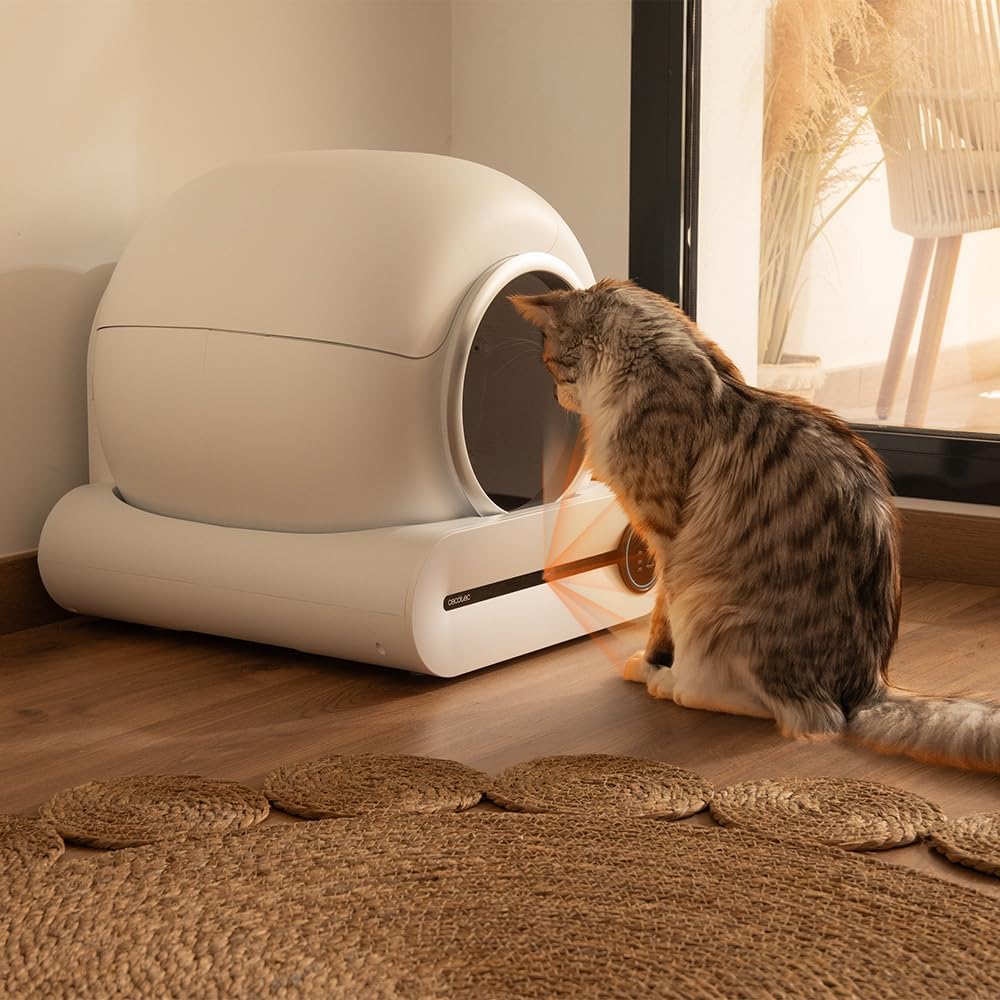
Figure 4.2: The infrared safety sensor detecting a cat's presence, highlighting the automatic stop feature for pet safety.
5. Maintenance
5.1 Emptying the Waste Container:
The waste container has a capacity of 9 liters, typically allowing for up to 15 days of use before needing to be emptied, depending on the number of cats and their usage. The app will notify you when the waste container is full.
- Ensure the unit is in standby mode or powered off.
- Locate the waste drawer at the bottom of the unit.
- Pull out the drawer and carefully remove the sealed waste bag.
- Dispose of the waste bag according to local regulations.
- Insert a new waste bag into the drawer and slide it back into the unit until it clicks into place.

Figure 5.1: An internal view of the litter box, illustrating the waste collection system and the bag where soiled litter is deposited.
5.2 Cleaning the Unit:
Regular cleaning of the main drum and exterior is recommended to maintain hygiene and performance.
- Unplug the unit before cleaning.
- Wipe down the exterior with a damp cloth and mild detergent.
- For the interior drum, remove all litter and wipe with a pet-safe cleaner. Allow to dry completely before reassembling.
- Do not submerge the unit in water.
6. Troubleshooting
If you encounter issues with your Cecotec Pumba 8500 CleanKitty Smart, please refer to the following common problems and solutions:
| Problem | Possible Cause | Solution |
|---|---|---|
| Unit not responding / No power | Power cable disconnected; Power outlet issue. | Ensure power cable is securely connected. Try a different power outlet. |
| App connectivity issues | Incorrect Wi-Fi password; Router too far; 5GHz Wi-Fi network. | Verify Wi-Fi password. Move unit closer to router. Ensure your Wi-Fi is 2.4GHz (the unit may not support 5GHz). Restart router and unit. |
| Odor persists despite deodorization | Waste container full; Insufficient litter; Deodorizer needs replacement. | Empty waste container. Ensure adequate litter level. Check if the ionic sterilizer/deodorizer needs maintenance or replacement. |
| Litter spillage / Ineffective cleaning | Litter type not suitable; Overfilled litter; Unit malfunction. | Use high-quality clumping cat litter. Do not overfill the drum. If issues persist, contact customer support. |
| Unit stops during operation (safety sensor) | Cat approached the unit; Sensor obstruction. | This is a safety feature. Ensure no objects are obstructing the sensor. The unit will resume when clear. |
If the problem persists after trying these solutions, please contact Cecotec customer support for further assistance.
7. Specifications
| Feature | Detail |
|---|---|
| Model Number | A01_EU01_112398 |
| Dimensions (L x W x H) | 53 cm x 49 cm x 51 cm (20.9 in x 19.3 in x 20.1 in) |
| Product Weight | 7.79 kg (17.17 lbs) |
| Internal Drum Capacity | 65 Liters |
| Waste Container Capacity | 9 Liters |
| Color | White |
| Connectivity | Wi-Fi (2.4GHz) |
| Safety Features | Infrared Sensor, Weight Sensor |
| Type | Automatic Self-Cleaning Litter Tray |
8. Warranty and Support
For warranty information, product registration, or technical support, please refer to the warranty card included with your product or visit the official Cecotec website. You can also contact Cecotec customer service directly for assistance with any issues or questions regarding your Pumba 8500 CleanKitty Smart litter box.
Cecotec Official Website: www.cecotec.com
Please have your model number (A01_EU01_112398) and purchase date ready when contacting support.


