1. Introduction
Thank you for choosing the Cecotec FastCut 3000 Freemove Cordless Electric Grass Trimmer. This 4-in-1 multifunction tool is designed for efficient lawn care, including trimming edges, cutting grass, removing weeds, and pruning small branches. Featuring a powerful 650W motor and a 21V battery system, it offers cordless convenience and versatility. Please read this manual carefully before use to ensure safe and optimal operation.
2. Important Safety Information
WARNING: Always use safety glasses and appropriate clothing to prevent injuries from flying objects or cuts. Do not operate the device while under the influence of drugs or alcohol. Follow all instructions in this user manual for safe operation.
- Always wear eye protection (safety glasses) and sturdy footwear.
- Wear long trousers and gloves to protect against debris.
- Keep bystanders, especially children and pets, at a safe distance (at least 15 meters) from the operating area.
- Inspect the work area for objects such as stones, metal pieces, or wires that could be thrown or entangled in the cutting mechanism.
- Ensure all guards and handles are properly installed before use.
- Do not operate the trimmer in wet conditions or rain.
- Always hold the trimmer firmly with both hands during operation.
- Disconnect the battery before cleaning, maintenance, or changing accessories.
- Store the trimmer in a dry, secure place, out of reach of children.
3. Product Components and What's in the Box
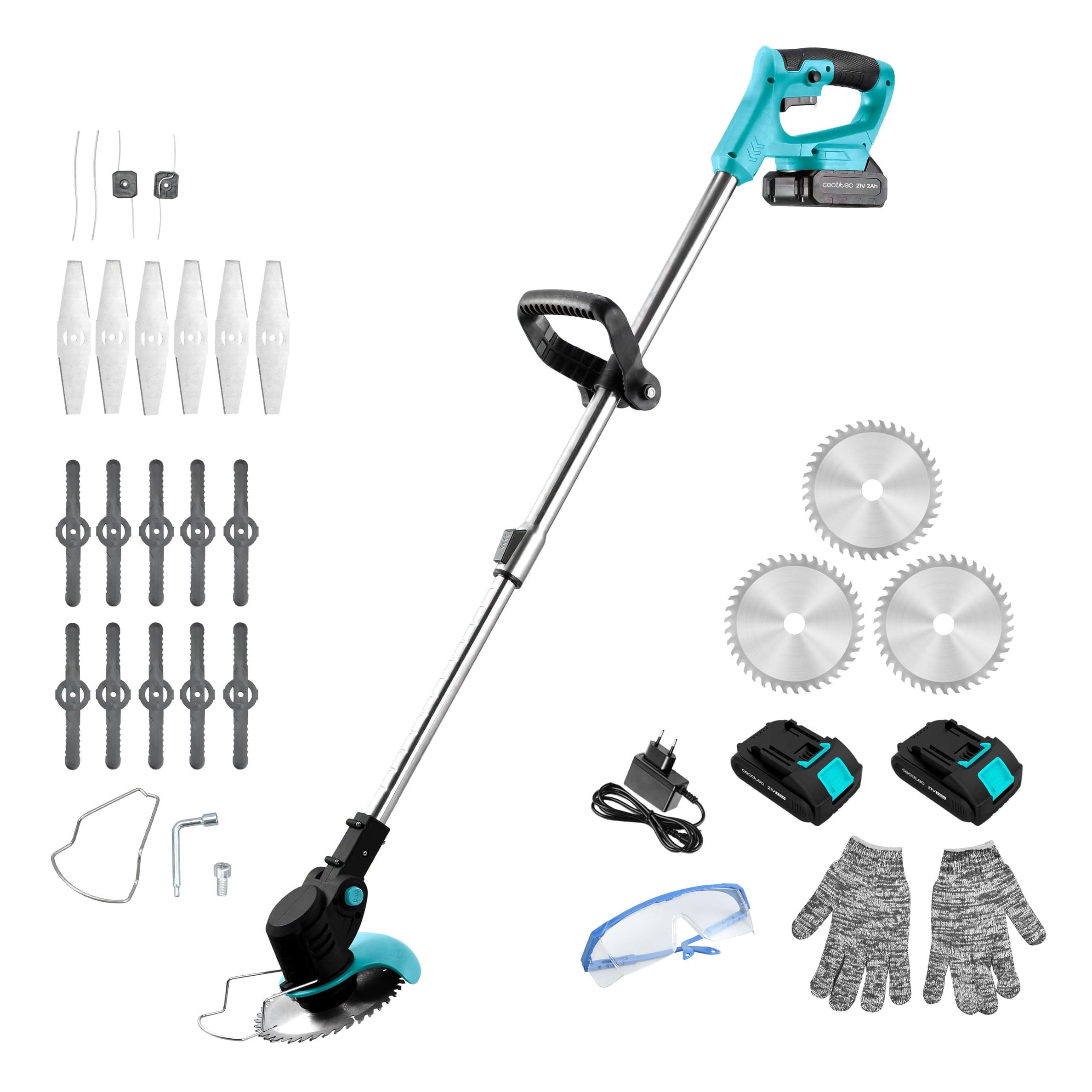
The Cecotec FastCut 3000 Freemove comes with a comprehensive set of components and accessories to maximize its versatility and performance.

Included Accessories:
- Main Trimmer Unit with Telescopic Pole
- 2 x 21V 2.0Ah Lithium-Ion Batteries
- Battery Charger
- Protective Guard
- Adjustable Auxiliary Handle
- Plastic Blades (for light grass trimming)
- Metal Blades (for tougher weeds)
- Saw Blade (for small branches)
- Safety Glasses
- Work Gloves
- Tools for blade replacement
4. Setup and Assembly
Follow these steps to assemble your Cecotec FastCut 3000 Freemove trimmer before first use.
4.1 Attaching the Protective Guard
The protective guard must always be installed to ensure user safety by deflecting debris.
- Align the protective guard with the mounting points on the trimmer head.
- Secure it in place using the provided screws and screwdriver. Ensure it is firmly attached.
4.2 Installing the Auxiliary Handle
The auxiliary handle provides better control and comfort during operation.
- Slide the auxiliary handle onto the telescopic pole.
- Adjust its position for comfortable grip and balance.
- Tighten the knob to secure the handle in place.
4.3 Attaching the Desired Blade
Your trimmer supports different blade types for various tasks.
- Ensure the battery is removed before changing blades.
- Use the provided wrench to loosen the nut on the trimmer head.
- Place the desired blade (plastic, metal, or saw blade) onto the spindle, ensuring it is correctly seated.
- Secure the blade by tightening the nut with the wrench.
4.4 Battery Installation and Charging
The trimmer operates on a 21V Lithium-Ion battery.
- To install the battery, slide it into the battery slot on the main handle until it clicks into place.
- To remove, press the release button and slide the battery out.
- Charge the battery using the provided charger. The indicator light on the charger will show the charging status.

5. Operating Instructions
Before operating, ensure you have read the safety information and properly assembled the trimmer.
5.1 Starting and Stopping the Trimmer
- Ensure the battery is fully charged and securely installed.
- Press the safety lock button (if applicable) and then squeeze the trigger switch to start the trimmer.
- Release the trigger switch to stop the trimmer.
5.2 Adjusting the Telescopic Pole and Head Angle
The trimmer features an adjustable telescopic pole and an orientable head for ergonomic use and reaching difficult areas.
- Telescopic Pole: Loosen the locking mechanism on the pole, extend or retract to your desired length, and then tighten to secure.
- Orientable Head: Press the head adjustment button, pivot the head to the desired angle (e.g., for edging), and release the button to lock it.

5.3 Trimming Techniques
- General Trimming: Hold the trimmer at a slight angle to the ground and move it in a sweeping motion from side to side.
- Edging: Rotate the trimmer head to a vertical position and guide the blade along the edge of your lawn or pathway.
- Weed Removal: Use metal blades for thicker weeds. Approach weeds carefully to avoid damaging desired plants.
- Branch Pruning: For small branches, use the saw blade. Ensure the branch is stable and cut away from your body.


6. Maintenance
Regular maintenance ensures the longevity and optimal performance of your trimmer.
- Cleaning: After each use, remove the battery and clean the trimmer head, protective guard, and blades from grass clippings and debris. Use a damp cloth; do not use harsh chemicals.
- Blade Inspection: Regularly check blades for wear, damage, or dullness. Replace worn or damaged blades immediately to maintain cutting efficiency and safety.
- Battery Care: Store batteries in a cool, dry place. Do not expose them to extreme temperatures. Charge them fully before long-term storage.
- Storage: Store the trimmer in a dry, secure location, away from direct sunlight and moisture.

7. Troubleshooting
If you encounter issues with your trimmer, refer to the following common problems and solutions:
| Problem | Possible Cause | Solution |
|---|---|---|
| Trimmer does not start | Battery not charged or improperly installed. Safety switch not engaged. | Ensure battery is fully charged and correctly inserted. Press safety lock before squeezing trigger. |
| Reduced cutting performance | Dull or damaged blades. Excessive grass/debris buildup. | Replace blades if dull or damaged. Clean trimmer head and blades thoroughly. |
| Excessive vibration | Unbalanced or damaged blade. Loose components. | Check blade for damage and replace if necessary. Ensure all screws and fasteners are tight. |
| Short battery life | Battery not fully charged. Old or worn-out battery. | Ensure battery is fully charged before use. Consider replacing the battery if it no longer holds a charge. |
8. Technical Specifications
- Model: A01_EU01_102264
- Brand: Cecotec
- Power Source: Battery
- Battery Type: 2 x 21V Lithium-Ion (2.0Ah included)
- Power: 650W
- Product Dimensions: 124.5 x 27.8 x 12.7 cm
- Product Weight: 2.43 kg
- Color: Grey
- Assembly Required: No (initial setup of accessories)
- Country of Origin: Spain
9. Warranty and Support
Cecotec is committed to providing high-quality products. This product is backed by a warranty in accordance with local regulations. For specific warranty details, please refer to the warranty card included with your product or visit the official Cecotec website.
Spare parts for this product are available in the EU for a period of 10 years from the date of purchase. For technical support, spare parts, or service inquiries, please contact Cecotec customer service through their official channels.


