
Retekess TR113, TR112
Contents
Retekess TR113 and TR112 Full Band Multiband Radio User Manual
Model: TR113, TR112
1. Introduction
This manual provides detailed instructions for the operation and maintenance of your Retekess TR113 and TR112 Full Band Multiband Radios. Please read this manual thoroughly before using the devices to ensure proper function and to maximize your listening experience.
2. Product Overview
The Retekess TR113 and TR112 are advanced multiband radio receivers designed for comprehensive signal reception across various frequencies. The TR113 offers full-band reception including FM, AM, SW, LW, VHF, UHF, CB, WB, AIR, and SSB, with multiple antenna options and advanced tuning methods. The TR112 is a compact multiband radio with extensive station storage, app control, and emergency features.
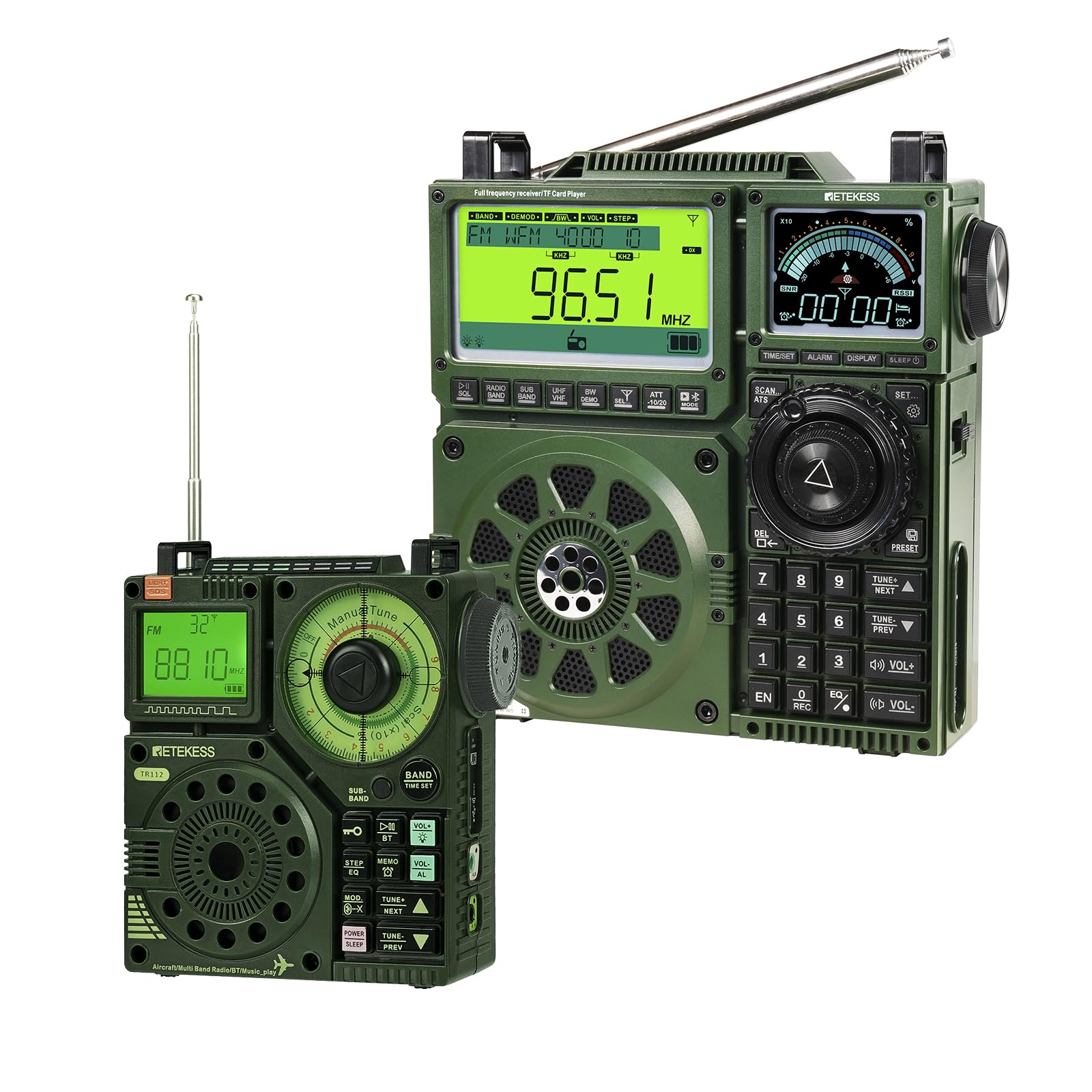
Image: The Retekess TR113 and TR112 multiband radios, showcasing their compact design and various controls.
3. What's in the Box
Upon unpacking, please ensure all items are present:
- Retekess TR113 Radio
- Retekess TR112 AIR VHF AM FM SW WB Multiband Radio Receiver
- External Antenna
- Owner's Manual (This document)
- Remote Control (for TR113)
4. Setup
4.1 Initial Power-Up
- Battery Installation and Charging: Ensure the radio's internal battery is charged. Connect the radio to a compatible USB power source using the provided cable. The TR112 features a 1600mAh battery, providing 8-10 hours of working time and requiring 3-4 hours for a full charge.
- Antenna Connection: For optimal reception, extend the built-in telescopic antenna. For enhanced signal reception, connect the external antenna to one of the available antenna ports on the TR113.

Image: The TR112 radio showing its 1600mAh battery and USB charging port, indicating working and charging times.
5. Operating Instructions
5.1 Retekess TR113 Operation
5.1.1 Full Band Reception
The TR113 is equipped for comprehensive reception across FM, AM, SW, LW, VHF, UHF, CB, WB, AIR, and SSB bands. This allows access to a wide array of radio programs and information.

Image: The TR113 radio display indicating its capability for full band reception across multiple frequency ranges including FM, AM, SW, VHF, UHF, CB, WB, MW, and SSB.
5.1.2 Multiple Antenna Modes
The TR113 features multiple antennas with gain adjustment and supports external antenna expansion. This design helps overcome signal issues, ensuring stable and clear audio reception in various environments.

Image: The TR113 radio highlighting its multiple antenna ports, including an external antenna connection, to enhance signal reception.
5.1.3 Tuning Methods and Station Saving
The TR113 offers flexible station search options:
- Fully Automatic Search: Scans and saves available stations automatically.
- Semi-Automatic Search: Allows for more controlled scanning and saving.
- Manual Search: Tune to specific frequencies directly using the digital keypad or tuning knob.
The radio also includes station storage functionality, allowing you to save your favorite stations for quick access. A remote control is included for convenient operation.

Image: The TR113 radio demonstrating various tuning methods, including digital tuning via the keypad and manual tuning using the rotary knob.
5.1.4 Alarm Clock and Sleep Mode
The TR113 includes an alarm clock function, allowing you to set a wake-up time. A sleep mode feature is also available, which can automatically turn off the radio after a set period, useful for falling asleep to audio.

Image: The TR113 radio displaying its alarm clock and sleep mode functions, with an illustration of a person sleeping, indicating its use for timed operation.
5.2 Retekess TR112 Operation
5.2.1 Multiband Reception
The TR112 is a multiband radio receiver capable of receiving AIR, FM, MW, SW, VHF, and WB bands, providing access to a variety of broadcasts.

Image: The TR112 radio displaying its multiband reception capabilities, including AIR, FM, MW, SW, VHF, and WB, with an airplane in the background.
5.2.2 Large Storage Capacity
The TR112 offers significant storage capacity, allowing you to save up to 199 radio stations per band. In total, the TR112 can memorize up to 995 channels, ensuring your favorite stations are always accessible.
5.2.3 Smart App Control
Control the TR112 remotely from up to 20 meters away using the dedicated mobile application. The app supports Android, Harmony OS, and iOS devices. Features include:
- Band switching
- Mode adjustment
- Precise frequency tuning
- Volume control
- Recording capabilities
- Touch lock prevention

Image: A smartphone screen displaying the app control interface for the TR112 radio, showing various control options like band selection, tuning, and volume.
5.2.4 SOS Alarm Emergency Function
The TR112 includes an SOS alarm emergency function. When activated, it emits an alarm signal. This feature also supports flashlight lighting for emergency situations.

Image: The TR112 radio with an activated SOS alarm, indicated by a red light and a flashing siren icon, demonstrating its emergency function.
6. Maintenance
- Cleaning: Use a soft, dry cloth to clean the radio's exterior. Do not use abrasive cleaners or solvents.
- Storage: When not in use for extended periods, store the radio in a cool, dry place.
- Battery Care: To prolong battery life, avoid fully discharging the battery frequently. Charge the battery regularly, even if the radio is not in active use.
- Antenna Care: Handle the telescopic antenna gently to prevent bending or breakage.
7. Troubleshooting
| Problem | Possible Cause | Solution |
|---|---|---|
| No power / Radio does not turn on | Battery is discharged or not properly installed. | Charge the battery. Ensure the battery is correctly inserted. |
| Poor reception / Static | Weak signal, antenna not extended, or interference. | Extend the telescopic antenna fully. Try connecting an external antenna. Move to an area with better signal. Adjust antenna gain on TR113. |
| Cannot connect to app (TR112) | Bluetooth is off, radio is out of range, or app issue. | Ensure Bluetooth is enabled on your device. Bring the radio closer (within 20 meters). Restart the app and radio. |
| Buttons unresponsive | Touch lock activated (TR112 app control) or temporary software glitch. | Check if touch lock is enabled via the app. Restart the radio. |
8. Specifications
General
- Brand: Retekess
- Color: Green
- Power Source: Battery Powered
- Included Components: Antenna, Owner's Manual, Remote Control, TR112 AIR VHF AM FM SW WB Multiband Radio Receiver
- Manufacturer: Retekess
- Hardware Interface: Radio Frequency
Retekess TR113
- Model Number: TR113
- Tuner Technology: AM, FM, LW, SW, WB, VHF, UHF, AIR, CB, SSB
- Radio Bands Supported: Full Band (FM/AM/SW/LW/VHF/UHF/CB/WB/AIR/SSB)
- Antenna Ports: 3 (for external antenna expansion)
- Presets: 1600 (approximate)
Retekess TR112
- Model Number: TR112
- Tuner Technology: AM, FM, SW, WB, AIR, VHF
- Radio Bands Supported: AIR, FM, MW, SW, VHF, WB
- Storage Capacity: 199 stations per band, 995 channels total
- Battery: 1600mAh (Working Time: 8-10 hours, Charging Time: 3-4 hours)
- App Control: Yes (Android, Harmony OS, iOS, up to 20m range)
- EQ Mode: 6
- Emergency Function: SOS Alarm, Flashlight
9. Warranty Information
For detailed warranty information, please refer to the warranty card included with your product or visit the official Retekess website. Keep your purchase receipt as proof of purchase for warranty claims.
10. Customer Support
If you encounter any issues or have questions not covered in this manual, please contact Retekess customer support through their official website or the contact information provided in your product packaging.
Retekess Official Website: Visit Retekess Store on Amazon
Ask a question about this manual
Ask about setup, troubleshooting, compatibility, parts, safety, or missing instructions. Manuals+ will review the question and use this page’s manual context to help answer it.