
XINFUTE RM-034S+, RM-L1599
Contents
XINFUTE HUAYU RM-034S+ RM-L1599 Universal TV Remote Control Instruction Manual
Model: RM-034S+, RM-L1599
Brand: XINFUTE
Introduction
This manual provides instructions for the XINFUTE HUAYU RM-034S+ RM-L1599 universal replacement remote control. This remote is designed to operate various LED TVs from brands such as Samsung, Sony, LG, and AOC without requiring complex programming.
Setup
Battery Installation
The remote control requires two (2) AAA batteries (not included) for operation. Follow these steps to install the batteries:
- Locate the battery compartment on the back of the remote control.
- Slide the battery compartment cover downwards or outwards to open it.
- Insert two AAA batteries, ensuring the positive (+) and negative (-) terminals align correctly with the markings inside the compartment.
- Replace the battery compartment cover by sliding it back into position until it clicks securely.
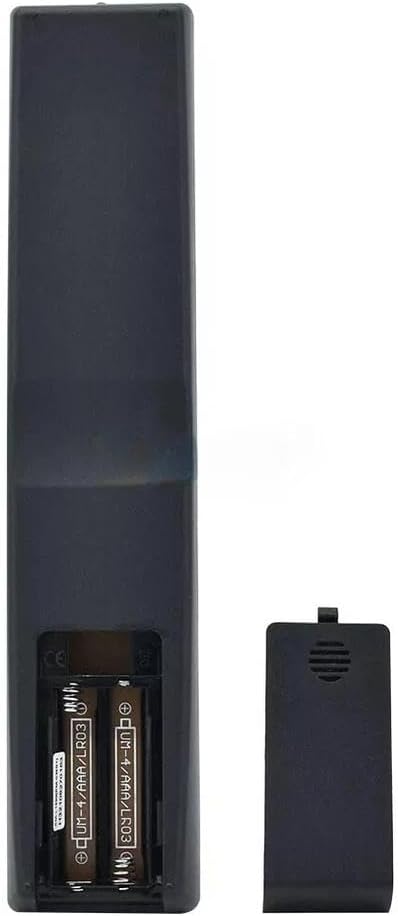
Figure 1: Rear view of the remote control with the battery cover removed, illustrating the correct placement of two AAA batteries.

Figure 2: Rear view of the remote control with the battery compartment cover securely closed.
Note: Ensure batteries are inserted with correct polarity. Incorrect installation may prevent the remote from functioning.
Operating Instructions
This universal remote control is designed for direct use with most compatible TV models without requiring initial programming. Simply point the remote at your television and press the desired function button.

Figure 3: Front view of the XINFUTE universal remote control, displaying its button layout.
Key Functions
- Power (●): Turns the television on or off.
- Mute (🔇): Mutes or unmutes the television audio.
- Number Pad (0-9): Used for direct channel selection or inputting numbers.
- Volume (+/-): Adjusts the television's volume level.
- Channel (CH +/-): Changes the television channel up or down.
- Netflix, YouTube, My Apps: Dedicated buttons for quick access to streaming services and smart TV applications.
- P.MODE, S.MODE, GUIDE, INFO, AUDIO, DEFINE, 3D, SUB: Various function buttons for picture mode, sound mode, program guide, information display, audio settings, custom functions, 3D mode, and subtitles.
- USB, HDMI, ROTATE, Home: Input selection and smart TV navigation buttons.
For specific functions related to your TV model, refer to your television's original instruction manual.
Maintenance
Cleaning
To clean the remote control, use a soft, dry cloth. Do not use liquid cleaners, abrasive pads, or chemical solvents, as these may damage the remote's surface or internal components.
Battery Replacement
Replace batteries when the remote's performance degrades or it stops responding. Always replace both batteries simultaneously with new AAA batteries. Do not mix old and new batteries, or different types of batteries.
Troubleshooting
| Problem | Possible Cause | Solution |
|---|---|---|
| Remote control does not work. |
|
|
| Some buttons do not respond. |
|
|
If troubleshooting steps do not resolve the issue, please refer to the Warranty and Support section.
Specifications
- Brand:
- XINFUTE
- Model Numbers:
- RM-034S+, RM-L1599
- Product Dimensions:
- 6 x 3 x 1 inches
- Item Weight:
- 2.82 ounces
- Batteries:
- 2 AAA batteries (not included)
- Manufacturer:
- XINFUTE
- Special Feature:
- Ergonomic, No Programming Required
- Max Number of Supported Devices:
- 1
- Compatible Devices:
- Television (Samsung, Sony, LG, AOC LED TV, etc.)
- Connectivity Technology:
- Infrared
Warranty Information
This product comes with a one-year warranty from the date of purchase. For warranty claims or service, please retain your proof of purchase.
Support
For further assistance or if you encounter issues not covered in this manual, please contact the seller directly through the platform where the purchase was made. Ensure you have your product model number (RM-034S+, RM-L1599) and purchase details available.
Seller: Xinfute
Documents and downloads
Ask a question about this manual
Ask about setup, troubleshooting, compatibility, parts, safety, or missing instructions. Manuals+ will review the question and use this page’s manual context to help answer it.