
1. Introduction
This manual provides essential information for the safe and effective operation, maintenance, and troubleshooting of your JEXUGK JCIW1600 21V Cordless Impact Wrench. Please read this manual thoroughly before using the tool and retain it for future reference.
The JEXUGK JCIW1600 is a high-performance cordless impact wrench designed for various fastening and loosening tasks, including automotive maintenance, construction, and general repairs. It features a powerful brushless motor, intelligent speed control, and a robust battery system for extended use.
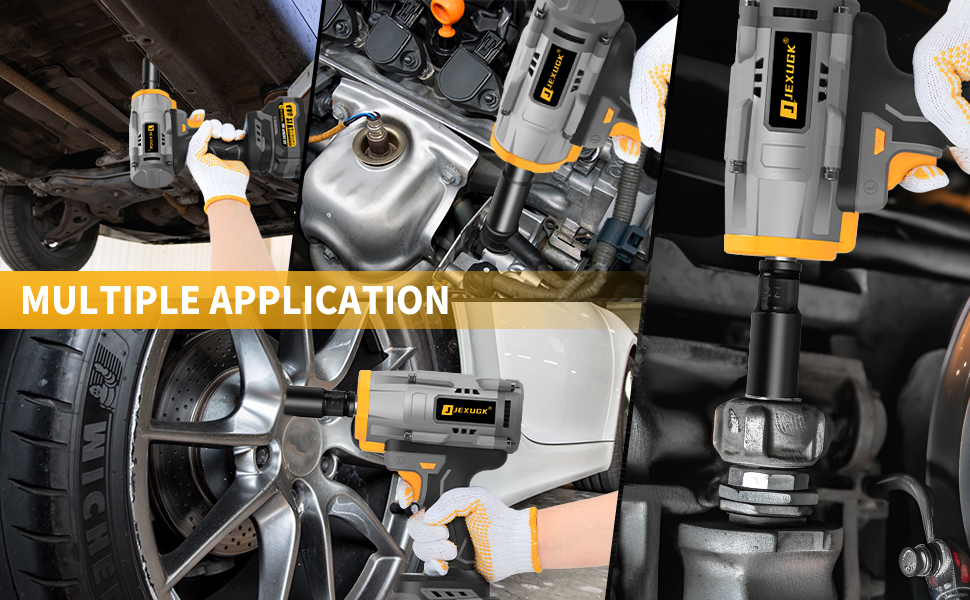
Image 1.1: The JEXUGK JCIW1600 Cordless Impact Wrench being used for multiple applications, demonstrating its versatility in automotive and mechanical tasks.
2. Safety Instructions
Always follow basic safety precautions to reduce the risk of fire, electric shock, and personal injury when using power tools.
General Power Tool Safety
- Work Area Safety: Keep your work area clean and well-lit. Cluttered or dark areas invite accidents. Do not operate power tools in explosive atmospheres, such as in the presence of flammable liquids, gases, or dust.
- Electrical Safety: Avoid body contact with earthed or grounded surfaces such as pipes, radiators, ranges, and refrigerators. There is an increased risk of electric shock if your body is earthed or grounded.
- Personal Safety: Always wear eye protection. Use appropriate safety equipment such as dust masks, non-skid safety shoes, hard hats, or hearing protection when necessary. Dress properly; avoid loose clothing or jewelry that can be caught in moving parts.
- Tool Use and Care: Do not force the power tool. Use the correct power tool for your application. Disconnect the plug from the power source and/or the battery pack from the power tool before making any adjustments, changing accessories, or storing power tools.
Battery Tool Use and Care
- Recharge only with the charger specified by the manufacturer. A charger that is suitable for one type of battery pack may create a risk of fire when used with another battery pack.
- Use power tools only with specifically designated battery packs. Use of any other battery packs may create a risk of injury and fire.
- When battery pack is not in use, keep it away from other metal objects like paper clips, coins, keys, nails, screws, or other small metal objects that can make a connection from one terminal to another. Shorting the battery terminals together may cause burns or a fire.
- Under abusive conditions, liquid may be ejected from the battery; avoid contact. If contact accidentally occurs, flush with water. If liquid contacts eyes, additionally seek medical help. Liquid ejected from the battery may cause irritation or burns.
3. Package Contents
Carefully unpack all items and ensure you have received all components listed below. If any items are missing or damaged, please contact your retailer.
- 1 x JEXUGK Cordless Impact Wrench
- 2 x 4.0Ah Lithium-Ion Batteries
- 1 x Desktop Fast Charger
- 6 x Impact Sockets (17mm, 19mm, 21mm, 22mm, 24mm, 26mm)
- 1 x 5-inch Extension Bar
- 1 x Sturdy Carrying Case
- 1 x User Manual (this document)

Image 3.1: All components included in the JEXUGK JCIW1600 Cordless Impact Wrench set, neatly arranged with the carrying case.
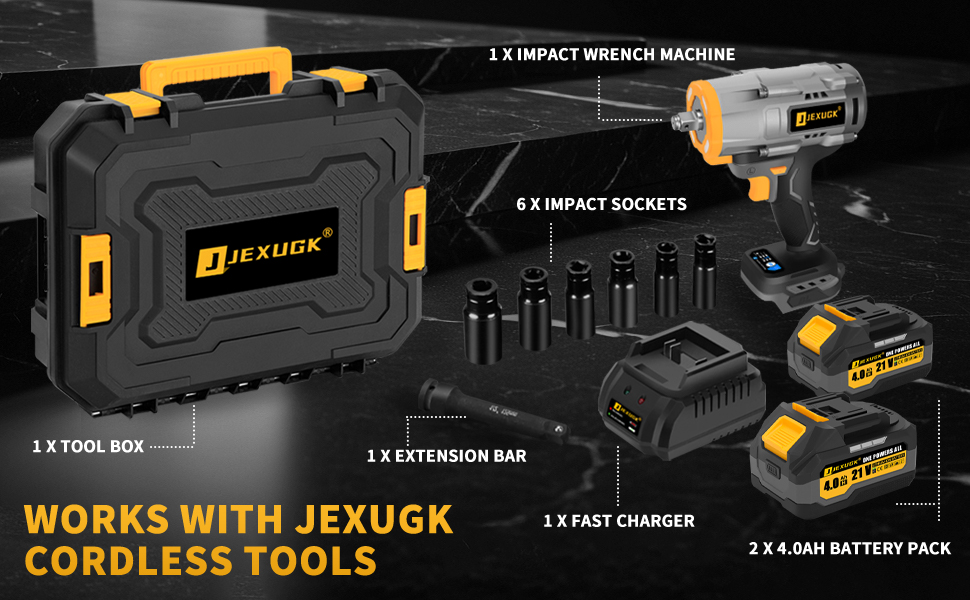
Image 3.2: A detailed breakdown of the JEXUGK JCIW1600 kit contents, illustrating each item included in the package.
4. Product Overview
Familiarize yourself with the various parts of your JEXUGK JCIW1600 Cordless Impact Wrench for proper and safe operation.

Image 4.1: Key components of the JEXUGK JCIW1600 Cordless Impact Wrench, including the 1/2" square drive, LED light, variable speed switch, and smart control panel.
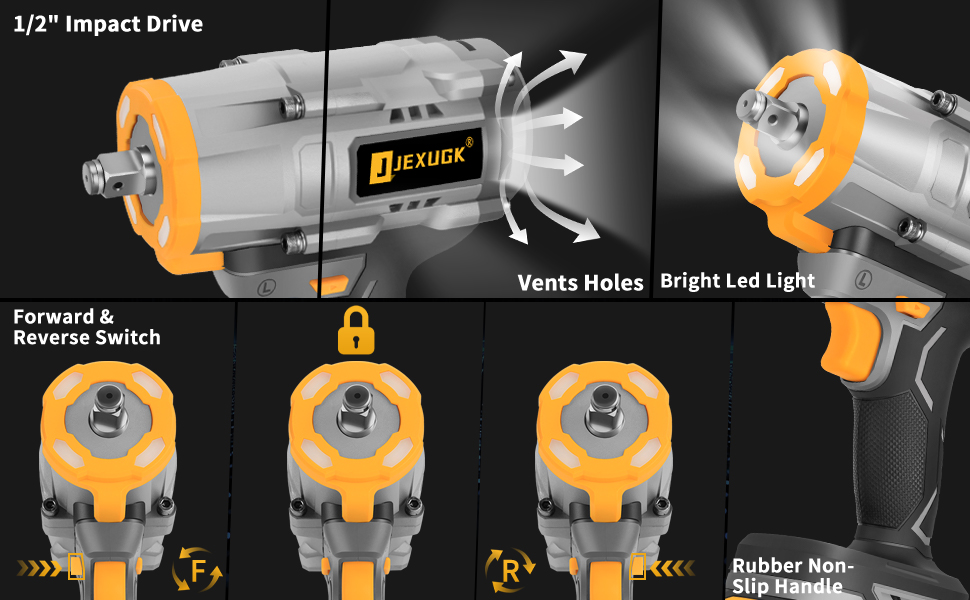
Image 4.2: Detailed view of the impact wrench's features, such as the 1/2" drive, LED light, ventilation, and the forward/reverse switch with a lock function.
Key Features:
- Brushless Motor: Provides increased efficiency, longer runtime, and extended tool life compared to brushed motors.
- 1/2" Square Drive: Compatible with standard 1/2-inch impact sockets.
- LED Work Light: Illuminates the work area for improved visibility, with a 5-second delayed shut-off.
- Variable Speed Trigger: Allows for precise speed control based on pressure applied.
- Smart Control Panel: Digital interface for speed settings and battery status.
- Forward/Reverse Switch: Easily change rotation direction for tightening or loosening.
- Ergonomic Handle: Soft rubberized grip designed for comfort and reduced vibration.

Image 4.3: An illustration of the upgraded brushless motor, highlighting its internal structure and benefits such as high torque and variable speed.
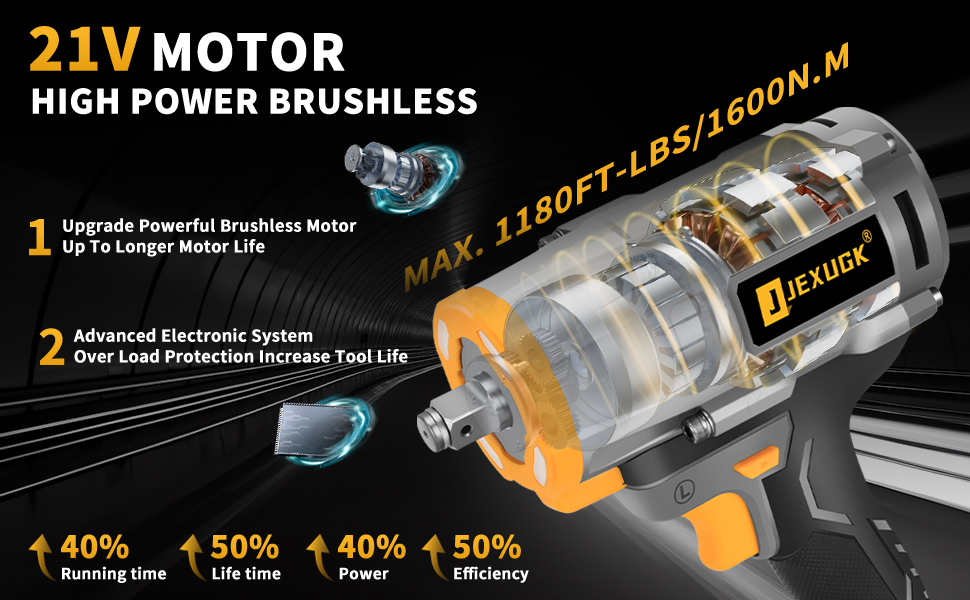
Image 4.4: The 21V high-power brushless motor, emphasizing its advanced electronic system for overload protection and improved performance metrics.
5. Setup
5.1 Charging the Battery
The JEXUGK JCIW1600 comes with two 4.0Ah Lithium-Ion batteries. Ensure batteries are fully charged before first use.
- Connect the desktop fast charger to a standard power outlet.
- Slide the battery pack onto the charger. Ensure it clicks into place.
- Observe the charger indicator light:
- Red Light: Battery is charging.
- Green Light: Charging is complete.
- Once fully charged, remove the battery from the charger.

Image 5.1: The 4.0Ah Lithium-Ion battery being charged, showing the internal cell structure.
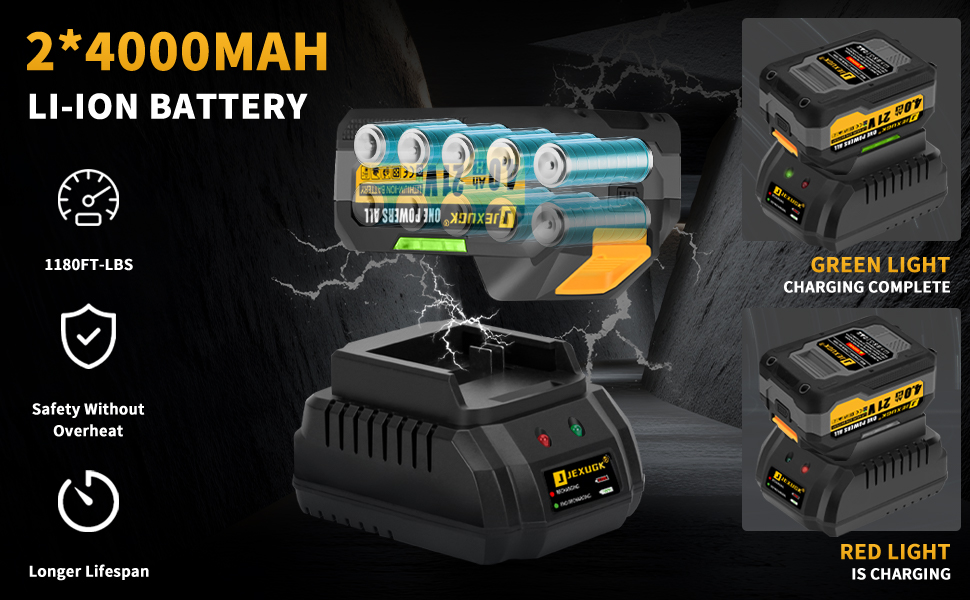
Image 5.2: Illustration of the 4000mAh Li-ion battery charging process, with indicators for charging status.
5.2 Installing and Removing the Battery
- Installation: Align the battery pack with the base of the impact wrench and slide it in until it clicks securely into place.
- Removal: Press the battery pack release button (located on the front of the battery) and slide the battery pack out.
5.3 Attaching Sockets
- Ensure the impact wrench is off and the battery is removed for safety.
- Push the desired 1/2-inch impact socket onto the square drive anvil until it locks securely.
- To remove, pull the socket firmly off the anvil.
6. Operation
6.1 Powering On/Off and Speed Control
The impact wrench features an intelligent speed control system with three adjustable speed settings and a variable-speed trigger.
- Power On: Press the variable speed trigger to activate the tool. The LED work light will illuminate.
- Speed Adjustment: Use the 'MODE' button on the smart control panel to cycle through the three speed settings:
- H (High): Up to 3500 RPM for maximum power.
- M (Medium): Up to 2500 RPM for balanced power and control.
- L (Low): Up to 1500 RPM for delicate tasks or starting fasteners.
- Variable Speed: The trigger allows for continuous speed adjustment within the selected mode. Pressing the trigger further increases the speed.
- Power Off: Release the variable speed trigger. The LED work light will turn off after approximately 5 seconds.

Image 6.1: The three adjustable speed settings (High, Medium, Low) and their corresponding RPMs, selectable via the mode button.
6.2 Forward and Reverse Operation
The forward/reverse switch controls the direction of rotation for tightening or loosening fasteners.
- Forward (Tightening): Push the switch to the left (indicated by 'F' or a left arrow) for clockwise rotation.
- Reverse (Loosening): Push the switch to the right (indicated by 'R' or a right arrow) for counter-clockwise rotation.
- Lock Mode: When the switch is in the center position, the trigger is locked, preventing accidental activation.

Image 6.2: Illustration of the forward and reverse switch positions and their functions for tightening and loosening fasteners.
6.3 Intelligent Safety System
The JEXUGK JCIW1600 incorporates an intelligent safety system to enhance user safety and tool longevity.
- Overload Protection: The intelligent chip actively prevents overcurrent, overvoltage, overheating, and short circuits.
- Lock Mode: The center position of the forward/reverse switch acts as a lock to prevent accidental activation.
- Reverse Auto-Stop: In reverse mode, the tool automatically stops when it detects a loose nut. This feature helps prevent the nut from flying off and causing injury or loss.
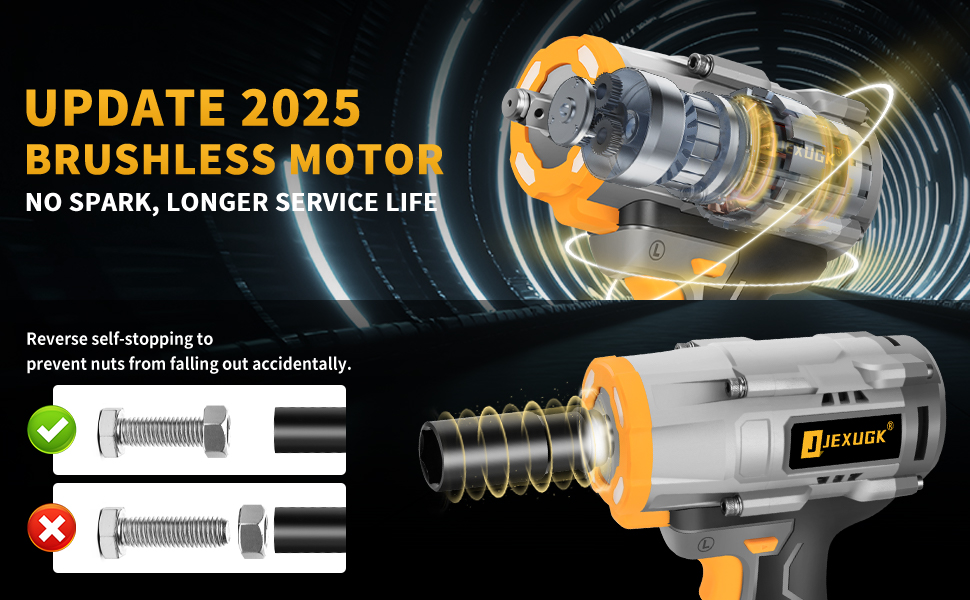
Image 6.3: The reverse self-stopping mechanism, designed to prevent nuts from falling off accidentally during loosening operations.
6.4 High Torque Performance
The brushless motor delivers a peak breakaway torque of 1600 Nm (1180 ft-lbs), making it suitable for heavy-duty applications.

Image 6.4: Demonstration of the impact wrench's high torque capabilities, suitable for various demanding tasks.
7. Maintenance
Regular maintenance ensures optimal performance and extends the lifespan of your tool.
- Cleaning: Keep the tool's ventilation openings clean and free from debris. Use a soft, damp cloth to clean the housing. Do not use harsh chemicals or abrasive cleaners.
- Battery Care: Store batteries in a cool, dry place away from direct sunlight. Do not store fully discharged batteries for extended periods. Charge them periodically if not in use.
- Storage: When not in use, store the impact wrench, batteries, and charger in the provided carrying case in a dry, secure location, out of reach of children.
- Inspection: Periodically inspect the tool for any signs of damage, loose screws, or worn parts. If any issues are found, discontinue use and have the tool serviced by a qualified technician.
8. Troubleshooting
This section addresses common issues you might encounter with your JEXUGK JCIW1600 impact wrench.
| Problem | Possible Cause | Solution |
|---|---|---|
| Tool does not start | Battery not charged Battery not properly installed Forward/Reverse switch in lock position | Charge battery Re-install battery securely Move switch to forward or reverse position |
| Reduced power/torque | Low battery charge Incorrect speed setting Overload protection activated | Recharge battery Select a higher speed setting Allow tool to cool down; reduce load |
| Battery not charging | Charger not plugged in Faulty battery or charger Battery too hot/cold | Ensure charger is securely plugged in Contact customer support Allow battery to reach room temperature |
| Socket does not attach securely | Incorrect socket size Debris in square drive | Use correct 1/2-inch impact socket Clean square drive anvil |
If the problem persists after attempting these solutions, please contact JEXUGK customer support for further assistance.
9. Specifications
| Feature | Specification |
|---|---|
| Model Number | JCIW1600 |
| Voltage | 21 Volts (DC) |
| Max Breakaway Torque | 1600 Newton Meters (1180 ft-lbs) |
| No-Load Speed | 0-3500 RPM (3 speed settings) |
| Drive Size | 1/2 inch Square Drive |
| Motor Type | Brushless |
| Battery Type | Lithium-Ion |
| Battery Capacity | 2 x 4.0Ah |
| Power Source | Battery Powered |
| Item Weight (Tool only) | 5.83 Kilograms (approx. 12.82 lbs with package) |
| Material | Plastic |
| UPC | 768553577072 |
10. Warranty and Support
For warranty information, product registration, or technical support, please refer to the warranty card included with your purchase or visit the official JEXUGK website. Keep your proof of purchase for any warranty claims.
Manufacturer: JEXUGK