TOPDON TC004 Mini Handheld Thermal Imaging Camera User Manual
Model: TC004 Mini Blue | Brand: TOPDON
1. Introduction
The TOPDON TC004 Mini is a compact and versatile handheld thermal imaging camera designed for a wide range of applications, from home inspections to industrial diagnostics. It features advanced thermal clarity, smart alerts, and a durable, portable design, making it an essential tool for professionals and DIY enthusiasts alike.
Figure 1: TOPDON TC004 Mini Handheld Thermal Imaging Camera
This image displays the TOPDON TC004 Mini thermal imaging camera, highlighting its compact and ergonomic design. The device features a screen on the top portion and a comfortable grip for handheld use.
2. What's in the Box
Upon unboxing your TOPDON TC004 Mini, please ensure all the following items are present:
TC004 Mini Thermal Imager
Hanging Strap
USB-A to USB-C Cable
User Guide (Electronic version available via QR code)
Figure 2: Included Accessories
This image shows the complete contents of the product package: the TC004 Mini thermal camera, a hanging strap, a USB-A to USB-C charging cable, and a quick user guide.
3. Setup
3.1 Initial Charging
Before first use, fully charge the TC004 Mini. Connect the provided USB-A to USB-C cable to the charging port located on the top of the device (under the rubber cover) and plug the other end into a compatible USB power adapter (not included). A full charge typically takes approximately 2 hours and provides up to 15 hours of continuous operation.
Figure 3: Long-Lasting Battery
This image illustrates the TC004 Mini's impressive 15-hour battery life and its auto power-off options (5/10/20 minutes) to conserve power.
3.2 Language and Time Settings
Upon powering on the device for the first time, you will be prompted to select your preferred language and set the current date and time. Use the navigation buttons to select options and confirm your choices.
4. Operating Instructions
4.1 Basic Operation
To begin thermal imaging, simply power on the device by long-pressing the power button. Point the infrared camera lens towards the object you wish to inspect. The thermal image will instantly appear on the 2.4-inch screen.
Figure 4: Device in Operation
This image shows the TC004 Mini being held and used, with its screen displaying a thermal image. The buttons for navigation and control are clearly visible.
4.2 Temperature Measurement and Alerts
The TC004 Mini automatically pinpoints the highest, lowest, and central temperature spots within the frame, displaying their values on the screen. You can set custom high/low temperature alerts, which will trigger an on-screen warning and automatically capture a photo when exceeded.
Figure 5: Automatic Spot Tracker
This image demonstrates the automatic temperature measurement feature, showing the device's screen with indicators for center, hot, and cold spots on a thermal image of an electrical panel.
Figure 6: High & Low Temperature Alerts
This image shows the TC004 Mini displaying a high-temperature alert on its screen, indicating that temperatures have exceeded a preset limit, useful for safety and diagnostics.
4.3 TISR Image Enhancement Technology
The camera's original 128x128 thermal imaging resolution can be enhanced to 240x240 using TISR technology, providing greater detail for precise inspections.
Figure 7: TISR Enhancement
This image provides a side-by-side comparison of thermal images with TISR (Thermal Image Super Resolution) technology enabled and disabled, demonstrating the enhanced clarity and detail when TISR is active.
4.4 Color Palettes
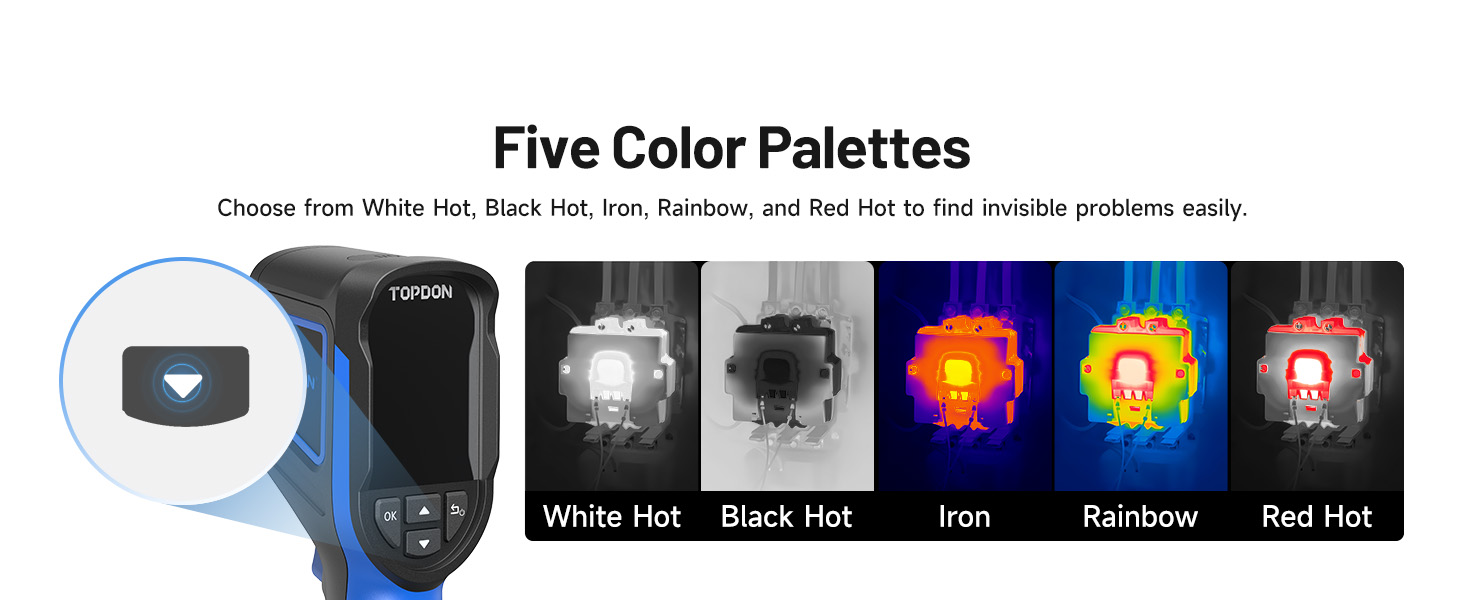
Choose from 5 different color palettes (White Hot, Black Hot, Iron, Rainbow, and Red Hot) to best visualize temperature differences for your specific application.
Figure 8: Color Palette Options
This image displays the five different color palettes available on the TC004 Mini: White Hot, Black Hot, Iron, Rainbow, and Red Hot, allowing users to select the best visual representation for their needs.
5. Applications
The TC004 Mini is a versatile tool suitable for various diagnostic and inspection tasks:
HVAC Troubleshooting: Identify issues in heating, ventilation, and air conditioning systems.
Home Inspection: Detect insulation gaps, drafts, and moisture problems.
Water Leak Inspection: Locate hidden water leaks by observing temperature differentials.
Electrical Inspection: Pinpoint overheating components in electrical panels and wiring.
Vehicle Maintenance: Diagnose automotive issues related to heat, such as engine components or electrical systems.
Industrial Inspection: Monitor machinery and equipment for abnormal heat signatures to prevent failures.
Figure 9: Diverse Applications
This image showcases various scenarios where the TC004 Mini can be effectively used, including HVAC troubleshooting, home inspection, water leak detection, electrical inspection, vehicle maintenance, and industrial inspection.
The device can also be used to check skin temperature, heat dissipation from electronics (like server racks and network ports), and the integrity of weather stripping on doors and windows to identify heating or cooling issues.
6. Maintenance
6.1 Durability and Protection
The TC004 Mini is engineered for durability, capable of surviving drops up to 2 meters. It also boasts an IP54 waterproof rating, providing protection against dust and splashing water, making it suitable for various working environments.
Figure 10: Built to Last
This image highlights the robust construction of the TC004 Mini, featuring its 2-meter drop-proof capability and IP54 protection against dust and water.
6.2 Battery Life Management
To maximize battery life, the device includes automatic shut-off options at 5, 10, and 20-minute intervals. This feature helps conserve power during periods of inactivity.
7. Troubleshooting
For common issues or detailed troubleshooting steps, please refer to the comprehensive electronic user manual. This manual provides in-depth information on device functions, error codes, and solutions.
8. Specifications
Feature
Specification
Package Dimensions
10.75 x 7.36 x 3.86 inches; 1.04 Pounds
Item Model Number
TC004 Mini Blue
Batteries
1 Lithium Ion batteries required. (included)
Date First Available
March 24, 2025
Manufacturer
TOPDON
ASIN
B0F29969G1
9. Support & Warranty
TOPDON provides lifetime technical support for the TC004 Mini. For any inquiries or assistance, please refer to the official TOPDON support channels.
9.1 Electronic User Manual
For environmental protection, a paper manual is not included in the package. An electronic manual is available for download:
Scan the QR code on the back of the product package.
After navigating to the TC004 Mini webpage, click the small arrow in the upper right corner (below the shopping bag icon).
Click "Download" and select the manual you wish to download.
Ask about setup, troubleshooting, compatibility, parts, safety, or missing instructions. Manuals+ will review the question and use this page’s manual context to help answer it.