
1. Introduction
Thank you for choosing the NEEWER Basics TS04 Selfie Stick Tripod. This versatile accessory is designed to enhance your photography and videography experience, offering both a portable selfie stick and a stable tripod for various devices. Please read this manual carefully to ensure proper setup and operation.
2. Package Contents
- 1 x Selfie Stick Tripod
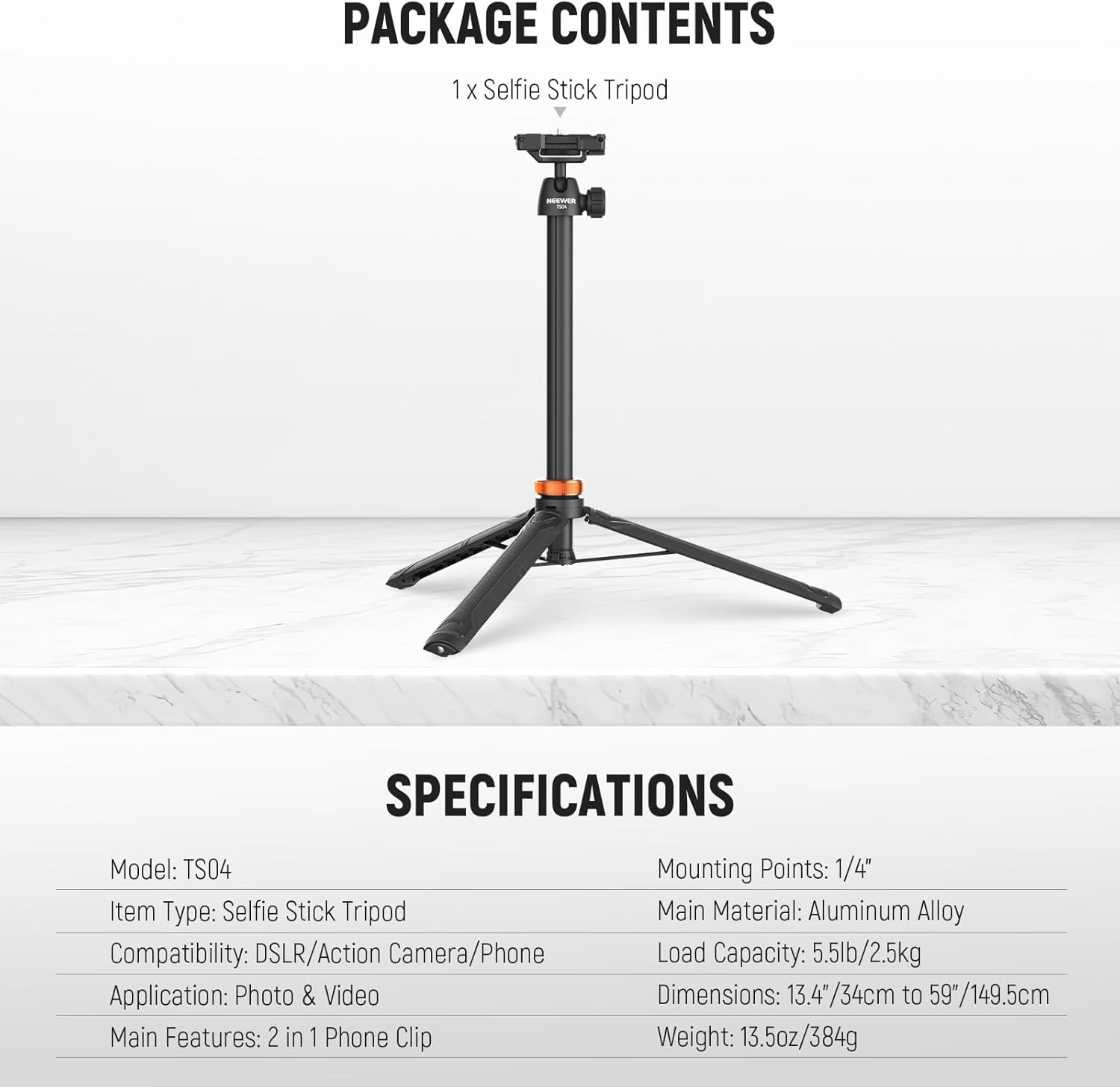
Image: The NEEWER Basics TS04 Selfie Stick Tripod as it appears in its packaging.
3. Product Overview
The NEEWER Basics TS04 combines a selfie stick and a tripod into one compact unit. It features an integrated phone holder, a 1/4" screw mount for cameras, and an adjustable ball head for flexible positioning.

Image: Detailed view of the NEEWER TS04 showing the integrated phone holder, 1/4" screw, and ball head.
- Integrated Phone Holder: Converts from a flat platform to a spring-loaded phone clamp (2.4" to 3.3" / 6 to 8.5 cm wide).
- 1/4" Screw Mount: Standard screw for attaching DSLR cameras, action cameras (adapter not included), webcams, or other compatible devices.
- 360° Ball Head: Allows for 360° swivel and 90° tilt for flexible shooting angles.
- Extendable Pole: 7-section design extends from 13.4" (34cm) to 59" (149.5cm).
- Tripod Legs: Foldable legs with non-slip rubber feet for stability.
4. Setup Instructions
4.1 Unfolding the Tripod Legs
- Hold the handle firmly.
- Gently pull the three legs outwards until they are fully extended and stable.
- Ensure the orange locking ring is tightened to secure the legs in place.

Image: The NEEWER TS04 in tripod mode, supporting a smartphone on a table.
4.2 Extending the Selfie Stick
- With the tripod legs folded or unfolded, twist the orange locking ring to the unlock position (indicated by an open padlock icon).
- Pull the telescopic pole upwards to extend it to your desired height. The pole has 7 sections and can extend up to 59 inches (149.5 cm).
- Twist the orange locking ring back to the lock position (closed padlock icon) to secure the pole at the chosen length.

Image: Visual guide demonstrating the adjustable height of the selfie stick tripod from minimum to maximum extension.
4.3 Mounting a Smartphone
- Locate the integrated phone holder at the top of the ball head.
- Flip up the phone holder to reveal the spring-loaded clamp.
- Gently pull the top part of the clamp upwards and insert your smartphone. Ensure it is securely held by the silicone pads.
- The phone holder accommodates devices from 2.4" to 3.3" (6 to 8.5 cm) wide.
Image: Close-up of the phone holder, illustrating how it unfolds and clamps a smartphone.
4.4 Mounting a Camera or Accessory
- If using a camera, ensure the integrated phone holder is folded down flat.
- Locate the 1/4" screw at the top of the ball head.
- Carefully screw your DSLR camera, action camera (with appropriate adapter, not included), or other 1/4" compatible accessory onto the screw until secure.
- The tripod supports devices up to 5.5lb (2.5kg).
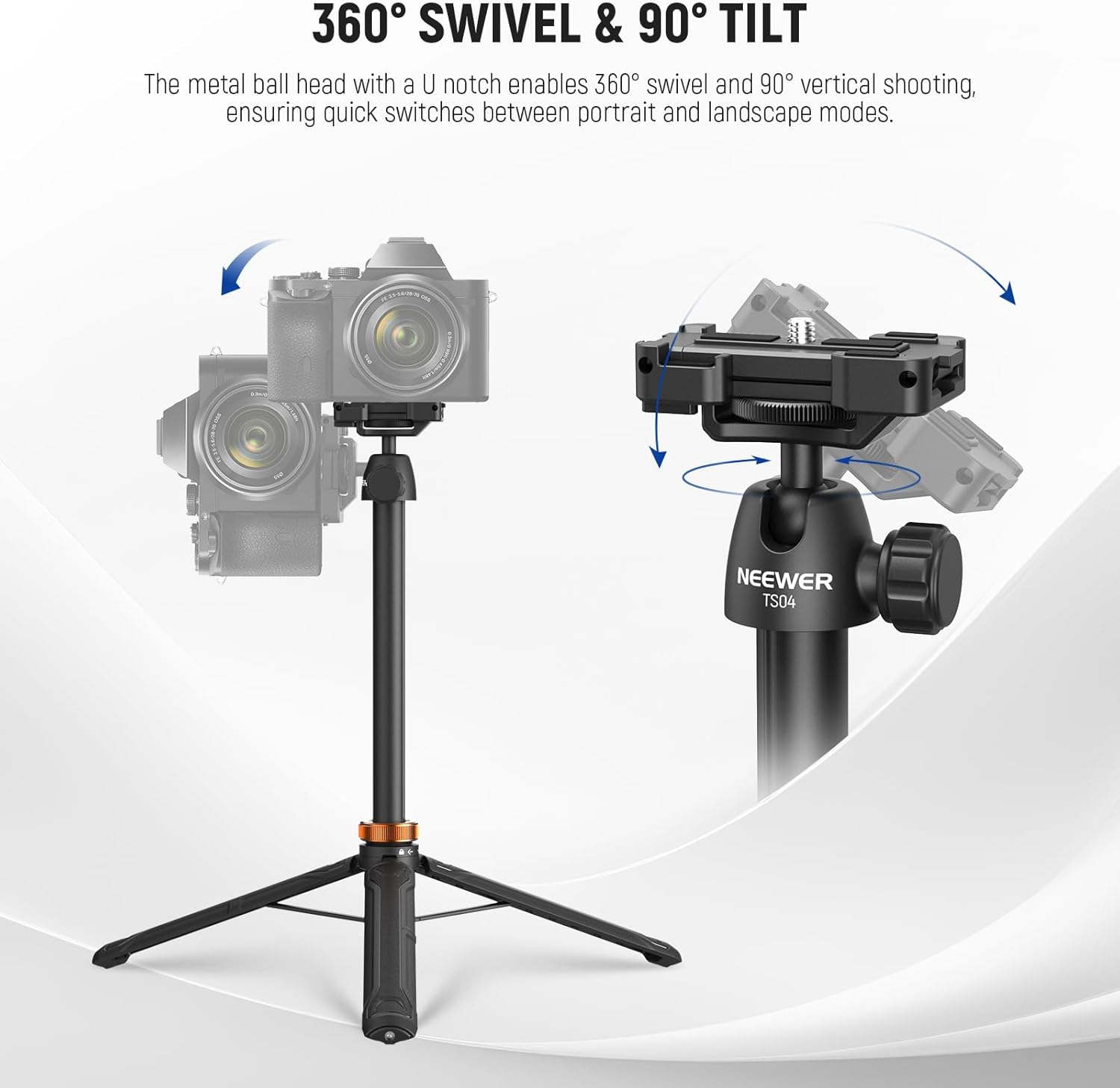
Image: The TS04 with a camera mounted, highlighting the ball head's range of motion.
5. Operating Instructions
5.1 Adjusting Angles (Ball Head)
- Loosen the knob on the side of the ball head.
- Adjust your device to the desired angle (360° swivel, 90° tilt).
- Tighten the knob to secure the device in position.
Image: The ball head mechanism allowing for 360° rotation and 90° tilt.
5.2 Using as a Selfie Stick
- Ensure the tripod legs are folded together to form a comfortable grip.
- Extend the pole to your desired length (refer to Section 4.2).
- Mount your smartphone or camera (refer to Sections 4.3 and 4.4).
- Adjust the angle using the ball head.

Image: A person using the TS04 as an extended selfie stick to capture a photo.
5.3 Using as a Tripod
- Unfold the tripod legs for stability (refer to Section 4.1).
- Place the tripod on a flat, stable surface.
- Extend the pole to your desired height and mount your device.
- Adjust the angle using the ball head.

Image: Examples of the TS04 being used as a tripod for different content creation needs.
5.4 Portability
The TS04 is designed for portability, folding down to 12.6 inches (32 cm) and weighing only 13.5 oz (384 g). This makes it easy to carry in a backpack for outdoor shooting or travel.

Image: The compact TS04 attached to a backpack, illustrating its portability for outdoor activities.
5.5 Official Product Video
Video: An official product video from NEEWER demonstrating the features and usage of the TS04 Selfie Stick Tripod, including its phone holder, camera mount, and portability.
6. Maintenance
- Keep the tripod clean and free from dust and debris. Use a soft, dry cloth for cleaning.
- Avoid exposing the product to extreme temperatures or moisture.
- Do not apply excessive force when extending or collapsing the pole to prevent damage.
- Store in a cool, dry place when not in use.
7. Troubleshooting
| Problem | Possible Cause | Solution |
|---|---|---|
| Tripod feels unstable at maximum extension. | Inherent flexibility of a lightweight, extendable pole. | Ensure the orange locking ring is fully tightened. For maximum stability, use at lower heights or on a very flat, stable surface. Avoid bumping the tripod when fully extended. |
| Phone not securely held. | Phone size outside of supported range or not properly seated. | Verify phone width is between 2.4" and 3.3" (6-8.5 cm). Ensure the phone is centered and fully seated in the spring-loaded clamp. |
| Camera not attaching to 1/4" screw. | Incorrect screw size or obstruction. | Confirm your camera uses a standard 1/4" tripod mount. Check for any debris in the screw thread. |
8. Specifications
| Brand | NEEWER |
| Model Name | TS04 |
| Model Number | TS04 w/360° Ball Head |
| Material | Aluminum |
| Maximum Height | 59 inches (149.5 cm) |
| Minimum Height | 13.4 inches (34 cm) |
| Folded Size | 12.6 inches (32 cm) |
| Weight | 13.5 oz (384 g) |
| Weight Limit | 5.5 lb (2.5 kg) |
| Tripod Head Type | Ball Heads |
| Compatible Devices | DSLR Camera, Action Camera, Smartphone |
| UPC | 191073108745 |
9. Warranty & Support
This product comes with a 1 Year Manufacturer Warranty. For technical support, warranty claims, or further assistance, please visit the official NEEWER website or contact their customer service directly. You can find more information and products at the NEEWER Store.