
DJI Mini 5 Pro
Contents
DJI Mini 5 Pro Drone User Manual
Model: Mini 5 Pro
Introduction
The DJI Mini 5 Pro is an ultra-light, foldable drone designed for aerial photography and videography. It features a 1-inch CMOS sensor, omnidirectional obstacle sensing, and advanced intelligent flight modes. This manual provides essential information for safe and effective operation of your drone.

Image: The DJI Mini 5 Pro drone with its remote controller, showcasing its compact design.
Setup
1. Unboxing and Component Check
Ensure all components are present in the package:
- DJI Mini 5 Pro Aircraft x 1
- DJI RC-N3 Remote Controller x 1
- DJI Mini 5 Pro Intelligent Flight Battery x 1
- DJI Mini 5 Pro Spare Propeller (Pair) x 1
- DJI RC-N Series RC Cable (USB-C Connector) x 1
- DJI RC-N Series RC Cable (Lightning Connector) x 1
- USB-C to USB-C Data Cable x 1
- DJI Mini 5 Pro Storage Cover x 1
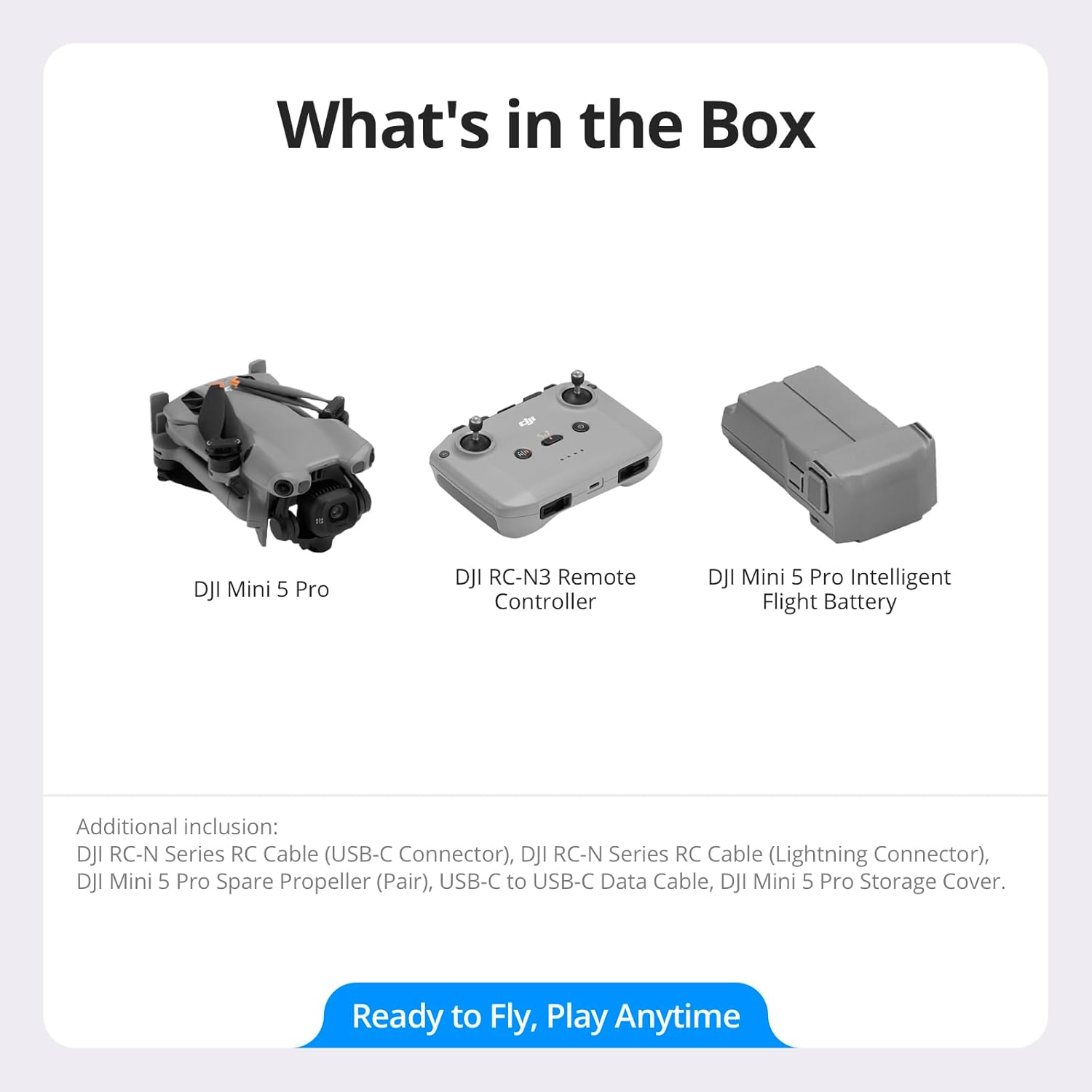
Image: A visual representation of the items included in the DJI Mini 5 Pro package.
2. Battery Charging
Charge the Intelligent Flight Battery and remote controller before first use. Use the provided USB-C cable and a compatible charger. The optional Two-Way Charging Hub can charge multiple batteries efficiently.

Image: Diagram illustrating the Smart Power Charging Hub, which allows for efficient charging of multiple batteries.
3. App Installation and Activation
The DJI Mini 5 Pro requires the DJI Fly app for operation. Due to platform compatibility, the app has been removed from Google Play. Please visit the official DJI website to download the latest DJI Fly app and user manual for the best experience. Follow the in-app instructions to activate your drone.
Operating Instructions
1. Flight Controls
Operate the drone using the DJI RC-N3 remote controller in conjunction with the DJI Fly app. Familiarize yourself with the control sticks and buttons. Always ensure a clear line of sight to the drone and operate within legal flight zones.

Image: The DJI Mini 5 Pro drone and its remote controller resting on a tree stump, ready for flight.
2. Camera System
The Mini 5 Pro features a 1-inch CMOS sensor capable of capturing 4K/60fps HDR video and 50 MP still images. The gimbal offers 225° roll rotation for flexible camera movement and supports true vertical filming. Utilize the 48mm Med-Tele Mode for 2x zoom and portrait optimization.

Image: A close-up of the DJI Mini 5 Pro drone in flight, emphasizing its 1-inch CMOS sensor for high-quality imaging.

Image: Visuals demonstrating the drone's 225° gimbal rotation, capability for true vertical filming, and 55° upward shot angles.
3. Safety Features
The drone is equipped with an Omnidirectional Obstacle Sensing system, including forward-facing LiDAR and vision sensors, to detect obstacles in all directions. This enhances safety, especially during night flights and Return-to-Home (RTH) procedures. Nightscape Omnidirectional Obstacle Sensing provides robust safety for night photography.

Image: A diagram illustrating the DJI Mini 5 Pro's Omnidirectional Vision Sensing System, showing its comprehensive obstacle detection capabilities.

Image: Examples of Nighttime RTH, where LiDAR guides the drone in low light, and Non-GNSS RTH, where the drone memorizes flight paths for safe returns.
4. Intelligent Flight Modes
Utilize Upgraded ActiveTrack 360° for customizable tracking modes, ensuring subjects remain in focus with enhanced stability and faster response. This feature adapts to various scenarios, including cycling.

Image: Visuals demonstrating the drone's Multi-Scenario Tracking, including Standard Mode and Cycling Mode for optimal subject tracking.
5. Flight Performance
The Intelligent Flight Battery Plus provides up to 52 minutes of flight time. The O4+ video transmission system offers a stable 20 km range, even in urban environments. The drone can operate at altitudes up to 6000m with a maximum ascent speed of 10 m/s.

Image: The DJI Mini 5 Pro drone in flight, highlighting its extended flight time of up to 52 minutes.

Image: A person operating the DJI Mini 5 Pro with the remote controller, illustrating the drone's 20km video transmission capability.
6. Data Transfer
Utilize QuickTransfer to transfer files at up to 100 MB/s, even when the drone is off. View and download footage anytime with the DJI Fly app.

Image: A person demonstrating QuickTransfer, wirelessly downloading files from the DJI Mini 5 Pro to a smartphone.
Maintenance
1. Firmware Updates
When the drone is connected to the remote controller and a new firmware version is available, the DJI Fly app will prompt you to update. Follow the instructions to update the firmware for the drone, remote controller, battery, and other devices. You can also update via the DJI Assistant 2 (Consumer Drones Series) software on a computer, available on the official DJI website.
2. Cleaning and Care
Regularly inspect the drone for any damage. Keep the forward-facing LiDAR and vision sensors clean to ensure accurate obstacle sensing. Use a soft, dry cloth for cleaning. Avoid exposing the drone to dust or sand.
3. Battery Care
Store batteries in a cool, dry place. Avoid overcharging or fully discharging the batteries. Follow all safety guidelines provided by DJI for battery handling and storage.
Troubleshooting
1. DJI Fly App Compatibility
If you encounter issues with the DJI Fly app, ensure you have downloaded the latest version directly from the official DJI website, as it is no longer available on Google Play. If using DJI RC 2, the app is pre-installed.
2. Forward-Facing LiDAR Issues
Dirt and debris can lead to false obstacle detection. Keep the forward-facing LiDAR clean for accurate sensing. The LiDAR works automatically in moderately lit environments but may not function properly in bright light. Pay attention to ambient light conditions to maintain safe flight operations.
3. Water Exposure
Avoid contact with water during use, as it may damage the device. If the drone falls into water, retrieve it immediately and power it off. Do not attempt to use it again until it is completely dry, both inside and out.
Specifications
| Feature | Detail |
|---|---|
| Brand | DJI |
| Model Name | DJI Mini 5 Pro |
| Item Weight | 249 Grams (8.8 ounces) |
| Product Dimensions | 10.04"L x 7.12"W x 3.56"H |
| Video Capture Resolution | 4K |
| Effective Still Resolution | 50 MP |
| Optical Sensor Technology | CMOS (1-inch) |
| Connectivity Technology | Bluetooth, Wi-Fi |
| Wireless Communication Technology | O3 |
| Control Type | Remote Control |
| Battery Cell Composition | Lithium Polymer |
| Max Flight Time (with Intelligent Flight Battery Plus) | Up to 52 minutes |
| Max Transmission Distance | 20 km |
| Max Takeoff Altitude | 6000 m |
| Max Ascent Speed | 10 m/s |
Warranty and Support
For detailed warranty information, technical support, and additional resources, please visit the official DJI website. The website provides comprehensive FAQs, troubleshooting guides, and contact options for customer service.
It is recommended to register your product on the DJI website to receive updates and support notifications.
Check local regulations before flying at night. In certain countries or regions, relevant permits may be required.
Documents and downloads
Ask a question about this manual
Ask about setup, troubleshooting, compatibility, parts, safety, or missing instructions. Manuals+ will review the question and use this page’s manual context to help answer it.