
1. Introduction
The NEEWER TP53 Entry Level Version Tripod is designed for ease of use and portability, making it suitable for beginners and travelers. Constructed from durable aluminum alloy, this lightweight tripod provides stable support for various devices, including DSLR cameras, action cameras, and smartphones. It features versatile adjustment options for capturing a wide range of shots, from panoramic landscapes to vertical video.
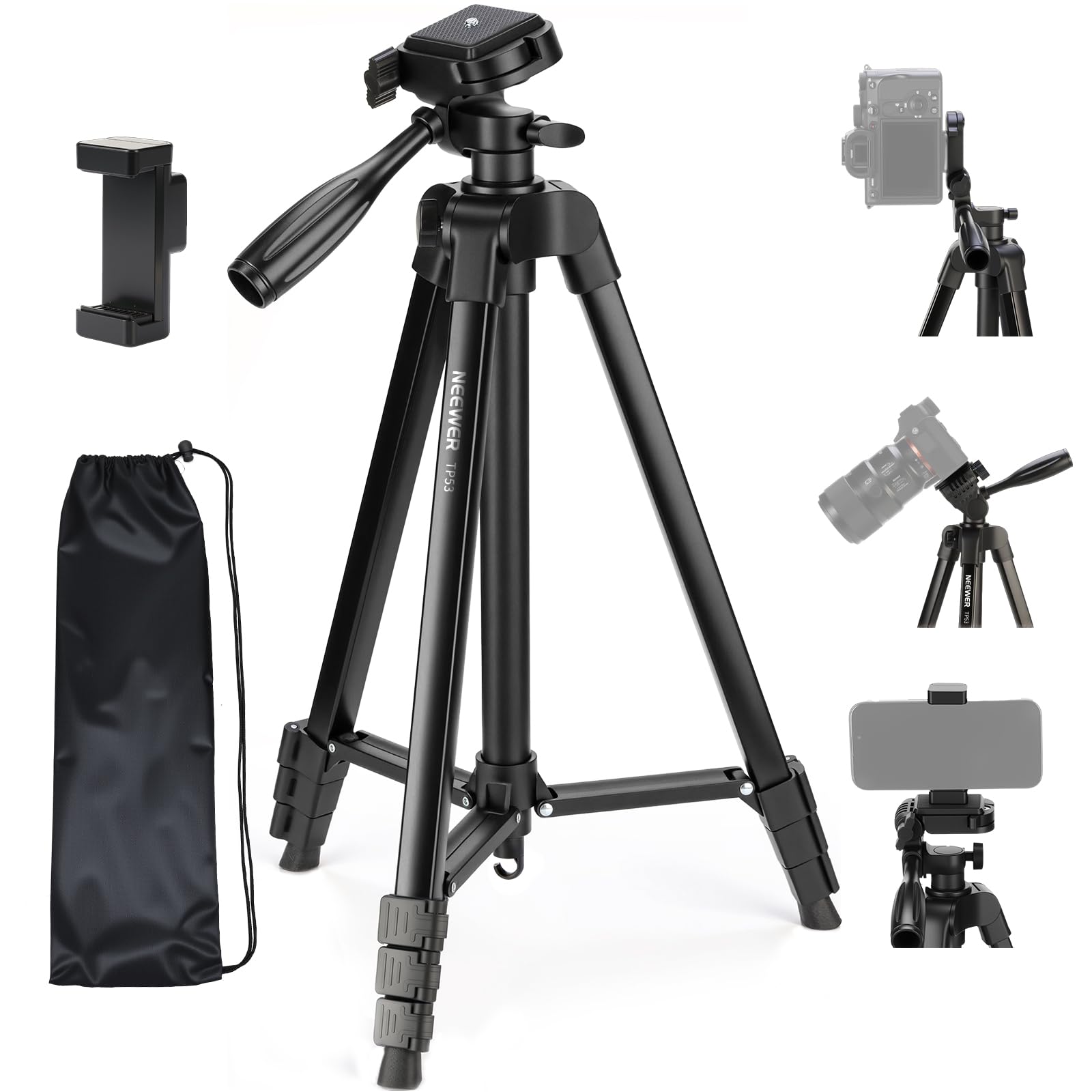
Image 1.1: The NEEWER TP53 Tripod, a lightweight and portable solution for stable photography and videography.
2. Package Contents
Verify that all items are present in the package:
- 1 x Travel Tripod
- 1 x Phone Holder
- 1 x Carrying Bag
- 1 x User Manual

Image 2.1: Contents of the NEEWER TP53 Tripod package, including the tripod, phone holder, carrying bag, and user manual.
3. Product Features
The NEEWER TP53 Tripod offers several key features for enhanced usability and performance:
- Metal Build: Constructed from heavy-duty aluminum alloy for durability and stability.
- Lightweight & Portable: Weighs 1.25lb (568g) and folds to 16.9" (43cm) for easy transport in the included carrying bag.
- Wide Compatibility: Features a 1/4" screw mount for DSLRs, mirrorless cameras, and action cameras. Includes an adjustable phone holder (2.2"/55mm to 3.4"/85mm) with a cold shoe mount for accessories like LED lights or microphones.
- Versatile Shooting Angles: Quick release plate allows seamless switching between horizontal and vertical orientations. The tripod head supports 360° panoramic rotation and a tilt range of +90° to -70°.
- Effortless Height Adjustment: Four-section legs with flip locks allow height adjustment from 16.5" (42cm) to 57.5" (146cm). The center column can be extended an additional 10.2" (26cm).
- Enhanced Stability: A mid-spreader and a bottom hook for hanging weights contribute to overall stability during use.

Image 3.1: Key components of the NEEWER TP53 Tripod, including the 1/4" screw, angle adjustment knob, horizontal rotation knob, pitch adjustment rotary handle, center column locking knob, flip locks, and bottom hook.
4. Setup
4.1 Unfolding the Tripod
- Place the tripod on a flat, stable surface.
- Gently spread the tripod legs outwards until the mid-spreader is fully extended, ensuring a stable base.
4.2 Adjusting Height
- To extend a leg section, open the flip lock on that section.
- Pull the leg section outwards to the desired length.
- Close the flip lock firmly to secure the leg section in place. Repeat for all leg sections as needed.
- To raise the center column, loosen the center column locking knob, extend the column, and then tighten the knob.

Image 4.1: A hand demonstrating how to open and close the flip lock to adjust the tripod leg height.

Image 4.2: Diagram illustrating the various height adjustments of the NEEWER TP53 Tripod, ranging from 16.5 inches (42cm) to 57.5 inches (146cm).
4.3 Attaching a Camera or Phone
- Locate the quick release plate on the tripod head.
- If attaching a camera, screw the camera onto the 1/4" screw on the quick release plate. Ensure it is securely fastened.
- If attaching a smartphone, first attach the phone holder to the 1/4" screw on the quick release plate. Then, expand the phone holder and insert your smartphone.
- Slide the quick release plate with the attached device back into the tripod head until it clicks securely into place.

Image 4.3: The tripod head with a 1/4" screw, demonstrating compatibility with cameras, mobile phone holders, microphones, and fill lights.
Video 4.1: Demonstration of attaching a camera to the NEEWER TP53 Tripod and adjusting the head for various shots.
5. Operating Instructions
5.1 Adjusting Shooting Angles
- Tilt Adjustment: Use the pitch adjustment rotary handle to tilt the camera or phone between +90° and -70°. Loosen the handle, adjust the angle, and then tighten to secure.
- Panoramic Rotation: Loosen the horizontal rotation knob to rotate the tripod head 360° for panoramic shots. Tighten the knob to lock the position.
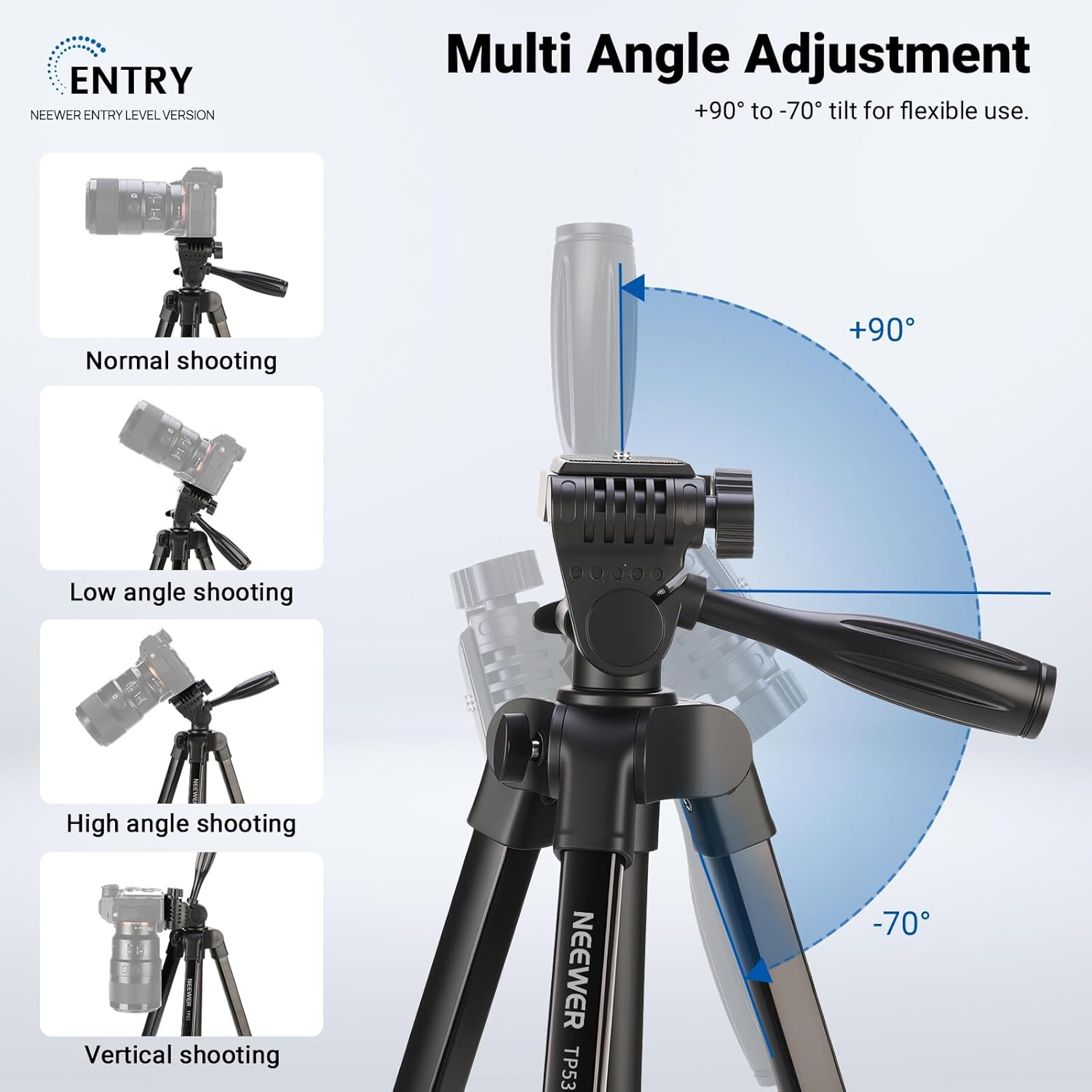
Image 5.1: Illustrations of various shooting angles achievable with the NEEWER TP53 Tripod, including normal, low-angle, high-angle, and vertical shooting, with a tilt range of +90° to -70°.

Image 5.2: The tripod head's 360° panoramic capability, ideal for capturing sweeping landscapes.
5.2 Horizontal to Vertical Switch
The quick release plate allows for a seamless transition between horizontal and vertical shooting orientations. Simply loosen the angle adjustment knob, rotate the plate to the desired orientation, and tighten the knob to secure.

Image 5.3: Visual guide for switching between horizontal and vertical camera orientations using the tripod's quick release plate.
5.3 Enhancing Stability
For additional stability, especially in windy conditions or with heavier equipment, utilize the hook located at the bottom of the center column to hang a weight (e.g., a camera bag).

Image 5.4: The center column hook, designed for hanging additional weights to increase tripod stability.

Image 5.5: The NEEWER TP53 Tripod being used in different outdoor settings, showcasing its versatility for various photography and videography needs.
6. Maintenance
- Cleaning: Wipe the tripod with a soft, dry cloth after each use to remove dust and dirt. For stubborn grime, use a slightly damp cloth and mild soap, then dry thoroughly.
- Lubrication: Periodically check moving parts for smooth operation. If any part feels stiff, apply a small amount of silicone-based lubricant. Avoid oil-based lubricants as they can attract dust.
- Storage: Store the tripod in its carrying bag in a cool, dry place away from direct sunlight and extreme temperatures.
- Inspection: Regularly inspect all screws, knobs, and flip locks to ensure they are tight and functioning correctly. Do not overtighten.
7. Troubleshooting
| Problem | Possible Cause | Solution |
|---|---|---|
| Tripod is unstable | Legs not fully extended or locked; uneven surface; excessive weight. | Ensure all leg sections are fully extended and flip locks are closed. Place on a level surface. Do not exceed the 3.3lb (1.5kg) load capacity. Hang a weight from the bottom hook for added stability. |
| Camera/phone not secure | Quick release plate not properly seated or tightened; 1/4" screw loose. | Ensure the quick release plate is fully inserted and locked into the tripod head. Tighten the 1/4" screw securely to the device. For phones, ensure the holder grips the phone firmly. |
| Head movement is stiff | Knobs overtightened; lack of lubrication; dirt accumulation. | Loosen adjustment knobs slightly. Clean the head mechanism. Apply a small amount of silicone lubricant if necessary. |
| Leg sections won't extend/retract smoothly | Flip locks are stuck; dirt/debris inside leg sections. | Check that flip locks are fully open. Clean leg sections to remove any obstructions. Apply silicone lubricant to the sliding parts. |
8. Specifications
| Feature | Detail |
|---|---|
| Model | TP53 |
| Item Type | Travel Tripod |
| Compatibility | DSLR, Mirrorless Camera, Action Camera, Smartphone |
| Application | Video & Photo |
| Main Material | Aluminum Alloy |
| Mounting Points | 1/4" screw, Cold Shoe |
| Load Capacity | 3.3 lb (1.5 kg) |
| Minimum Height | 16.5 inches (42 cm) |
| Maximum Height | 57.5 inches (146 cm) |
| Folded Size | 16.9 inches (43 cm) |
| Item Weight | 1.25 lb (568 g) |
| Head Type | Pan-and-Tilt Head |
| Color | Black |
9. Warranty and Support
The NEEWER TP53 Tripod comes with a 1 Year Manufacturer Warranty. For warranty claims, technical support, or service inquiries, please contact NEEWER customer service through their official website or the retailer where the product was purchased. Please retain your proof of purchase for warranty validation.
For returns, the product is eligible for a refund or replacement within 30 days of purchase, subject to the retailer's return policy.