
1. Product Overview
The WOBANE Wardrobe Lighting with Motion Sensor (Model WBE037) is a versatile, rechargeable LED light designed for various indoor applications such as wardrobes, cabinets, bedsides, and hallways. It features an eye-protection design, multiple operating modes, dimmable brightness, and adjustable color temperature to suit different preferences and environments.

Image 1.1: Overview of the WOBANE Wardrobe Lighting package, showing three light bars and their respective USB-C charging cables and metal mounting plates.
Key Features:
- Eye Protection Design: Trapezoidal structure prevents direct light exposure, reducing glare and flickering for comfortable use.
- Dual Operating Modes: Manual (always on) and Automatic (motion sensor activated).
- Dimmable Brightness: Stepless dimming from 10% to 100%.
- Adjustable Color Temperature: Three settings (2700K Warm White, 4000K Natural White, 6000K Cool White) with memory function.
- USB Rechargeable: Built-in 900mAh battery, easily charged via USB Type-C.
- Easy Installation: Magnetic attachment with included metal plates, no tools required.
2. Safety Information
Please read and understand all safety instructions before using this product. Keep this manual for future reference.
- Do not expose the device to water or excessive moisture.
- Do not attempt to disassemble, repair, or modify the device. This will void the warranty.
- Use only the provided USB Type-C cable or a certified equivalent for charging.
- Keep the device away from high temperatures and direct sunlight.
- This product contains a rechargeable battery. Dispose of it responsibly according to local regulations.
- Ensure the installation surface is clean and dry before attaching the metal plates.
3. Setup
3.1 Charging the Device
Before first use, fully charge the light bar. The built-in 900mAh battery provides extended usage time.
- Connect the provided USB Type-C cable to the charging port on the light bar.
- Connect the other end of the cable to a standard USB power adapter (not included) or a computer USB port.
- The charging indicator light will illuminate red during charging.
- Once fully charged, the indicator light will turn green. A full charge typically takes approximately 3 hours.

Image 3.1: The light bar being charged via USB-C, with indicators showing red for charging and green for fully charged.
3.2 Installation Methods
The WOBANE light bar offers two convenient installation methods:
- Direct Magnetic Attachment: If your desired installation surface is metallic (e.g., iron), the light bar can be directly adsorbed onto it using its built-in magnets.
- Adhesive Metal Plates: For non-metallic surfaces (e.g., wood, plastic), use the included adhesive metal plates.
- Clean the installation surface thoroughly to ensure it is free of dust and grease.
- Peel off the protective film from one side of the adhesive metal plate.
- Firmly press the metal plate onto the desired location for at least 3 seconds.
- Repeat for the second metal plate, ensuring they are aligned with the magnets on the light bar.
- Magnetically attach the light bar to the installed metal plates.

Image 3.2: Illustration of direct magnetic attachment to metal surfaces and using adhesive metal plates for non-metallic surfaces.
4. Operating Instructions
4.1 Mode Selection
The light bar features a switch to select between three modes: Manual (M), Automatic (A), and Off (O).

Image 4.1: The mode switch with 'A' for Auto, 'O' for Off, and 'M' for Manual, along with motion detection range.
- 'M' (Manual Mode): The light will remain continuously on until manually switched off.
- 'O' (Off): The light is turned off.
- 'A' (Automatic Mode - Motion Sensor): The light automatically turns on when human motion is detected within a maximum range of 3 meters and a 120° angle. It will automatically turn off after 10, 25, or 40 seconds of inactivity, depending on the selected timer setting.
4.2 Adjusting Brightness (Dimming)
To adjust the brightness, use the dedicated button on the light bar:
- Stepless Dimming: Long press the button to smoothly adjust the brightness from 10% to 100%. Release the button when the desired brightness is reached.
4.3 Changing Color Temperature
The light offers three color temperature options. To cycle through them:
- Color Temperature Adjustment: Click the button (short press) to switch between 2700K (Warm White), 4000K (Natural White), and 6000K (Cool White). The device has a memory function that will recall the last selected color temperature setting.
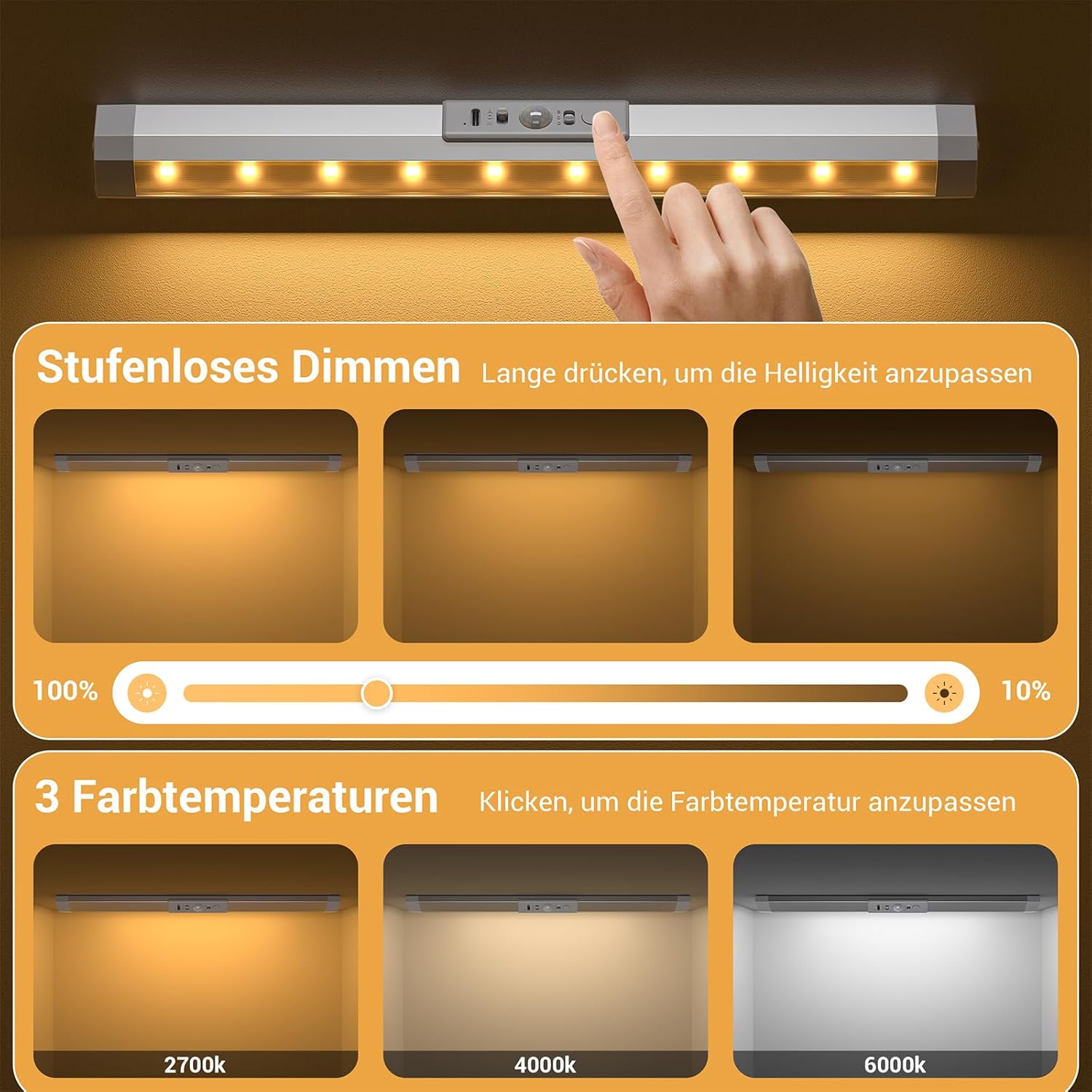
Image 4.2: Visual representation of stepless dimming from 100% to 10% and the three available color temperatures: 2700K, 4000K, and 6000K.
5. Maintenance
5.1 Cleaning
To maintain the appearance and functionality of your WOBANE light bar:
- Wipe the surface with a soft, dry cloth.
- Do not use abrasive cleaners, solvents, or harsh chemicals, as these may damage the finish or electronic components.
5.2 Battery Care
To prolong the life of the built-in rechargeable battery:
- Avoid completely draining the battery frequently.
- Charge the device regularly, even if not in constant use, to maintain battery health.
- Store the device in a cool, dry place when not in use for extended periods.
6. Troubleshooting
If you encounter any issues with your WOBANE light bar, please refer to the following common problems and solutions:
- Light does not turn on:
- Ensure the battery is charged. Connect to a power source and check the charging indicator.
- Verify the mode switch is set to 'M' (Manual) or 'A' (Automatic).
- Motion sensor not working in 'A' (Automatic) mode:
- Check if the ambient light is too bright. The motion sensor may not activate in well-lit conditions to conserve battery.
- Ensure there are no obstructions blocking the sensor.
- Confirm motion is within the 3-meter, 120° detection range.
- Light flickers or dims unexpectedly:
- The battery may be low. Recharge the device.
- Ensure the light bar is securely attached and connections are stable.
- Light does not hold a charge:
- Try using a different USB Type-C cable and power adapter to rule out faulty accessories.
- If the issue persists, the battery may need service. Contact customer support.
If these steps do not resolve the issue, please contact WOBANE customer support for further assistance.
7. Specifications
Detailed technical specifications for the WOBANE Wardrobe Lighting (Model WBE037):

Image 7.1: Dimensions of the WOBANE light bar (30cm length, 3.5cm width, 1.8cm height) and its components, including the PC cover and 10 SMD 2835 LEDs.
| Specification | Value |
|---|---|
| Model Number | WBE037 |
| Brand Name | WOBANE |
| Manufacturer | Shenzhen Wobane Trading Co.,Ltd |
| Product Dimensions | 30 x 3.5 x 1.8 cm |
| Item Weight | 430 g (for pack of 3) |
| Material | Aluminum |
| Color | Silver |
| Power Source | Battery Powered |
| Battery Type | 1 Nonstandard Battery (included) |
| Battery Capacity | 900mAh |
| Light Source Type | LED (10*SMD 2835 LEDs) |
| Total Lumens | 72 lumens |
| Color Temperatures | 2700K, 4000K, 6000K |
| Motion Sensor Range | 3 meters, 120° |
| Auto Shut-off Time | 10/25/40 seconds (adjustable) |
| Indoor/Outdoor Usage | Indoor |
| Specific Uses | Cabinet, Wardrobe, Hallway, Bedside |
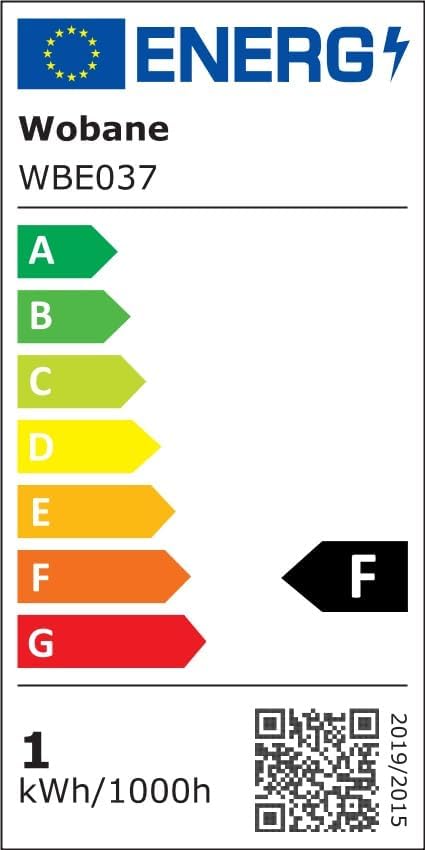
Image 7.2: EU Energy Label for Model WBE037, indicating an energy efficiency class F. For more details, refer to the official EPREL database: https://eprel.ec.europa.eu/qr/2043182
8. Warranty and Support
WOBANE products are manufactured with quality and reliability in mind. For warranty information, product support, or any inquiries, please contact your retailer or the manufacturer directly.
- Manufacturer: Shenzhen Wobane Trading Co.,Ltd
- Please retain your proof of purchase for warranty claims.