1. Introduction
1.1 Product Overview
The XUZHID Mechanical Wired Gaming Keyboard is designed to enhance your gaming and typing experience. It features a mechanical feel, backlighting, and an ergonomic design for comfortable and precise input. This keyboard is suitable for a wide range of operating systems and environments, from home use to office tasks.
1.2 Key Features
- Mechanical Feel: Provides tactile feedback for precise control.
- Backlighting: Enhances visibility and aesthetic appeal.
- Durable Construction: Made with ABS material for long-lasting use.
- Ergonomic Design: Contributes to typing comfort and reduces strain.
- Anti-Splash Feature: Offers protection against accidental liquid spills.
2. Setup
2.1 Package Contents
- XUZHID Mechanical Wired Gaming Keyboard
- User Manual
2.2 Connecting the Keyboard
- Unpack the keyboard and ensure all components are present.
- Locate an available USB port on your computer.
- Plug the USB connector of the keyboard firmly into the USB port.
- Your operating system should automatically detect and install the necessary drivers. No additional software installation is typically required.
- The keyboard is ready for use once detected.

Figure 2.2.1: The XUZHID Mechanical Wired Gaming Keyboard, showcasing its layout and design.
3. Operating Instructions
3.1 Basic Functions
The keyboard functions as a standard QWERTY layout keyboard. Simply type as you would with any other keyboard. Special function keys (F1-F12) may have secondary functions accessible by pressing the Fn key in combination with the desired function key.
3.2 Backlight Control
The keyboard features integrated backlighting. Specific key combinations, often involving the Fn key and certain function keys (e.g., Fn + Scroll Lock, Fn + Home, or dedicated backlight keys), control backlight brightness, patterns, and on/off states. Refer to the keycap legends for specific backlight control icons.

Figure 3.2.1: The keyboard illuminated by its integrated backlighting, enhancing visibility and aesthetic.
3.3 Ergonomic Design
This keyboard incorporates an ergonomic design to promote a more natural hand and wrist position during extended use. This design aims to reduce discomfort and fatigue, contributing to a more comfortable typing experience.

Figure 3.3.1: An illustration demonstrating the ergonomic design of the keyboard, showing optimal hand placement.
4. Maintenance
4.1 Cleaning
To clean your keyboard, first disconnect it from your computer. Use a soft, dry cloth to wipe down the keycaps and chassis. For stubborn dirt, a slightly damp cloth with a mild cleaning solution can be used, ensuring no liquid enters the keyboard's internal components. Avoid abrasive cleaners or solvents.
4.2 Spill Resistance
The keyboard features an anti-splash design, providing a degree of protection against accidental liquid spills. In case of a spill, immediately disconnect the keyboard from your computer, gently shake off any excess liquid, and allow it to air dry completely before reconnecting. This feature is designed to mitigate damage from minor spills but does not guarantee full waterproofing.

Figure 4.2.1: The keyboard with water droplets, visually representing its anti-splash capability.
5. Troubleshooting
- Keyboard Not Responding:
- Ensure the USB cable is securely connected to both the keyboard and the computer.
- Try plugging the keyboard into a different USB port.
- Restart your computer.
- Test the keyboard on another computer to rule out a computer-specific issue.
- Backlight Not Working:
- Check if the backlight is turned off or set to the lowest brightness level using the designated function key combinations (e.g., Fn + Scroll Lock).
- Ensure the keyboard is properly connected and receiving power.
- Keys Not Registering:
- Clean around the affected key to ensure no debris is obstructing its movement.
- If multiple keys are affected, try the steps for 'Keyboard Not Responding'.
6. Specifications
| Brand | XUZHID |
| Model Number (ASIN) | B0F6V47CSF |
| Material | Acrylonitrile Butadiene Styrene (ABS) |
| Color | White and Blue (as per product variant) |
| Dimensions (Approx.) | 43.5cm x 13cm x 2.5cm (17.13in x 5.12in x 0.98in) |
| Connectivity | Wired USB |
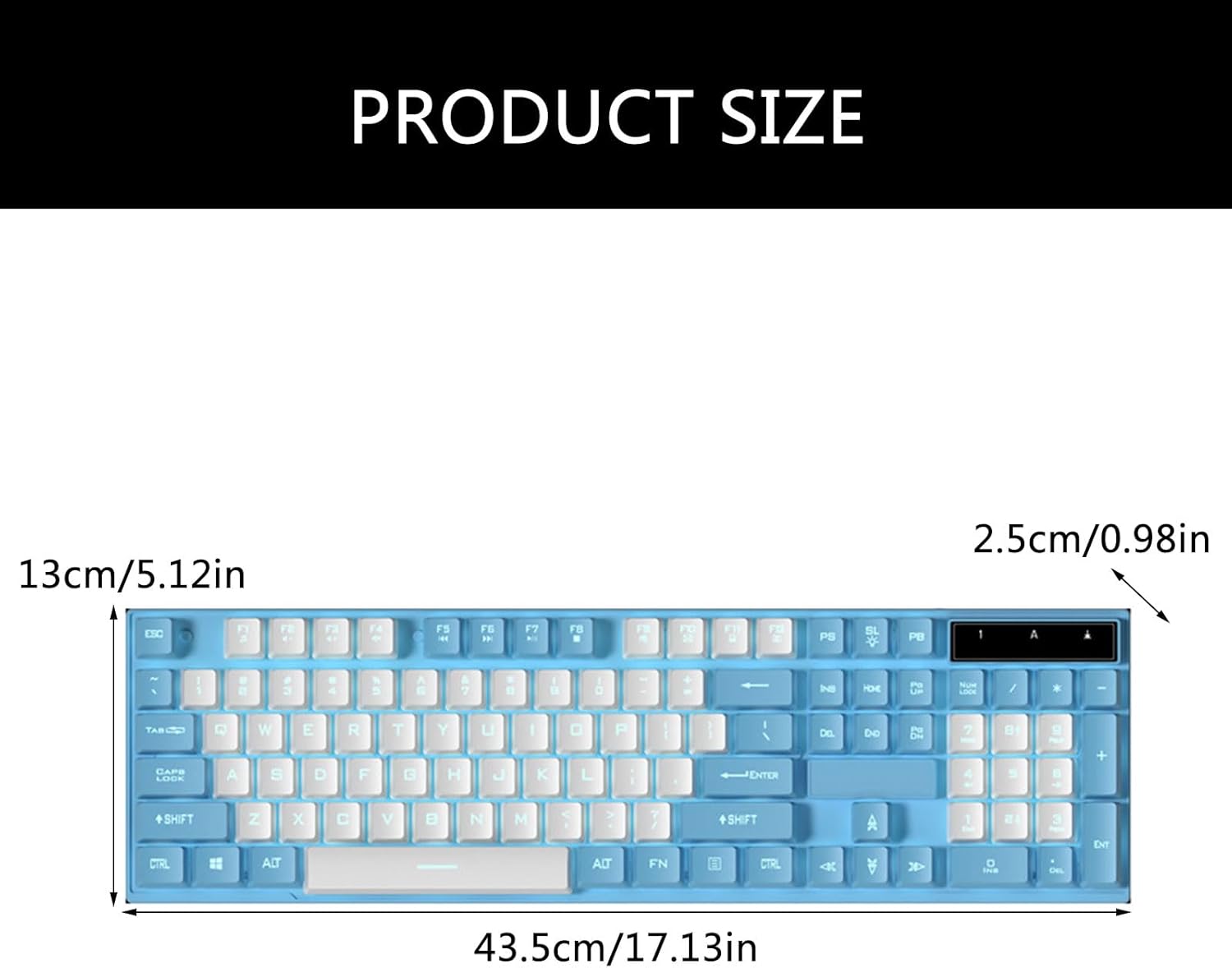
Figure 6.1.1: Product dimensions of the XUZHID Mechanical Wired Gaming Keyboard.