
1. Introduction
Thank you for choosing the Bolisila KPS15010D High Power DC Voltage Regulator. This device is designed to provide a stable and adjustable DC power source for various applications requiring precise voltage and current control. This manual provides essential information for the safe and efficient operation, setup, and maintenance of your power supply.
Please read this manual thoroughly before operating the device and keep it for future reference.
2. Safety Instructions
To prevent electric shock, injury, or damage to the device, please observe the following safety precautions:
- Ensure the power supply is connected to a properly grounded AC outlet.
- Do not operate the device in wet or damp conditions.
- Do not open the casing; there are no user-serviceable parts inside. Refer servicing to qualified personnel.
- Verify the input voltage matches the specified voltage (220V for this model) before connecting to power.
- Avoid short-circuiting the output terminals.
- Ensure adequate ventilation around the unit to prevent overheating.
- Always disconnect power before making or changing connections.
3. Product Overview
The Bolisila KPS15010D is a high-performance DC power supply featuring precise control and high efficiency. It is designed for applications requiring stable and adjustable voltage and current output.
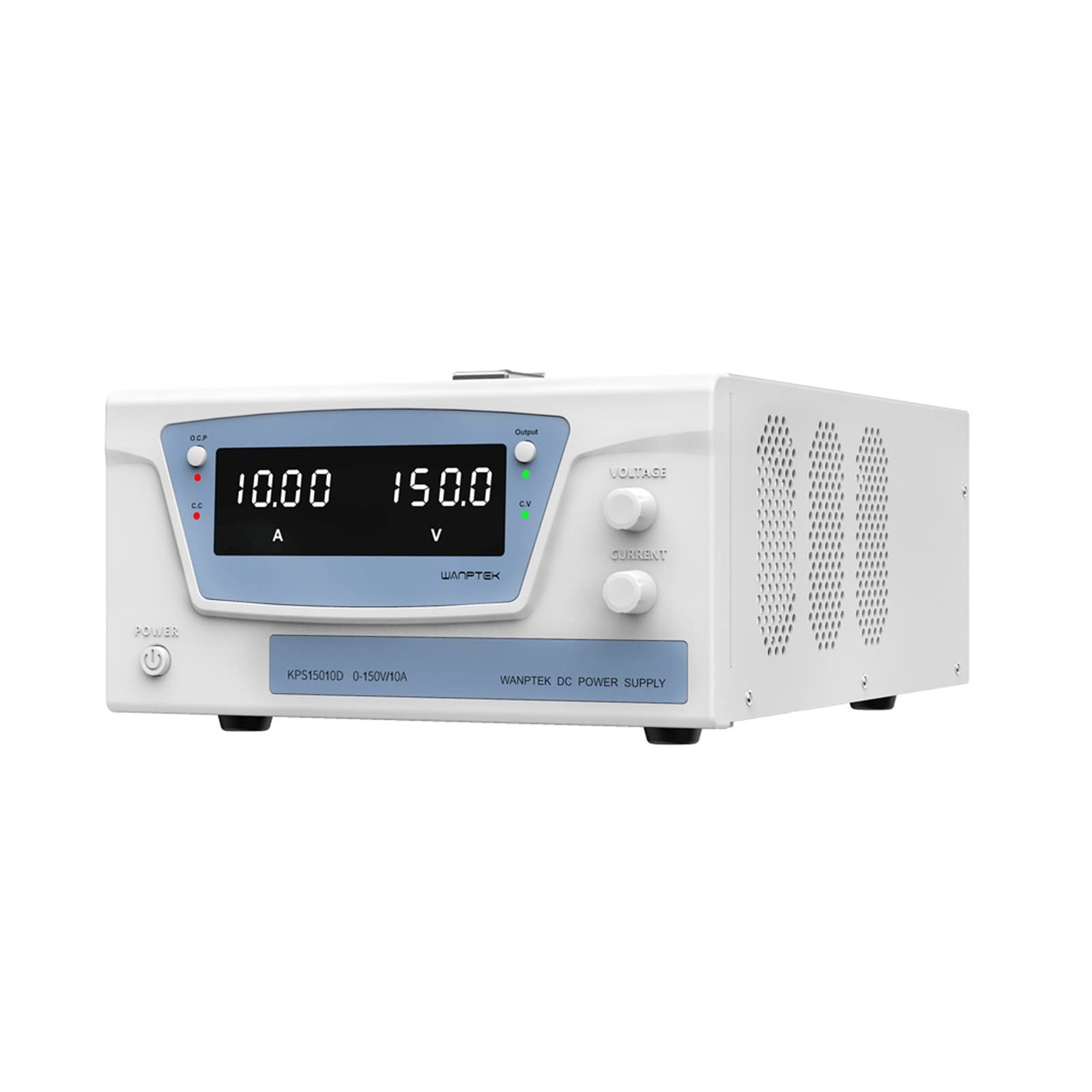
Figure 3.1: Front view of the Bolisila KPS15010D High Power DC Voltage Regulator, showing the display, control knobs, and output terminals.
Key Features:
- High efficiency and stable performance.
- Precise voltage and current control.
- Durable design for industrial environments.
- User-friendly interface for easy operation.
4. Setup
4.1 Unpacking and Inspection
- Carefully remove the power supply from its packaging.
- Inspect the unit for any signs of physical damage during transit. If damage is found, contact your supplier immediately.
- Verify that all accessories, such as the power cord and output cables, are included.
4.2 Placement
- Place the power supply on a stable, level surface.
- Ensure there is sufficient space around the unit (at least 10 cm on all sides) for proper ventilation. Do not block the ventilation openings.
- Avoid placing the unit near heat sources, in direct sunlight, or in areas with excessive dust or humidity.
4.3 Power Connection
- Ensure the power switch on the front panel is in the "OFF" position.
- Connect the provided AC power cord to the power input socket on the rear of the unit.
- Plug the other end of the AC power cord into a grounded 220V AC power outlet.
5. Operating Instructions
5.1 Basic Operation
- Power On: Turn the power switch on the front panel to the "ON" position. The display will illuminate, showing the current voltage and current settings.
- Connecting Load: With the power supply output OFF (if applicable, or set to minimum voltage/current), connect your load to the output terminals (positive to red, negative to black). Ensure connections are secure.
- Adjusting Voltage: Use the "Voltage" adjustment knob to set the desired output voltage. The display will show the set voltage.
- Adjusting Current Limit: Use the "Current" adjustment knob to set the desired current limit. This protects your load from excessive current. The display will show the set current limit.
- Output Activation: If your model has an output ON/OFF button, press it to activate the output. The power supply will now deliver power to your load according to the set voltage and current limits.
- Power Off: Before disconnecting the load, turn off the output (if applicable), then turn the main power switch to "OFF".
5.2 Constant Voltage (CV) and Constant Current (CC) Modes
- Constant Voltage (CV) Mode: When the load resistance is high, the power supply operates in CV mode. The output voltage remains constant at the set value, and the output current is determined by the load.
- Constant Current (CC) Mode: When the load resistance is low, or the current drawn by the load exceeds the set current limit, the power supply automatically switches to CC mode. The output current remains constant at the set limit, and the output voltage drops accordingly. This protects both the power supply and the connected load.
6. Maintenance
The Bolisila KPS15010D is designed for low maintenance. Follow these guidelines to ensure its longevity:
- Cleaning: Disconnect the power supply from the AC outlet before cleaning. Use a soft, dry cloth to wipe the exterior. Do not use abrasive cleaners or solvents.
- Ventilation: Regularly check that the ventilation openings are clear of dust and debris. Use compressed air to gently clear any blockages if necessary.
- Storage: When not in use for extended periods, store the unit in a cool, dry place, away from direct sunlight and extreme temperatures.
- Internal Maintenance: There are no user-serviceable parts inside. Do not attempt to open the casing.
7. Troubleshooting
If you encounter issues with your Bolisila KPS15010D, refer to the table below for common problems and solutions:
| Problem | Possible Cause | Solution |
|---|---|---|
| No power/Display off | Power cord disconnected; Power switch off; Blown fuse; No AC power from outlet. | Check power cord connection; Turn power switch ON; Check fuse (if accessible and user-replaceable, otherwise contact support); Test AC outlet with another device. |
| No output voltage/current | Output OFF; Current limit set too low; Overload protection activated; Faulty connection to load. | Press output ON button; Increase current limit; Reduce load or check for short circuit; Verify load connections. |
| Unit overheats | Blocked ventilation; Excessive ambient temperature; Prolonged operation at maximum output. | Clear ventilation openings; Operate in a cooler environment; Reduce load or allow unit to cool down. |
If the problem persists after attempting these solutions, please contact customer support.
8. Specifications
| Parameter | Value |
|---|---|
| Model | KPS15010D |
| Input Voltage | 220V AC (Specific to this model variant) |
| Output Voltage Range | 0-150V DC |
| Output Current Range | 0-10A DC |
| Output Power | 1500W (Max) |
| Voltage Regulation | ≤0.01% + 2mV |
| Current Regulation | ≤0.1% + 5mA |
| Load Regulation (Voltage) | ≤0.01% + 2mV (10%-100% load) |
| Load Regulation (Current) | ≤0.1% + 5mA (10%-100% load) |
| Ripple and Noise (Voltage) | ≤2mVrms |
| Ripple and Noise (Current) | ≤3mArms |
| Operating Temperature | 0°C to 40°C |
| Humidity | <80% RH (non-condensing) |
Note: Specifications are subject to change without notice.
9. Warranty and Support
9.1 Warranty Information
Bolisila products are manufactured to high-quality standards. This product is covered by a standard manufacturer's warranty against defects in materials and workmanship for a period specified at the time of purchase. Please retain your proof of purchase for warranty claims. The warranty does not cover damage caused by misuse, unauthorized modification, or improper operation.
9.2 Customer Support
For technical assistance, troubleshooting, or warranty inquiries, please contact your retailer or Bolisila customer support. Please have your model number (KPS15010D) and purchase information ready when contacting support.
Contact information (e.g., website, email, phone number) can typically be found on the product packaging or the official Bolisila website.