
1. Introduction
The WeHawk SAJ2.25kw Micro Inverter is a high-efficiency, single-phase micro inverter designed for solar photovoltaic (PV) systems. It features four independent Maximum Power Point Trackers (MPPTs) to optimize energy harvesting from individual solar panels. With integrated Wi-Fi connectivity, users can remotely monitor system performance via a dedicated mobile application. This device is built for durability and safety, offering IP67 protection for outdoor installation and comprehensive internal safety mechanisms.
2. Safety Instructions
Please read and understand all safety instructions before installation and operation. Failure to follow these instructions may result in electric shock, fire, or serious injury.
- Installation must be performed by qualified personnel in accordance with local electrical codes and regulations.
- Do not attempt to repair or disassemble the micro inverter. Refer all servicing to authorized service personnel.
- Ensure the micro inverter is properly grounded.
- Disconnect all power sources (DC from solar panels and AC from the grid) before performing any maintenance or connections.
- The micro inverter is rated IP67 for outdoor use, but avoid submerging it in water or exposing it to extreme environmental conditions beyond its operating limits.
- Wear appropriate personal protective equipment (PPE) during installation and maintenance.
3. Product Features
- High Efficiency: Maximum efficiency of 97% and CEC efficiency of 96.5% for optimal energy production.
- Independent MPPTs: Equipped with 4 independent MPPTs, allowing for flexible installation and maximized performance even with varying panel orientations or shading. Each MPPT supports up to 680W.
- Integrated Wi-Fi: Features a shielded Wi-Fi antenna for remote monitoring and control via a dedicated mobile application.
- Robust Protection: IP67 rated for protection against dust and water, suitable for outdoor installation. Includes internal DPS (lightning protection) and AC surge protection.
- Comprehensive Safety: Built-in protections against reverse polarity (DC), AC surge, ground fault, AC short-circuit, grid monitoring, and anti-islanding.
4. Specifications
| Feature | Specification |
|---|---|
| Brand | WeHawk |
| Model | SAJ2.25kw (M2-2.25K-S4) |
| Max AC Output Power | 2250 VA |
| Nominal AC Current | 9.78 A |
| AC Voltage Range | 220–240V (180–280 V) |
| AC Frequency Range | 50/60 Hz (45–65 Hz) |
| Max Efficiency | 97% |
| CEC Efficiency | 96.5% |
| MPPTs | 4 Independent MPPTs |
| Recommended Module Power (per MPPT) | 400 to 625+ Wp |
| MPPT Tracking Range | 28–45 V |
| Max DC Voltage | 60 V |
| Max DC Current (per MPPT) | 20A x 4 |
| Power Factor | > 0.99 |
| THDi | <3% |
| Protection Rating | IP67 |
| Product Weight | 5.8 Kilograms |
| Package Dimensions | 33.3 x 22.5 x 4 cm |
5. Setup
This section outlines the general steps for installing your WeHawk SAJ2.25kw Micro Inverter. For detailed instructions, refer to the full installation guide provided with your product or consult a certified solar installer.
5.1. Mounting the Micro Inverter
Mount the micro inverter securely to the racking system, typically underneath the solar panels. Ensure adequate ventilation and clearance as per manufacturer guidelines.
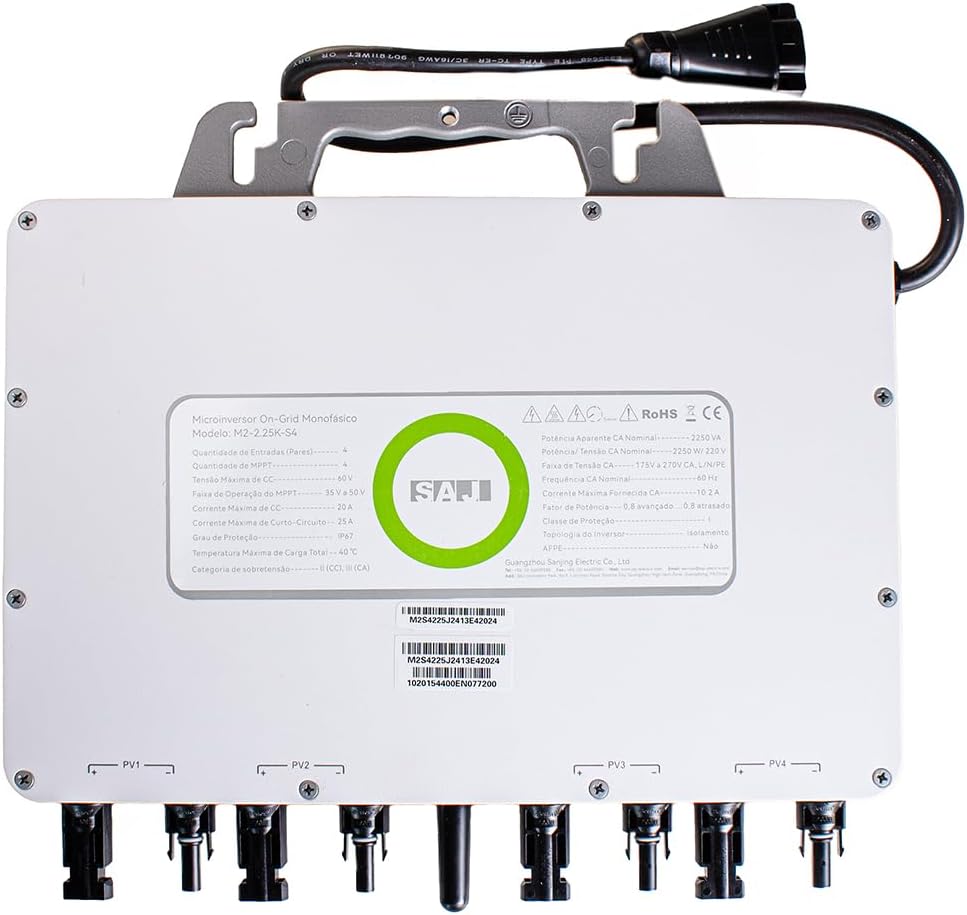
Figure 1: Front view of the WeHawk SAJ2.25kw Micro Inverter.
5.2. DC Connection (Solar Panels)
Connect the DC cables from your solar panels to the corresponding MPPT input connectors on the micro inverter. Ensure correct polarity (+/-) for each connection.

Figure 2: Side view showing the DC input connectors for solar panels.

Figure 3: Detailed view of the DC input connectors.
5.3. AC Connection (Grid)
Connect the AC output cable from the micro inverter to your home's electrical grid. This connection should be made by a licensed electrician to ensure compliance with all safety standards.

Figure 4: AC output connector for grid connection.
5.4. Wi-Fi Setup
Follow the instructions in the mobile application to connect your micro inverter to your home Wi-Fi network for remote monitoring. This typically involves scanning a QR code or entering the device's serial number.
6. Operating Instructions
6.1. Powering On
Once all connections are secure and verified, turn on the AC breaker for the micro inverter. The inverter will automatically begin its startup sequence and connect to the grid, starting energy production when sufficient sunlight is available.
6.2. Monitoring
Use the dedicated mobile application to monitor the real-time performance of your solar system. The app provides data on energy production, individual panel performance, and system status.
6.3. Status Indicators
The micro inverter may have LED indicators to show its operational status (e.g., power on, generating, fault). Refer to the detailed product manual for specific LED indicator meanings.
7. Maintenance
Regular maintenance ensures optimal performance and longevity of your micro inverter.
- Cleaning: Periodically clean the exterior of the micro inverter to remove dust, dirt, or debris. Use a soft, damp cloth. Do not use harsh chemicals or abrasive materials.
- Connection Checks: Annually inspect all DC and AC connections for tightness and signs of corrosion or damage.
- Software Updates: Ensure the mobile application and micro inverter firmware are up-to-date to benefit from the latest features and security enhancements.
- Environmental Inspection: Ensure the area around the inverter remains clear of obstructions to maintain proper ventilation.
8. Troubleshooting
If you encounter issues with your micro inverter, refer to the following common troubleshooting steps. If the problem persists, contact customer support.
- No Power Output: Check all DC and AC connections. Ensure the AC breaker is on. Verify that solar panels are receiving sufficient sunlight.
- Wi-Fi Connectivity Issues: Ensure your Wi-Fi router is functioning correctly and within range of the micro inverter. Restart the router and the inverter if necessary. Re-attempt the Wi-Fi setup process via the app.
- Error Codes: If the micro inverter displays an error code (via LED indicators or the mobile app), consult the detailed product manual for the specific meaning and recommended actions.
- Reduced Performance: Check for shading on solar panels. Ensure panels are clean. Verify individual MPPT performance via the monitoring app.
9. Warranty and Support
9.1. Manufacturer's Warranty
The WeHawk SAJ2.25kw Micro Inverter comes with a 10-year manufacturer's warranty. Please retain your proof of purchase for warranty claims. The warranty covers defects in materials and workmanship under normal use and service conditions.
9.2. Customer Support
For technical assistance, warranty claims, or any other inquiries, please contact WeHawk customer service. Refer to the contact information provided in your product packaging or on the official WeHawk website.