
Dubstep Buzz X3
Dubstep Buzz X3 Wireless Earbuds User Manual
Model: Buzz X3
1. Introduction
Thank you for choosing the Dubstep Buzz X3 Wireless Earbuds. These in-ear earbuds are designed to provide a superior audio experience with powerful bass, clear calls, and extended playtime. This manual will guide you through the setup, operation, and maintenance of your new earbuds to ensure optimal performance.
Package Contents:
- Dubstep Buzz X3 Wireless Earbuds
- Wireless Charging Case
- Type-C Charging Cable
- Ear Cushions (various sizes)
- User Manual

Image: Dubstep Buzz X3 Wireless Earbuds in their charging case.
2. Safety Information
Please read all safety warnings before using this product to ensure proper and safe operation.
- Do not expose the earbuds or charging case to extreme temperatures, humidity, or liquids.
- Avoid dropping, impacting, or disassembling the device.
- Use only the provided Type-C charging cable and a compatible power adapter.
- Prolonged exposure to loud sounds may cause hearing damage. Adjust volume to a moderate level.
- Keep out of reach of children and pets.
3. Setup
3.1 Charging the Earbuds and Case
Before first use, fully charge the earbuds and the charging case.
- Place the earbuds into the charging case, ensuring they are correctly seated.
- Connect the Type-C charging cable to the charging port on the case and the other end to a USB power source.
- The indicator light on the case will show charging status. A full charge takes approximately 1.5 hours for both the earbuds and the charging case.
3.2 Pairing with Your Device
The Dubstep Buzz X3 earbuds feature auto-pair technology for seamless connection.
- Ensure the earbuds are charged.
- Open the charging case. The earbuds will automatically enter pairing mode.
- On your device (smartphone, tablet, laptop), enable Bluetooth.
- Search for "Dubstep Buzz X3" in the list of available Bluetooth devices and select it to connect.
- Once connected, a voice prompt will confirm successful pairing. The earbuds will automatically reconnect to the last paired device when taken out of the case.
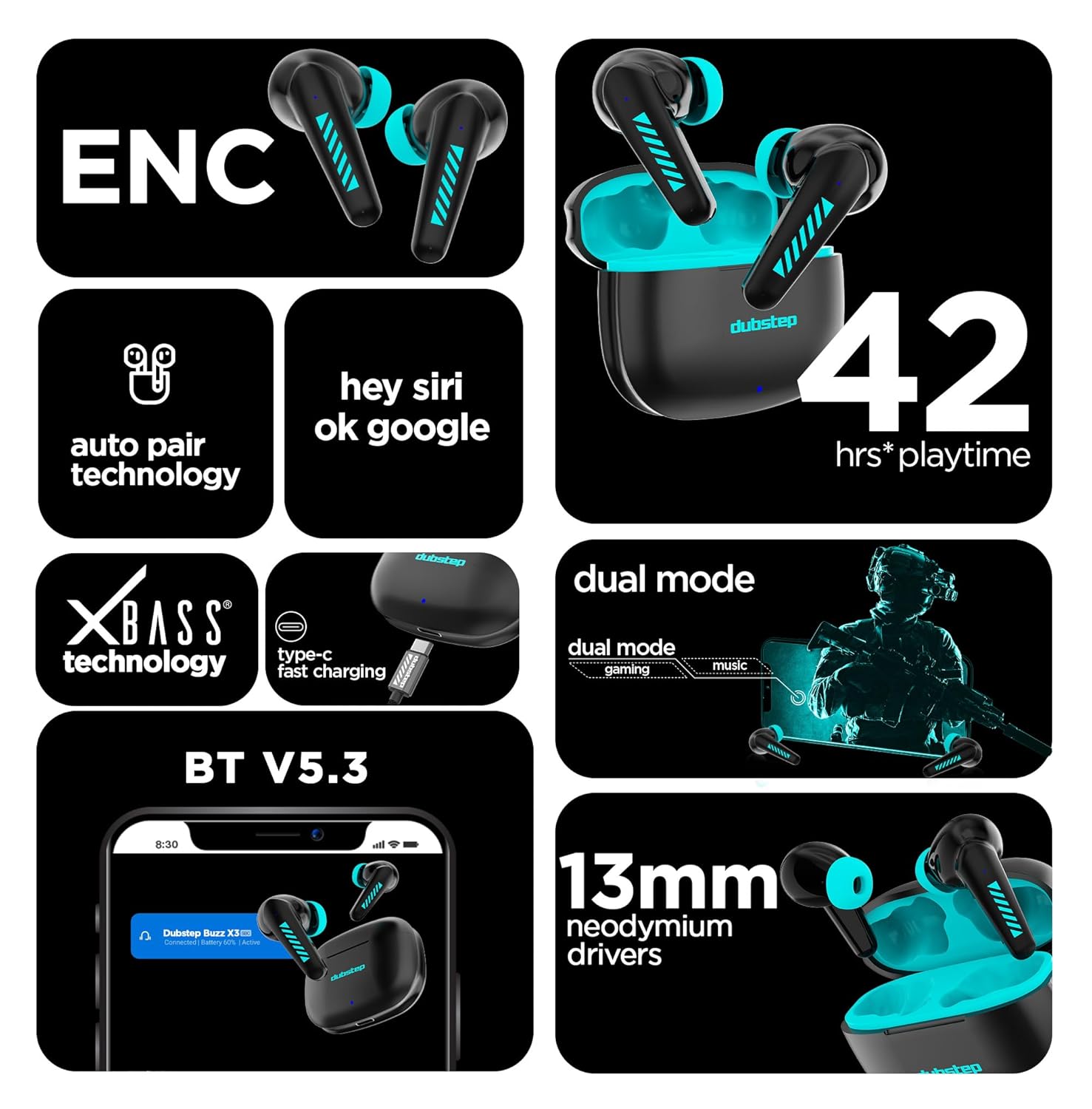
Image: Overview of Dubstep Buzz X3 features, including Bluetooth V5.3 and auto-pair technology.
4. Operating the Earbuds
4.1 Touch Controls
The Dubstep Buzz X3 earbuds are equipped with intuitive touch controls for easy management of music, calls, and voice assistant.
| Function | Action |
|---|---|
| Play/Pause Music | Single tap on either earbud |
| Next Track | Double tap on the right earbud |
| Previous Track | Double tap on the left earbud |
| Answer/End Call | Single tap on either earbud |
| Reject Call | Long press on either earbud |
| Activate Voice Assistant (Siri/Google Assistant) | Triple tap on either earbud |
| Switch Modes (Gaming/Music) | Long press on the left earbud (approx. 2 seconds) |

Image: Illustration of touch control functionality on the earbud.
4.2 Dual Mode Functionality
The Buzz X3 offers specialized modes for different audio experiences:
- Music Mode: Optimized for rich audio quality and deep X-Bass.
- Gaming Mode: Provides ultra-low latency for synchronized audio and video during gaming.
To switch between modes, long press the left earbud for approximately 2 seconds until you hear a voice prompt indicating the mode change.

Image: Visual representation of the dual mode feature for gaming and music.
4.3 Environmental Noise Cancellation (ENC) for Calls
The earbuds feature Environmental Noise Cancellation (ENC) with dual condenser microphones to ensure clear calls by reducing background noise.
- Microphone 1 captures your voice.
- Microphone 2 captures and eliminates ambient noise.

Image: Diagram illustrating how the dual microphones and ENC technology work to reduce background noise during calls.
5. Maintenance
Proper care will extend the lifespan of your Dubstep Buzz X3 earbuds.
- Cleaning: Use a soft, dry, lint-free cloth to clean the earbuds and charging case. Do not use harsh chemicals or abrasive materials.
- Water Resistance: The earbuds are waterproof (as per specifications) and sweat/splash resistant. However, avoid submerging them in water or exposing them to heavy rain. Dry them thoroughly if they get wet.
- Storage: When not in use, store the earbuds in their charging case to protect them and keep them charged. Store in a cool, dry place away from direct sunlight.

Image: The charging case with water droplets, highlighting its water and sweat resistance.
6. Troubleshooting
If you encounter issues with your Dubstep Buzz X3 earbuds, try the following solutions:
| Problem | Possible Solution |
|---|---|
| Earbuds not pairing | Ensure earbuds are charged. Turn off and on Bluetooth on your device. Forget "Dubstep Buzz X3" from your device's Bluetooth list and re-pair. |
| No sound from one earbud | Place both earbuds back in the case, close the lid, wait a few seconds, then take them out again. Check if both are charged. |
| Earbuds not charging | Ensure the charging cable is securely connected. Try a different USB port or power adapter. Clean the charging contacts on the earbuds and case. |
| Poor call quality | Ensure earbuds are properly seated in your ears. Move closer to your connected device. Check for obstructions between earbuds and device. |
| Touch controls not responding | Ensure your fingers are clean and dry. Try restarting the earbuds by placing them in the case and taking them out. |
7. Specifications
Detailed technical specifications for the Dubstep Buzz X3 Wireless Earbuds:
| Feature | Detail |
|---|---|
| Model Name | Buzz X3 |
| Connectivity Technology | Wireless, Bluetooth |
| Bluetooth Version | 5.3 |
| Bluetooth Range | 10 Metres |
| Audio Driver Size | 13 Millimetres |
| Audio Driver Type | Dynamic Driver |
| Noise Control | Passive Noise Cancellation, Environmental Noise Cancellation (ENC) |
| Battery Life (Total Playtime) | Up to 42 Hours (with charging case) |
| Battery Life (Per Charge) | 6 Hours |
| Standby Time | Up to 300 Hours |
| Charging Time | 1.5 Hours (earbuds and case) |
| Charging Port | Type-C |
| Control Type | Touch Controls |
| Water Resistance Level | Waterproof (Sweat and Splash Resistant) |
| Item Weight | 45 Grams |
| Material | Acrylonitrile Butadiene Styrene (ABS) |
| Compatible Devices | Cellphones, Tablets, Smart Devices, Laptops |
8. Warranty and Support
The Dubstep Buzz X3 Wireless Earbuds are manufactured by Nuworld Retail Private Limited.
For warranty information, technical support, or service inquiries, please contact the manufacturer or your point of purchase. Keep your purchase receipt as proof of purchase for any warranty claims.
Additional extended warranty plans may be available from your retailer.
Ask a question about this manual
Ask about setup, troubleshooting, compatibility, parts, safety, or missing instructions. Manuals+ will review the question and use this page’s manual context to help answer it.